android

google-introduces-advanced-protection-mode-for-its-most-at-risk-android-users

Google introduces Advanced Protection mode for its most at-risk Android users

Google is adding a new security setting to Android to provide an extra layer of resistance against attacks that infect devices, tap calls traveling through insecure carrier networks, and deliver scams through messaging services.

On Tuesday, the company unveiled the Advanced Protection mode, most of which will be rolled out in the upcoming release of Android 16. The setting comes as mercenary malware sold by NSO Group and a cottage industry of other exploit sellers continues to thrive. These players provide attacks-as-a-service through end-to-end platforms that exploit zero-day vulnerabilities on targeted devices, infect them with advanced spyware, and then capture contacts, message histories, locations, and other sensitive information. Over the past decade, phones running fully updated versions of Android and iOS have routinely been hacked through these services.

A core suite of enhanced security features

Advanced Protection is Google’s latest answer to this type of attack. By flipping a single button in device settings, users can enable a host of protections that can thwart some of the most common techniques used in sophisticated hacks. In some cases, the protections hamper performance and capabilities of the device, so Google is recommending the new mode mainly for journalists, elected officials, and other groups who are most often targeted or have the most to lose when infected.

“With the release of Android 16, users who choose to activate Advanced Protection will gain immediate access to a core suite of enhanced security features,” Google’s product manager for Android Security, Il-Sung Lee, wrote. “Additional Advanced Protection features like Intrusion Logging, USB protection, the option to disable auto-reconnect to insecure networks, and integration with Scam Detection for Phone by Google will become available later this year.”

Google introduces Advanced Protection mode for its most at-risk Android users Read More »
google-announces-material-3-expressive,-a-colorful-evolution-of-android-design

Google announces Material 3 Expressive, a colorful evolution of Android design

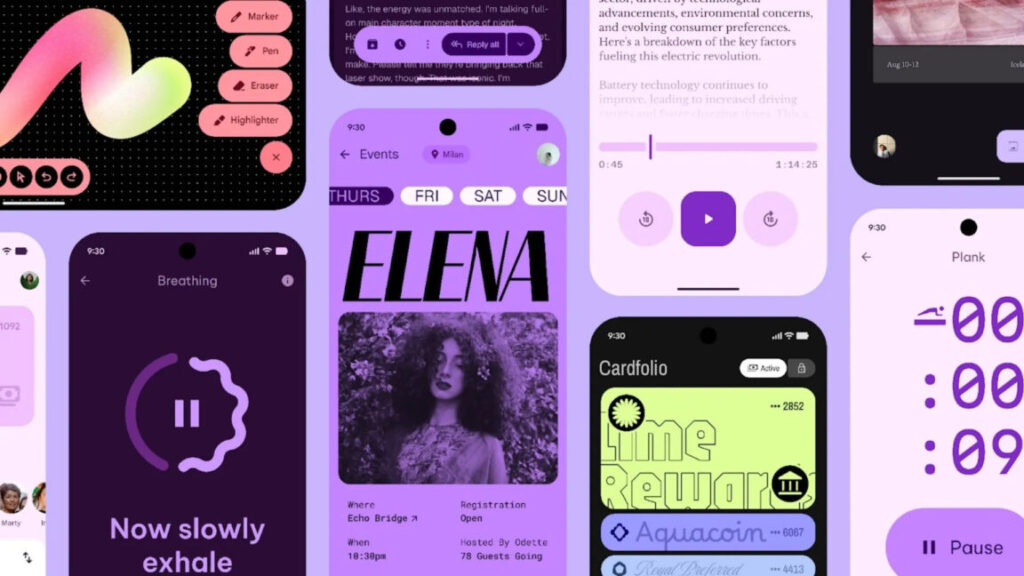
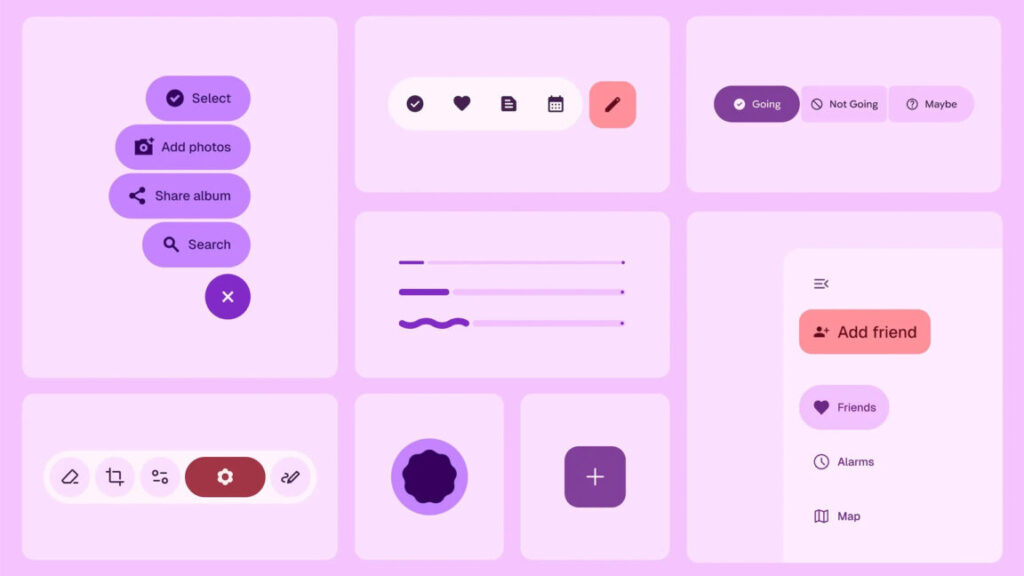
Google accidentally showed off its big Android design refresh last week, but now Material 3 Expressive is official. Google says the new interface will begin with Android OS, but it will eventually expand across the full Google app ecosystem, bringing a more lively vibe to Gmail, Google Photos, and more.

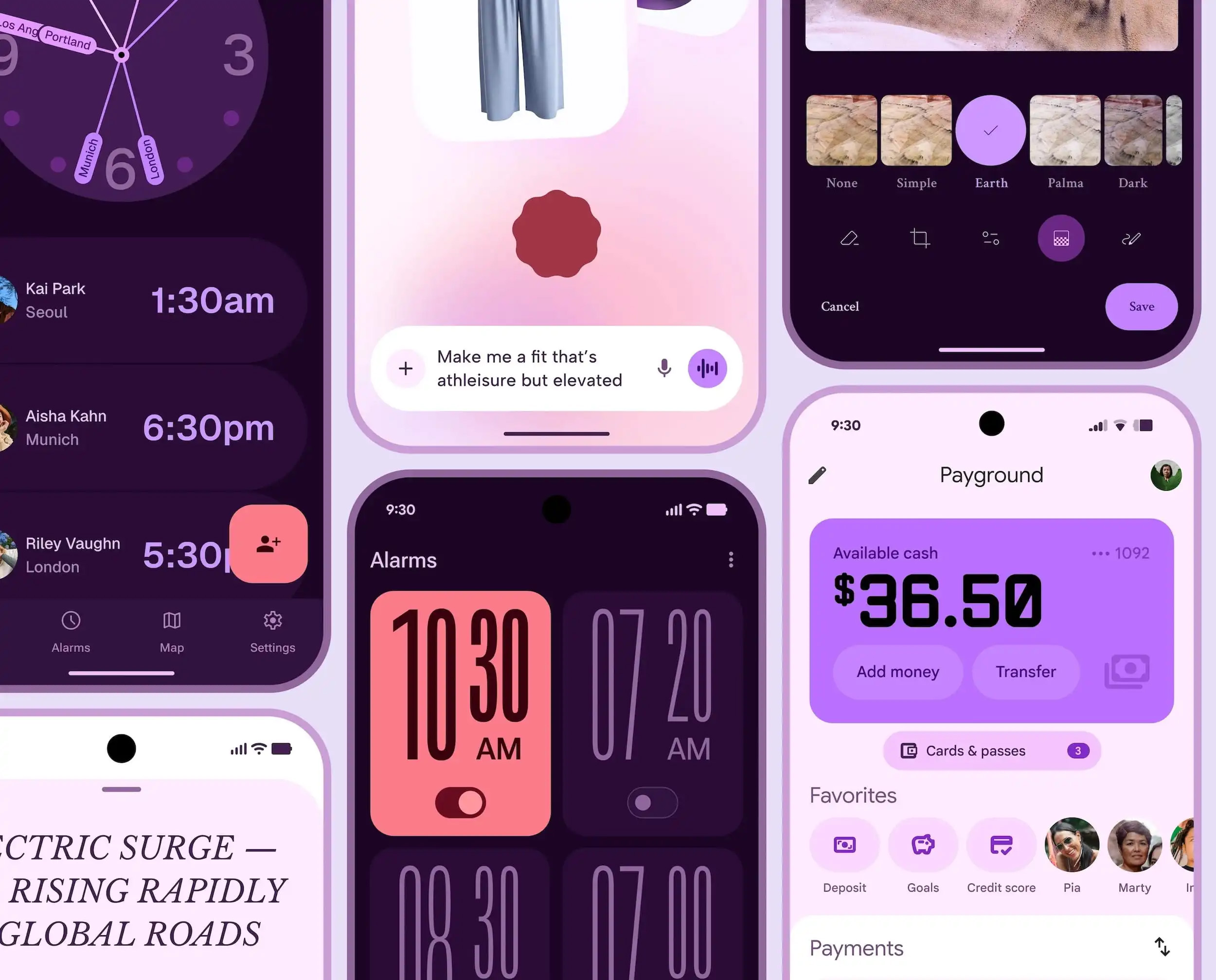
Material 3 Expressive won’t be entirely unfamiliar—it shares some basic design elements with the Material You system Google launched four years ago. Material 3 Expressive is a bolder take on the same aesthetic, featuring “springy” animations, brighter colors, and new shapes.

Material 3 Expressive

As we learned from Google’s slipup, Material 3 Expressive is the result of numerous user studies, which included more than 18,000 participants. Google explored how people parse information on their phone, finding design themes that supposedly support quicker and easier interactions. Often, that seems to result in making certain UI elements larger and easier to spot. Google claims people can find these important buttons four times faster than they can with older Material You interfaces.

What you can expect from Material 3 Expressive

Animations will abound in future versions of Android, and Google emphasizes the springy aspect. The style is supposed to feel natural and fun, with more UI elements connected to dynamic haptics. Colors are also getting an overhaul, but this isn’t a complete rethink of Material You. The theming engine will pick bolder colors to improve the visual separation of UI elements, and you will see those colors in more places.

Google says it’s also updating Android’s typography, featuring more contrast between headers and body text. This will change across Google’s apps to help users parse information faster. Certain buttons will also come in a wider variety of shapes, and the labels will have varying text weights. Likewise, the style and shape of status bar icons will change to be more readable.

Google announces Material 3 Expressive, a colorful evolution of Android design Read More »
samsung-reveals-the-super-slim-galaxy-s25-edge-with-a-laughably-small-battery

Samsung reveals the super-slim Galaxy S25 Edge with a laughably small battery

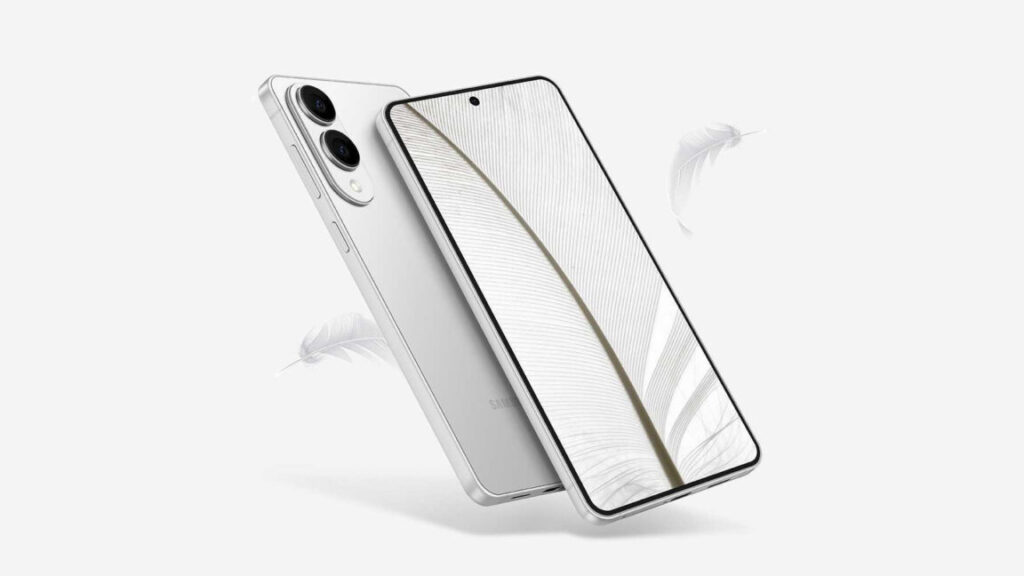
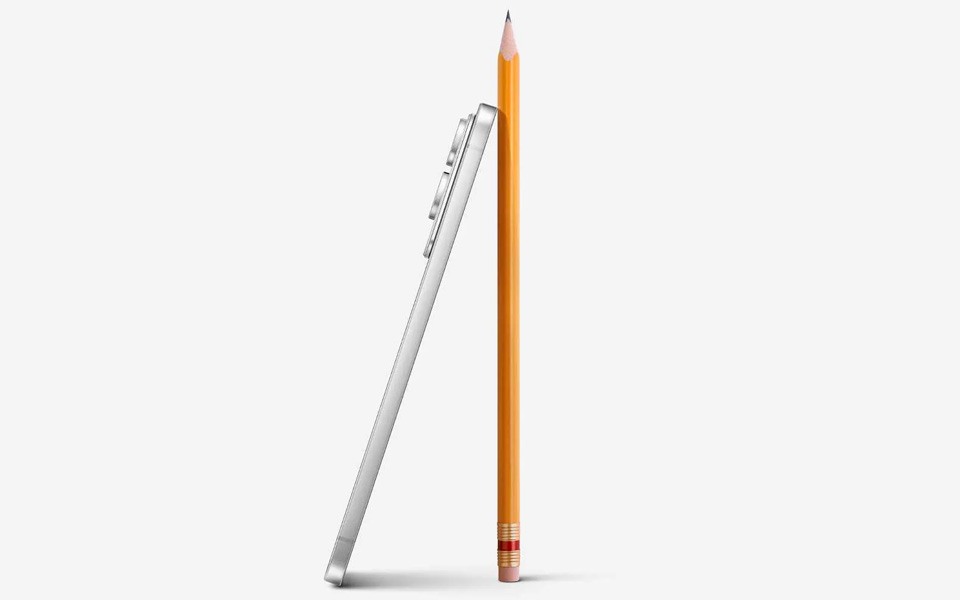
While the body of the phone is just 5.8 mm thick, the camera modules stick out a few millimeters more, making the phone quite wobbly when you set it on a table. The cameras have to stick out to leave more space for the internals, which are pretty powerful. Inside, this phone is essentially unchanged from the other S25 phones, with a Snapdragon 8 Elite, 12GB of RAM, and either 256 or 512GB of storage. The battery will be a problem, though.

S25 edge side with pencil

It is very, very thin.

Credit: Samsung

It is very, very thin. Credit: Samsung

While the S25+ sports a passable 4,900 mAh cell, the super-slim S25 Edge has just 3,900 mAh of juice. That is a problem because the Snapdragon 8 Elite is a flagship processor designed for speed. While it’s relatively efficient in low-power mode, it will devour the Edge’s battery in short order if you’re playing games or multitasking. A 20 percent reduction in battery life compared to the Galaxy S25+, which is a one-day phone, is a tough sell.

Most smartphone manufacturers could never justify making such a strange, niche device. This is Samsung showing off its engineering skills, and the S25 Edge does look neat. But the novelty of a super-slim phone will probably wear off when you have to start plugging it in to get a boost mid-afternoon. It doesn’t even charge very fast, topping out at a mere 25 W. And you’ll be paying $1,099 for the privilege, which slots the Edge between the S25+ ($1,000) and the S25 Ultra ($1,300).

If you want a phone that is thin at the expense of everything else, you can order the Galaxy S25 Edge from Samsung or Best Buy. It comes in black, icy blue, and silver colors and will ship on May 30.

Samsung reveals the super-slim Galaxy S25 Edge with a laughably small battery Read More »

google-accidentally-reveals-android’s-material-3-expressive-interface-ahead-of-i/o

Google accidentally reveals Android’s Material 3 Expressive interface ahead of I/O

The youths love it.

Credit: Google

The youths love it. Credit: Google

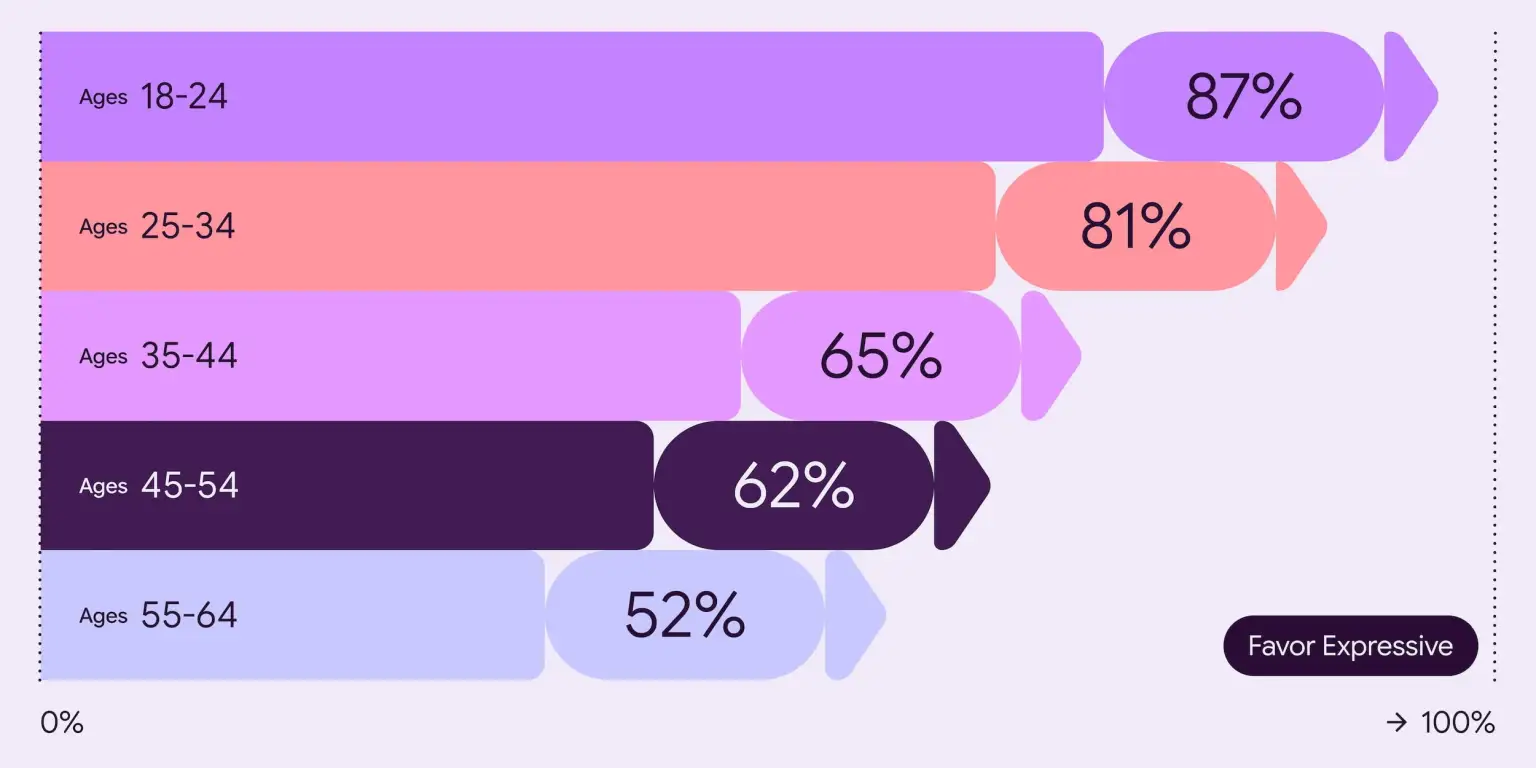
All those studies allegedly revealed that people prefer Material 3 Expressive to the old version. However, that preference varies greatly with age. Zoomers apparently like Material 3 Expressive a lot, with over 80 percent of younger folks saying it was better than the non-expressive design. That drops to 52 percent by the time you get to the 55-plus age group. Yeah, change can be scary. Google also says Material 3 Expressive was rated as subjectively “cooler” than old designs.

One of many

This leak confirms Android will get a stylish overhaul in version 16, but the benefits (and drawbacks) won’t be shared equally. Android is open source, and other OEMs have their own priorities. They can choose to adopt elements of expressive design or not. Just because Google decrees it does not mean it is so.

Depending on the phone you have, the update to Android 16 might not look all that visually different from Android 15. Google creates the open source code and closed-source Google bits, but licensees like Samsung and OnePlus take that and run with it to produce custom versions of the OS with their own branding. It’s common to hear Samsung and OnePlus talk about One UI and Oxygen OS, respectively, but not so much about Android itself.

Material 3 Expressive may bleed into these modified versions of Android, but you’ll need a Google Pixel device for the full effect. Google’s Pixel devices will have system elements attached to this theming system, and most of Google’s apps will be updated to the new system at some point. If you’ve got another phone, you’ll probably see much less of the expressive style. However, Motorola’s Hello UI usually sticks pretty close to Google’s material theming.

Material 3 Expressive isn’t just about the system UI or preloaded apps. Google will also make these design templates available to app developers who can support the bright, energetic theming for all phones. However, uptake of material design in apps has been modest so far. It’s common to see apps that use a few material UI elements or color theming, but almost no one is running the full Google style.

Google struggled for years to unify Android design aesthetics, but it never made much progress. While Material 3 Expressive looks very thoughtfully designed, it’s unlikely it will see any more take-up than the company’s previous attempts. Google’s contracts with OEMs and its management of the Play Store have both come under legal scrutiny, so the company won’t be able to use any heavy-handed tactics to encourage the adoption of Material 3 Expressive.

Google accidentally reveals Android’s Material 3 Expressive interface ahead of I/O Read More »

ios-and-android-juice-jacking-defenses-have-been-trivial-to-bypass-for-years

iOS and Android juice jacking defenses have been trivial to bypass for years


SON OF JUICE JACKING ARISES

New ChoiceJacking attack allows malicious chargers to steal data from phones.

Credit: Aurich Lawson | Getty Images

Credit: Aurich Lawson | Getty Images

About a decade ago, Apple and Google started updating iOS and Android, respectively, to make them less susceptible to “juice jacking,” a form of attack that could surreptitiously steal data or execute malicious code when users plug their phones into special-purpose charging hardware. Now, researchers are revealing that, for years, the mitigations have suffered from a fundamental defect that has made them trivial to bypass.

“Juice jacking” was coined in a 2011 article on KrebsOnSecurity detailing an attack demonstrated at a Defcon security conference at the time. Juice jacking works by equipping a charger with hidden hardware that can access files and other internal resources of phones, in much the same way that a computer can when a user connects it to the phone.

An attacker would then make the chargers available in airports, shopping malls, or other public venues for use by people looking to recharge depleted batteries. While the charger was ostensibly only providing electricity to the phone, it was also secretly downloading files or running malicious code on the device behind the scenes. Starting in 2012, both Apple and Google tried to mitigate the threat by requiring users to click a confirmation button on their phones before a computer—or a computer masquerading as a charger—could access files or execute code on the phone.

The logic behind the mitigation was rooted in a key portion of the USB protocol that, in the parlance of the specification, dictates that a USB port can facilitate a “host” device or a “peripheral” device at any given time, but not both. In the context of phones, this meant they could either:

  • Host the device on the other end of the USB cord—for instance, if a user connects a thumb drive or keyboard. In this scenario, the phone is the host that has access to the internals of the drive, keyboard or other peripheral device.
  • Act as a peripheral device that’s hosted by a computer or malicious charger, which under the USB paradigm is a host that has system access to the phone.

An alarming state of USB security

Researchers at the Graz University of Technology in Austria recently made a discovery that completely undermines the premise behind the countermeasure: They’re rooted under the assumption that USB hosts can’t inject input that autonomously approves the confirmation prompt. Given the restriction against a USB device simultaneously acting as a host and peripheral, the premise seemed sound. The trust models built into both iOS and Android, however, present loopholes that can be exploited to defeat the protections. The researchers went on to devise ChoiceJacking, the first known attack to defeat juice-jacking mitigations.

“We observe that these mitigations assume that an attacker cannot inject input events while establishing a data connection,” the researchers wrote in a paper scheduled to be presented in August at the Usenix Security Symposium in Seattle. “However, we show that this assumption does not hold in practice.”

The researchers continued:

We present a platform-agnostic attack principle and three concrete attack techniques for Android and iOS that allow a malicious charger to autonomously spoof user input to enable its own data connection. Our evaluation using a custom cheap malicious charger design reveals an alarming state of USB security on mobile platforms. Despite vendor customizations in USB stacks, ChoiceJacking attacks gain access to sensitive user files (pictures, documents, app data) on all tested devices from 8 vendors including the top 6 by market share.

In response to the findings, Apple updated the confirmation dialogs in last month’s release of iOS/iPadOS 18.4 to require a user authentication in the form of a PIN or password. While the researchers were investigating their ChoiceJacking attacks last year, Google independently updated its confirmation with the release of version 15 in November. The researchers say the new mitigation works as expected on fully updated Apple and Android devices. Given the fragmentation of the Android ecosystem, however, many Android devices remain vulnerable.

All three of the ChoiceJacking techniques defeat Android juice-jacking mitigations. One of them also works against those defenses in Apple devices. In all three, the charger acts as a USB host to trigger the confirmation prompt on the targeted phone.

The attacks then exploit various weaknesses in the OS that allow the charger to autonomously inject “input events” that can enter text or click buttons presented in screen prompts as if the user had done so directly into the phone. In all three, the charger eventually gains two conceptual channels to the phone: (1) an input one allowing it to spoof user consent and (2) a file access connection that can steal files.

An illustration of ChoiceJacking attacks. (1) The victim device is attached to the malicious charger. (2) The charger establishes an extra input channel. (3) The charger initiates a data connection. User consent is needed to confirm it. (4) The charger uses the input channel to spoof user consent. Credit: Draschbacher et al.

It’s a keyboard, it’s a host, it’s both

In the ChoiceJacking variant that defeats both Apple- and Google-devised juice-jacking mitigations, the charger starts as a USB keyboard or a similar peripheral device. It sends keyboard input over USB that invokes simple key presses, such as arrow up or down, but also more complex key combinations that trigger settings or open a status bar.

The input establishes a Bluetooth connection to a second miniaturized keyboard hidden inside the malicious charger. The charger then uses the USB Power Delivery, a standard available in USB-C connectors that allows devices to either provide or receive power to or from the other device, depending on messages they exchange, a process known as the USB PD Data Role Swap.

A simulated ChoiceJacking charger. Bidirectional USB lines allow for data role swaps. Credit: Draschbacher et al.

With the charger now acting as a host, it triggers the file access consent dialog. At the same time, the charger still maintains its role as a peripheral device that acts as a Bluetooth keyboard that approves the file access consent dialog.

The full steps for the attack, provided in the Usenix paper, are:

1. The victim device is connected to the malicious charger. The device has its screen unlocked.

2. At a suitable moment, the charger performs a USB PD Data Role (DR) Swap. The mobile device now acts as a USB host, the charger acts as a USB input device.

3. The charger generates input to ensure that BT is enabled.

4. The charger navigates to the BT pairing screen in the system settings to make the mobile device discoverable.

5. The charger starts advertising as a BT input device.

6. By constantly scanning for newly discoverable Bluetooth devices, the charger identifies the BT device address of the mobile device and initiates pairing.

7. Through the USB input device, the charger accepts the Yes/No pairing dialog appearing on the mobile device. The Bluetooth input device is now connected.

8. The charger sends another USB PD DR Swap. It is now the USB host, and the mobile device is the USB device.

9. As the USB host, the charger initiates a data connection.

10. Through the Bluetooth input device, the charger confirms its own data connection on the mobile device.

This technique works against all but one of the 11 phone models tested, with the holdout being an Android device running the Vivo Funtouch OS, which doesn’t fully support the USB PD protocol. The attacks against the 10 remaining models take about 25 to 30 seconds to establish the Bluetooth pairing, depending on the phone model being hacked. The attacker then has read and write access to files stored on the device for as long as it remains connected to the charger.

Two more ways to hack Android

The two other members of the ChoiceJacking family work only against the juice-jacking mitigations that Google put into Android. In the first, the malicious charger invokes the Android Open Access Protocol, which allows a USB host to act as an input device when the host sends a special message that puts it into accessory mode.

The protocol specifically dictates that while in accessory mode, a USB host can no longer respond to other USB interfaces, such as the Picture Transfer Protocol for transferring photos and videos and the Media Transfer Protocol that enables transferring files in other formats. Despite the restriction, all of the Android devices tested violated the specification by accepting AOAP messages sent, even when the USB host hadn’t been put into accessory mode. The charger can exploit this implementation flaw to autonomously complete the required user confirmations.

The remaining ChoiceJacking technique exploits a race condition in the Android input dispatcher by flooding it with a specially crafted sequence of input events. The dispatcher puts each event into a queue and processes them one by one. The dispatcher waits for all previous input events to be fully processed before acting on a new one.

“This means that a single process that performs overly complex logic in its key event handler will delay event dispatching for all other processes or global event handlers,” the researchers explained.

They went on to note, “A malicious charger can exploit this by starting as a USB peripheral and flooding the event queue with a specially crafted sequence of key events. It then switches its USB interface to act as a USB host while the victim device is still busy dispatching the attacker’s events. These events therefore accept user prompts for confirming the data connection to the malicious charger.”

The Usenix paper provides the following matrix showing which devices tested in the research are vulnerable to which attacks.

The susceptibility of tested devices to all three ChoiceJacking attack techniques. Credit: Draschbacher et al.

User convenience over security

In an email, the researchers said that the fixes provided by Apple and Google successfully blunt ChoiceJacking attacks in iPhones, iPads, and Pixel devices. Many Android devices made by other manufacturers, however, remain vulnerable because they have yet to update their devices to Android 15. Other Android devices—most notably those from Samsung running the One UI 7 software interface—don’t implement the new authentication requirement, even when running on Android 15. The omission leaves these models vulnerable to ChoiceJacking. In an email, principal paper author Florian Draschbacher wrote:

The attack can therefore still be exploited on many devices, even though we informed the manufacturers about a year ago and they acknowledged the problem. The reason for this slow reaction is probably that ChoiceJacking does not simply exploit a programming error. Rather, the problem is more deeply rooted in the USB trust model of mobile operating systems. Changes here have a negative impact on the user experience, which is why manufacturers are hesitant. [It] means for enabling USB-based file access, the user doesn’t need to simply tap YES on a dialog but additionally needs to present their unlock PIN/fingerprint/face. This inevitably slows down the process.

The biggest threat posed by ChoiceJacking is to Android devices that have been configured to enable USB debugging. Developers often turn on this option so they can troubleshoot problems with their apps, but many non-developers enable it so they can install apps from their computer, root their devices so they can install a different OS, transfer data between devices, and recover bricked phones. Turning it on requires a user to flip a switch in Settings > System > Developer options.

If a phone has USB Debugging turned on, ChoiceJacking can gain shell access through the Android Debug Bridge. From there, an attacker can install apps, access the file system, and execute malicious binary files. The level of access through the Android Debug Mode is much higher than that through Picture Transfer Protocol and Media Transfer Protocol, which only allow read and write access to system files.

The vulnerabilities are tracked as:

    • CVE-2025-24193 (Apple)
    • CVE-2024-43085 (Google)
    • CVE-2024-20900 (Samsung)
    • CVE-2024-54096 (Huawei)

A Google spokesperson confirmed that the weaknesses were patched in Android 15 but didn’t speak to the base of Android devices from other manufacturers, who either don’t support the new OS or the new authentication requirement it makes possible. Apple declined to comment for this post.

Word that juice-jacking-style attacks are once again possible on some Android devices and out-of-date iPhones is likely to breathe new life into the constant warnings from federal authorities, tech pundits, news outlets, and local and state government agencies that phone users should steer clear of public charging stations.

As I reported in 2023, these warnings are mostly scaremongering, and the advent of ChoiceJacking does little to change that, given that there are no documented cases of such attacks in the wild. That said, people using Android devices that don’t support Google’s new authentication requirement may want to refrain from public charging.

Photo of Dan Goodin

Dan Goodin is Senior Security Editor at Ars Technica, where he oversees coverage of malware, computer espionage, botnets, hardware hacking, encryption, and passwords. In his spare time, he enjoys gardening, cooking, and following the independent music scene. Dan is based in San Francisco. Follow him at here on Mastodon and here on Bluesky. Contact him on Signal at DanArs.82.

iOS and Android juice jacking defenses have been trivial to bypass for years Read More »

new-android-spyware-is-targeting-russian-military-personnel-on-the-front-lines

New Android spyware is targeting Russian military personnel on the front lines

Russian military personnel are being targeted with recently discovered Android malware that steals their contacts and tracks their location.

The malware is hidden inside a modified app for Alpine Quest mapping software, which is used by, among others, hunters, athletes, and Russian personnel stationed in the war zone in Ukraine. The app displays various topographical maps for use online and offline. The trojanized Alpine Quest app is being pushed on a dedicated Telegram channel and in unofficial Android app repositories. The chief selling point of the trojanized app is that it provides a free version of Alpine Quest Pro, which is usually available only to paying users.

Looks like the real thing

The malicious module is named Android.Spy.1292.origin. In a blog post, researchers at Russia-based security firm Dr.Web wrote:

Because Android.Spy.1292.origin is embedded into a copy of the genuine app, it looks and operates as the original, which allows it to stay undetected and execute malicious tasks for longer periods of time.

Each time it is launched, the trojan collects and sends the following data to the C&C server:

  • the user’s mobile phone number and their accounts;
  • contacts from the phonebook;
  • the current date;
  • the current geolocation;
  • information about the files stored on the device;
  • the app’s version.

If there are files of interest to the threat actors, they can update the app with a module that steals them. The threat actors behind Android.Spy.1292.origin are particularly interested in confidential documents sent over Telegram and WhatsApp. They also show interest in the file locLog, the location log created by Alpine Quest. The modular design of the app makes it possible for it to receive additional updates that expand its capabilities even further.

New Android spyware is targeting Russian military personnel on the front lines Read More »

google-makes-android-development-private,-will-continue-open-source-releases

Google makes Android development private, will continue open source releases

Google is planning a major change to the way it develops new versions of the Android operating system. Since the beginning, large swaths of the software have been developed in public-facing channels, but that will no longer be the case. This does not mean Android is shedding its open source roots, but the process won’t be as transparent.

Google has confirmed to Android Authority that all Android development work going forward will take place in Google’s internal branch. This is a shift from the way Google has worked on Android in the past, which featured frequent updates to the public AOSP branch. Anyone can access AOSP, but the internal branches are only available to Google and companies with a Google Mobile Services (GMS) license, like Samsung, Motorola, and others.

According to the company, it is making this change to simplify things, building on a recent change to trunk-based development. As Google works on both public and private branches of Android, the two fall out of sync with respect to features and API support. This forces Google to tediously merge the branches for every release. By focusing on the internal branch, Google claims it can streamline releases and make life easier for everyone.

When new versions of Android are done, Google says it will continue to publish the source code in AOSP as always. Supposedly, this will allow developers to focus on supporting their apps without keeping track of pending changes to the platform in AOSP. Licensed OEMs, meanwhile, can just focus on the lively internal branch as they work on devices that can take a year or more to launch.

Google makes Android development private, will continue open source releases Read More »

rcs-texting-updates-will-bring-end-to-end-encryption-to-green-bubble-chats

RCS texting updates will bring end-to-end encryption to green bubble chats

One of the best mostly invisible updates in iOS 18 was Apple’s decision to finally implement the Rich Communications Services (RCS) communication protocol, something that is slowly helping to fix the generally miserable experience of texting non-iPhone users with an iPhone. The initial iOS 18 update brought RCS support to most major carriers in the US, and the upcoming iOS 18.4 update is turning it on for a bunch of smaller prepaid carriers like Google Fi and Mint Mobile.

Now that Apple is on board, iPhones and their users can also benefit from continued improvements to the RCS standard. And one major update was announced today: RCS will now support end-to-end encryption using the Messaging Layer Security (MLS) protocol, a standard finalized by the Internet Engineering Task Force in 2023.

“RCS will be the first large-scale messaging service to support interoperable E2EE between client implementations from different providers,” writes GSMA Technical Director Tom Van Pelt in the post announcing the updates. “Together with other unique security features such as SIM-based authentication, E2EE will provide RCS users with the highest level of privacy and security for stronger protection from scams, fraud and other security and privacy threats. ”

RCS texting updates will bring end-to-end encryption to green bubble chats Read More »

android-apps-laced-with-north-korean-spyware-found-in-google-play

Android apps laced with North Korean spyware found in Google Play

Researchers have discovered multiple Android apps, some that were available in Google Play after passing the company’s security vetting, that surreptitiously uploaded sensitive user information to spies working for the North Korean government.

Samples of the malware—named KoSpy by Lookout, the security firm that discovered it—masquerade as utility apps for managing files, app or OS updates, and device security. Behind the interfaces, the apps can collect a variety of information including SMS messages, call logs, location, files, nearby audio, and screenshots and send them to servers controlled by North Korean intelligence personnel. The apps target English language and Korean language speakers and have been available in at least two Android app marketplaces, including Google Play.

Think twice before installing

The surveillanceware masquerades as the following five different apps:

  • 휴대폰 관리자 (Phone Manager)
  • File Manager
  • 스마트 관리자 (Smart Manager)
  • 카카오 보안 (Kakao Security) and
  • Software Update Utility

Besides Play, the apps have also been available in the third-party Apkpure market. The following image shows how one such app appeared in Play.

Credit: Lookout

The image shows that the developer email address was mlyqwl@gmail[.]com and the privacy policy page for the app was located at https://goldensnakeblog.blogspot[.]com/2023/02/privacy-policy.html.

“I value your trust in providing us your Personal Information, thus we are striving to use commercially acceptable means of protecting it,” the page states. “But remember that no method of transmission over the internet, or method of electronic storage is 100% secure and reliable, and I cannot guarantee its absolute security.”

The page, which remained available at the time this post went live on Ars, has no reports of malice on Virus Total. By contrast, IP addresses hosting the command-and-control servers have previously hosted at least three domains that have been known since at least 2019 to host infrastructure used in North Korean spy operations.

Android apps laced with North Korean spyware found in Google Play Read More »

no-one-asked-for-this:-google-is-testing-round-keys-in-gboard

No one asked for this: Google is testing round keys in Gboard

Most Android phones ship with Google’s Gboard as the default input option. It’s a reliable, feature-rich on-screen keyboard, so most folks just keep using it instead of installing a third-party option. Depending on how you feel about circles, it might be time to check out some of those alternatives. Google has quietly released an update that changes the shape and position of the keys, and users are not pleased.

In the latest build of Gboard (v15.1.05.726012951-beta-arm64-v8a), Google has changed the key shape from the long-running squares to circle shapes. If you’re using the four-row layout, the keys are like little pills. In five-row mode with the exposed number row, the keys are collapsed further into circles. The reactions seem split between those annoyed by this change and those annoyed that everyone else is so annoyed.

Change can be hard sometimes, so certainly some of the discontent is just a function of having the phone interface changed without warning. If you find it particularly distasteful, you can head into the Gboard settings and open the Themes menu. From there, you can tap on a theme and then turn off the key borders. Thus, you won’t be distracted by the horror of rounded edges. That’s not the only problem with the silent update, though.

The wave of objections isn’t just about aesthetics—this update also moves the keys around a bit. After years of tapping away on keys with a particular layout, people develop muscle memory. Big texters can sometimes type messages on their phone without even looking at it, but moving the keys around even slightly, as Google has done here, can cause you to miss more keys than you did before the update.

No one asked for this: Google is testing round keys in Gboard Read More »

serbian-student’s-android-phone-compromised-by-exploit-from-cellebrite

Serbian student’s Android phone compromised by exploit from Cellebrite

Amnesty International on Friday said it determined that a zero-day exploit sold by controversial exploit vendor Cellebrite was used to compromise the phone of a Serbian student who had been critical of that country’s government.

The human rights organization first called out Serbian authorities in December for what it said was its “pervasive and routine use of spyware” as part of a campaign of “wider state control and repression directed against civil society.” That report said the authorities were deploying exploits sold by Cellebrite and NSO, a separate exploit seller whose practices have also been sharply criticized over the past decade. In response to the December report, Cellebrite said it had suspended sales to “relevant customers” in Serbia.

Campaign of surveillance

On Friday, Amnesty International said that it uncovered evidence of a new incident. It involves the sale by Cellebrite of an attack chain that could defeat the lock screen of fully patched Android devices. The exploits were used against a Serbian student who had been critical of Serbian officials. The chain exploited a series of vulnerabilities in device drivers the Linux kernel uses to support USB hardware.

“This new case provides further evidence that the authorities in Serbia have continued their campaign of surveillance of civil society in the aftermath of our report, despite widespread calls for reform, from both inside Serbia and beyond, as well as an investigation into the misuse of its product, announced by Cellebrite,” authors of the report wrote.

Amnesty International first discovered evidence of the attack chain last year while investigating a separate incident outside of Serbia involving the same Android lockscreen bypass. Authors of Friday’s report wrote:

Serbian student’s Android phone compromised by exploit from Cellebrite Read More »

google-will-finally-fix-awesome-(but-broken)-song-detection-feature-for-pixels

Google will finally fix awesome (but broken) song detection feature for Pixels

Google’s Pixel phones include numerous thoughtful features you don’t get on other phones, like Now Playing. This feature can identify background music from the lock screen, but unlike some similar song identifiers, it works even without an Internet connection. Sadly, it has been broken for months. There is some hope, though. Google has indicated that a fix is ready for deployment, and Pixel users can expect to see it in a future OS update.

First introduced in 2017, Now Playing uses a cache of thousands of audio fingerprints to identify songs you might encounter in your daily grind. Since it works offline, it’s highly efficient and preserves your privacy. Now Playing isn’t a life-changing addition to the mobile experience, but it’s damn cool.

That makes it all the stranger that Google appears to have broken Now Playing with the release of Android 15 (or possibly a Play Services update around the same time) and has left it that way for months. Before that update, Now Playing would regularly list songs on the lock screen and offer enhanced search for songs it couldn’t ID offline. It was obvious to Pixel fans when Now Playing stopped listening last year, and despite a large volume of online complaints, Google has seemingly dragged its feet.

Google will finally fix awesome (but broken) song detection feature for Pixels Read More »