android

google-announces-second-android-16-release-of-2025-is-heading-to-pixels

Google announces second Android 16 release of 2025 is heading to Pixels

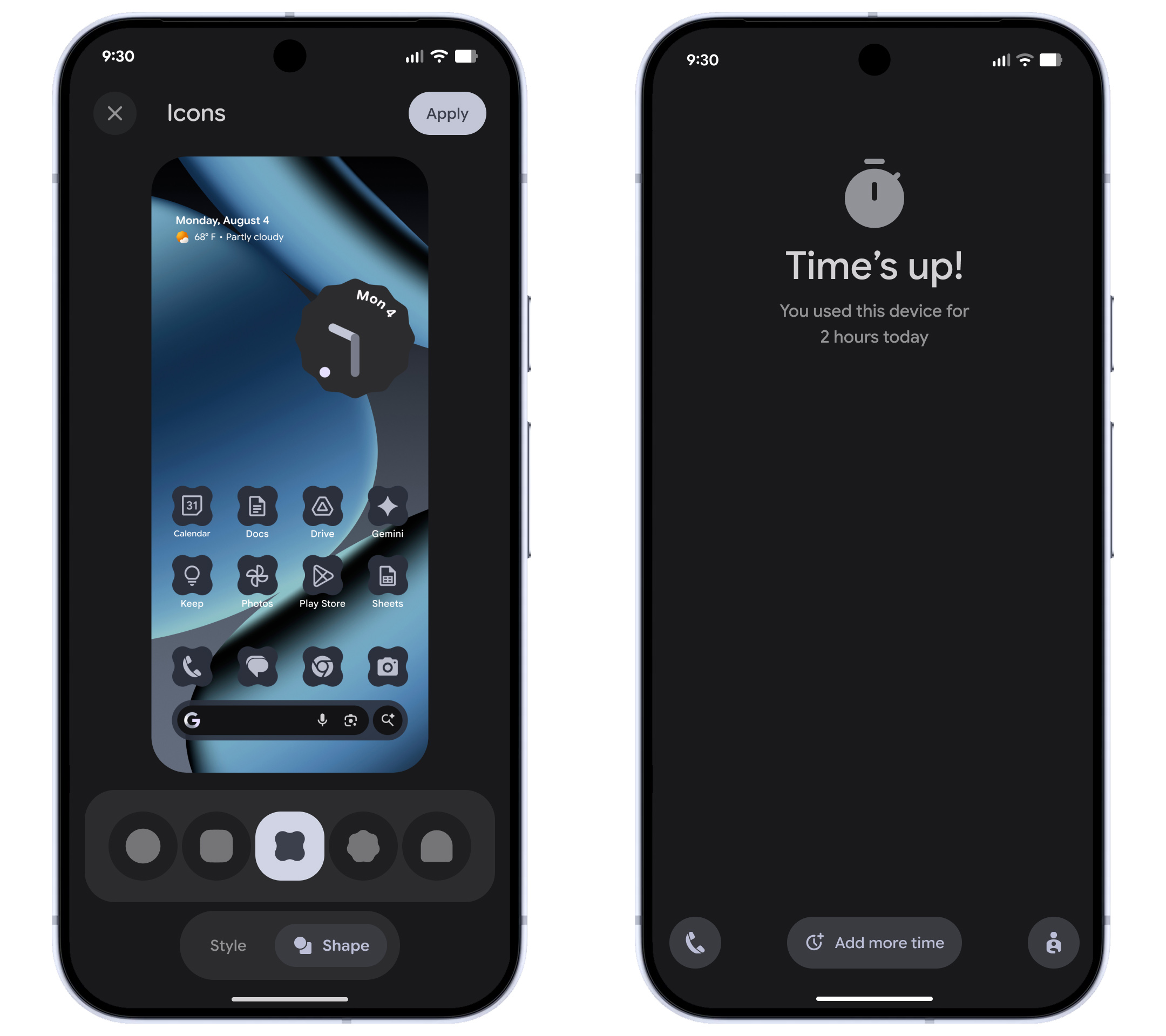
Material 3 Expressive came to Pixels earlier this year but not as part of the first Android 16 upgrade—Google’s relationship with Android versions is complicated these days. Regardless, Material 3 will get a bit more cohesive on Pixels following this update. Google will now apply Material theming to all icons on your device automatically, replacing legacy colored icons with theme-friendly versions. Similarly, dark mode will be supported across more apps, even if the devs haven’t added support. Google is also adding a few more icon shape options if you want to jazz up your home screen.

Android 16 screens

Credit: Google

By way of functional changes, Google has added a more intuitive way of managing parental controls—you can just use the managed device directly. Parents will be able to set a PIN code for accessing features like screen time, app usage, and so on without grabbing a different device. If you want more options or control, the new on-device settings will also help you configure Google Family Link.

Android for all

No Pixel? No problem. Google has also bundled up a collection of app and system updates that will begin rolling out today for all supported Android devices.

Chrome for Android is getting an update with tab pinning, mirroring a feature that has been in the desktop version since time immemorial. The Google Messages app is also taking care of some low-hanging fruit. When you’re invited to a group chat by a new number, the app will display group information and a one-tap option to leave and report the chat as spam.

Google’s official dialer app comes on Pixels, but it’s also in the Play Store for anyone to download. If you and your contacts use Google Dialer, you’ll soon be able to place calls with a “reason.” You can flag a call as “Urgent” to indicate to the recipient that they shouldn’t send you to voicemail. The urgent label will also remain in the call history if they miss the call.

Google announces second Android 16 release of 2025 is heading to Pixels Read More »

the-eu-made-apple-adopt-new-wi-fi-standards,-and-now-android-can-support-airdrop

The EU made Apple adopt new Wi-Fi standards, and now Android can support AirDrop

Last year, Apple finally added support for Rich Communications Services (RCS) texting to its platforms, improving consistency, reliability, and security when exchanging green-bubble texts between the competing iPhone and Android ecosystems. Today, Google is announcing another small step forward in interoperability, pointing to a slightly less annoying future for friend groups or households where not everyone owns an iPhone.

Google has updated Android’s Quick Share feature to support Apple’s AirDrop, which allows users of Apple devices to share files directly using a local peer-to-peer Wi-Fi connection. Apple devices with AirDrop enabled and set to “everyone for 10 minutes” mode will show up in the Quick Share device list just like another Android phone would, and Android devices that support this new Quick Share version will also show up in the AirDrop menu.

Google will only support this feature on the Pixel 10 series, at least to start. The company is “looking forward to improving the experience and expanding it to more Android devices,” but it didn’t announce anything about a timeline or any hardware or software requirements. Quick Share also won’t work with AirDrop devices working in the default “contacts only” mode, though Google “[welcomes] the opportunity to work with Apple to enable ‘Contacts Only’ mode in the future.” (Reading between the lines: Google and Apple are not currently working together to enable this, and Google confirmed to The Verge that Apple hadn’t been involved in this at all.)

Like AirDrop, Google notes that files shared via Quick Share are transferred directly between devices, without being sent to either company’s servers first.

Google shared a little more information in a separate post about Quick Share’s security, crediting Android’s use of the memory-safe Rust programming language with making secure file sharing between platforms possible.

“Its compiler enforces strict ownership and borrowing rules at compile time, which guarantees memory safety,” writes Google VP of Platforms Security and Privacy Dave Kleidermacher. “Rust removes entire classes of memory-related bugs. This means our implementation is inherently resilient against attackers attempting to use maliciously crafted data packets to exploit memory errors.”

The EU made Apple adopt new Wi-Fi standards, and now Android can support AirDrop Read More »

commercial-spyware-“landfall”-ran-rampant-on-samsung-phones-for-almost-a-year

Commercial spyware “Landfall” ran rampant on Samsung phones for almost a year

Before the April 2025 patch, Samsung phones had a vulnerability in their image processing library. This is a zero-click attack because the user doesn’t need to launch anything. When the system processes the malicious image for display, it extracts shared object library files from the ZIP to run the Landfall spyware. The payload also modifies the device’s SELinux policy to give Landfall expanded permissions and access to data.

Landfall flowchart

How Landfall exploits Samsung phones.

Credit: Unit 42

How Landfall exploits Samsung phones. Credit: Unit 42

The infected files appear to have been delivered to targets via messaging apps like WhatsApp. Unit 42 notes that Landfall’s code references several specific Samsung phones, including the Galaxy S22, Galaxy S23, Galaxy S24, Galaxy Z Flip 4, and Galaxy Z Fold 4. Once active, Landfall reaches out to a remote server with basic device information. The operators can then extract a wealth of data, like user and hardware IDs, installed apps, contacts, any files stored on the device, and browsing history. It can also activate the camera and microphone to spy on the user.

Removing the spyware is no easy feat, either. Because of its ability to manipulate SELinux policies, it can burrow deeply into the system software. It also includes several tools that help evade detection. Based on the VirusTotal submissions, Unit 42 believes Landfall was active in 2024 and early 2025 in Iraq, Iran, Turkey, and Morocco. The vulnerability may have been present in Samsung’s software from Android 13 through Android 15, the company suggests.

Unit 42 says that several naming schemes and server responses share similarities with industrial spyware developed by big cyber-intelligence firms like NSO Group and Variston. However, they cannot directly tie Landfall to any particular group. While this attack was highly targeted, the details are now in the open, and other threat actors could now employ similar methods to access unpatched devices. Anyone with a supported Samsung phone should make certain they are on the April 2025 patch or later.

Commercial spyware “Landfall” ran rampant on Samsung phones for almost a year Read More »

the-android-powered-boox-palma-2-pro-fits-in-your-pocket,-but-it’s-not-a-phone

The Android-powered Boox Palma 2 Pro fits in your pocket, but it’s not a phone

Softly talking about the Boox Palma 2 Pro

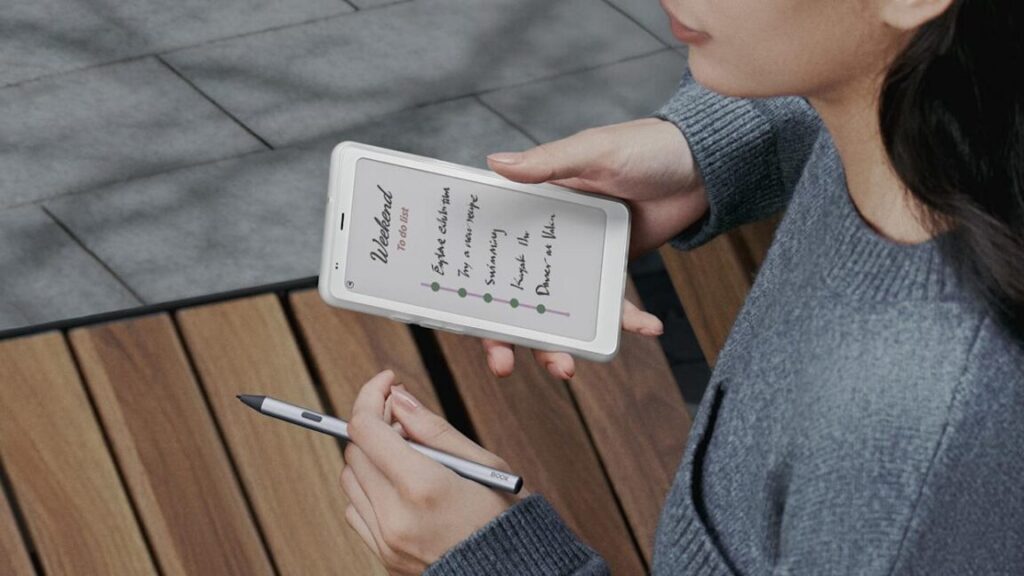
For years, color E Ink was seen as a desirable feature, which would make it easier to read magazines and comics on low-power devices—Boox even has an E Ink monitor. However, the quality of the displays has been lacking. These screens do show colors, but they’re not as vibrant as what you get on an LCD or OLED. In the case of the Palma 2 Pro, the screen is also less sharp in color mode. The touchscreen display is 824 × 1648 in monochrome, but turning on color cuts that in half to 412 × 824.

In addition to the new screen, the second-gen Palma adds a SIM card slot. It’s not for phone calls, though. The SIM slot allows the device to get 5G mobile data in addition to Wi-Fi.

Credit: Boox

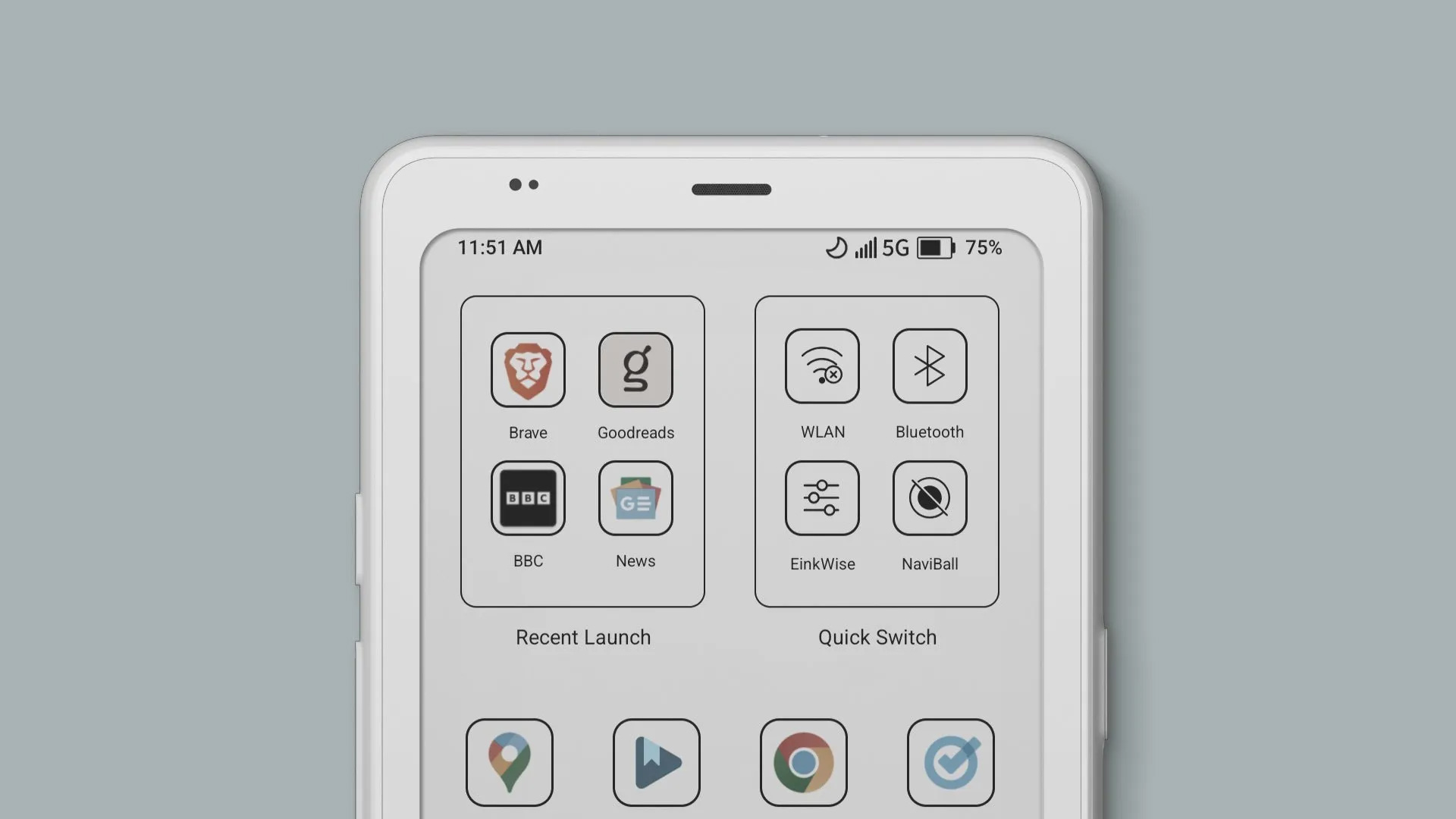
The Palma 2 Pro runs Android 15 out of the box. That’s a solid showing for Boox, which often uses much older builds of Google’s mobile OS. Upgrades aren’t guaranteed, and there’s no official support for Google services. However, Boox has a workaround for its devices so the Play Store can be installed.

The new Boox pocket reader is available for pre-order now at $400. It’s expected to ship around November 14.

The Android-powered Boox Palma 2 Pro fits in your pocket, but it’s not a phone Read More »

hackers-can-steal-2fa-codes-and-private-messages-from-android-phones

Hackers can steal 2FA codes and private messages from Android phones

In the second step, Pixnapping performs graphical operations on individual pixels that the targeted app sent to the rendering pipeline. These operations choose the coordinates of target pixels the app wants to steal and begin to check if the color of those coordinates is white or non-white.

“Suppose, for example, [the attacker] wants to steal a pixel that is part of the screen region where a 2FA character is known to be rendered by Google Authenticator,” Wang said. “This pixel is either white (if nothing was rendered there) or non-white (if part of a 2FA digit was rendered there). Then, conceptually, the attacker wants to cause some graphical operations whose rendering time is long if the target victim pixel is non-white and short if it is white. The malicious app does this by opening some malicious activities (i.e., windows) in front of the victim app that was opened in Step 1.”

The third step measures the amount of time required at each coordinate. By combining the times for each one, the attack can rebuild the images sent to the rendering pipeline one pixel at a time.

The amount of time required to perform the attack depends on several variables, including how many coordinates need to be measured. In some cases, there’s no hard deadline for obtaining the information the attacker wants to steal. In other cases—such as stealing a 2FA code—every second counts, since each one is valid for only 30 seconds. In the paper, the researchers explained:

To meet the strict 30-second deadline for the attack, we also reduce the number of samples per target pixel to 16 (compared to the 34 or 64 used in earlier attacks) and decrease the idle time between pixel leaks from 1.5 seconds to 70 milliseconds. To ensure that the attacker has the full 30 seconds to leak the 2FA code, our implementation waits for the beginning of a new 30-second global time interval, determined using the system clock.

… We use our end-to-end attack to leak 100 different 2FA codes from Google Authenticator on each of our Google Pixel phones. Our attack correctly recovers the full 6-digit 2FA code in 73%, 53%, 29%, and 53% of the trials on the Pixel 6, 7, 8, and 9, respectively. The average time to recover each 2FA code is 14.3, 25.8, 24.9, and 25.3 seconds for the Pixel 6, Pixel 7, Pixel 8, and Pixel 9, respectively. We are unable to leak 2FA codes within 30 seconds using our implementation on the Samsung Galaxy S25 device due to significant noise. We leave further investigation of how to tune our attack to work on this device to future work.

In an email, a Google representative wrote, “We issued a patch for CVE-2025-48561 in the September Android security bulletin, which partially mitigates this behavior. We are issuing an additional patch for this vulnerability in the December Android security bulletin. We have not seen any evidence of in-the-wild exploitation.”

Hackers can steal 2FA codes and private messages from Android phones Read More »

google-pixel-10-pro-fold-review:-the-ultimate-google-phone

Google Pixel 10 Pro Fold review: The ultimate Google phone


Google delivers another phone that is slightly better than its predecessor—is that enough?

Pixel 10 Pro Fold flexed

The Pixel 10 Pro Fold is a sleek piece of hardware. Credit: Ryan Whitwam

The Pixel 10 Pro Fold is a sleek piece of hardware. Credit: Ryan Whitwam

When the first foldable phones came along, they seemed like a cool evolution of the traditional smartphone form factor and, if they got smaller and cheaper, like something people might actually want. After more than five years of foldable phones, we can probably give up on the latter. Google’s new Pixel 10 Pro Fold retains the $1,800 price tag of last year’s model, and while it’s improved in several key ways, spending almost two grand on any phone remains hard to justify.

For those whose phones are a primary computing device or who simply love gadgets, the Pixel 10 Pro Fold is still appealing. It offers the same refined Android experience as the rest of the Pixel 10 lineup, with much more screen real estate on which to enjoy it. Google also improved the hinge for better durability, shaved off some bezel, and boosted both charging speed and battery capacity. However, the form factor hasn’t taken the same quantum leap as Samsung’s latest foldable.

An iterative (but good) design

The Pixel 10 Pro Fold doesn’t reinvent the wheel—it looks and feels almost exactly like last year’s foldable, with a few minor tweaks centered around a new “gearless” hinge. Dropping the internal gears allegedly helps make the mechanism twice as durable. Google claims the Pixel 10 Pro Fold’s hinge will last for more than 10 years of folding and unfolding.

Specs at a glance: Google Pixel 10 series
Pixel 10 ($799) Pixel 10 Pro ($999) Pixel 10 Pro XL ($1,199) Pixel 10 Pro Fold ($1,799)
SoC Google Tensor G5  Google Tensor G5  Google Tensor G5  Google Tensor G5
Memory 12GB 16GB 16GB 16GB
Storage 128GB / 256GB 128GB / 256GB / 512GB 128GB / 256GB / 512GB / 1TB 256GB / 512GB / 1TB
Display 6.3-inch 1080×2424 OLED, 60-120 Hz, 3,000 nits 6.3-inch 1280×2856 LTPO OLED, 1-120 Hz, 3,300 nits 6.8-inch 1344×2992 LTPO OLED, 1-120 Hz, 3,300 nits External: 6.4-inch 1080×2364 OLED, 60-120 Hz, 3,000 nits; Internal: 8-inch 2076×2152 LTPO OLED, 1-120 Hz, 3,000 nits
Cameras 48 MP wide with Macro

Focus, F/1.7, 1/2-inch sensor; 13 MP ultrawide, f/2.2, 1/3.1-inch sensor;

10.8 MP 5x telephoto, f/3.1, 1/3.2-inch sensor; 10.5 MP selfie, f/2.2
50 MP wide with Macro

Focus, F/1.68, 1/1.3-inch sensor; 48 MP ultrawide, f/1.7, 1/2.55-inch sensor;

48 MP 5x telephoto, f/2.8, 1/2.55-inch sensor; 42 MP selfie, f/2.2
50 MP wide with Macro

Focus, F/1.68, 1/1.3-inch sensor; 48 MP ultrawide, f/1.7, 1/2.55-inch sensor;

48 MP 5x telephoto, f/2.8, 1/2.55-inch sensor; 42 MP selfie, f/2.2
48 MP wide, F/1.7, 1/2-inch sensor; 10.5 MP ultrawide with Macro Focus, f/2.2, 1/3.4-inch sensor;

10.8 MP 5x telephoto, f/3.1, 1/3.2-inch sensor; 10.5 MP selfie, f/2.2 (outer and inner)
Software Android 16 Android 16 Android 16 Android 16
Battery 4,970 mAh, up to 30 W wired charging, 15 W wireless charging (Pixelsnap) 4,870 mAh, up to 30 W wired charging, 15 W wireless charging (Pixelsnap) 5,200 mAh, up to 45 W wired charging, 25 W wireless charging (Pixelsnap) 5,015 mAh, up to 30 W wired charging, 15 W wireless charging (Pixelsnap)
Connectivity Wi-Fi 6e, NFC, Bluetooth 6.0, sub-6 GHz and mmWave 5G, USB-C 3.2 Wi-Fi 7, NFC, Bluetooth 6.0, sub-6 GHz and mmWave 5G, UWB, USB-C 3.2 Wi-Fi 7, NFC, Bluetooth 6.0, sub-6 GHz and mmWave 5G, UWB, USB-C 3.2 Wi-Fi 7, NFC, Bluetooth 6.0, sub-6 GHz and mmWave 5G, UWB, USB-C 3.2
Measurements 152.8 height×72.0 width×8.6 depth (mm), 204 g 152.8 height×72.0 width×8.6 depth (mm), 207 g 162.8 height×76.6 width×8.5 depth (mm), 232 g Folded: 154.9 height×76.2 width×10.1 depth (mm); Unfolded: 154.9 height×149.8 width×5.1 depth (mm); 258 g
Colors Indigo

Frost

Lemongrass

Obsidian
Moonstone

Jade

Porcelain

Obsidian
Moonstone

Jade

Porcelain

Obsidian
Moonstone

Jade

While the new phone is technically a fraction of a millimeter thicker, it’s narrowed by a similar amount. You likely won’t notice this, nor will the 1g in additional mass register. You may, however, spot the slimmer bezels and hinge. And that means cases for the 2024 foldable are just a fraction of a millimeter from fitting on the Pixel 10 Pro Fold. It does fit better in your hand, though.

Pixel 10 Pro Fold side

The Pixel is on the thick side for 2025, but this was record-setting thinness last year.

The Pixel is on the thick side for 2025, but this was record-setting thinness last year.

Thanks to the gearless hinge, the Pixel 10 Pro Fold the first foldable with full IP68 certification for water and dust resistance. The hinge feels extremely smooth and sturdy, but it’s a bit stiffer than we’ve seen on most foldables. This might change over time, but it’s a little harder to open and close out of the box. Samsung’s Z Fold 7 is thinner and easier to fold, but the hinge doesn’t open to a full 180 degrees like the Pixel does.

The new foldable also retains the camera module design of last year’s phone—it’s off-center on the back panel, a break from Google’s camera bar on other Pixels. The Pixel 10 Pro Fold, therefore, doesn’t lie flat on tables and will rock back and forth like most other phones. However, it does have the Qi2 magnets like in the cheaper phones. There are various Maglock kickstands and mounting rings that will attach to the back of the phone if you want to prop it up on a surface.

Pixel 10 Pro Fold and Z Fold 7

The Pixel 10 Pro Fold (left) and the Galaxy Z Fold 7 (right) both have 8-inch displays, but the Pixel is curvier.

Credit: Ryan Whitwam

The Pixel 10 Pro Fold (left) and the Galaxy Z Fold 7 (right) both have 8-inch displays, but the Pixel is curvier. Credit: Ryan Whitwam

The power and volume buttons are on the right edge in the same location as last year. The buttons are stable and tactile when pressed, and there’s a fingerprint sensor in the power button. It’s as fast and accurate as any capacitive sensor on a phone today. The aluminum frame and the buttons have the same matte finish, which differs from the glossy look of the other Pro Pixels. The more grippy matte texture is preferable for a phone you need to fold and unfold throughout the day.

Thanks to the modestly slimmer bezels, Google equipped the phone with a 6.4-inch external screen, slightly larger than the 6.3-inch panel on last year’s Fold. The 120 Hz OLED has a respectable 1080p resolution, and the brightness peaks around 3,000 nits, making it readable in bright outdoor light.

Pixel 10 Pro Fold and Pixel 9 Pro Fold

The Pixel 10 Pro Fold (left) has a more compact hinge and slimmer bezels compared to the Pixel 9 Pro Fold (right).

The Pixel 10 Pro Fold (left) has a more compact hinge and slimmer bezels compared to the Pixel 9 Pro Fold (right).

The Pixel 10 Pro Fold has a big 8-inch flexible OLED inside, clocking in at 2076×2152 pixels and 120Hz. It gets similarly bright, but the plastic layer is more reflective than the Gorilla Glass Victus 2 on the cover screen. While the foldable screen is legible, it’s not as pleasant to use outside as high-brightness glass screens.

Like all foldable screens, it’s possible to damage the internal OLED if you’re not careful. On the other hand, the flexible OLED is well-protected when the phone is closed—there’s no gap between the halves, and the magnets hold them together securely. There’s a crease visible in the middle of the screen, but it’s slightly improved from last year’s phone. You can see it well from some angles, but you get used to it.

Pixel 10 Pro Fold keyboard glamor

The Jade colorway looks great.

Credit: Ryan Whitwam

The Jade colorway looks great. Credit: Ryan Whitwam

While the flat Pixel 10 phones have dropped the physical SIM card slot, the Pixel 10 Pro Fold still has one. It has moved to the top this year, but it seems like only a matter of time before Google removes the slot in foldables, too. For the time being, you can move a physical SIM card to the Fold, transfer to eSIM, or use a combination of physical and electronic SIMs.

Google’s take on big Androids

Google’s version of Android is pretty refined these days. The Pixel 10 Pro Fold uses the same AI-heavy build of Android 16 as the flat Pixels. That means you can expect old favorites like Pixel Screenshots, Call Screen, and Magic Compose, along with new arrivals like Magic Cue and Pixel Journal. One thing you won’t see right now is the largely useless Daily Brief, which was pulled after its launch on the Pixel 10 so it could be improved.

Google’s expanded use of Material 3 Expressive theming is also a delight. The Pixel OS has a consistent, clean look you don’t often see on Android phones. Google bundles almost every app it makes on this phone, but you won’t see any sponsored apps, junk games, or other third-party software cluttering up the experience. In short, if you like the vibe of the Pixel OS on other Pixel 10 phones, you’ll like it on the Pixel 10 Pro Fold. We’ve noted a few minor UI glitches in the launch software, but there are no show-stopping bugs.

Pixel 10 Pro Fold split-screen

Multitasking on foldables is a snap.

Credit: Ryan Whitwam

Multitasking on foldables is a snap. Credit: Ryan Whitwam

The software on this phone goes beyond the standard Pixel features to take advantage of the folding screen. There’s a floating taskbar that can make swapping apps and multitasking easier, and you can pin it on the screen for even more efficiency. The Pixel 10 Pro Fold also supports saving app pairs to launch both at once in split-screen.

Google’s multi-window system on the Fold isn’t as robust as what you get with Samsung, though. For example, split-screen apps open in portrait mode on the Pixel, and if you want them in landscape, you have to physically rotate the phone. On Samsung foldables, you can move app windows around and change the orientation however you like—there’s even support for floating app windows and up to three windowed apps. Google reserves floating windows for tablets, none of which it has released since the Pixel Tablet in 2023. It would be nice to see a bit more multitasking power to make the most of the Fold’s big internal display.

As with all of Google’s Pixels, the new foldable gets seven years of update support, all the way through 2032. You’ll probably need at least one battery swap to make it that long, but you might be more inclined to hold onto an $1,800 phone for seven years. Samsung also offers seven years of support, but its updates are slower and don’t usually include new features after the first year. Google rolls out new updates promptly every month, and updated features are delivered in regular Pixel Drops.

Almost the best cameras

Google may have fixed some of the drawbacks of foldables, but you’ll get better photos with flat Pixels. That said, the Pixel 10 Pro Fold is no slouch—it has a camera setup very similar to the base model Pixel 10 (and last year’s foldable), which is still quite good in the grand scheme of mobile photography.

Pixel 10 Pro Fold cameras

The cameras are unchanged from last year.

Credit: Ryan Whitwam

The cameras are unchanged from last year. Credit: Ryan Whitwam

The Pixel 10 Pro Fold sports a 48 MP primary sensor, a 10.5 MP ultrawide, and a 10.8 MP 5x telephoto. There are 10 MP selfie cameras peeking through the front and internal displays as well.

Like the other Pixels, this phone is great for quick snapshots. Google’s image processing does an admirable job of sharpening details and has extraordinary dynamic range. The phone also manages to keep exposure times short to help capture movement. You don’t have to agonize over exactly how to frame a shot or wait for the right moment to hit the shutter. The Pixel 10 Pro and Pro XL do all of this slightly better, but provided you don’t zoom too much, the Pixel 10 Pro Fold photos are similarly excellent.

Medium indoor light. Ryan Whitwam

The primary sensor does better than most in dim conditions, but this is where you’ll notice limitations compared to the flat Pro phones. The Fold’s smaller image sensor can’t collect as much light, resulting in longer exposures. You’ll notice this most in Night Sight shots.

The telephoto sensor is only 10.8 MP compared to 48 MP on the other Pro Pixels. So images won’t be as sharp if you zoom in, but the normal framing looks fine and gets you much closer to your subject. The phone does support up to 20x zoom, but going much beyond 5x begins to reveal the camera’s weakness, and even Google’s image processing can’t hide that. The ultrawide camera is good enough for landscapes and wide group shots, but don’t bother zooming in. It also has autofocus for macro shots.

The selfie cameras are acceptable, but you don’t have to use them. As a foldable, this phone allows you to use the main cameras to snap selfies with the external display as a viewfinder. The results are much better, but the phone is a bit awkward to hold in that orientation. Google also added a few more camera features that complement the form factor, including a split-screen camera roll similar to Samsung’s app and a new version of the Made You Look cover screen widgets.

The Pixel 10 Pro Fold can leverage generative AI in several imaging features, so it has the same C2PA labeling as the other Pixels. We’ve seen this “AI edited” tag appear most often on images from the flat Pixels that are zoomed beyond 20x, so you likely won’t end up with any of those on the Fold. However, features like Add Me and Best Take will get the AI labeling.

The Tensor tension

This probably won’t come as a surprise, but the Tensor G5 in the Pixel 10 Pro Fold performs identically to the Tensor in other Pixel 10 phones. It is marginally faster across the board than the Tensor G4, but this isn’t the huge leap people hoped for with Google’s first TSMC chip. While it’s fast enough to keep the phone chugging, benchmarks are not its forte.

Pixel 10 Pro Fold in hand

Pixel 10 Pro Fold hinge has been redesigned.

Credit: Ryan Whitwam

Pixel 10 Pro Fold hinge has been redesigned. Credit: Ryan Whitwam

Across all our usual benchmarks, the Tensor G5 shows small gains over last year’s Google chip, but it’s running far behind the latest from Qualcomm. We expect that gap to widen even further when Qualcomm updates its flagship Snapdragon line in a few months.

The Tensor G5 does remain a bit cooler under load than the Snapdragon 8 Elite, losing only about 20 percent to thermal throttling. So real-world gaming performance on the Pixel 10 Pro Fold is closer to Qualcomm-based devices than the benchmark numbers would lead you to believe. Some game engines behave strangely on the Tensor’s PowerVR GPU, though. If mobile gaming is a big part of your usage, a Samsung or OnePlus flagship might be more your speed.

Day-to-day performance with the Pixel 10 Pro Fold is solid. Google’s new foldable is quick to register taps and open apps, even though the Tensor G5 chip doesn’t offer the most raw speed. Even on Snapdragon-based phones like the Galaxy Z Fold 7, the UI occasionally hiccups or an animation gets jerky. That’s a rarer occurrence on the Pixel 10 Pro Fold.

One of the biggest spec bumps is the battery—it’s 365 mAh larger, at 5,015 mAh. This finally puts Google’s foldables in the same range as flat phones. Granted, you will use more power when the main display is unfurled, and you should not expect a substantial increase in battery life generally. The power-hungry Tensor and increased background AI processing appear to soak up most of the added capacity. The Pixel 10 Pro Fold should last all day, but there won’t be much leeway.

The Pixel 10 Pro Fold does bring a nice charging upgrade, boosting wired speeds from 21 W to 30 W with a USB-PD charger that supports PPS (as most now do). That’s enough for a 50 percent charge in about half an hour. Wireless charging is now twice as fast, thanks to the addition of Qi2 support. Any Qi2-certified charger can hit those speeds, including the Google Pixelsnap charger. But the Fold is limited to 15 W, whereas the Pixel 10 Pro XL gets 25 W over Qi2. It’s nice to see an upgrade here, but all of Google’s phones should charge faster than they do.

Big phone, big questions

The Pixel 10 Pro Fold is better than last year’s Google foldable, and that means there’s a lot to like. The new hinge and slimmer bezels make the third-gen foldable a bit easier to hold, and the displays are fantastic. The camera setup, while a step down from the other Pro Pixels, is still one of the best you can get on a phone. The addition of Qi2 charging is much appreciated, too. And while Google has overloaded the Pixels with AI features, more of them are useful compared to those on the likes of Samsung, Motorola, or OnePlus.

Pixel 10 Pro Fold and Pixel 10 Pro

Left: Pixel 10 Pro Fold, Right: Pixel 10 Pro.

Credit: Ryan Whitwam

Left: Pixel 10 Pro Fold, Right: Pixel 10 Pro. Credit: Ryan Whitwam

That’s all great, but these are relatively minor improvements for an $1,800 phone, and the competition is making great strides. The Pixel 10 Pro Fold isn’t as fast or slim as the Galaxy Z Fold 7, and Samsung’s multitasking system is much more powerful. The Z Fold 7 retails for $200 more, but that distinction hardly matters as you close in on two grand for a smartphone. If you’re willing to pay $1,800, going to $2,000 isn’t much of a leap.

Pixel 10 Pro Fold back in hand

It’s the size of a normal phone when closed.

Credit: Ryan Whitwam

It’s the size of a normal phone when closed. Credit: Ryan Whitwam

The Pixel 10 Pro Fold is the ultimate Google phone with some useful AI features, but the Galaxy Z Fold 7 is a better piece of hardware. Ultimately, the choice depends on what’s more important to you, but Google will have to move beyond iterative upgrades if it wants foldables to look like a worthwhile upgrade.

The good

  • Redesigned hinge and slimmer bezels
  • Huge, gorgeous foldable OLED screen
  • Colorful, attractive Material 3 UI
  • IP68 certification
  • Includes Qi2 with magnetic attachment
  • Seven years of update support
  • Most AI features run on-device for better privacy

The bad

  • Cameras are a step down from other Pro Pixels
  • Tons of AI features you probably won’t use
  • Could use more robust multitasking
  • Tensor G5 still not benchmark king
  • High $1,800 price

Photo of Ryan Whitwam

Ryan Whitwam is a senior technology reporter at Ars Technica, covering the ways Google, AI, and mobile technology continue to change the world. Over his 20-year career, he’s written for Android Police, ExtremeTech, Wirecutter, NY Times, and more. He has reviewed more phones than most people will ever own. You can follow him on Bluesky, where you will see photos of his dozens of mechanical keyboards.

Google Pixel 10 Pro Fold review: The ultimate Google phone Read More »

google-will-block-sideloading-of-unverified-android-apps-starting-next-year

Google will block sideloading of unverified Android apps starting next year

Android Developer Console

An early look at the streamlined Android Developer Console for sideloaded apps. Credit: Google

Google says that only apps with verified identities will be installable on certified Android devices, which is virtually every Android-based device—if it has Google services on it, it’s a certified device. If you have a non-Google build of Android on your phone, none of this applies. However, that’s a vanishingly small fraction of the Android ecosystem outside of China.

Google plans to begin testing this system with early access in October of this year. In March 2026, all developers will have access to the new console to get verified. In September 2026, Google plans to launch this feature in Brazil, Indonesia, Singapore, and Thailand. The next step is still hazy, but Google is targeting 2027 to expand the verification requirements globally.

A seismic shift

This plan comes at a major crossroads for Android. The ongoing Google Play antitrust case brought by Epic Games may finally force changes to Google Play in the coming months. Google lost its appeal of the verdict several weeks ago, and while it plans to appeal the case to the US Supreme Court, the company will have to begin altering its app distribution scheme, barring further legal maneuvering.

Credit: Google

Among other things, the court has ordered that Google must distribute third-party app stores and allow Play Store content to be rehosted in other storefronts. Giving people more ways to get apps could increase choice, which is what Epic and other developers wanted. However, third-party sources won’t have the deep system integration of the Play Store, which means users will be sideloading these apps without Google’s layers of security.

It’s hard to say how much of a genuine security problem this is. On one hand, it makes sense Google would be concerned—most of the major malware threats to Android devices spread via third-party app repositories. However, enforcing an installation whitelist across almost all Android devices is heavy handed. This requires everyone making Android apps to satisfy Google’s requirements before virtually anyone will be able to install their apps, which could help Google retain control as the app market opens up. While the requirements may be minimal right now, there’s no guarantee they will stay that way.

The documentation currently available doesn’t explain what will happen if you try to install a non-verified app, nor how phones will check for verification status. Presumably, Google will distribute this whitelist in Play Services as the implementation date approaches. We’ve reached out for details on that front and will report if we hear anything.

Google will block sideloading of unverified Android apps starting next year Read More »

murena’s-pixel-tablet-is-helping-to-wean-me-off-google

Murena’s Pixel Tablet is helping to wean me off Google

There were times when a side-by-side comparison found Google’s results to be more aligned with what I had in mind. However, I quickly appreciated Qwant’s lack of AI-generated responses, Google Maps listings, rows of advertisements, and other distractions ahead of actual results. For example, the top results for a search for “Brooklyn rooftop bars” with the Qwant-based engine were roundups from different blogs and publications. Google’s top results were a map, a few bars’ individual websites, posts from Reddit and Instagram, and only two curated lists (one from a news publication and another from Yelp).

The tablet is weaning me off of Google Search, but I’ll likely download Google Maps soon. Murena’s tablet comes with Magic Earth, the only non-open source app preloaded onto the device. However, without Street Views, speedier response, more detailed public transit information (like the names of stops you have to pass), and easier ways to find points of interest, like restaurants, Magic Earth is not sufficient for replacing Google’s alternative—despite Maps’ low privacy rating.

More privacy, please

Despite the inconveniences of a truly Google-free tablet, using Murena’s Pixel Tablet encouraged me to push for more online privacy. It’s proof that privacy-centric tablets and other gadgets are not only possible, but also worthwhile. With Big Tech often failing to protect users, gadgets that don’t spy on you deserve a bigger spotlight.

One of /e/OS’s best features is its privacy reports, which provide an overview of the apps tracking you.

An example of a privacy report.

Credit: Scharon Harding/Murena

An example of a privacy report. Credit: Scharon Harding/Murena

The tablet’s privacy menu also has a toggle for hiding your IP address, although Murena notes that you may want to think twice before sending emails, as “your address may end [up getting a] permanent ban from your provider.” Both features give users more control without introducing complexity and place a much greater emphasis on understanding online privacy than what you find among other tablets.

Murena’s Pixel Tablet, while not perfect, proves that a privacy-forward tablet doesn’t have to come with trade-offs. Devices like this make privacy a competitive advantage that other companies should emulate.

Murena’s Pixel Tablet is helping to wean me off Google Read More »

nothing-phone-3-review:-nothing-ventured,-nothing-gained

Nothing Phone 3 review: Nothing ventured, nothing gained


The Nothing Phone 3 is the company’s best phone by a wide margin, but is that enough?

Nothing Phone 3 reply hazy

The Nothing Phone 3 has a distinctive design. Credit: Ryan Whitwam

The Nothing Phone 3 has a distinctive design. Credit: Ryan Whitwam

The last few years have seen several smartphone makers pull back or totally abandon their mobile efforts. UK-based Nothing Technologies, however, is still trying to carve out a niche in the increasingly competitive smartphone market. Its tools have been quirky designs and glowing lights, along with a focus on markets outside the US. With the Nothing Phone 3, the company has brought its “first flagship” phone stateside.

Nothing didn’t swing for the fences with the Phone 3’s specs, but this device can hold its own with the likes of OnePlus and Google. Plus, it has that funky Nothing design aesthetic. There’s a transparent back, a tiny dot matrix screen, and a comprehensive Android skin. But at the end of the day, the Nothing Phone 3 is not treading new ground.

Designing Nothing

Despite Nothing’s talk about unique designs, the Nothing Phone 3 looks unremarkable from the front. The bezels are slim and symmetrical all the way around the screen. Under a sheet of Gorilla Glass 7i, it has a 6.67-inch 120Hz OLED screen with an impressive 1260 x 2800 resolution. It hits 4,500 nits of brightness, which is even higher than Google and Samsung phones. It’s more than bright enough to be readable outdoors, and the touch sensitivity is excellent—sometimes too excellent, as we’ve noticed a few accidental edge touches.

Specs at a glance: Nothing Phone 3
SoC Snapdragon 8s Gen 4
Memory 12GB, 16GB
Storage 256GB, 512GB
Display 1260 x 2800 6.67″ OLED, 120 Hz
Cameras 50MP primary, f/1.7, OIS; 50MP ultrawide, f/2.2; 50MP 3x telephoto, f/2.7, OIS; 50MP selfie, f/2.2
Software Android 15, 5 years of OS updates
Battery 5,150 mAh, 65 W wired charging, 15 W wireless charging
Connectivity Wi-Fi 7, NFC, Bluetooth 6.0, sub-6 GHz 5G, USB-C 3.2
Measurements 160.6 x 75.6 x 9 mm; 218 g

Like many other phones, the Nothing Phone 3 has an optical fingerprint sensor under the display. It’s quick and accurate, but it’s a bit too low (barely a pinky finger’s width from the bottom of the device). As an optical sensor, it’s also very bright in a dark room. Similar phones from Google and Samsung have faster and less disruptive ultrasonic fingerprint sensors.

Nothing Phone 3 home screen

Nothing OS is a great Android skin.

Credit: Ryan Whitwam

Nothing OS is a great Android skin. Credit: Ryan Whitwam

The overall shape of the phone is almost the same as current Samsung, Apple, and Google phones, but it’s closest to the Pixel 9 series. The IP68-rated body has the same minimalist aesthetic as those other phones, with flat edges and rounded corners. The aluminum frame curves in to merge seamlessly with the front and rear glass panels. It has a matte finish, making it reasonably grippy in the hand. Nothing includes a clear case in the box—we appreciate the effort, but the case feels very cheap and will probably discolor after a couple of months of use.

You won’t see anything extravagant like a headphone jack or IR blaster. The volume and power buttons are flat, tactile, and very stable, with no discernible wiggle. Below the power button is the Essential Key, a convex button that plugs into Nothing’s on-device AI features (more on that later). It’s a delight for button-lovers, but it can be too easy to accidentally press when picking up the phone. And no, you can’t remap the button to do something else.

Nothing Phone 3 side

The Essential Button has a nice feel, but it’s too easy to mistake for the power button.

Credit: Ryan Whitwam

The Essential Button has a nice feel, but it’s too easy to mistake for the power button. Credit: Ryan Whitwam

It’s not until you get to the back that the Nothing Phone 3 stands out. The back has a clear panel of extra-strong Gorilla Glass Victus, but you’re not seeing the phone’s internals through it. The panels under the glass have slightly different colors and textures and were chosen to create an interesting visual effect. It’s certainly eye-catching, but whether or not you like it is a matter of taste. The camera sensors are near the top in a staggered arrangement, right across from the “Glyph Matrix.”

The monochrome Glyph Matrix is Nothing’s replacement for the Glyph light bars on its older phones. A pressure-sensitive button under the glass can be pressed to switch between various display options, some of which might occasionally be useful, like a clock and battery monitor. There are also less useful “Glyph toys” like a Magic 8-ball, a low-fi mirror, and a Rock, Paper, Scissors simulator. It can also display call and status notifications, for instance letting you know when Do Not Disturb is activated or when you have a missed call. Or you can just turn the phone over and use the full display.

Nothing Phone 3 Glyph

The Glyph matrix is a gimmick, but it does look cool.

Credit: Ryan Whitwam

The Glyph matrix is a gimmick, but it does look cool. Credit: Ryan Whitwam

There’s only so much you can do with 489 LEDs and a single button, which makes some of the toys frustrating. For example, you have to long-press to stop the stopwatch, which defeats the purpose, and the selfie mirror is very difficult to use for framing a photo. The Glyph dot matrix is fun to play around with, but it’s just a gimmick. Really, how much time do you spend looking at the back of your phone? Checking the time or playing Rock, Paper, Scissors is not a game-changer, even if the display is visually interesting.

Flagship-ish performance

Nothing says this is a flagship phone, but it doesn’t have Qualcomm’s flagship mobile processor. While you’ll find the Snapdragon 8 Elite in most high-end devices today, Nothing went with the slightly more modest Snapdragon 8s Gen 4. It doesn’t have the Oryon CPU cores, relying instead on eight Arm reference cores, along with a slower GPU.

Nothing Phone 3 and Pixel 9 Pro XL

The Nothing Phone 3 (left) is about the same size and shape as the Pixel 9 Pro XL (right).

Credit: Ryan Whitwam

The Nothing Phone 3 (left) is about the same size and shape as the Pixel 9 Pro XL (right). Credit: Ryan Whitwam

What does that mean for the speeds and feeds? The Nothing Phone 3 doesn’t keep up with high-end devices like the Galaxy S25 in benchmarks, but it’s no slouch, either. In fact, the Snapdragon 8s Gen 4 beats Google’s latest Tensor chip featured in the Pixel 9 series.

As expected, the standard Arm cores fall behind the custom Oryon CPUs in Geekbench, running about 40 percent behind Qualcomm’s best processor. However, the gulf is much narrower in graphics because the Adreno 825 in the Nothing Phone 3 is very similar to the 830 used in Snapdragon 8 Elite phones.

So you could see better gaming performance with a phone like the Galaxy S25 compared to the Nothing Phone 3, but only if you’re playing something very graphically intensive. Even when running these devices side by side, we have a hard time noticing any loss of fidelity on the Nothing Phone 3. It performs noticeably better in high-end games compared to the latest Pixels, though. The Phone 3 maintains performance fairly well under load, only losing 25 to 30 percent at peak temperature. The body of the phone does get uncomfortably hot, but that’s better than overheating the processor.

That modest drop in CPU performance benchmarks does not equate to a poor user experience. The Nothing Phone 3 is very snappy, opening apps quickly and handling rapid multitasking without hesitation. The animations also have a Google level of polish.

Nothing managed to fit a 5,150 mAh battery in this phone, which is a bit larger than even the Galaxy S25 Ultra at 5,000 mAh. The battery life is strong, with the phone easily making it all day—no range anxiety. It won’t last through a second day on a single charge, though. Just like a Pixel or Galaxy phone, you’ll want to plug the Nothing Phone 3 in every night.

But you don’t necessarily have to save your charging for nighttime. The Nothing Phone 3 offers 65 W wired charging, which is much faster than what you get from Google, Samsung, or Apple phones. If the battery gets low, just a few minutes connected to almost any USB-PD charger will get you enough juice to head out the door. You also get 15 W wireless charging, but it doesn’t support the magnetic Qi 2 standard.

We’ve had no problems using the Phone 3 on T-Mobile, and Nothing says AT&T is also fully supported. However, there’s no official support for Verizon. The phone has all the necessary sub-6GHz 5G bands, but you may have trouble activating it as a new device on Verizon’s network.

Upgraded cameras

A camera upgrade was a necessary part of making this device a “flagship” phone, so Nothing equipped the Phone 3 with a solid array of sensors, ensuring you’ll get some good shots. They won’t all be good, though.

Nothing Phone 3 back

The clear glass shows off subtly differing blocks and a button to control the Glyph Matrix display.

Credit: Ryan Whitwam

The clear glass shows off subtly differing blocks and a button to control the Glyph Matrix display. Credit: Ryan Whitwam

The Nothing Phone 3 has a quartet of 50 MP sensors, including a wide-angle, a 3x telephoto, and an ultrawide on the back. The front-facing selfie camera is also 50 MP. While you can shoot in 50 MP mode, smartphone camera sensors are designed with pixel binning in mind. The phone outputs 12.5 MP images, leaning on merged pixel elements to brighten photos and speed up captures. We’ve found Nothing’s color balance and exposure to be very close to reality, and the dynamic range is good enough that you don’t have to worry about overly bright or dim backgrounds ruining a shot.

The Nothing Phone 3 cameras can produce sharp details, but some images tend to look overprocessed and “muddy.” However, the biggest issue is shutter lag—there’s too much of it. It seems like the phone is taking too long to stack and process images. So even outdoors and with a high shutter speed, a moving subject can look blurry. It’s challenging to snap a clear photo of a hyperactive kid or pet. In low-light settings, the shutter lag becomes worse, making it hard to take a sharp photo. Night mode shots are almost always a bit fuzzy.

Low indoor light. Ryan Whitwam

Photos of still subjects are generally good, and you can get some nice ones with the ultrawide camera. Landscapes look particularly nice, and the camera has autofocus for macro shots. This mode doesn’t activate automatically when you move in, so you have to remember it’s there. It’s worth remembering, though.

The telephoto sensor uses a periscope-style lens, which we usually see on sensors with 5x or higher zoom factors. This one is only 3x, so it will get you somewhat closer to your subject without cropping, but don’t expect the same quality you’d get from a Pixel or Samsung phone.

In its sub-flagship price range, we’d put the Nothing Phone 3 camera experience on par with Motorola. A device like the OnePlus 13R or Pixel 9a will take better pictures, but the Nothing Phone 3 is good enough unless mobile photography is at the top of your requirements.

Great software, plus an AI button

Nothing isn’t beating Samsung to the punch with Android 16—the first new phone to launch with Google’s latest OS will be the Z Fold 7 and Z Flip 7 later this month. Nothing is releasing its phone with Android 15 and Nothing OS 3.5, but an Android 16 update is promised soon. There’s not much in the first Android 16 release to get excited about, though, and in the meantime, Nothing OS is actually quite good.

Nothing’s take on Android makes changes to almost every UI element, which is usually a recipe for Samsung levels of clutter. However, Nothing remains true to its minimalist aesthetic throughout the experience. The icon styling is consistent and attractive, Nothing’s baked-in apps are cohesive, and the software includes some useful home screen options and widgets. Nothing also made a few good functional changes to Android, including a fully configurable quick settings panel and a faster way to clear your recent apps.

We’ve encountered a few minor bugs, like the weather widget that won’t show freedom units and a back gesture that can be a little finicky. Nothing’s Android skin is also very distinctive compared to other OEM themes. Not everyone will like the “dot matrix” vibe of Nothing OS, but it’s one of the more thoughtfully designed Android skins we’ve seen.

Nothing Phone 3 software

Nothing OS has a distinctive look.

Credit: Ryan Whitwam

Nothing OS has a distinctive look. Credit: Ryan Whitwam

Like every other 2025 smartphone, there’s an AI angle here. Nothing has a tool called Essential Space that ties into the aforementioned Essential Key. When you press the button, it takes a screenshot you can add notes to. It logs that in Essential Space and turns an AI loose on it to glean important details. It can create to-do lists and reminders based on the images, but those suggestions are misses as often as they are hits. There’s also no search function like the Google Pixel Screenshots app, which seems like a mistake. You can hold the essential key to record a voice memo, which goes through a similar AI process.

There are also some privacy caveats with Essential Space. The screenshots you save are uploaded to a remote server for processing, but Nothing says it won’t store any of that data. Your voice notes are processed on-device, but it would be nice if images were as well.

Nothing has part of a good idea with its mobile AI implementation, but it’s not as engaging as what we’ve seen from Google. And it’s not as if Google’s use of AI is essential to the mobile experience. The Nothing Phone 3 also gets the standard Gemini integration, and Google’s chatbot will probably get much more use than Essential Space.

Nothing has promised five years of major Android version updates, and there will be two additional years of security patches after that. Nothing is still a very new company, though, and there’s no guarantee it will still be around in seven years. If we assume the best, this is a good update policy, surpassing Motorola and OnePlus but not quite at the level of Google or Samsung, both of which offer seven years of full update support.

Different but not that different

The Nothing Phone 3 is a good smartphone, and it’s probably the best piece of hardware the company has made in its short run. The performance is snappy, the software is thoughtfully designed, and the hardware, while gimmicky, is solid and visually interesting. If you prefer a more understated look or plan to encapsulate your phone in the most durable case you can find, this is not the phone for you.

Nothing Phone 3

The Nothing Phone 3 is a rather large, heavy phone.

Credit: Ryan Whitwam

The Nothing Phone 3 is a rather large, heavy phone. Credit: Ryan Whitwam

Nothing’s Glyph Matrix is fun to play with, but it’s the kind of thing you’ll write off after some time with the phone. You can only play so many games of Rock, Paper, Scissors before the novelty wears off. Nothing is not alone in going down this path—Asus has a dot matrix on its ROG gaming phones, and Xiaomi has slapped full LCDs on the back of a few of its devices. It’s really no different from the days when OEMs tinkered with secondary ticker displays and rear-facing e-paper screens. Those weren’t very useful, either.

Nothing did all it could to make the secondary display attractive, but even if it came up with a truly great idea, there’s little utility in a screen on the back of your phone. The transparent design and dot matrix screen help the phone stand out from the crowd, but not because they’re doing anything radical. This is still a pretty typical glass sandwich smartphone, like most other 2025 offerings.

At $799, the Nothing Phone 3 is competing with devices like the Pixel 9 and OnePlus 13, both of which have it beat in the camera department, and the OnePlus phone is faster. Meanwhile, Google also has better update support. If you buy the Nothing Phone 3, it should be because you genuinely like the hardware and software design, and there’s very little bad to say about Nothing OS. Otherwise, there are better options for the same or less money.

The good

  • Excellent build quality with IP68 rating
  • Nothing OS looks and works great
  • Good performance
  • Glyph Matrix looks cool

The bad

  • Glyph Matrix is an unnecessary gimmick
  • AI features are still not very useful
  • Cameras have noticeable shutter lag
  • Verizon not officially supported

Photo of Ryan Whitwam

Ryan Whitwam is a senior technology reporter at Ars Technica, covering the ways Google, AI, and mobile technology continue to change the world. Over his 20-year career, he’s written for Android Police, ExtremeTech, Wirecutter, NY Times, and more. He has reviewed more phones than most people will ever own. You can follow him on Bluesky, where you will see photos of his dozens of mechanical keyboards.

Nothing Phone 3 review: Nothing ventured, nothing gained Read More »

how-android-phones-became-an-earthquake-warning-system

How Android phones became an earthquake warning system

Of course, the trick is that you only send out the warning if there’s an actual earthquake, and not when a truck is passing by. Here, the sheer volume of Android phones sold plays a key role. As a first pass, AEA can simply ignore events that aren’t picked up by a lot of phones in the same area. But we also know a lot about the patterns of shaking that earthquakes produce. Different waves travel at different speeds, cause different types of ground motion, and may be produced at different intensities as the earthquake progresses.

So, the people behind AEA also include a model of earthquakes and seismic wave propagation, and check whether the pattern seen in phones’ accelerometers is consistent with that model. It only triggers an alert when there’s widespread phone activity that matches the pattern expected for an earthquake.

Raising awareness

In practical terms, AEA is distributed as part of the core Android software, and is set to on by default, so it is active in most Android phones. It starts monitoring when the phone has been stationary for a little while, checking for acceleration data that’s consistent with the P or S waves produced by earthquakes. If it gets a match, it forwards the information along with some rough location data (to preserve privacy) to Google servers. Software running on those servers then performs the positional analysis to see if the waves are widespread enough to have been triggered by an earthquake.

If so, it estimates the size and location, and uses that information to estimate the ground motion that will be experienced in different locations. Based on that, AEA sends out one of two alerts, either “be aware” or “take action.” The “be aware” alert is similar to a standard Android notification, but it plays a distinctive sound and is sent to users further from the epicenter. In contrast, the “take action” warning that’s sent to those nearby will display one of two messages in the appropriate language, either “Protect yourself” or “Drop, cover, and hold on.” It ignores any do-not-disturb settings, takes over the entire screen, and also plays a distinct noise.

How Android phones became an earthquake warning system Read More »

unless-users-take-action,-android-will-let-gemini-access-third-party-apps

Unless users take action, Android will let Gemini access third-party apps

Starting today, Google is implementing a change that will enable its Gemini AI engine to interact with third-party apps, such as WhatsApp, even when users previously configured their devices to block such interactions. Users who don’t want their previous settings to be overridden may have to take action.

An email Google sent recently informing users of the change linked to a notification page that said that “human reviewers (including service providers) read, annotate, and process” the data Gemini accesses. The email provides no useful guidance for preventing the changes from taking effect. The email said users can block the apps that Gemini interacts with, but even in those cases, data is stored for 72 hours.

An email Google recently sent to Android users.

An email Google recently sent to Android users.

No, Google, it’s not good news

The email never explains how users can fully extricate Gemini from their Android devices and seems to contradict itself on how or whether this is even possible. At one point, it says the changes “will automatically start rolling out” today and will give Gemini access to apps such as WhatsApp, Messages, and Phone “whether your Gemini apps activity is on or off.” A few sentences later, the email says, “If you have already turned these features off, they will remain off.” Nowhere in the email or the support pages it links to are Android users informed how to remove Gemini integrations completely.

Compounding the confusion, one of the linked support pages requires users to open a separate support page to learn how to control their Gemini app settings. Following the directions from a computer browser, I accessed the settings of my account’s Gemini app. I was reassured to see the text indicating no activity has been stored because I have Gemini turned off. Then again, the page also said that Gemini was “not saving activity beyond 72 hours.”

Unless users take action, Android will let Gemini access third-party apps Read More »

samsung-and-epic-games-call-a-truce-in-app-store-lawsuit

Samsung and Epic Games call a truce in app store lawsuit

Epic Games, buoyed by the massive success of Fortnite, has spent the last few years throwing elbows in the mobile industry to get its app store on more phones. It scored an antitrust win against Google in late 2023, and the following year it went after Samsung for deploying “Auto Blocker” on its Android phones, which would make it harder for users to install the Epic Games Store. Now, the parties have settled the case just days before Samsung will unveil its latest phones.

The Epic Store drama began several years ago when the company defied Google and Apple rules about accepting outside payments in the mega-popular Fortnite. Both stores pulled the app, and Epic sued. Apple emerged victorious, with Fortnite only returning to the iPhone recently. Google, however, lost the case after Epic showed it worked behind the scenes to stymie the development of app stores like Epic’s.

Google is still working to avoid penalties in that long-running case, but Epic thought it smelled a conspiracy last year. It filed a similar lawsuit against Samsung, accusing it of implementing a feature to block third-party app stores. The issue comes down to the addition of a feature to Samsung phones called Auto Blocker, which is similar to Google’s new Advanced Protection in Android 16. It protects against attacks over USB, disables link previews, and scans apps more often for malicious activity. Most importantly, it blocks app sideloading. Without sideloading, there’s no way to install the Epic Games Store or any of the content inside it.

Samsung and Epic Games call a truce in app store lawsuit Read More »