Google is redesigning Chrome malware detections to include password-protected executable files that users can upload for deep scanning, a change the browser maker says will allow it to detect more malicious threats.
Google has long allowed users to switch on the Enhanced Mode of its Safe Browsing, a Chrome feature that warns users when they’re downloading a file that’s believed to be unsafe, either because of suspicious characteristics or because it’s in a list of known malware. With Enhanced Mode turned on, Google will prompt users to upload suspicious files that aren’t allowed or blocked by its detection engine. Under the new changes, Google will prompt these users to provide any password needed to open the file.
Beware of password-protected archives
In a post published Wednesday, Jasika Bawa, Lily Chen, and Daniel Rubery of the Chrome Security team wrote:
Not all deep scans can be conducted automatically. A current trend in cookie theft malware distribution is packaging malicious software in an encrypted archive—a .zip, .7z, or .rar file, protected by a password—which hides file contents from Safe Browsing and other antivirus detection scans. In order to combat this evasion technique, we have introduced two protection mechanisms depending on the mode of Safe Browsing selected by the user in Chrome.
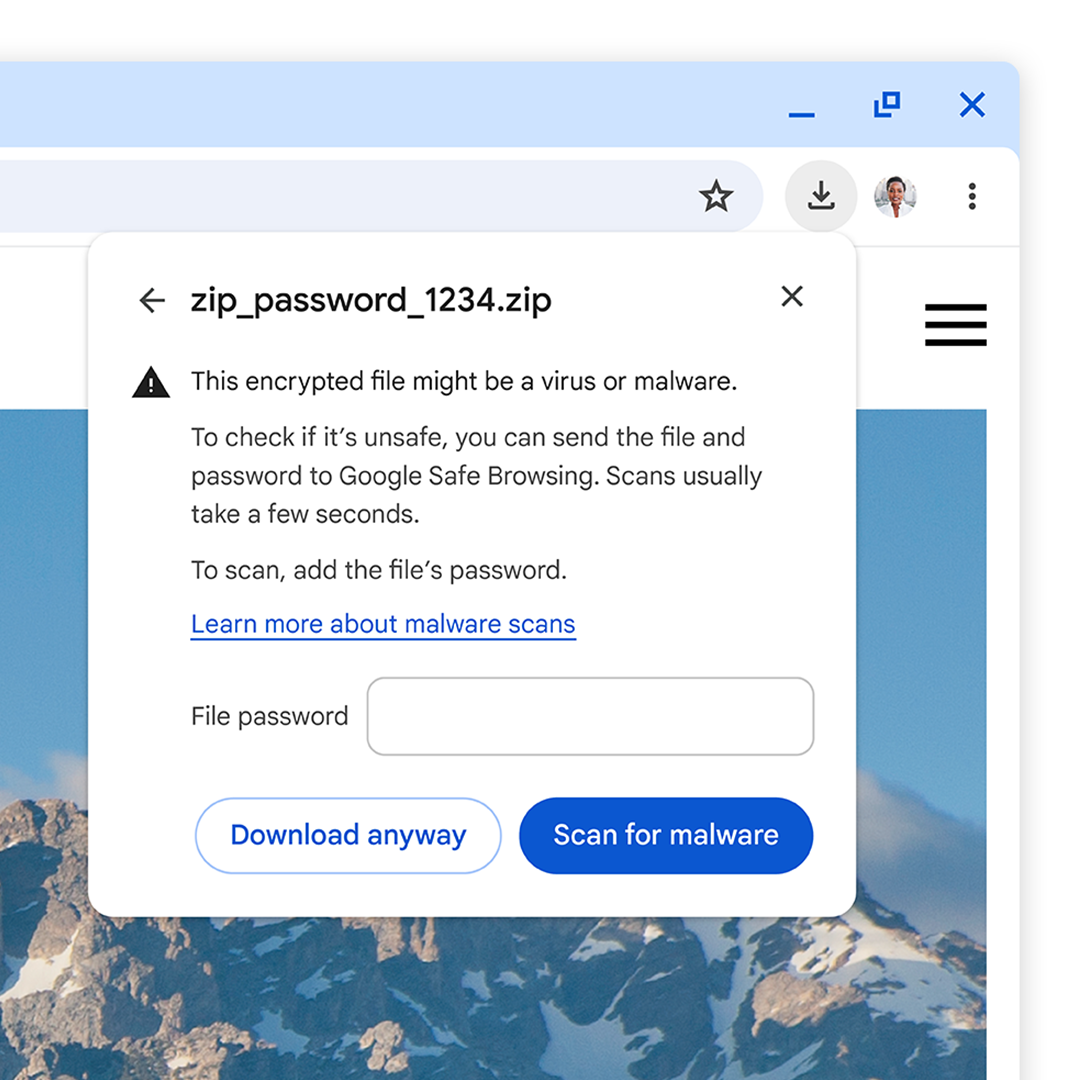
Attackers often make the passwords to encrypted archives available in places like the page from which the file was downloaded, or in the download file name. For Enhanced Protection users, downloads of suspicious encrypted archives will now prompt the user to enter the file’s password and send it along with the file to Safe Browsing so that the file can be opened and a deep scan may be performed. Uploaded files and file passwords are deleted a short time after they’re scanned, and all collected data is only used by Safe Browsing to provide better download protections.
Enlarge/ Enter a file password to send an encrypted file for a malware scan
Google
For those who use Standard Protection mode which is the default in Chrome, we still wanted to be able to provide some level of protection. In Standard Protection mode, downloading a suspicious encrypted archive will also trigger a prompt to enter the file’s password, but in this case, both the file and the password stay on the local device and only the metadata of the archive contents are checked with Safe Browsing. As such, in this mode, users are still protected as long as Safe Browsing had previously seen and categorized the malware.
Sending Google an executable casually downloaded from a site advertising a screensaver or media player is likely to generate little if any hesitancy. For more sensitive files such as a password-protected work archive, however, there is likely to be more pushback. Despite the assurances the file and password will be deleted promptly, things sometimes go wrong and aren’t discovered for months or years, if at all. People using Chrome with Enhanced Mode turned on should exercise caution.
A second change Google is making to Safe Browsing is a two-tiered notification system when users are downloading files. They are:
Suspicious files, meaning those Google’s file-vetting engine have given a lower-confidence verdict, with unknown risk of user harm
Dangerous files, or those with a high confidence verdict that they pose a high risk of user harm
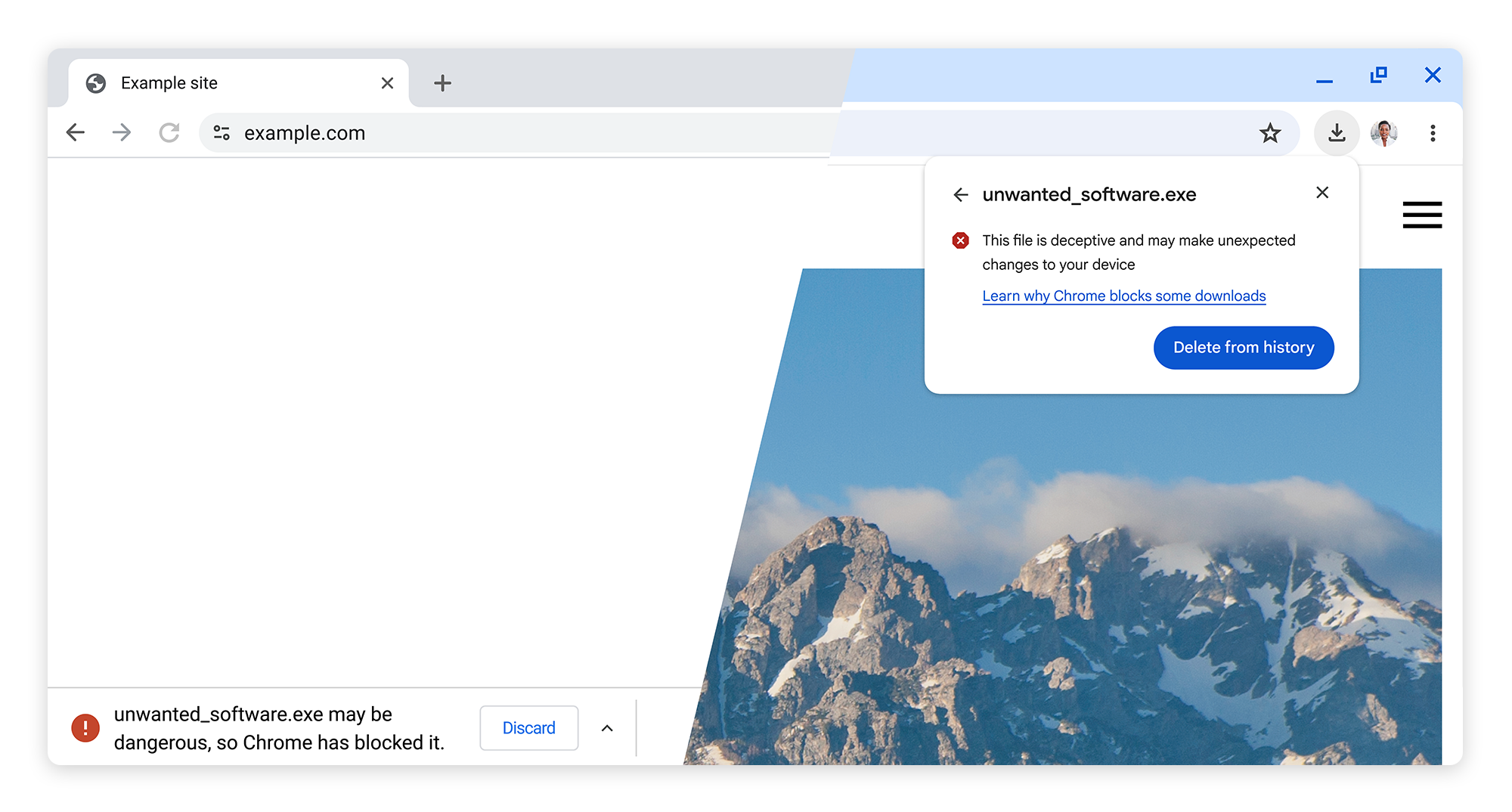
The new tiers are highlighted by iconography, color, and text in an attempt to make it easier for users to easily distinguish between the differing levels of risk. “Overall, these improvements in clarity and consistency have resulted in significant changes in user behavior, including fewer warnings bypassed, warnings heeded more quickly, and all in all, better protection from malicious downloads,” the Google authors wrote.
Previously, Safe Browsing notifications looked like this:
Enlarge/ Differentiation between suspicious and dangerous warnings.
Google
Over the past year, Chrome hasn’t budged on its continued support of third-party cookies, a decision that allows companies large and small to track users of that browser as they navigate from website to website to website. Google’s alternative to tracking cookies, known as the Privacy Sandbox, has also received low marks from privacy advocates because it tracks user interests based on their browser usage.
That said, Chrome has long been a leader in introducing protections, such as a security sandbox that cordons off risky code so it can’t mingle with sensitive data and operating system functions. Those who stick with Chrome should at a minimum keep Standard Mode Safe Browsing on. Users with the experience required to judiciously choose which files to send to Google should consider turning on Enhanced Mode.
Enlarge/ Google, like most of us, has a hard time letting go of cookies. Most of us just haven’t created a complex set of APIs and brokered deals across regulation and industry to hold onto the essential essence of cookies.
Getty Images
Google has an announcement today: It’s not going to do something it has thought about, and tinkered with, for quite some time.
Most people who just use the Chrome browser, rather than develop for it or try to serve ads to it, are not going to know what “A new path for Privacy Sandbox on the web” could possibly mean. The very short version is that Google had a “path,” first announced in January 2020, to turn off third-party (i.e., tracking) cookies in the most-used browser on Earth, bringing it in line with Safari, Firefox, and many other browsers. Google has proposed several alternatives to the cookies that follow you from page to page, constantly pitching you on that space heater you looked at three days ago. Each of these alternatives has met varying amounts of resistance from privacy and open web advocates, trade regulators, and the advertising industry.
So rather than turn off third-party cookies by default and implement new solutions inside the Privacy Sandbox, Chrome will “introduce a new experience” that lets users choose their tracking preferences when they update or first use Chrome. Google will also keep working on its Privacy Sandbox APIs but in a way that recognizes the “impact on publishers, advertisers, and everyone involved in online advertising.” Google also did not fail to mention it was “discussing this new path with regulators.”
Why today? What does it really mean? Let’s journey through more than four and a half years of Google’s moves to replace third-party cookies, without deeply endangering its standing as the world’s largest advertising provider.
2017–2022: FLoC or “What if machines tracked you, not cookies?”
Google’s big moves toward a standstill likely started at Apple headquarters. Its operating system updates in the fall of 2017 implemented a 24-hour time limit on ad-targeting cookies in Safari, the default browser on Macs and iOS devices. A “Coalition of Major Advertising Trade Associations” issued a sternly worded letter opposing this change, stating it would “drive a wedge between brands and their customers” and make advertising “more generic and less timely and useful.”
By the summer of 2019, Firefox was ready to simply block tracking cookies by default. Google, which makes the vast majority of its money through online advertising, made a different, broader argument against dropping third-party cookies. To paraphrase: Trackers will track, and if we don’t give them a proper way to do it, they’ll do it the dirty way by fingerprinting browsers based on version numbers, fonts, screen size, and other identifiers. Google said it had some machine learning that could figure out when it was good to share your browsing habits. For example:
New technologies like Federated Learning show that it’s possible for your browser to avoid revealing that you are a member of a group that likes Beyoncé and sweater vests until it can be sure that group contains thousands of other people.
In January 2020, Google shifted its argument from “along with” to “instead of” third-party cookies. Chrome Engineering Director Justin Schuh wrote, “Building a more private Web: A path towards making third party cookies obsolete,” suggesting that broad support for Chrome’s privacy sandbox tools would allow for dropping third-party cookies entirely. Privacy advocate Ben Adida described the move as “delivering teeth” and “a big deal.” Feedback from the W3C and other parties, Schuh wrote at that time, “gives us confidence that solutions in this space can work.”
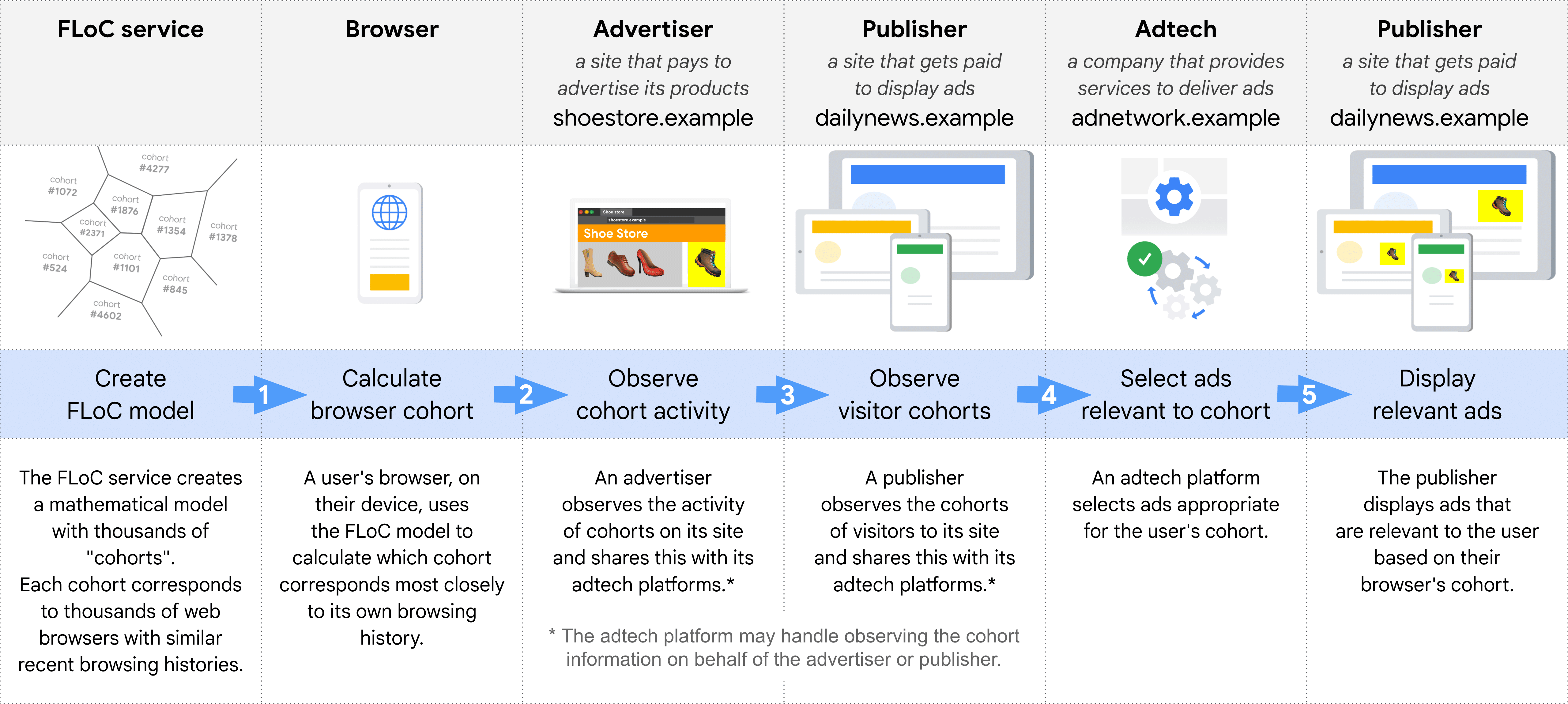
Google’s explanatory graphic for FLoC, or Federated Learning of Cohorts.
Google
As Google developed its replacement for third-party cookies, the path grew trickier and the space more perilous. The Electronic Frontier Foundation described Google’s FLoC, or the “Federated Learning of Cohorts” that would let Chrome machine-learn your profile for sites and ads, as “A Terrible Idea.” The EFF was joined by Mozilla, Apple, WordPress, DuckDuckGo, and lots of browsers based on Chrome’s core Chromium code in being either opposed or non-committal to FLoC. Google pushed back testing FLOC until late 2022 and third-party cookie removal (and thereby FLoC implementation) until mid-2023.
By early 2022, FLoC didn’t have a path forward. Google pivoted to a Topics API, which would give users a bit more control over which topics (“Rock Music,” “Auto & Vehicles”) would be transmitted to potential advertisers. It would certainly improve over third-party cookies, which are largely inscrutable in naming and offer the user only one privacy policy: block them, or delete them all and lose lots of logins.
Google has updated its Chrome browser to patch a high-severity zero-day vulnerability that allows attackers to execute malicious code on end user devices. The fix marks the fifth time this year the company has updated the browser to protect users from an existing malicious exploit.
The vulnerability, tracked as CVE-2024-4671, is a “use after free,” a class of bug that occurs in C-based programming languages. In these languages, developers must allocate memory space needed to run certain applications or operations. They do this by using “pointers” that store the memory addresses where the required data will reside. Because this space is finite, memory locations should be deallocated once the application or operation no longer needs it.
Use-after-free bugs occur when the app or process fails to clear the pointer after freeing the memory location. In some cases, the pointer to the freed memory is used again and points to a new memory location storing malicious shellcode planted by an attacker’s exploit, a condition that will result in the execution of this code.
On Thursday, Google said an anonymous source notified it of the vulnerability. The vulnerability carries a severity rating of 8.8 out of 10. In response, Google said, it would be releasing versions 124.0.6367.201/.202 for macOS and Windows and 124.0.6367.201 for Linux in subsequent days.
“Google is aware that an exploit for CVE-2024-4671 exists in the wild,” the company said.
Google didn’t provide any other details about the exploit, such as what platforms were targeted, who was behind the exploit, or what they were using it for.
Counting this latest vulnerability, Google has fixed five zero-days in Chrome so far this year. Three of the previous ones were used by researchers in the Pwn-to-Own exploit contest. The remaining one was for a vulnerability for which an exploit was available in the wild.
Chrome automatically updates when new releases become available. Users can force the update or confirm they’re running the latest version by going to Settings > About Chrome and checking the version and, if needed, clicking on the Relaunch button.
If you run the Chrome browser in Windows 10 or 11 and you’ve suddenly discovered that you’re running Microsoft Edge instead, you’re not alone. The Verge’s Tom Warren reports that he and multiple other users on social media and Microsoft’s support forums have suddenly found their Chrome browsing sessions mysteriously replicated in Edge.
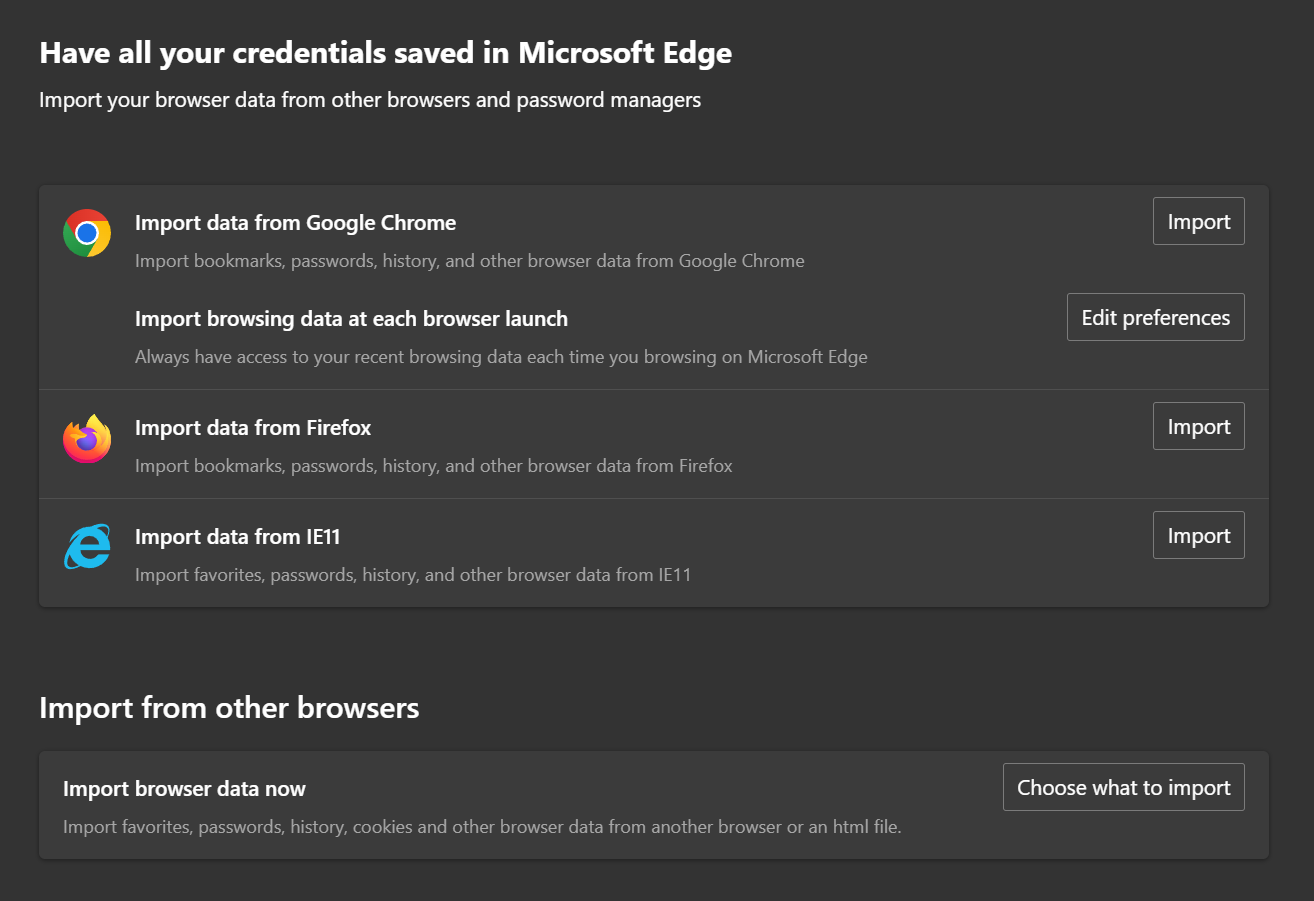
Without an official comment from Microsoft, Warren posits that the tab-snatching happened because of a bug or an inadvertently clicked-through dialog box that triggers a feature in Edge that’s meant to make it easier to (intentionally) switch browsers. The setting, which can be accessed by typing edge://settings/profiles/importBrowsingData into the browser’s address bar, offers to import recent browsing data from Chrome every time you launch Edge, as opposed to the one-time data import it offers for Firefox.
Enlarge/ The setting in question, as seen on a Windows 11 23H2 system running Edge 122. It will offer to continuously import data from Chrome, but not from other browsers. Edge will offer a one-time data import from Firefox, but most other browsers (like Opera) don’t show up here.
Andrew Cunningham
Assuming it is a bug, this data-importing issue is hard to distinguish from some of Microsoft’s actual officially sanctioned, easy-to-reproduce tactics for pushing Edge. I encountered two of these while installing Chrome on a PC for this piece—one when I navigated to the Chrome download page and another across the top of Edge’s Settings pages after I had set another browser as my default.
Microsoft has also used system notifications, special Edge-specific pop-up messages, and full-screen post-update messages about “recommended browser settings” to push Windows users into running Edge and using Bing. (I personally would love it if PCs I’ve been using for months or years would stop asking me to “finish setting up [my] device.”)
Edge is based on the same Chromium browsing engine as Chrome, and most users probably wouldn’t notice much of a difference in how most pages render in either browser. But Edge is centered on Microsoft’s products and services, starting with a Microsoft account but also extending to coupon codes and other shopping notifications, the Microsoft 365 app suite, and generative AI tools like Image Designer and the Copilot chatbot.
Microsoft has gotten more aggressive about how it pushes everything from Microsoft account sign-in to Microsoft 365 and Game Pass subscriptions in recent years, something that has made a “clean” Windows install feel much less clean than it used to. Whether this Edge data-import thing is a bug, it’s telling that it’s not immediately obvious whether it’s a bug or something that Microsoft did intentionally.
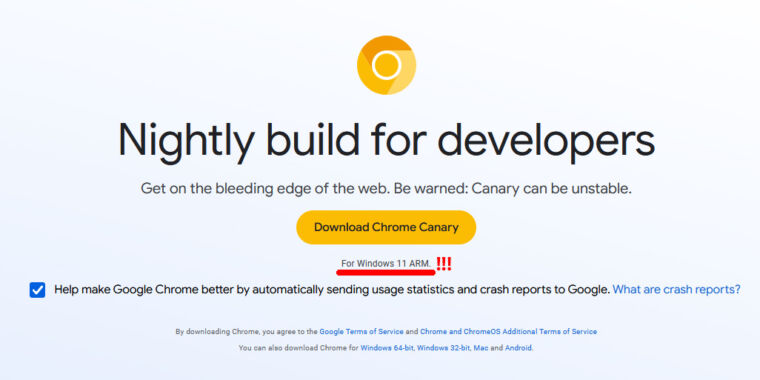
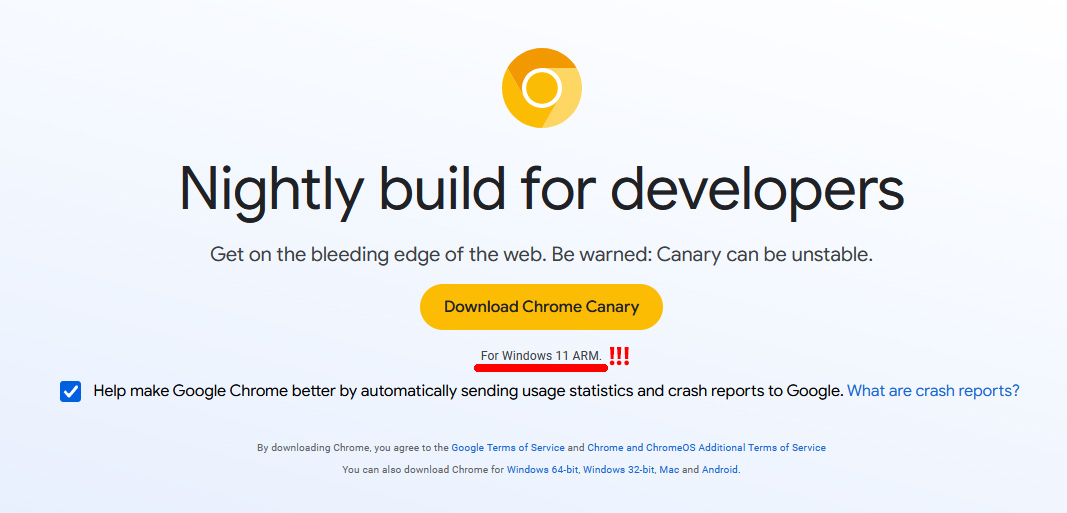
Enlarge/ The Chrome nightly download page with an important section highlighted.
Ron Amadeo
Chrome is landing on a new platform: Windows on Arm. We don’t have an official announcement yet, but X user Pedro Justo was the first to spot that the Chrome Canary page now quietly hosts binaries for “Windows 11 Arm.”
Chrome has run on Windows for a long time, but that’s the x86 version. It also supports various Arm OSes, like Android, Chrome OS, and Mac OS. There’s also Chromium, the open source codebase on Chrome, which has run on Windows Arm for a while now, thanks mostly to Microsoft’s Edge browser being a Chromium derivative. The official “Google Chrome” has never been supported on Windows on Arm until now, though.
Windows may be a huge platform, but “Windows on Arm” is not. Apple’s switch to the Arm architecture has been a battery life revelation for laptops, and in the wake of that, interest in Windows on Arm has picked up. A big inflection point will be the release of laptops with the Qualcomm Snapdragon X Elite SoC in mid-2024. Assuming Qualcomm’s pre-launch hype pans out, this will be the first Arm on Windows chip to be in the same class as Apple Silicon. Previously, Windows on Arm could only run Chrome as an x86 app via a slow translation layer, so getting the world’s most popular browser to a native quality level in time for launch will be a big deal for Qualcomm.
The “Canary” channel is Chrome’s nightly builds channel, so fresh Arm builds should be arriving at a rapid pace. Usually, Canary features take about two months to hit the stable channels, which would be plenty of time for the new Snapdragon chip. It’s hard to know if Google will stick to that timeline, as this is a whole new architecture/OS combo. But again, most of the work has been ongoing for years now. The next steps would be rolling out Windows Arm dev and beta channels soon.
Google has indicated that it is ready to settle a class-action lawsuitfiled in 2020 over its Chrome browser’s Incognito mode. Arising in the Northern District of California, the lawsuit accused Google of continuing to “track, collect, and identify [users’] browsing data in real time” even when they had opened a new Incognito window.
The lawsuit, filed by Florida resident William Byatt and California residents Chasom Brown and Maria Nguyen, accused Google of violating wiretap laws. It also alleged that sites using Google Analytics or Ad Manager collected information from browsers in Incognito mode, including web page content, device data, and IP address. The plaintiffs also accused Google of taking Chrome users’ private browsing activity and then associating it with their already-existing user profiles.
Google initially attempted to have the lawsuit dismissed by pointing to the message displayed when users turned on Chrome’s incognito mode. That warning tells users that their activity “might still be visible to websites you visit.”
Judge Yvonne Gonzalez Rogers rejected Google’s bid for summary judgement in August, pointing out that Google never revealed to its users that data collection continued even while surfing in Incognito mode.
“Google’s motion hinges on the idea that plaintiffs consented to Google collecting their data while they were browsing in private mode,” Rogers ruled. “Because Google never explicitly told users that it does so, the Court cannot find as a matter of law that users explicitly consented to the at-issue data collection.”
According to the notice filed on Tuesday, Google and the plaintiffs have agreed to terms that will result in the litigation being dismissed. The agreement will be presented to the court by the end of January, with the court giving final approval by the end of February.