Apple

rip-to-the-macintosh-hd-hard-drive-icon,-2000–2025

RIP to the Macintosh HD hard drive icon, 2000–2025

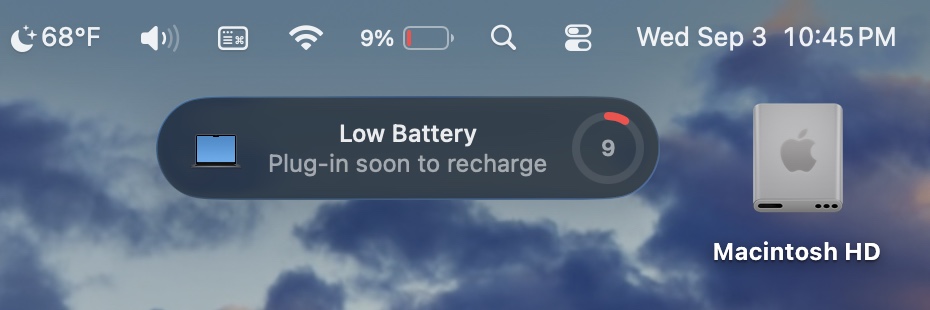
That version of the icon persisted through the Apple Silicon-era Big Sur redesign and was still with us in the first public beta build for macOS 26 Tahoe that Apple released last week. The new beta also updates the icons for external drives (orange, with a USB-C connector on top), network shares (blue, with a globe on top), and removable disk images (white, with an arrow on top).

All of the system’s disk icons get an update in the latest macOS 26 Tahoe developer beta. Credit: Apple/Andrew Cunningham

Other icons that reused or riffed on the old hard drive icon have also been changed. Disk Utility now looks like a wrench tightening an Apple-branded white bolt, for some reason, and drive icons within Disk Utility also have the new SSD-esque icon. Installer apps use the new icon instead of the old one. Navigate to the /System/Library/CoreServices folder where many of the built-in operating system icons live, and you can see a bunch of others that exchange the old HDD icon for the new SSD.

Apple first offered a Mac with an SSD in 2008, when the original MacBook Air came out. By the time “Retina” Macs began arriving in the early 2010s, SSDs had become the primary boot disk for most of them; laptops tended to be all-SSD, while desktops could be configured with an SSD or a hybrid Fusion Drive that used an SSD as boot media and an HDD for mass storage. Apple stopped shipping spinning hard drives entirely when the last of the Intel iMacs went away.

This doesn’t actually matter much. The old icon didn’t look much like the SSD in your Mac, and the new one doesn’t really look like the SSD in your Mac either. But we didn’t want to let the old icon’s passing go unremarked. So, thanks for the memories, Macintosh HD hard drive icon! Keep on spinning, wherever you are.

RIP to the Macintosh HD hard drive icon, 2000–2025 Read More »

new-“applecare-one”-plan-bundles-three-extended-warranties-for-$20-a-month

New “AppleCare One” plan bundles three extended warranties for $20 a month

AppleCare One can also be extended to other Apple products you own “that are up to four years old” (or one year old for headphones) and “in good condition,” even if they’re outside of the typical 60-day grace period for subscribing to AppleCare+. Apple says that the condition of these devices may need to be verified “using a customer’s iPhone or iPad, or at an Apple Store” before they can be added to the plan, presumably to reduce the number of people who opt in after the fact to avoid pricey repairs to already damaged devices.

While the potential savings are the best argument in favor of the new plan, it also adds a handful of new benefits for some devices. For example, AppleCare One covers theft for both iPads and Apple Watches, something that isn’t covered for these devices under a standard AppleCare+ subscription. The subscription can also simplify the trade-in process, removing a traded-in device from your AppleCare One plan and replacing it with an upgraded device automatically.

If you haven’t subscribed to AppleCare+ before, it functions both as an extended warranty and an insurance program. If your device breaks suddenly for reasons outside of your control, repairs and replacements are generally free of additional charge; for accidental damage, theft and loss, or battery replacements, users are charged additional flat service fees for repairs and replacements, rather than Apple’s hefty parts and labor costs. Battery replacements are also free when your battery drops below 80 percent of its original capacity.

AppleCare One plans will go on sale starting tomorrow, July 24.

New “AppleCare One” plan bundles three extended warranties for $20 a month Read More »

conduct-rules-are-coming-for-google-and-apple-in-the-uk

Conduct rules are coming for Google and Apple in the UK

“The targeted and proportionate actions we have set out today would enable UK app developers to remain at the forefront of global innovation while ensuring UK consumers receive a world-class experience,” Cardell said. “Time is of the essence: as competition agencies and courts globally take action in these markets, it’s essential the UK doesn’t fall behind.”

Google and Apple oppose the outlined changes, arguing they could threaten user security and delay the launch of new products and services in the UK.

“We’re concerned the rules the UK is now considering would undermine the privacy and security protections that our users have come to expect, hamper our ability to innovate, and force us to give away our technology for free to foreign competitors,” Apple said. “We will continue to engage with the regulator to make sure they fully understand these risks.”

Oliver Bethell, Google’s senior director for competition, said the CMA’s move was “both disappointing and unwarranted” and that it was “crucial that any new regulation is evidence-based, proportionate, and does not become a roadblock to growth in the UK.”

Apple has repeatedly clashed with Brussels over the implementation of the EU’s Digital Markets Act, making changes to its platform after the European Commission accused the iPhone maker of failing to comply with its “online gatekeeper” rules.

The DMA also requires Apple to open up iOS features and data to its rivals and has demanded changes to its App Store, such as allowing users to install apps from outside its store.

The CMA said it was taking a different approach to the EU by being more “tailored” and iterative than the DMA’s blanket rules.

Last month, Google’s search services were the first Big Tech product to be targeted under the UK’s Digital Markets, Competition and Consumers Act, which was passed last year.

If a company’s products or services are designated as having “strategic market status,” it can last for a five-year period. Companies can be fined up to 10 percent of global turnover for breaching conduct rules.

© 2025 The Financial Times Ltd. All rights reserved. Not to be redistributed, copied, or modified in any way.

Conduct rules are coming for Google and Apple in the UK Read More »

apple-intelligence-news-summaries-are-back,-with-a-big-red-disclaimer

Apple Intelligence news summaries are back, with a big red disclaimer

Apple has released the fourth developer betas of iOS 26, iPadOS 26, macOS 26 and its other next-generation software updates today. And along with their other changes and fixes, the new builds are bringing back Apple Intelligence notification summaries for news apps.

Apple disabled news notification summaries as part of the iOS 18.3 update in January. Incorrect summaries circulating on social media prompted news organizations to complain to Apple, particularly after one summary said that Luigi Mangione, alleged murderer of UnitedHealthcare CEO Brian Thompson, had died by suicide (he had not and has not).

Upon installing the new update, users of Apple Intelligence-compatible devices will be asked to enable or disable three broad categories of notifications: those for “News & Entertainment” apps, for “Communication & Social” apps, and for all other apps. The operating systems will list sample apps based on what you currently have installed on your device.

All Apple Intelligence notification summaries continue to be listed as “beta,” but Apple’s main change here is a big red disclaimer when you enable News & Entertainment notification summaries, pointing out that “summarization may change the meaning of the original headlines.” The notifications also get a special “summarized by Apple Intelligence” caption to further distinguish them from regular, unadulterated notifications.

Apple Intelligence news summaries are back, with a big red disclaimer Read More »

uk-backing-down-on-apple-encryption-backdoor-after-pressure-from-us

UK backing down on Apple encryption backdoor after pressure from US

Under the terms of the legislation, recipients of such a notice are unable to discuss the matter publicly, even with customers affected by the order, unless granted permission by the Home Secretary.

The legislation’s use against Apple has triggered the tech industry’s highest-profile battle over encryption technology in almost a decade.

In response to the demand, Apple withdrew its most secure cloud storage service from the UK in February and is now challenging the Home Office’s order at the Investigatory Powers Tribunal, which probes complaints against the UK’s security services.

Last month, Meta-owned WhatsApp said it would join Apple’s legal challenge, in a rare collaboration between the Silicon Valley rivals.

In the meantime, the Home Office continues to pursue its case with Apple at the tribunal.

Its lawyers discussed the next legal steps this month, reflecting the divisions within government over how best to proceed. “At this point, the government has not backed down,” said one person familiar with the legal process.

A third senior British official added that the UK government was reluctant to push “anything that looks to the US vice-president like a free-speech issue.”

In a combative speech at the Munich Security Conference in February, Vance argued that free speech and democracy were threatened by European elites.

The UK official added, this “limits what we’re able to do in the future, particularly in relation to AI regulation.” The Labour government has delayed plans for AI legislation until after May next year.

Trump has also been critical of the UK stance on encryption.

The US president has likened the UK’s order to Apple to “something… that you hear about with China,” saying in February that he had told Starmer: “You can’t do this.”

US Director of National Intelligence Tulsi Gabbard has also suggested the order would be an “egregious violation” of Americans’ privacy that risked breaching the two countries’ data agreement.

Apple did not respond to a request for comment. “We have never built a back door or master key to any of our products, and we never will,” Apple said in February.

The UK government did not respond to a request for comment.

A spokesperson for Vance declined to comment.

The Home Office has previously said the UK has “robust safeguards and independent oversight to protect privacy” and that these powers “are only used on an exceptional basis, in relation to the most serious crimes.”

© 2025 The Financial Times Ltd. All rights reserved. Not to be redistributed, copied, or modified in any way.

UK backing down on Apple encryption backdoor after pressure from US Read More »

apple-sues-youtuber-who-leaked-ios-26’s-new-“liquid-glass”-software-redesign

Apple sues YouTuber who leaked iOS 26’s new “Liquid Glass” software redesign

“Defendants’ misconduct was brazen and egregious,” says Apple’s filing. “After Mr. Prosser learned that Mr. Ramacciotti needed money, and that his friend Ethan Lipnik worked at Apple on unreleased software designs, Defendants jointly planned to access Apple’s confidential and trade secret information through Mr. Lipnik’s Apple-owned development iPhone.”

Apple’s main source of information appears to be an audio message sent to Lipnik by Ramacciotti, which Lipnik then provided to Apple. An April 4 email from an anonymous source, also shared in the filing, named Lipnik as the source of the leaks and alleged the involvement of Ramaciotti and three other names that are blacked out.

According to the filing, Lipnik has been fired from Apple “for failing to follow Apple’s policies designed to protect its confidential information, including development devices and unreleased software and features.” The filing also accuses Lipnik of failing to report “multiple prior breaches” to Apple.

For his part, Prosser claims that Apple’s timeline of events is incorrect.

“This is not how the situation played out on my end,” Prosser posted to social media late yesterday. “Luckily have receipts for that. I did not ‘plot’ to access anyone’s phone. I did not have any passwords. I was unaware of how the information was obtained. Looking forward to speaking with Apple on this.”

Prosser then posted a screenshot from a messaging app, dated to February, which implies that he had been sent the information about the Liquid Glass redesign unsolicited.

Apple’s suit is seeking damages from Prosser and Ramacciotti, and it wants “to protect its trade secrets” and “prevent Messrs. Ramacciotti and Prosser from continuing to act unlawfully.” Even though the company has already publicly announced iOS 26 and the Liquid Glass design, Apple describes Prosser and Ramacciotti as “an ongoing threat” because Lipnik’s phone “contained other announced design elements that remain confidential.”

Apple sues YouTuber who leaked iOS 26’s new “Liquid Glass” software redesign Read More »

everything-we-learned-from-a-week-with-apple-carplay-ultra

Everything we learned from a week with Apple CarPlay Ultra


CarPlay Ultra takes over the main instrument display as well as the infotainment.

Aston Martin dashboard showing CarPlay ultra logo

Aston Martin is the first automaker to adopt Apple’a CarPlay Ultra, which takes over all the displays in the car. Credit: Michael Teo Van Runkle

Aston Martin is the first automaker to adopt Apple’a CarPlay Ultra, which takes over all the displays in the car. Credit: Michael Teo Van Runkle

For the 2025 model year, Aston Martin’s user interface took a major step forward across the lineup, with improvements to the physical controls and digital infotainment, as well as updated gauge cluster layouts. However, the big news dropped in the spring, when Aston and Apple announced the launch of CarPlay Ultra, the next generation of Apple’s nearly ubiquitous automotive operating system.

Ultra extends beyond the strictly “phone” functions of traditional CarPlay to now encompass more robust vehicular integration, including climate control, drive modes, and the entire gauge cluster readout. Running Ultra, therefore, requires a digital gauge cluster. So far, not many automakers other than Aston have signaled their intent to join the revolution: Kia/Hyundai/Genesis will adopt Ultra next, and Porsche may come after that.

Before future partnerships come to fruition, I spent a week with a DB12 Volante to test Ultra’s use cases and conceptual failure points, most critically to discover whether this generational leap actually enhances or detracts from an otherwise stellar driving experience.

Setup

The following gallery will take you through the setup process. Michael Teo Van Runkle

Connecting to Ultra via Bluetooth takes a minute or two longer than traditional CarPlay and includes more consent screens to cover the additional legal ramifications of the operating system sharing data with the car, and vice versa. Apple restricts this data to multimedia info, plus real-time speed and engine status, vehicle lights, and similar functions. Specifically, neither the iPhone nor third-party apps store any vehicle data after disconnecting from the car, and the car doesn’t keep personal data once the iPhone disconnects, either.

What about Siri? I generally keep Siri turned off so that accidental “Hey, Siri” activations don’t constantly interrupt my life—but by pushing the DB12’s steering wheel button, I could test simple tasks that went just about as well as typical for Siri (read: don’t expect much “Apple Intelligence” quite yet). Standard Siri data sharing with Apple therefore applies when used with Ultra.

I tested Ultra with an iPhone 16 Pro, but the software requires an iPhone 12 or newer and the latest iOS 18.5 update. As a type of simple failure exercise, I turned my phone off while driving more than once. Doing so reverts both the gauge cluster and infotainment screen to Aston’s native UI, the former almost instantly and the latter just a few seconds later. However, once I turned my phone back on, I struggled to reactivate either traditional CarPlay or Ultra until I forgot the device in my Bluetooth settings and started over from scratch. This held true for every attempt.

We didn’t love the fact that there was some latency with the needles on the dials. Michael Teo Van Runkle

Once initiated, though, Ultra fired up straightaway every time. Much faster than the typical lag to boot up traditional CarPlay. In fact, as soon as I unlocked the doors but before entering the DB12, the gauge cluster showed Ultra’s Apple-style readouts. These configurable designs, which Apple developed with Aston’s input, include a classic analog-style gauge view as well as layouts that allow for minimized data, navigation, and stylistic choices selectable through the center console screen or by swiping the haptic button on the DB12’s steering wheel.

Call me old-fashioned, but I still enjoy seeing a tachometer, speedometer, drive modes, and fuel level versus range remaining and a digital speed—especially on an engaging performance vehicle like the DB12 Volante. Apple might be skilled at making new tech easy to use, but it’s hard to beat the power of millions of minds adapting to analog gauges over the past century or so. And in this case, Ultra’s tach(s) showed a bit of latency or lag while ripping that 671-hp twin-turbo V8 up through the revs, something I never noticed in the native UI.

It’s much more holistic now

Ultra’s biggest improvements over preceding CarPlay generations are in the center console infotainment integration. Being able to access climate controls, drive modes, and traction settings without leaving the intuitive suite of CarPlay makes life much easier. In fact, changing between drive modes and turning traction control off or down via Aston’s nifty adjustable system caused less latency and lagging in the displays in Ultra. And for climate, Ultra actually brings up a much better screen after spinning the physical rotaries on the center console than you get through Aston’s UI—plus, I found a way to make the ventilated seats blow stronger, which I never located through the innate UI despite purposefully searching for a similar menu page.

There are different main instrument UIs to choose from, like this one. Michael Teo Van Runkle

Some specific functions do require dipping out of Ultra, though, including changing any audio settings for the spectacular Bowers & Wilkins sound system. I also found two glitches. Trying to bring down the DB12 Volante’s convertible top cued up a “Close trunk separator” alert, but the only way to close the trunk separator is via the same button as the convertible top. So instead, the windows only went up and down repeatedly as I tried to enjoy open-top motoring. This happened both in Ultra and without, however, so it could just be an Aston issue that Ultra couldn’t fix.

Plus, over the course of my eight days with Ultra, I experienced one moment where both the infotainment and gauge cluster went totally black. This resembled GM’s Ultium screen issues and lasted about 30 seconds or so before both flickered to life again. At first, I suspected an inadvertent attempt to activate nighttime driving mode. But again, this could have been an Aston issue, an Apple issue, or both.

Running around Los Angeles, I never found a spot with zero reception (I run e-sims, both Verizon and AT&T simultaneously, for this very reason), but I did purposefully enter airplane mode. This time, Ultra stayed active, and regardless, Apple assured me that essential functions, including navigation, can pre-load offline data for planned route guidance. But at the very worst, as with the phone turning off or battery dying, Ultra can simply revert to the onboard navigation.

Using Ultra regularly seemed to deplete my iPhone’s battery slightly more quickly than normal, and I noticed some warming of the iPhone—though without a controlled experiment, I can’t say with certainty whether these two symptoms happened quicker than simply running traditional CarPlay or Bluetooth. And in reality, most cars running Ultra (for Aston and beyond) should come equipped with wireless charge pads and plenty of USB-C ports anyhow to keep those batteries topped up. On hot summer days in LA, though, my iPhone seemed to get warmest while using inductive charging and Ultra simultaneously, to my admittedly unscientific touch.

Apple Maps is the only map that is allowed to go here in CarPlay Ultra. Michael Teo Van Runkle

For commuters who brave traffic using Advanced Driver Assistance Systems (ADAS), Ultra seemed to work smoothly with the DB12’s lane departure warnings, steering corrections, and adaptive cruise control—though I typically turn all this off via Aston’s handy single button, which helps to stave off frustration. This introduces a loophole or gap in regulations, however, whether CarPlay Ultra needs to meet the ISO’s ASIL-D standards or achieve some kind of National Highway Traffic Safety Administration certification.

Traditional CarPlay stuck with infotainment and basic “phone” functions, but now that the iPhone essentially accesses and displays ADAS, drive modes, and traction setting information, where does regulated consumer safety come in? And where does liability rest, in the event of a driver aid or corrective maneuver going awry? Somehow, this question seems most likely to wind up on the desk of an insurance adjuster sooner rather than later.

Can we try it in an EV?

For me, some disappointment arose from being unable to cue up either Waze or Google Maps in Ultra’s gauge cluster navigation screens rather than strictly Apple Maps. But in many ways, I suspect that Ultra might work even better when (or if) Hyundai/Kia/Genesis introduce compatible EVs, rather than Aston’s (so far) more classic ICE vehicles. And not just because the modern futurist aesthetic matches better, either, but more so thanks to the improved accuracy of range, charging, and navigation features.

The center infotainment screen’s integration with vehicular functions, therefore, stands out as much more of a pro for Aston Martins than Ultra’s gauge cluster readout, enhancing the driving experience through a more intuitive UI that decreases time spent glancing away from the road. For those who want to skip out on Ultra, it’s also worth noting that the iPhone allows for the choice to stick with traditional CarPlay only as well. However, I suspect car buyers will eventually begin to expect Ultra, even if the added jump to vehicular control represents somewhat less of a massive leap than simply picking between models equipped with CarPlay or not.

It’s unclear whether other automakers will find the advantages worthy of converting to Ultra, including Rivian, which offers neither CarPlay nor Android Auto, or GM, which skipped out on CarPlay for EVs. On the other hand, automakers may also decide to hesitate before handing over further control to Apple now that the Apple Car is officially dead. And in that regard, Ultra might just represent the final straw that inspires further improvements to proprietary user interfaces across the industry as well.

Everything we learned from a week with Apple CarPlay Ultra Read More »

report:-apple-m4,-more-comfortable-strap-will-headline-first-major-vision-pro-update

Report: Apple M4, more comfortable strap will headline first major Vision Pro update

Apple hasn’t iterated on its Vision Pro hardware since launching it in early 2024 for $3,499, opting instead to refine the headset with a steady stream of software updates. But Bloomberg’s Mark Gurman reports that a new version of the Vision Pro could arrive “as early as this year,” with a replacement for the 3-year-old Apple M2 chip and a more comfortable strap.

Gurman says that the updated Vision Pro would ship with Apple’s M4 processor, which launched in the iPad Pro last year and has since found its way into new MacBook Pros, MacBook Airs, a new iMac, and a redesigned Mac mini.

Our tests in Apple’s other devices (and publicly available benchmark databases like Geekbench’s) show the M4 offering roughly 50 percent better multicore CPU performance and 20 or 25 percent better graphics performance than the M2—respectable increases for a device like the Vision Pro that needs to draw high-resolution images with as little latency as possible. Improvements to the chip’s video encoding and decoding hardware and image signal processor should also provide small-but-noticeable improvements to the headset’s passthrough video feed.

The report also claims that Apple is working on redesigned headbands for the new Vision Pro to “reduce neck strain and head pain” and make the headset more comfortable to wear for longer periods of time. This update reportedly won’t be making major changes to the design of the device itself, so it would probably still come close to the 1.3–1.4-pound weight of the current M2-powered Vision Pro.

The report doesn’t mention any pricing plans one way or the other. But it’s worth noting that Apple has functionally reduced prices on M4-equipped Macs over the last year and a half, most notably by bumping the minimum amount of RAM from 8GB to 16GB—a cut of a few hundred dollars wouldn’t suddenly change the Vision Pro into a mass-market product, but it would be a step in the right direction.

Report: Apple M4, more comfortable strap will headline first major Vision Pro update Read More »
what-would-a-cheap,-apple-a18-powered-macbook-actually-be-good-at?

What would a cheap, Apple A18-powered MacBook actually be good at?


Op-ed: A Mac with an iPhone chip inside could be great—for the right audience.

The 2018 MacBook Air, which still lives on today as the low-cost M1 MacBook Air. Credit: Valentina Palladino

The 2018 MacBook Air, which still lives on today as the low-cost M1 MacBook Air. Credit: Valentina Palladino

Some Apple rumors just don’t go away, hanging around in perpetuity either because they reflect things that Apple is actually testing in its labs or because hope springs eternal. A HomePod-like device with a screen? A replacement for the dear, departed 27-inch iMac? Touchscreen MacBooks? The return of TouchID fingerprint scanning via a sensor located beneath a screen? Maybe these things are coming, but they ain’t here yet.

However, few rumors have had the longevity or staying power of “Apple is planning a low-cost MacBook,” versions of which have been circulating since at least the late-2000s netbook craze. And yet, despite seismic shifts in just about everything—three distinct processor instruction sets, two CEOs, innumerable design changes, and global trade upheaval—Apple’s cheapest modern laptops have started around $1,000 for more than two decades.

Last week, supply chain analyst Ming-Chi Kuo (whose Apple predictions aren’t always correct but whose track record is better than your garden variety broken-clock prognosticators) kicked up another round of these rumors, claiming that Apple was preparing to manufacture a new low-cost MacBook based on the iPhone’s A18 Pro chip. Kuo claims it will come in multiple colors, similar to Apple’s lower-cost A16 iPad, and will use a 13-inch screen.

MacRumors chipped in with its own contribution, claiming that a “Mac17,1” model it had found listed in an older macOS update was actually that A18 Pro MacBook model, apparently far enough along in development that Apple’s beta operating systems were running on it.

The last round of “cheap MacBook” rumors happened in late 2023 (also instigated by Kuo, but without the corroboration from Apple’s own software). As we wrote then, Apple’s control over its own chips could make this kind of laptop more plausible. But if it existed, what would this laptop be good for? Who could buy it instead of a MacBook Air, and who would want to stick to Apple’s current $999 status quo? To commemorate the “budget MacBook” idea becoming infinitesimally more likely, let’s ruminate on those questions a bit.

Good for: Basic computing

The A18 Pro combines two high-performance CPU cores, four high-efficiency CPU cores, and six GPU cores. Assuming this A18 Pro MacBook would ship with that fully enabled version of the chip—not a guarantee, especially if Apple is trying to cut costs—that’s two big CPU cores, two little CPU cores, and between two and four GPU cores fewer than the basic Apple M4.

But as pointed out by Jason Snell at Sixcolors, the A18 Pro actually far outstrips the old M1 in single-core processor benchmarks and essentially matches it in both multicore and graphics benchmarks—despite having fewer cores, the other architectural improvements Apple has made over a few generations have helped elevate its performance into a performance category that would still probably read as sufficiently Mac-like for most people.

I still use an M1 MacBook Air with some regularity, and nearly five years on, its combination of performance and efficiency still strikes a really good balance for basic computing. I’m not using it to play games or edit 8K videos or transcode my media library. But for Messages? Safari? Photos? Google Chrome? Microsoft Word? Slack? For bread-and-butter computing, including office work and communication, I don’t especially miss the extra speed of my Mac Studio’s M2 Max, or even the faster M4 chip in Apple’s latest MacBook Air.

Good for: All-portable use

No one knows what design Apple would use for a hypothetical low-cost MacBook, though past precedent and the 13-inch screen rumor would suggest that Apple could continue to roll with the old 2018-vintage MacBook Air design (“old shell with new guts” being Apple’s standard formula for this kind of thing).

But whatever the company does, the 13-inch MacBook Air is still a great all-rounder and a good combination of size and speed for people whose laptop is a purely portable computer that floats from room to room in their house rather than traveling for work or getting docked on a desk.

There are MacBooks that will never see an external display; there are MacBooks that will never crop or edit a photo; there are MacBooks whose USB-C ports will never be plugged into anything other than their charger. As the MacBook Air has gotten more capable—it has added a 15-inch screen size, more performance, more RAM, and more display outputs in the last couple of years, closing a lot of the gap between the Air and the cheapest of the MacBook Pros—it has left more space underneath it for a cheaper model that can serve an audience that doesn’t need those kinds of features.

Bad for: Heavy multitaskers

Apple’s A18 Pro is smaller and slower than a chip like the M3 or M4, but it’s as fast or faster than the M1. That could make it a decent fit for a low-cost Mac, though it might not be enough for power users. Credit: Apple

The A18 Pro’s single-core performance is going to keep things feeling snappy when you’re just hopping between a couple of apps at a time, but having two fewer high-performance cores and two fewer high-efficiency cores than the M4 is going to take a big bite out of your multicore performance—how your Mac feels when you’re doing something that uses all of its processor cores at once, especially for an extended period of time.

An A18 MacBook—or any Mac built around an A-series iPhone processor—could also have other limitations because of its handheld pedigree. We already know from the iPhone 16 Pro that the A18 Pro only supports 10Gbps USB 3 connections, rather than full Thunderbolt speeds as the M-class processors do. But do they include display controllers that could be used to extend a Mac’s desktop to even a single external display? The A17 Pro chip used in the latest iPad mini doesn’t support extended displays; it could be because it’s an older chip, or it could be because Apple doesn’t spend precious transistors on adding features that its phones don’t need.

Another big question mark here is how much RAM the laptop will have. Would it stick to the same 8GB that the iPhone versions of the processors use? Or could Apple package up a version with 16GB or even 12GB of RAM instead? If the point is to keep the laptop cheap, Apple’s costs would go up when paying for the RAM itself and when asking TSMC to package purpose-built versions of the A18 with extra RAM that could only be used for MacBooks.

It would feel like a step back, since Apple just bumped entry-level Macs up to 16GB of RAM for the first time last fall. But dipping back down to 8GB could be the thing that makes the most financial sense for this kind of laptop.

Bad for: Future-proofing

If you’re already spending a lot of money on new hardware, it’s best to buy a little more than you think you’ll currently need, at least if your budget will bear it. That’s because you don’t know how demanding future software will get, or what new apps you’ll get into that you weren’t thinking of when you bought it. (Case in point: One Ars Technica staffer bought an M1 Mac mini with 8GB of RAM and needed to replace it before its time because 8GB of RAM wasn’t enough to handle Logic Pro when they decided to start experimenting with it.)

Even stuck with 8GB of RAM, an A18 MacBook would serve a lot of people well, particularly the class of casual Internet browsers and email checkers who want a Mac because they’re comfortable with its interface but for whom an Apple M4 would be overkill. But it could be iffy as a starter laptop for someone who wants to experiment with new software. And they’d be less useful hand-me-downs, because the person having the laptop handed down to them could already have needs that outstrip the modest hardware.

Good for: Apple’s lineup

Apple’s iPhone and iPad lineups both include products that were purpose-built to cost a couple hundred dollars less than its flagships (right now, the $599 iPhone 16e and the A16-powered 11th-generation iPad). Even the Apple Watch has a cheaper “SE” version that’s sold alongside the Series 10 and Ultra 2.

These products have always been slow to adopt new designs and lack certain features that Apple uses to differentiate its midrange and high-end offerings. But they still get the basics right and integrate into buyers’ individual Apple ecosystems just as well as the more expensive products do. A cheap MacBook still syncs with iCloud; it still gives you easy access to iMessage and your photo library; it still runs the same software and apps, even if it doesn’t always do it as quickly.

You could argue that 2020’s M1 MacBook Air currently fills that niche, even though Apple itself no longer offers it for sale through its own site—you can head to Walmart and buy one right now for $649 if you wanted. But buying a nearly 5-year-old MacBook design also means you’re probably buying fewer macOS versions and security updates, potentially lopping years off the useful life of your new-to-you laptop.

Replacing that M1 Air, possibly with an A18-powered version that uses the exact same design, fills a gap in the Mac lineup that Apple has filled in all of its other product families. Buyers would be able to rest easier knowing they were buying a modern product with years of software support ahead of it (Apple sometimes cuts off its “cheap” devices a year or two before higher-end ones, but it varies from device to device). And Apple has already proven that it can make and sell a MacBook that serves basic needs for way less than $1,000, without (apparently) totally wrecking demand for new MacBook Airs and Pros.

Photo of Andrew Cunningham

Andrew is a Senior Technology Reporter at Ars Technica, with a focus on consumer tech including computer hardware and in-depth reviews of operating systems like Windows and macOS. Andrew lives in Philadelphia and co-hosts a weekly book podcast called Overdue.

What would a cheap, Apple A18-powered MacBook actually be good at? Read More »
analyst:-m5-vision-pro,-vision-air,-and-smart-glasses-coming-in-2026–2028

Analyst: M5 Vision Pro, Vision Air, and smart glasses coming in 2026–2028

Apple is also reportedly planning a “Vision Air” product, with production expected to start in Q3 2027. Kuo says it will be more than 40 percent lighter than the first-generation Vision Pro, and that it will include Apple’s flagship iPhone processor instead the more robust Mac processor found in the Vision Pro—all at a “significantly lower price than Vision Pro.” The big weight reduction is “achieved through glass-to-plastic replacement, extensive magnesium alloy use (titanium alloy deemed too expensive), and reduced sensor count.”

True smart glasses in 2027

The Vision Pro (along with the planned Vision Air) is a fully immersive VR headset that supports augmented reality by displaying the wearer’s surroundings on the internal screens based on what’s captured by 3D cameras on the outside of the device. That allows for some neat applications, but it also means the device is bulky and impractical to wear in public.

The real dream for many is smart glasses that are almost indistinguishable from normal glasses, but which display some of the same AR content as the Vision Pro on transparent lenses instead of via a camera-to-screen pipeline.

Apple is also planning to roll that out, Kuo says. But first, mass production of display-free “Ray-Ban-like” glasses is scheduled for Q2 2027, and Kuo claims Apple plans to ship between 3 million and 5 million units through 2027, suggesting the company expects this form factor to make a much bigger impact than the Vision Pro’s VR-like HMD approach.

The glasses would have a “voice control and gesture recognition user interface” but no display functionality at all. Instead, “core features include: audio playback, camera, video recording, and AI environmental sensing.”

The actual AR glasses would come later, in 2028.

Analyst: M5 Vision Pro, Vision Air, and smart glasses coming in 2026–2028 Read More »
apple-gives-eu-users-app-store-options-in-attempt-to-avoid-massive-fines

Apple gives EU users App Store options in attempt to avoid massive fines

Apple is changing its App Store policies in the EU in a last-minute attempt to avoid a series of escalating fines from Brussels.

The $3 trillion iPhone maker will allow developers in the bloc to offer apps designed for the iOS operating system in places other than Apple’s App Store, the company said.

Apple has been negotiating for two months with the European Commission after being fined €500 million for breaching the EU’s Digital Markets Act, the landmark legislation designed to curtail the power of Big Tech groups.

Throughout the process, Apple has accused the commission of moving the goalposts on what the company needs to do to comply with the EU’s digital rule book.

Apple announced the measures on Thursday, the deadline for the company to comply with the bloc’s rules in order to avoid new levies. The financial penalties can escalate over time and reach up to 5 percent of average daily worldwide revenue.

Still, an Apple spokesperson said that “the European Commission is requiring Apple to make a series of additional changes to the App Store. We disagree with this outcome and plan to appeal.”

In a reaction to the changes, a European Commission spokesperson said that “the commission will now assess these new business terms for DMA compliance.”

The spokesperson added that “the commission considers it particularly important to obtain the views of market operators and interested third parties before deciding on next steps.”

The decision on the new fines under the Digital Markets Act comes as Brussels and Washington near a July 9 deadline to agree on a trade deal.

The EU’s rules on Big Tech are a flashpoint between Brussels and US President Donald Trump. But commission leaders have indicated they would not change their rule book as a part of trade negotiations with the US.

© 2025 The Financial Times Ltd. All rights reserved. Not to be redistributed, copied, or modified in any way.

Apple gives EU users App Store options in attempt to avoid massive fines Read More »

apple’s-push-to-take-over-the-dashboard-resisted-by-car-makers

Apple’s push to take over the dashboard resisted by car makers

Of the original 14 brands listed by Apple, Jaguar Land Rover said it was still evaluating the system, while Ford and Nissan along with its Infiniti brand said they had no information to share about future application.

According to a survey conducted by McKinsey in 2023, almost half the car buyers said they would not buy a vehicle that lacked Apple CarPlay or Android Auto, while 85 percent of car owners who have Apple CarPlay or a similar service preferred it over the auto group’s own built-in system.

Picture of infotainment system with CarPlay and Android Auto icons

Credit: Smith Collection/Gado/Getty Images

Many carmakers, including Mercedes-Benz, BMW, and Audi, have developed infotainment and operating systems, but they would continue to offer the option of using standard Apple CarPlay to meet consumer demand. Apple said customers were going to like CarPlay Ultra, and carmakers would ultimately respond to consumer demand.

BMW said it would integrate the existing Apple CarPlay with its new design, while Audi said its focus was to offer drivers “a customized and seamless digital experience,” so it would not use CarPlay Ultra, although the standard version was available on its vehicles.

While Volvo Cars said there were no plans to use CarPlay Ultra, its chief executive, Håkan Samuelsson, said carmakers should not try to compete on software with technology companies. “There are others who can do that better, and then we should offer that in our cars,” he said.

Aston Martin integrated Apple’s CarPlay Ultra with its newly developed infotainment system but stressed that the design inside the car remained “unmistakably” Aston Martin. The traditional physical dials were also available for those who do not want to use the touchscreen, it said.

People close to the carmaker said discussions with Apple in integrating CarPlay Ultra involved setting clear lines on data sharing from the start. The use of CarPlay Ultra did not entail additional sharing of vehicle data, which is stored inside Aston Martin’s own infotainment system and software. Apple also said vehicle data was not shared with the iPhone.

Graphic illustration by Ian Bott; additional reporting by Harry Dempsey in Tokyo.

© 2025 The Financial Times Ltd. All rights reserved. Not to be redistributed, copied, or modified in any way.

Apple’s push to take over the dashboard resisted by car makers Read More »