search

ai-overviews-gets-upgraded-to-gemini-3-with-a-dash-of-ai-mode

AI Overviews gets upgraded to Gemini 3 with a dash of AI Mode

It can be hard sometimes to keep up with the deluge of generative AI in Google products. Even if you try to avoid it all, there are some features that still manage to get in your face. Case in point: AI Overviews. This AI-powered search experience has a reputation for getting things wrong, but you may notice some improvements soon. Google says AI Overviews is being upgraded to the latest Gemini 3 models with a more conversational bent.

In just the last year, Google has radically expanded the number of searches on which you get an AI Overview at the top. Today, the chatbot will almost always have an answer for your query, which has relied mostly on models in Google’s Gemini 2.5 family. There was nothing wrong with Gemini 2.5 as generative AI models go, but Gemini 3 is a little better by every metric.

There are, of course, multiple versions of Gemini 3, and Google doesn’t like to be specific about which ones appear in your searches. What Google does say is that AI Overviews chooses the right model for the job. So if you’re searching for something simple for which there are a lot of valid sources, AI Overviews may manifest something like Gemini 3 Flash without running through a ton of reasoning tokens. For a complex “long tail” query, it could step up the thinking or move to Gemini 3 Pro (for paying subscribers).

AI Overviews gets upgraded to Gemini 3 with a dash of AI Mode Read More »

google-adds-your-gmail-and-photos-to-ai-mode-to-enable-“personal-intelligence”

Google adds your Gmail and Photos to AI Mode to enable “Personal Intelligence”

Google believes AI is the future of search, and it’s not shy about saying it. After adding account-level personalization to Gemini earlier this month, it’s now updating AI Mode with so-called “Personal Intelligence.” According to Google, this makes the bot’s answers more useful because they are tailored to your personal context.

Starting today, the feature is rolling out to all users who subscribe to Google AI Pro or AI Ultra. However, it will be a Labs feature that needs to be explicitly enabled (subscribers will be prompted to do this). Google tends to expand access to new AI features to free accounts later on, so free users will most likely get access to Personal Intelligence in the future. Whenever this option does land on your account, it’s entirely optional and can be disabled at any time.

If you decide to integrate your data with AI Mode, the search bot will be able to scan your Gmail and Google Photos. That’s less extensive than the Gemini app version, which supports Gmail, Photos, Search, and YouTube history. Gmail will probably be the biggest contributor to AI Mode—a great many life events involve confirmation emails. Traditional search results when you are logged in are adjusted based on your usage history, but this goes a step further.

If you’re going to use AI Mode to find information, Personal Intelligence could actually be quite helpful. When you connect data from other Google apps, Google’s custom Gemini search model will instantly know about your preferences and background—that’s the kind of information you’d otherwise have to include in your search query to get the best output. With Personal Intelligence, AI Mode can just pull those details from your email or photos.

Google adds your Gmail and Photos to AI Mode to enable “Personal Intelligence” Read More »

google:-don’t-make-“bite-sized”-content-for-llms-if-you-care-about-search-rank

Google: Don’t make “bite-sized” content for LLMs if you care about search rank

Signal in the noise

Google only provides general SEO recommendations, leaving the Internet’s SEO experts to cast bones and read tea leaves to gauge how the search algorithm works. This approach has borne fruit in the past, but not every SEO suggestion is a hit.

The tumultuous current state of the Internet, defined by inconsistent traffic and rapidly expanding use of AI, may entice struggling publishers to try more SEO snake oil like content chunking. When traffic is scarce, people will watch for any uptick and attribute that to the changes they have made. When the opposite happens, well, it’s just a bad day.

The new content superstition may appear to work at first, but at best, that’s an artifact of Google’s current quirks—the company isn’t building LLMs to like split-up content. Sullivan admits there may be “edge cases” where content chunking appears to work.

“Great. That’s what’s happening now, but tomorrow the systems may change,” he said. “You’ve made all these things that you did specifically for a ranking system, not for a human being because you were trying to be more successful in the ranking system, not staying focused on the human being. And then the systems improve, probably the way the systems always try to improve, to reward content written for humans. All that stuff that you did to please this LLM system that may or may not have worked, may not carry through for the long term.”

We probably won’t see chunking go away as long as publishers can point to a positive effect. However, Google seems to feel that chopping up content for LLMs is not a viable future for SEO.

Google: Don’t make “bite-sized” content for LLMs if you care about search rank Read More »

google-lobs-lawsuit-at-search-result-scraping-firm-serpapi

Google lobs lawsuit at search result scraping firm SerpApi

Google has filed a lawsuit to protect its search results, targeting a firm called SerpApi that has turned Google’s 10 blue links into a business. According to Google, SerpApi ignores established law and Google’s terms to scrape and resell its search engine results pages (SERPs). This is not the first action against SerpApi, but Google’s decision to go after a scraper could signal a new, more aggressive stance on protecting its search data.

SerpApi and similar firms do fulfill a need, but they sit in a legal gray area. Google does not provide an API for its search results, which are based on the world’s largest and most comprehensive web index. That makes Google’s SERPs especially valuable in the age of AI. A chatbot can’t summarize web links if it can’t find them, which has led companies like Perplexity to pay for SerpApi’s second-hand Google data. That prompted Reddit to file a lawsuit against SerpApi and Perplexity for grabbing its data from Google results.

Google is echoing many of the things Reddit said when it publicized its lawsuit earlier this year. The search giant claims it’s not just doing this to protect itself—it’s also about protecting the websites it indexes. In Google’s blog post on the legal action, it says SerpApi “violates the choices of websites and rightsholders about who should have access to their content.”

It’s worth noting that Google has a partnership with Reddit that pipes data directly into Gemini. As a result, you’ll often see Reddit pages cited in the chatbot’s outputs. As Google points out, it abides by “industry-standard crawling protocols” to collect the data that appears on its SERPs, but those sites didn’t agree to let SerpApi scrape their data from Google. So while you could reasonably argue that Google’s lawsuit helps protect the rights of web publishers, it also explicitly protects Google’s business interests.

Google lobs lawsuit at search result scraping firm SerpApi Read More »

google-releases-gemini-3-flash,-promising-improved-intelligence-and-efficiency

Google releases Gemini 3 Flash, promising improved intelligence and efficiency

Google began its transition to Gemini 3 a few weeks ago with the launch of the Pro model, and the arrival of Gemini 3 Flash kicks it into high gear. The new, faster Gemini 3 model is coming to the Gemini app and search, and developers will be able to access it immediately via the Gemini API, Vertex AI, AI Studio, and Antigravity. Google’s bigger gen AI model is also picking up steam, with both Gemini 3 Pro and its image component (Nano Banana Pro) expanding in search.

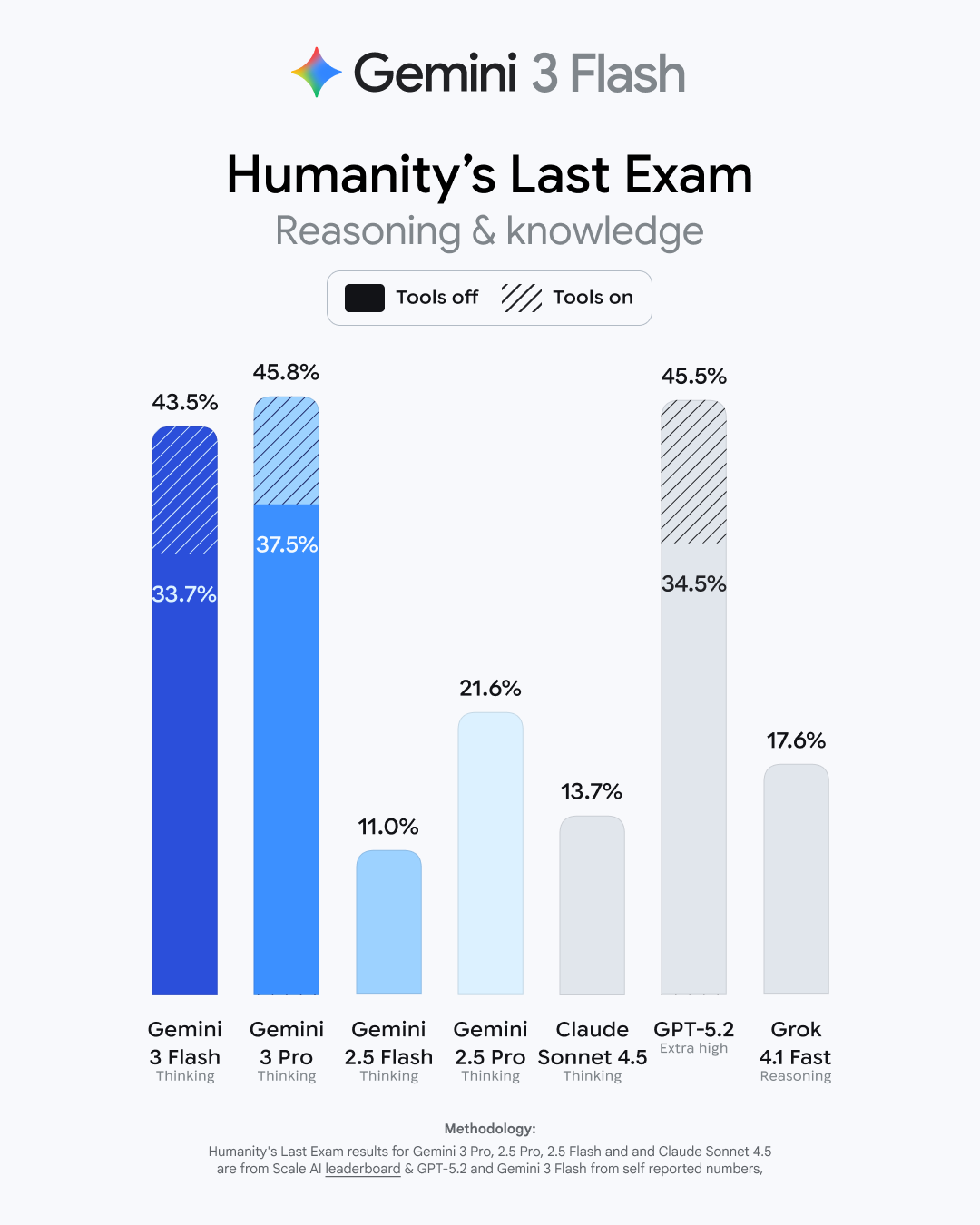
This may come as a shock, but Google says Gemini 3 Flash is faster and more capable than its previous base model. As usual, Google has a raft of benchmark numbers that show modest improvements for the new model. It bests the old 2.5 Flash in basic academic and reasoning tests like GPQA Diamond and MMMU Pro (where it even beats 3 Pro). It gets a larger boost in Humanity’s Last Exam (HLE), which tests advanced domain-specific knowledge. Gemini 3 Flash has tripled the old models’ score in HLE, landing at 33.7 percent without tool use. That’s just a few points behind the Gemini 3 Pro model.

Gemini HLE test

Credit: Google

Google is talking up Gemini 3 Flash’s coding skills, and the provided benchmarks seem to back that talk up. Over the past year, Google has mostly pushed its Pro models as the best for generating code, but 3 Flash has done a lot of catching up. In the popular SWE-Bench Verified test, Gemini 3 Flash has gained almost 20 points on the 2.5 branch.

The new model is also a lot less likely to get general-knowledge questions wrong. In the Simple QA Verified test, Gemini 3 Flash scored 68.7 percent, which is only a little below Gemini 3 Pro. The last Flash model scored just 28.1 percent on that test. At least as far as the evaluation scores go, Gemini 3 Flash performs much closer to Google’s Pro model versus the older 2.5 family. At the same time, it’s considerably more efficient, according to Google.

One of Gemini 3 Pro’s defining advances was its ability to generate interactive simulations and multimodal content. Gemini 3 Flash reportedly retains that underlying capability. Gemini 3 Flash offers better performance than Gemini 2.5 Pro did, but it runs workloads three times faster. It’s also a lot cheaper than the Pro models if you’re paying per token. One million input tokens for 3 Flash will run devs $0.50, and a million output tokens will cost $3. However, that’s an increase compared to Gemini 2.5 Flash input and output at $0.30 and $2.50, respectively. The Pro model’s tokens are $2 (1M input) and $12 (1M output).

Google releases Gemini 3 Flash, promising improved intelligence and efficiency Read More »

google’s-photoshop-killer-ai-model-is-coming-to-search,-photos,-and-notebooklm

Google’s Photoshop-killer AI model is coming to search, Photos, and NotebookLM

NotebookLM added a video overview feature several months back, which uses AI to generate a video summary of the content you’ve added to the notebook. The addition of Nano Banana to NotebookLM is much less open-ended. Instead of entering prompts to edit images, NotebookLM has a new set of video styles powered by Nano Banana, including whiteboard, anime, retro print, and more. The original style is still available as “Classic.”

My favorite video.

NotebookLM’s videos are still somewhat limited, but this update adds a second general format. You can now choose “Brief” in addition to “Explainer,” with the option to add prompts that steer the video in the right direction. Although, that’s not a guarantee, as this is still generative AI. At least the style should be more consistent with the addition of Nano Banana.

The updated image editor is also coming to Google Photos, but Google doesn’t have a firm timeline. Google claims that its Nano Banana model is a “major upgrade” over its previous image-editing model. Conversational editing was added to Photos last month, but it’s not the Nano Banana model that has impressed testers over the summer. Google says that Nano Banana will arrive in the Photos app in the next few weeks, which should make those conversational edits much less frustrating.

Google’s Photoshop-killer AI model is coming to search, Photos, and NotebookLM Read More »

uk-regulators-plan-to-force-google-changes-under-new-competition-law

UK regulators plan to force Google changes under new competition law

Google is facing multiple antitrust actions in the US, and European regulators have been similarly tightening the screws. You can now add the UK to the list of Google’s governmental worries. The country’s antitrust regulator, known as the Competition and Markets Authority (CMA), has confirmed that Google has “strategic market status,” paving the way to more limits on how Google does business in the UK. Naturally, Google objects to this course of action.

The designation is connected to the UK’s new digital markets competition regime, which was enacted at the beginning of the year. Shortly after, the CMA announced it was conducting an investigation into whether Google should be designated with strategic market status. The outcome of that process is a resounding “yes.”

This label does not mean Google has done anything illegal or that it is subject to immediate regulation. It simply means the company has “substantial and entrenched market power” in one or more areas under the purview of the CMA. Specifically, the agency has found that Google is dominant in search and search advertising, holding a greater than 90 percent share of Internet searches in the UK.

In Google’s US antitrust trials, the rapid rise of generative AI has muddied the waters. Google has claimed on numerous occasions that the proliferation of AI firms offering search services means there is ample competition. In the UK, regulators note that Google’s Gemini AI assistant is not in the scope of the strategic market status designation. However, some AI features connected to search, like AI Overviews and AI Mode, are included.

According to the CMA, consultations on possible interventions to ensure effective competition will begin later this year. The agency’s first set of antitrust measures will likely expand on solutions that Google has introduced in other regions or has offered on a voluntary basis in the UK. This could include giving publishers more control over how their data is used in search and “choice screens” that suggest Google alternatives to users. Measures that require new action from Google could be announced in the first half of 2026.

UK regulators plan to force Google changes under new competition law Read More »

in-court-filing,-google-concedes-the-open-web-is-in-“rapid-decline”

In court filing, Google concedes the open web is in “rapid decline”

Advertising and the open web

Google objects to this characterization. A spokesperson calls it a “cherry-picked” line from the filing that has been misconstrued. Google’s position is that the entire passage is referring to open-web advertising rather than the open web itself. “Investments in non-open web display advertising like connected TV and retail media are growing at the expense of those in open web display advertising,” says Google.

If we assume this is true, it doesn’t exactly let Google off the hook. As AI tools have proliferated, we’ve heard from Google time and time again that traffic from search to the web is healthy. When people use the web more, Google makes more money from all those eyeballs on ads, and indeed, Google’s earnings have never been higher. However, Google isn’t just putting ads on websites—Google is also big in mobile apps. As Google’s own filings make clear, in-app ads are by far the largest growth sector in advertising. Meanwhile, time spent on non-social and non-video content is stagnant or slightly declining, and as a result, display ads on the open web earn less.

So, whether Google’s wording in the filing is meant to address the web or advertising on the web may be a distinction without a difference. If ads on websites aren’t making the big bucks, Google’s incentives will undoubtedly change. While Google says its increasingly AI-first search experience is still consistently sending traffic to websites, it has not released data to show that. If display ads are in “rapid decline,” then it’s not really in Google’s interest to continue sending traffic to non-social and non-video content. Maybe it makes more sense to keep people penned up on its platform where they can interact with its AI tools.

Of course, the web isn’t just ad-supported content—Google representatives have repeatedly trotted out the claim that Google’s crawlers have seen a 45 percent increase in indexable content since 2023. This metric, Google says, shows that open web advertising could be imploding while the web is healthy and thriving. We don’t know what kind of content is in this 45 percent, but given the timeframe cited, AI slop is a safe bet.

If the increasingly AI-heavy open web isn’t worth advertisers’ attention, is it really right to claim the web is thriving as Google so often does? Google’s filing may simply be admitting to what we all know: the open web is supported by advertising, and ads increasingly can’t pay the bills. And is that a thriving web? Not unless you count AI slop.

In court filing, Google concedes the open web is in “rapid decline” Read More »

google-won’t-have-to-sell-chrome,-judge-rules

Google won’t have to sell Chrome, judge rules

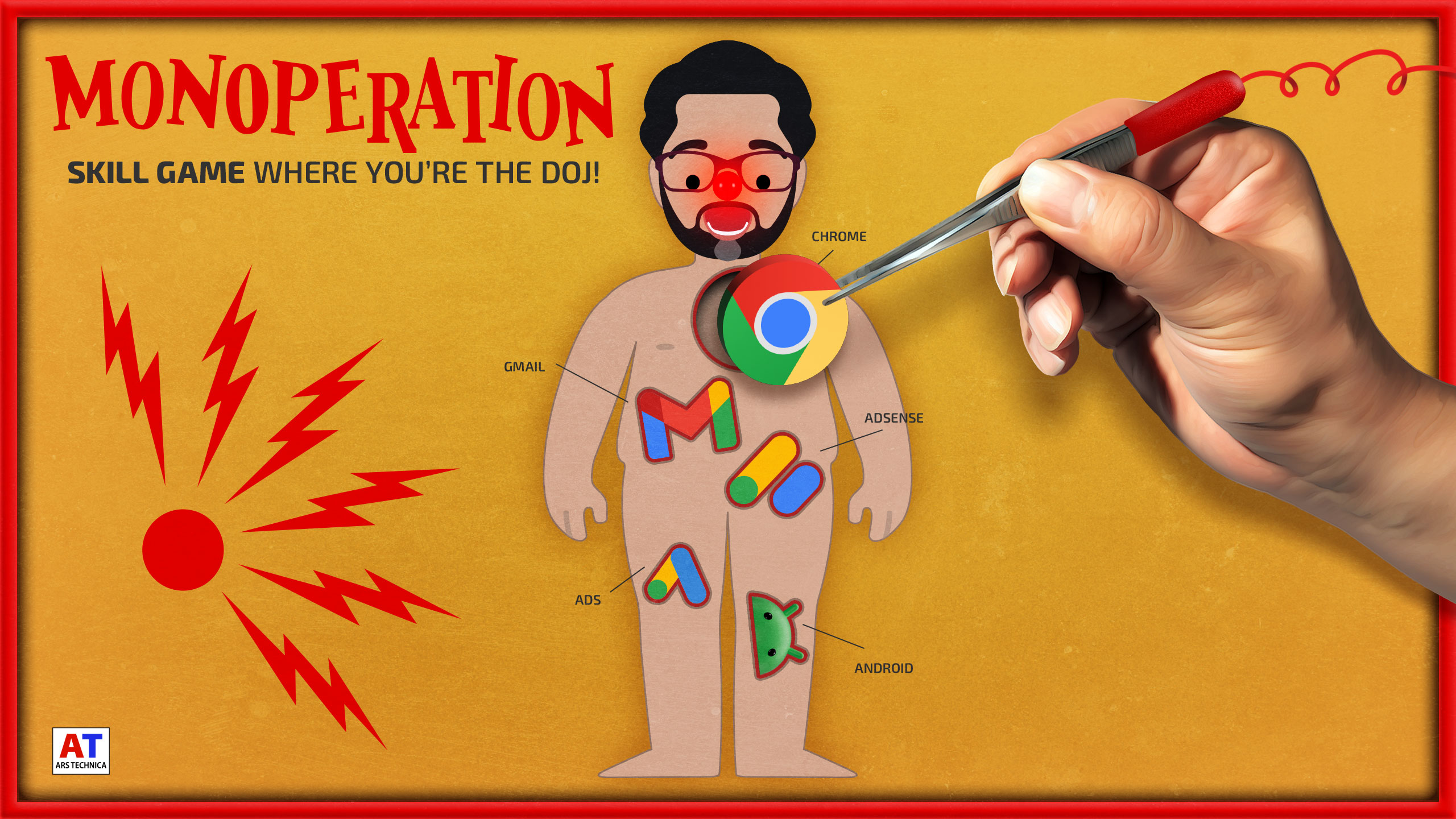
Google has avoided the worst-case scenario in the pivotal search antitrust case brought by the US Department of Justice. DC District Court Judge Amit Mehta has ruled that Google doesn’t have to give up the Chrome browser to mitigate its illegal monopoly in online search. The court will only require a handful of modest behavioral remedies, forcing Google to release some search data to competitors and limit its ability to make exclusive distribution deals.

More than a year ago, the Department of Justice (DOJ) secured a major victory when Google was found to have violated the Sherman Antitrust Act. The remedy phase took place earlier this year, with the DOJ calling for Google to divest the market-leading Chrome browser. That was the most notable element of the government’s proposed remedies, but it also wanted to explore a spin-off of Android, force Google to share search technology, and severely limit the distribution deals Google is permitted to sign.

Mehta has decided on a much narrower set of remedies. While there will be some changes to search distribution, Google gets to hold onto Chrome. The government contended that Google’s dominance in Chrome was key to its search lock-in, but Google claimed no other company could hope to operate Chrome and Chromium like it does. Mehta has decided that Google’s use of Chrome as a vehicle for search is not illegal in itself, though. “Plaintiffs overreached in seeking forced divesture (sic) of these key assets, which Google did not use to effect any illegal restraints,” the ruling reads.

Break up the company without touching the sides and getting shocked!

Credit: Aurich Lawson

Google’s proposed remedies were, unsurprisingly, much more modest. Google fully opposed the government’s Chrome penalties, but it was willing to accept some limits to its search deals and allow Android OEMs to choose app preloads. That’s essentially what Mehta has ruled. Under the court’s ruling, Google will still be permitted to pay for search placement—those multi-billion-dollar arrangements with Apple and Mozilla can continue. However, Google cannot require any of its partners to distribute Search, Chrome, Google Assistant, or Gemini. That means Google cannot, for example, make access to the Play Store contingent on bundling its other apps on phones.

Google won’t have to sell Chrome, judge rules Read More »

enough-is-enough—i-dumped-google’s-worsening-search-for-kagi

Enough is enough—I dumped Google’s worsening search for Kagi


I like how the search engine is the product instead of me.

Artist's depiction of the article author heaving a large multicolored

“Won’t be needing this anymore!” Credit: Aurich “The King” Lawson

“Won’t be needing this anymore!” Credit: Aurich “The King” Lawson

Mandatory AI summaries have come to Google, and they gleefully showcase hallucinations while confidently insisting on their truth. I feel about them the same way I felt about mandatory G+ logins when all I wanted to do was access my damn YouTube account: I hate them. Intensely.

But unlike those mandatory G+ logins—on which Google eventually relented before shutting down the G+ service—our reading of the tea leaves suggests that, this time, the search giant is extremely pleased with how things are going.

Fabricated AI dreck polluting your search? It’s the new normal. Miss your little results page with its 10 little blue links? Too bad. They’re gone now, and you can’t get them back, no matter what ephemeral workarounds or temporarily functional flags or undocumented, could-fail-at-any-time URL tricks you use.

And the galling thing is that Google expects you to be a good consumer and just take it. The subtext of the company’s (probably AI-generated) robo-MBA-speak non-responses to criticism and complaining is clear: “LOL, what are you going to do, use a different search engine? Now, shut up and have some more AI!”

But like the old sailor used to say: “That’s all I can stands, and I can’t stands no more.” So I did start using a different search engine—one that doesn’t constantly shower me with half-baked, anti-consumer AI offerings.

Out with Google, in with Kagi.

What the hell is a Kagi?

Kagi was founded in 2018, but its search product has only been publicly available since June 2022. It purports to be an independent search engine that pulls results from around the web (including from its own index) and is aimed at returning search to a user-friendly, user-focused experience. The company’s stated purpose is to deliver useful search results, full stop. The goal is not to blast you with AI garbage or bury you in “Knowledge Graph” summaries hacked together from posts in a 12-year-old Reddit thread between two guys named /u/WeedBoner420 and /u/14HitlerWasRight88.

Kagi’s offerings (it has a web browser, too, though I’ve not used it) are based on a simple idea. There’s an (oversimplified) axiom that if a good or service (like Google search, for example, or good ol’ Facebook) is free for you to use, it’s because you’re the product, not the customer. With Google, you pay with your attention, your behavioral metrics, and the intimate personal details of your wants and hopes and dreams (and the contents of your emails and other electronic communications—Google’s got most of that, too).

With Kagi, you pay for the product using money. That’s it! You give them some money, and you get some service—great service, really, which I’m overall quite happy with and which I’ll get to shortly. You don’t have to look at any ads. You don’t have to look at AI droppings. You don’t have to give perpetual ownership of your mind-palace to a pile of optioned-out tech bros in sleeveless Patagonia vests while you are endlessly subjected to amateur AI Rorschach tests every time you search for “pierogis near me.”

How much money are we talking?

I dunno, about a hundred bucks a year? That’s what I’m spending as an individual for unlimited searches. I’m using Kagi’s “Professional” plan, but there are others, including a free offering so that you can poke around and see if the service is worth your time.

image of kagi billing panel

This is my account’s billing page, showing what I’ve paid for Kagi in the past year. (By the time this article runs, I’ll have renewed my subscription!)

Credit: Lee Hutchinson

This is my account’s billing page, showing what I’ve paid for Kagi in the past year. (By the time this article runs, I’ll have renewed my subscription!) Credit: Lee Hutchinson

I’d previously bounced off two trial runs with Kagi in 2023 and 2024 because the idea of paying for search just felt so alien. But that was before Google’s AI enshittification rolled out in full force. Now, sitting in the middle of 2025 with the world burning down around me, a hundred bucks to kick Google to the curb and get better search results feels totally worth it. Your mileage may vary, of course.

The other thing that made me nervous about paying for search was the idea that my money was going to enrich some scumbag VC fund, but fortunately, there’s good news on that front. According to the company’s “About” page, Kagi has not taken any money from venture capitalist firms. Instead, it has been funded by a combination of self-investment by the founder, selling equity to some Kagi users in two rounds, and subscription revenue:

Kagi was bootstrapped from 2018 to 2023 with ~$3M initial funding from the founder. In 2023, Kagi raised $670K from Kagi users in its first external fundraise, followed by $1.88M raised in 2024, again from our users, bringing the number of users-investors to 93… In early 2024, Kagi became a Public Benefit Corporation (PBC).

What about DuckDuckGo? Or Bing? Or Brave?

Sure, those can be perfectly cromulent alternatives to Google, but honestly, I don’t think they go far enough. DuckDuckGo is fine, but it largely utilizes Bing’s index; and while DuckDuckGo exercises considerable control over its search results, the company is tied to the vicissitudes of Microsoft by that index. It’s a bit like sitting in a boat tied to a submarine. Sure, everything’s fine now, but at some point, that sub will do what subs do—and your boat is gonna follow it down.

And as for Bing itself, perhaps I’m nitpicky [Ed. note: He is!], but using Bing feels like interacting with 2000-era MSN’s slightly perkier grandkid. It’s younger and fresher, yes, but it still radiates that same old stanky feeling of taste-free, designed-by-committee artlessness. I’d rather just use Google—which is saying something. At least Google’s search home page remains uncluttered.

Brave Search is another fascinating option I haven’t spent a tremendous amount of time with, largely because Brave’s cryptocurrency ties still feel incredibly low-rent and skeevy. I’m slowly warming up to the Brave Browser as a replacement for Chrome (see the screenshots in this article!), but I’m just not comfortable with Brave yet—and likely won’t be unless the company divorces itself from cryptocurrencies entirely.

More anonymity, if you want it

The feature that convinced me to start paying for Kagi was its Privacy Pass option. Based on a clean-sheet Rust implementation of the Privacy Pass standard (IETF RFCs 9576, 9577, and 9578) by Raphael Robert, this is a technology that uses cryptographic token-based auth to send an “I’m a paying user, please give me results” signal to Kagi, without Kagi knowing which user made the request. (There’s a much longer Kagi blog post with actual technical details for the curious.)

To search using the tool, you install the Privacy Pass extension (linked in the docs above) in your browser, log in to Kagi, and enable the extension. This causes the plugin to request a bundle of tokens from the search service. After that, you can log out and/or use private windows, and those tokens are utilized whenever you do a Kagi search.

image of a kagi search with privacy pass enabled

Privacy pass is enabled, allowing me to explore the delicious mystery of pierogis with some semblance of privacy.

Credit: Lee Hutchinson

Privacy pass is enabled, allowing me to explore the delicious mystery of pierogis with some semblance of privacy. Credit: Lee Hutchinson

The obvious flaw here is that Kagi still records source IP addresses along with Privacy Pass searches, potentially de-anonymizing them, but there’s a path around that: Privacy Pass functions with Tor, and Kagi maintains a Tor onion address for searches.

So why do I keep using Privacy Pass without Tor, in spite of the opsec flaw? Maybe it’s the placebo effect in action, but I feel better about putting at least a tiny bit of friction in the way of someone with root attempting to casually browse my search history. Like, I want there to be at least a SQL JOIN or two between my IP address and my searches for “best Mass Effect alien sex choices” or “cleaning tips for Garrus body pillow.” I mean, you know, assuming I were ever to search for such things.

What’s it like to use?

Moving on with embarrassed rapidity, let’s look at Kagi a bit and see how using it feels.

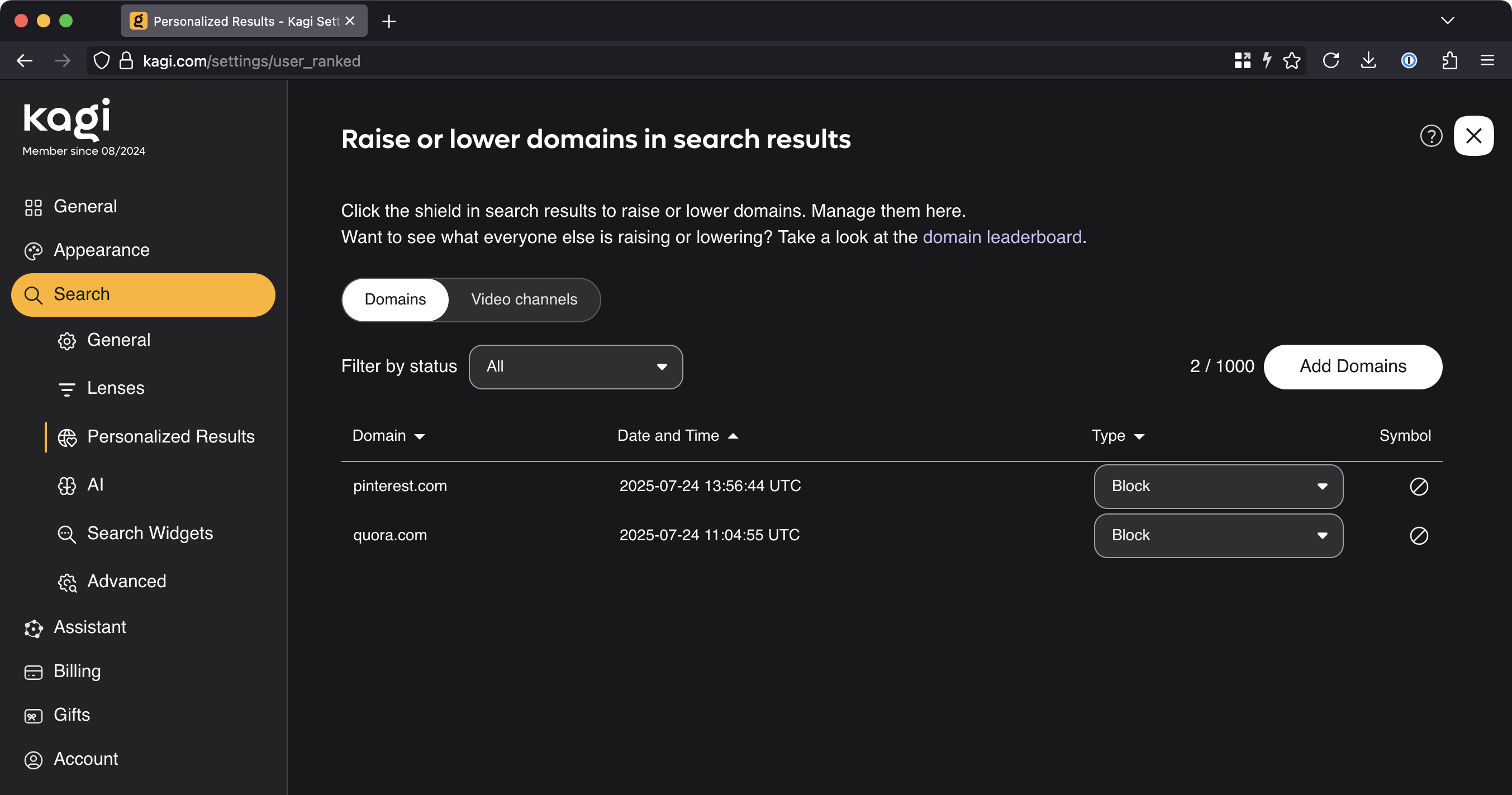
My anecdotal observation is that Kagi doesn’t favor Reddit-based results nearly as much as Google does, but sometimes it still has them near or at the top. And here is where Kagi curb-stomps Google with quality-of-life features: Kagi lets you prioritize or de-prioritize a website’s prominence in your search results. You can even pin that site to the top of the screen or block it completely.

This is a feature I’ve wanted Google to get for about 25 damn years but that the company has consistently refused to properly implement (likely because allowing users to exclude sites from search results notionally reduces engagement and therefore reduces the potential revenue that Google can extract from search). Well, screw you, Google, because Kagi lets me prioritize or exclude sites from my results, and it works great—I’m extraordinarily pleased to never again have to worry about Quora or Pinterest links showing up in my search results.

Further, Kagi lets me adjust these settings both for the current set of search results (if you don’t want Reddit results for this search but you don’t want to drop Reddit altogether) and also globally (for all future searches):

image of kagi search personalization options

Goodbye forever, useless crap sites.

Credit: Lee Hutchinson

Goodbye forever, useless crap sites. Credit: Lee Hutchinson

Another tremendous quality-of-life improvement comes via Kagi’s image search, which does a bunch of stuff that Google should and/or used to do—like giving you direct right-click access to save images without having to fight the search engine with workarounds, plugins, or Tampermonkey-esque userscripts.

The Kagi experience is also vastly more customizable than Google’s (or at least, how Google’s has become). The widgets that appear in your results can be turned off, and the “lenses” through which Kagi sees the web can be adjusted to influence what kinds of things do and do not appear in your results.

If that doesn’t do it for you, how about the ability to inject custom CSS into your search and landing pages? Or to automatically rewrite search result URLs to taste, doing things like redirecting reddit.com to old.reddit.com? Or breaking free of AMP pages and always viewing originals instead?

Image of kagi custom css field

Imagine all the things Ars readers will put here.

Credit: Lee Hutchinson

Imagine all the things Ars readers will put here. Credit: Lee Hutchinson

Is that all there is?

Those are really all the features I care about, but there are loads of other Kagi bits to discover—like a Kagi Maps tool (it’s pretty good, though I’m not ready to take it up full time yet) and a Kagi video search tool. There are also tons of classic old-Google-style inline search customizations, including verbatim mode, where instead of trying to infer context about your search terms, Kagi searches for exactly what you put in the box. You can also add custom search operators that do whatever you program them to do, and you get API-based access for doing programmatic things with search.

A quick run-through of a few additional options pages. This is the general customization page. Lee Hutchinson

I haven’t spent any time with Kagi’s Orion browser, but it’s there as an option for folks who want a WebKit-based browser with baked-in support for Privacy Pass and other Kagi functionality. For now, Firefox continues to serve me well, with Brave as a fallback for working with Google Docs and other tools I can’t avoid and that treat non-Chromium browsers like second-class citizens. However, Orion is probably on the horizon for me if things in Mozilla-land continue to sour.

Cool, but is it any good?

Rather than fill space with a ton of comparative screenshots between Kagi and Google or Kagi and Bing, I want to talk about my subjective experience using the product. (You can do all the comparison searches you want—just go and start searching—and your comparisons will be a lot more relevant to your personal use cases than any examples I can dream up!)

My time with Kagi so far has included about seven months of casual opportunistic use, where I’d occasionally throw a query at it to see how it did, and about five months of committed daily use. In the five months of daily usage, I can count on one hand the times I’ve done a supplementary Google search because Kagi didn’t have what I was looking for on the first page of results. I’ve done searches for all the kinds of things I usually look for in a given day—article fact-checking queries, searches for details about the parts of speech, hunts for duck facts (we have some feral Muscovy ducks nesting in our front yard), obscure technical details about Project Apollo, who the hell played Dupont in Equilibrium (Angus Macfadyen, who also played Robert the Bruce in Braveheart), and many, many other queries.

Image of Firefox history window showing kagi searches for july 22

A typical afternoon of Kagi searches, from my Firefox history window.

Credit: Lee Hutchinson

A typical afternoon of Kagi searches, from my Firefox history window. Credit: Lee Hutchinson

For all of these things, Kagi has responded quickly and correctly. The time to service a query feels more or less like Google’s service times; according to the timer at the top of the page, my Kagi searches complete in between 0.2 and 0.8 seconds. Kagi handles misspellings in search terms with the grace expected of a modern search engine and has had no problem figuring out my typos.

Holistically, taking search customizations into account on top of the actual search performance, my subjective assessment is that Kagi gets me accurate, high-quality results on more or less any given query, and it does so without festooning the results pages with features I find detractive and irrelevant.

I know that’s not a data-driven assessment, and it doesn’t fall back on charts or graphs or figures, but it’s how I feel after using the product every single day for most of 2025 so far. For me, Kagi’s search performance is firmly in the “good enough” category, and that’s what I need.

Kagi and AI

Unfortunately, the thing that’s stopping me from being completely effusive in my praise is that Kagi is exhibiting a disappointing amount of “keeping-up-with-the-Joneses” by rolling out a big ‘ol pile of (optional, so far) AI-enabled search features.

A blog post from founder Vladimir Prelovac talks about the company’s use of AI, and it says all the right things, but at this point, I trust written statements from tech company founders about as far as I can throw their corporate office buildings. (And, dear reader, that ain’t very far).

image of kagi ai features

No thanks. But I would like to exclude AI images from my search results, please.

Credit: Lee Hutchinson

No thanks. But I would like to exclude AI images from my search results, please. Credit: Lee Hutchinson

The short version is that, like Google, Kagi has some AI features: There’s an AI search results summarizer, an AI page summarizer, and an “ask questions about your results” chatbot-style function where you can interactively interrogate an LLM about your search topic and results. So far, all of these things can be disabled or ignored. I don’t know how good any of the features are because I have disabled or ignored them.

If the existence of AI in a product is a bright red line you won’t cross, you’ll have to turn back now and find another search engine alternative that doesn’t use AI and also doesn’t suck. When/if you do, let me know, because the pickings are slim.

Is Kagi for you?

Kagi might be for you—especially if you’ve recently typed a simple question into Google and gotten back a pile of fabricated gibberish in place of those 10 blue links that used to serve so well. Are you annoyed that Google’s search sucks vastly more now than it did 10 years ago? Are you unhappy with how difficult it is to get Google search to do what you want? Are you fed up? Are you pissed off?

If your answer to those questions is the same full-throated “Hell yes, I am!” that mine was, then perhaps it’s time to try an alternative. And Kagi’s a pretty decent one—if you’re not averse to paying for it.

It’s a fantastic feeling to type in a search query and once again get useful, relevant, non-AI results (that I can customize!). It’s a bit of sanity returning to my Internet experience, and I’m grateful. Until Kagi is bought by a value-destroying vampire VC fund or implodes into its own AI-driven enshittification cycle, I’ll probably keep paying for it.

After that, who knows? Maybe I’ll throw away my computers and live in a cave. At least until the cave’s robot exclusion protocol fails and the Googlebot comes for me.

Photo of Lee Hutchinson

Lee is the Senior Technology Editor, and oversees story development for the gadget, culture, IT, and video sections of Ars Technica. A long-time member of the Ars OpenForum with an extensive background in enterprise storage and security, he lives in Houston.

Enough is enough—I dumped Google’s worsening search for Kagi Read More »

google-tool-misused-to-scrub-tech-ceo’s-shady-past-from-search

Google tool misused to scrub tech CEO’s shady past from search

Capital F for “Frustrating”

Upon investigating, FPF found that its article on Blackman was completely absent from Google results, even through a search with the exact title. Poulson later realized that two of his own Substack articles were similarly affected. The Foundation was led to the Refresh Outdated Content tool upon checking its search console.

Google’s tool doesn’t just take anyone’s word for it when they suggest the removal of search results. However, a bug in the tool made it an ideal way to suppress information in search results. When inputting a URL, the tool allowed users to change the capitalization in the URL slug. The Foundation’s article was titled “Anatomy of a censorship campaign: A tech exec’s crusade to stifle journalism,” but the requests logged in Google’s tool included variations like “AnAtomy” and “censorSHip.”

Because the Refresh Outdated Content was seemingly case-insensitive, the crawler would check the URL, encounter a 404 error, and then de-index the working URL. Investigators determined this method was used by Blackman or someone with a suspicious interest in his online profile dozens of times between May and June 2025. Amusingly, since leaving Premise, Blackman has landed in the CEO role at online reputation management firm The Transparency Company.

If you go looking for the Freedom of the Press Foundation article or Poulson’s own reporting, it should appear normally in Google’s search results. The FPF contacted Google about the issue, and the company confirmed the bug. It issued a fix with unusual swiftness, telling the Foundation that the bug affected “a tiny fraction of websites.”

It is unclear whether Google was aware of the bug previously or if its exploitation was widespread. The Internet is vast, and those who seek to maliciously hide information are not prone to publicizing their methods. It’s somewhat unusual for Google to admit fault so readily, but at least it addressed the issue.

The Refresh Outdated Content tool doesn’t log who submits requests, but whoever was behind this disinformation campaign may want to look into the Streisand Effect.

Google tool misused to scrub tech CEO’s shady past from search Read More »

google’s-new-“web-guide”-will-use-ai-to-organize-your-search-results

Google’s new “Web Guide” will use AI to organize your search results

Web Guide is halfway between normal search and AI Mode.

Credit: Google

Web Guide is halfway between normal search and AI Mode. Credit: Google

Google suggests trying Web Guide with longer or open-ended queries, like “how to solo travel in Japan.” The video below uses that search as an example. It has many of the links you might expect, but there are also AI-generated headings with summaries and suggestions. It really looks halfway between standard search and AI Mode. Because it has to run additional searches and generate content, Web Guide takes a beat longer to produce results compared to a standard search. There’s no AI Overview at the top, though.

Web Guide is a Search Labs experiment, meaning you have to opt-in before you’ll see any AI organization in your search results. When enabled, this feature takes over the “Web” tab of Google search. Even if you turn it on, Google notes there will be a toggle that allows you to revert to the normal, non-AI-optimized page.

An example of the Web Guide test.

Eventually, the test will expand to encompass more parts of the search experience, like the “All” tab—that’s the default search experience when you input a query from a browser or phone search bar. Google says it’s approaching this as an opt-in feature to start. So that sounds like Web Guide might be another AI Mode situation in which the feature rolls out widely after a short testing period. It’s technically possible the test will not result in a new universal search feature, but Google hasn’t yet met a generative AI implementation that it hasn’t liked.

Google’s new “Web Guide” will use AI to organize your search results Read More »