Emulation

how-strong-is-nintendo’s-legal-case-against-switch-emulator-yuzu?

How strong is Nintendo’s legal case against Switch-emulator Yuzu?

The eye of Nintendo's legal department turns slowly towards a new target.

Enlarge / The eye of Nintendo’s legal department turns slowly towards a new target.

Aurich Lawson

Nintendo has filed a lawsuit against Tropic Haze LLC, the makers of the popular Yuzu emulator that the Switch-maker says is “facilitating piracy at a colossal scale.”

The federal lawsuit—filed Monday in the District Court of Rhode Island and first reported by Stephen Totilo—is the company’s most expansive and significant argument yet against emulation technology that it alleges “turns general computing devices into tools for massive intellectual property infringement of Nintendo and others’ copyrighted works.” Nintendo is asking the court to prevent the developers from working on, promoting, or distributing the Yuzu emulator and requesting significant financial damages under the DMCA.

If successful, the arguments in the case could help overturn years of legal precedent that have protected emulator software itself, even as using those emulators for software piracy has remained illegal.

“Nintendo is still basically taking the position that emulation itself is unlawful,” Foundation Law attorney and digital media specialist Jon Loiterman told Ars. “Though that’s not the core legal theory in this case.”

Just follow these (complicated) instructions

The bulk of Nintendo’s legal argument rests on Yuzu’s ability to break the many layers of encryption that protect Switch software from being copied and/or played by unauthorized users. By using so-called “prod.keys” obtained from legitimate Switch hardware, Yuzu can dynamically decrypt an encrypted Switch game ROM at runtime, which Nintendo argues falls afoul of the Digital Millennium Copyright Act’s prohibition against circumvention of software protections.

Crucially, though, the open source Yuzu emulator itself does not contain a copy of those “prod.keys,” which Nintendo’s lawsuit acknowledges that users need to supply themselves. That makes Yuzu different from the Dolphin emulator, which was taken off Steam last year after Nintendo pointed out that the software itself contains a copy of the Wii Common Key used to decrypt game files.

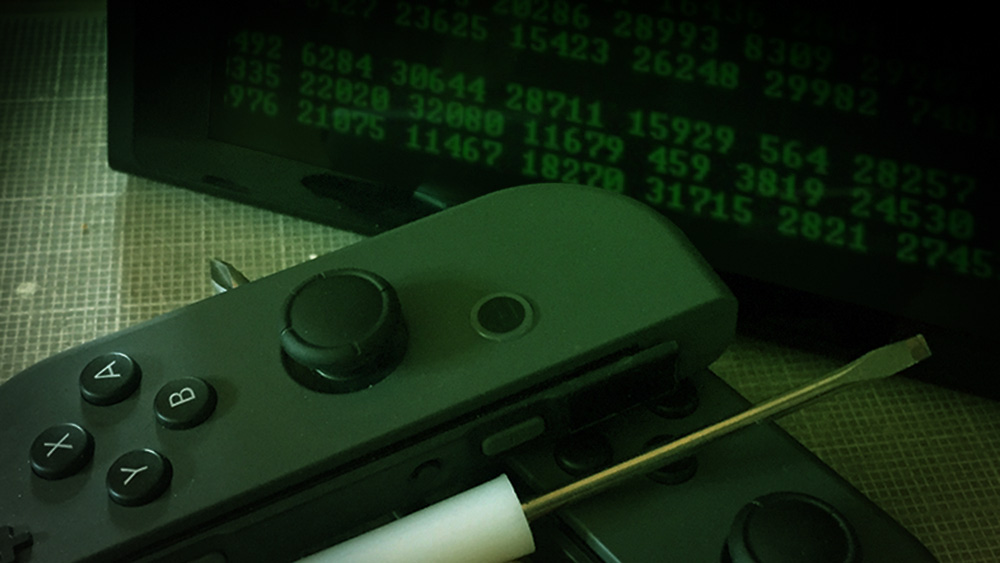
Just a little light console hacking...

Enlarge / Just a little light console hacking…

Aurich Lawson

Absent the inherent ability to break DRM, an emulator would generally be covered by decades of legal precedent establishing the right to emulate one piece of hardware on another using reverse-engineering techniques. But Yuzu’s “bring your own decryption” design is not necessarily a foolproof defense, either.

Nintendo’s lawsuit makes extensive reference to the Quickstart Guide that Yuzu provides on its own distribution site. That guide gives detailed instructions on how to “start playing commercial games” with Yuzu by hacking your (older) Switch to dump decryption keys and/or game files. That guide also includes links to a number of external tools that directly break console and/or game encryption techniques.

“Whether Yuzu can get tagged with [circumvention] simply by providing instructions and guidance and all the rest of it is, I think, the core issue in this case.”

Attorney Jon Loiterman

Through these instructions, Nintendo argues, “the Yuzu developers brazenly acknowledge that using Yuzu necessitates hacking or breaking into a Nintendo Switch.” Nintendo also points to a Yuzu Discord server where emulator developers and users discuss how to get copyrighted games running on the emulator, as well as publicly released telemetry data that shows the developers were aware of widespread use of their emulator for piracy (as the Yuzu devs wrote in June 2023, “Tears of the Kingdom is by far the most played game on Yuzu”).

While Loiterman says that “instructions and guidance are not circumvention,” he added that “the more layers of indirection between Yuzu’s software and activity and distribution of the keys the safer they are. The detailed instructions, the Discord server, and the knowledge of what all this is used for are at least problematic.”

“Whether Yuzu can get tagged with [circumvention] simply by providing instructions and guidance and all the rest of it is, I think, the core issue in this case,” he continued.

How strong is Nintendo’s legal case against Switch-emulator Yuzu? Read More »

flurry-of-firmware-updates-makes-analogue-pocket-an-even-better-retro-handheld

Flurry of firmware updates makes Analogue Pocket an even better retro handheld

super game boy —

Display filters for FPGA cores, custom Game Boy color palettes, and more.

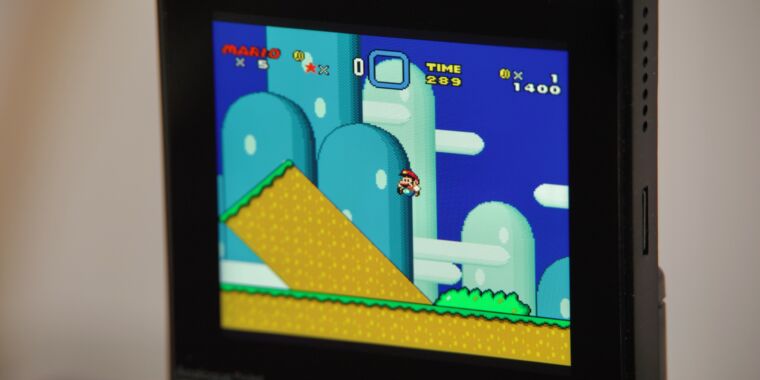
An Analogue Pocket running <em>Super Mario World</em> on an openFPGA core with the scanline filter enabled.” src=”https://cdn.arstechnica.net/wp-content/uploads/2024/01/IMG_1480-2-800×533.jpeg”></img><figcaption>
<p><a data-height=Enlarge / An Analogue Pocket running Super Mario World on an openFPGA core with the scanline filter enabled.

Andrew Cunningham

We’ve got a soft spot for the Analogue Pocket, the premium portable game console that melds 2020s technology with the design of the original Game Boy. Since its release, Analogue has added some new capabilities via firmware updates, most notably when it added support for emulating more consoles via its OpenFPGA platform in the summer of 2022. This allows the FPGA chip inside of the pocket to emulate the hardware of other systems, in addition to the portable systems the Pocket supports natively.

But aside from finalizing and releasing that 1.1 firmware, 2023 was mostly quiet for Pocket firmware updates. That changed in December when the company released not one but two major firmware upgrades for the Pocket that slipped under our radar during the holidays. These updates delivered a combination of fixes and long-promised features to the handheld, which Analogue has been re-releasing in different color palettes now that the original versions are more consistently in stock.

The most significant update for OpenFPGA fans is the ability to use display filters with third-party FPGA cores. Part of the appeal of the Pocket is its 1,600×1,440 screen, which is sharp enough to perfectly re-create the huge chunky pixels of the original Game Boy screens. By default, most FPGA cores now get access to a similarly high-quality CRT screen filter named after the Sony Trinitron TV, adding a touch of retro-blurriness to the sharp edges of 8- and 16-bit games. I’ve seen lots of bad, unconvincing scanline filters in retro game re-releases, and this isn’t one of them.

The basic Trinitron filter is available by default for “suitable” cores, which in our testing tends to mean “home consoles that were meant to be connected to a CRT TV.” FPGA cores for portable systems like the Game Boy or Game Boy Advance, which shipped with old but scanline-less LCD screens, don’t have the filter available. Third-party FPGA core developers will need to add support for additional screen filters themselves, something that most developers still haven’t done as of this writing.

  • A zoomed-in photo of the screen with no filters enabled. It’s sharp and crisp, and even zoomed in with a good mirrorless camera it’s difficult to make out individual pixels on the Pocket’s screen.

    Andrew Cunningham

  • The same scene with the Trinitron CRT filter enabled. Subtle scanlines, visible CRT “pixels,” and just the right amount of blurring makes the picture look more period-accurate.

    Andrew Cunningham

  • Zoomed out, scanlines off.

    Andrew Cunningham

  • Scanlines on, default “integer” scaling used. This is the most accurate aspect ratio, but it leaves a black border of unused pixels around the screen.

    Andrew Cunningham

  • Scanlines on, Integer+ mode used. This eliminates the black border and, to my eyes, looks just fine on the Pocket’s screen and makes the effect of the scanline filter easier to see.

    Andrew Cunningham

The Trinitron filter looks good on the Pocket’s screen, but it’s subtle; you may appreciate the scanline effect more and notice its downside less if you’re playing while connected to a TV with the Analogue Dock. And at least on the NES and SNES cores I tested it with, it has the undesirable side effect of shrinking the game picture down on what is already a fairly small screen. This default setting can be tweaked without visibly degrading the image quality, at least not to my eyes; just switch from the default Integer scaling mode in the display settings to Integer+.

The screen filters are probably the most interesting and requested new feature for the Pocket, but both firmware updates have many other smaller fixes and additions. Firmware version 1.2 fixes numerous issues with sleep/wake and save states for various games, allows FPGA cores to use cartridge adapters, and lets FPGA cores know when the Pocket is in a dock; when docked, it also adds support for additional controllers and fixes issues with others. Version 2.0 adds support for custom color palettes for Game Boy games, allows FPGA cores to switch aspect ratios when docked, and fixes a “video issue with some openFPGA cores and resolutions” when docked.

To update the Pocket’s firmware, connect the device’s microSD card to your computer and drop one of the firmware update .bin files into the root directory (make sure you delete any older firmware files first since the Pocket won’t delete old update files once it’s done with them). Next time you boot the console, it should install the firmware update and reboot. As usual, when performing any software or firmware update, it’s best to ensure the console is fully charged or plugged in before you start the process.

Flurry of firmware updates makes Analogue Pocket an even better retro handheld Read More »

how-to-emulate-old-pokemon-games-on-your-android-phone

How to Emulate Old Pokemon Games on Your Android Phone

internal/modules/cjs/loader.js: 905 throw err; ^ Error: Cannot find module ‘puppeteer’ Require stack: – /home/760439.cloudwaysapps.com/jxzdkzvxkw/public_html/wp-content/plugins/rss-feed-post-generator-echo/res/puppeteer/puppeteer.js at Function.Module._resolveFilename (internal/modules/cjs/loader.js: 902: 15) at Function.Module._load (internal/modules/cjs/loader.js: 746: 27) at Module.require (internal/modules/cjs/loader.js: 974: 19) at require (internal/modules/cjs/helpers.js: 101: 18) at Object. (/home/760439.cloudwaysapps.com/jxzdkzvxkw/public_html/wp-content/plugins/rss-feed-post-generator-echo/res/puppeteer/puppeteer.js:2: 19) at Module._compile (internal/modules/cjs/loader.js: 1085: 14) at Object.Module._extensions..js (internal/modules/cjs/loader.js: 1114: 10) at Module.load (internal/modules/cjs/loader.js: 950: 32) at Function.Module._load (internal/modules/cjs/loader.js: 790: 12) at Function.executeUserEntryPoint [as runMain] (internal/modules/run_main.js: 75: 12) code: ‘MODULE_NOT_FOUND’, requireStack: [ ‘/home/760439.cloudwaysapps.com/jxzdkzvxkw/public_html/wp-content/plugins/rss-feed-post-generator-echo/res/puppeteer/puppeteer.js’ ]

How to Emulate Old Pokemon Games on Your Android Phone Read More »