AMD

why-won’t-steam-machine-support-hdmi-21?-digging-in-on-the-display-standard-drama.

Why won’t Steam Machine support HDMI 2.1? Digging in on the display standard drama.

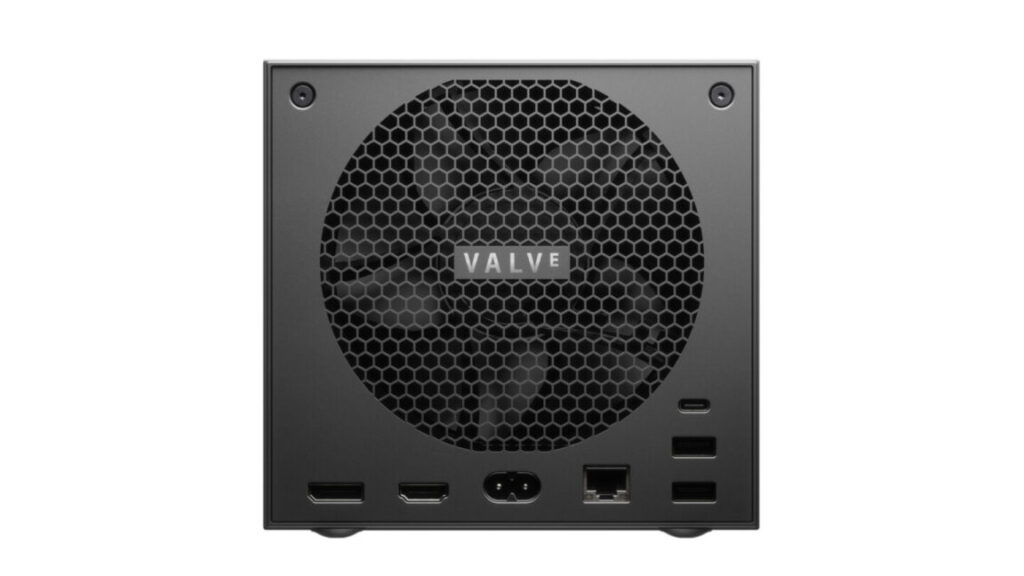
When Valve announced its upcoming Steam Machine hardware last month, some eagle-eyed gamers may have been surprised to see that the official spec sheet lists support for HDMI 2.0 output, rather than the updated, higher-bandwidth HDMI 2.1 standard introduced in 2017. Now, Valve tells Ars that, while the hardware itself actually supports HDMI 2.1, the company is struggling to offer full support for that standard due to Linux drivers that are “still a work-in-progress on the software side.”

As we noted last year, the HDMI Forum (which manages the official specifications for HDMI standards) has officially blocked any open source implementation of HDMI 2.1. That means the open source AMD drivers used by SteamOS can’t fully implement certain features that are specific to the updated output standard.

“At this time an open source HDMI 2.1 implementation is not possible without running afoul of the HDMI Forum requirements,” AMD engineer Alex Deucher said at the time.

Doing what they can

This situation has caused significant headaches for Valve, which tells Ars it has had to validate the Steam Machine’s HDMI 2.1 hardware via Windows during testing. And when it comes to HDMI performance via SteamOS, a Valve representative tells Ars that “we’ve been working on trying to unblock things there.”

That includes unblocking HDMI 2.0’s resolution and frame-rate limits, which max out at 60 Hz for a 4K output, according to the official standard. Valve tells Ars it has been able to increase that limit to the “4K @ 120Hz” listed on the Steam Machine spec sheet, though, thanks to a technique called chroma sub-sampling.

Why won’t Steam Machine support HDMI 2.1? Digging in on the display standard drama. Read More »

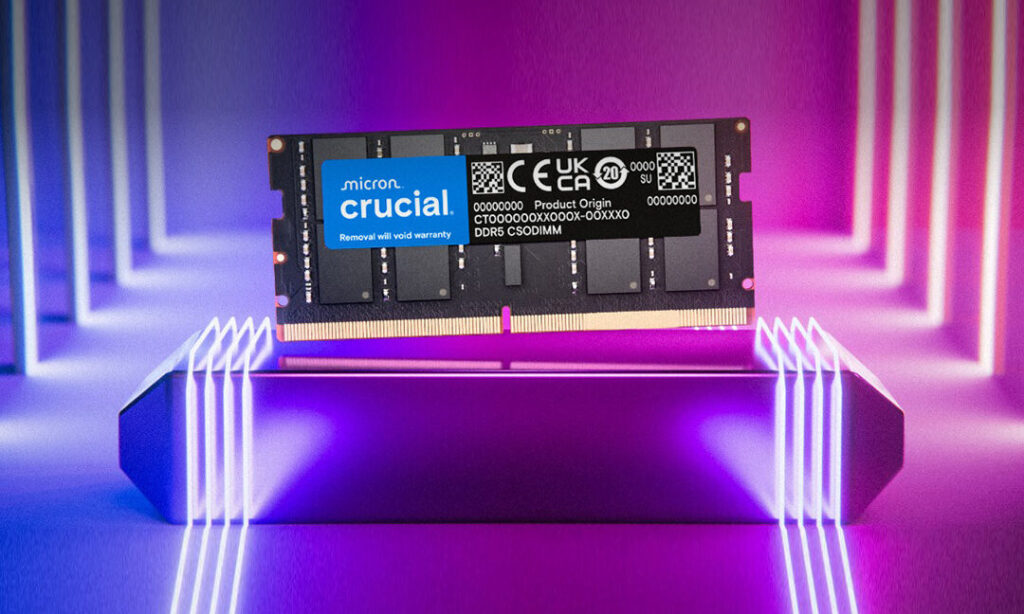
after-nearly-30-years,-crucial-will-stop-selling-ram-to-consumers

After nearly 30 years, Crucial will stop selling RAM to consumers

DRAM contract prices have increased 171 percent year over year, according to industry data. Gerry Chen, general manager of memory manufacturer TeamGroup, warned that the situation will worsen in the first half of 2026 once distributors exhaust their remaining inventory. He expects supply constraints to persist through late 2027 or beyond.

The fault lies squarely at the feet of AI mania in the tech industry. The construction of new AI infrastructure has created unprecedented demand for high-bandwidth memory (HBM), the specialized DRAM used in AI accelerators from Nvidia and AMD. Memory manufacturers have been reallocating production capacity away from consumer products toward these more profitable enterprise components, and Micron has presold its entire HBM output through 2026.

A photo of the

A photo of the “Stargate I” site in Abilene, Texas. AI data center sites like this are eating up the RAM supply. Credit: OpenAI

At the moment, the structural imbalance between AI demand and consumer supply shows no signs of easing. OpenAI’s Stargate project has reportedly signed agreements for up to 900,000 wafers of DRAM per month, which could account for nearly 40 percent of global production.

The shortage has already forced companies to adapt. As Ars’ Andrew Cunningham reported, laptop maker Framework stopped selling standalone RAM kits in late November to prevent scalping and said it will likely be forced to raise prices soon.

For Micron, the calculus is clear: Enterprise customers pay more and buy in bulk. But for the DIY PC community, the decision will leave PC builders with one fewer option when reaching for the RAM sticks. In his statement, Sadana reflected on the brand’s 29-year run.

“Thanks to a passionate community of consumers, the Crucial brand has become synonymous with technical leadership, quality and reliability of leading-edge memory and storage products,” Sadana said. “We would like to thank our millions of customers, hundreds of partners and all of the Micron team members who have supported the Crucial journey for the last 29 years.”

After nearly 30 years, Crucial will stop selling RAM to consumers Read More »

testing-shows-why-the-steam-machine’s-8gb-of-graphics-ram-could-be-a-problem

Testing shows why the Steam Machine’s 8GB of graphics RAM could be a problem

By Valve’s admission, its upcoming Steam Machine desktop isn’t swinging for the fences with its graphical performance. The specs promise decent 1080p-to-1440p performance in most games, with 4K occasionally reachable with assistance from FSR upscaling—about what you’d expect from a box with a modern midrange graphics card in it.

But there’s one spec that has caused some concern among Ars staffers and others with their eyes on the Steam Machine: The GPU comes with just 8GB of dedicated graphics RAM, an amount that is steadily becoming more of a bottleneck for midrange GPUs like AMD’s Radeon RX 7060 and 9060, or Nvidia’s GeForce RTX 4060 or 5060.

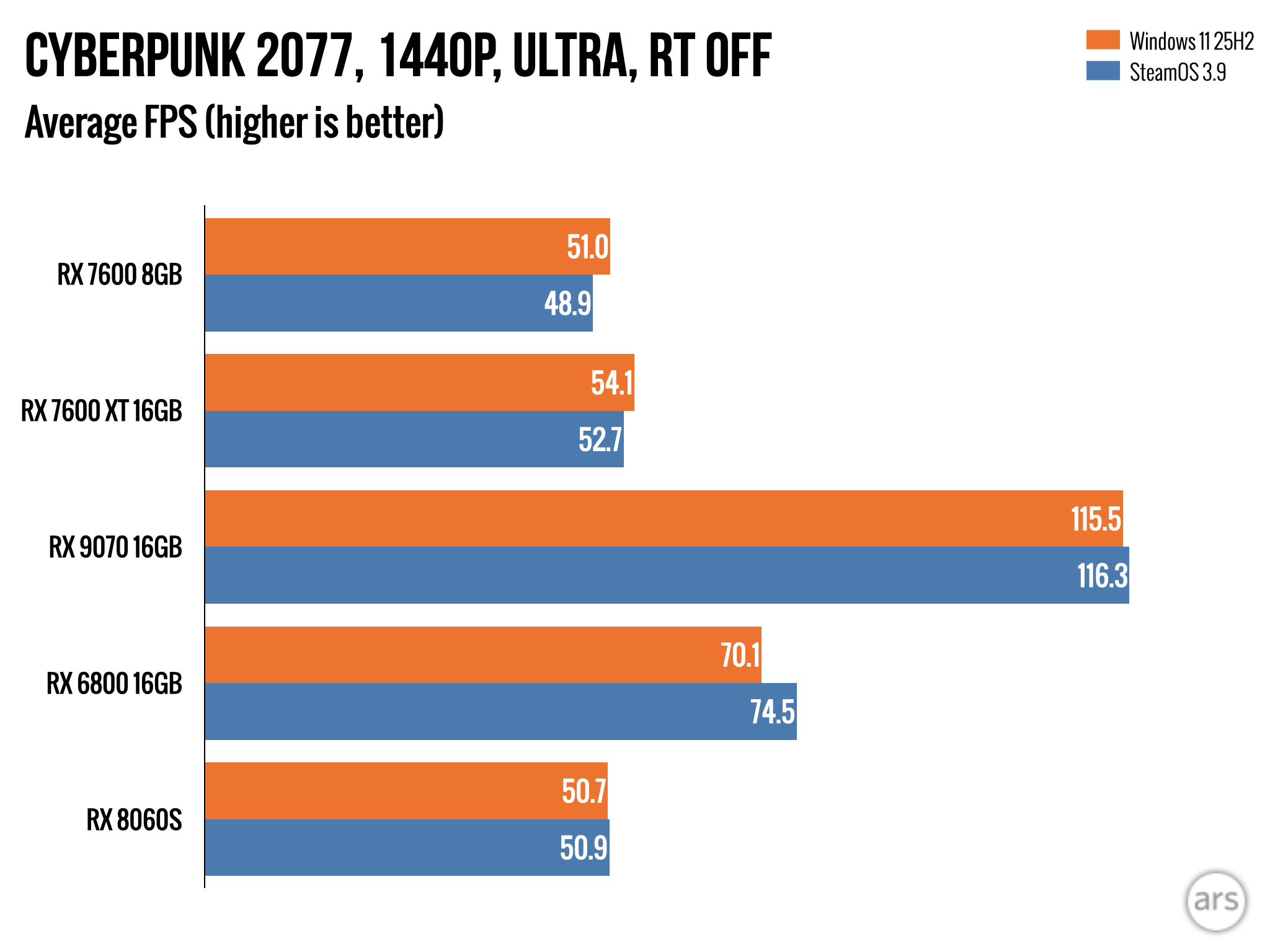
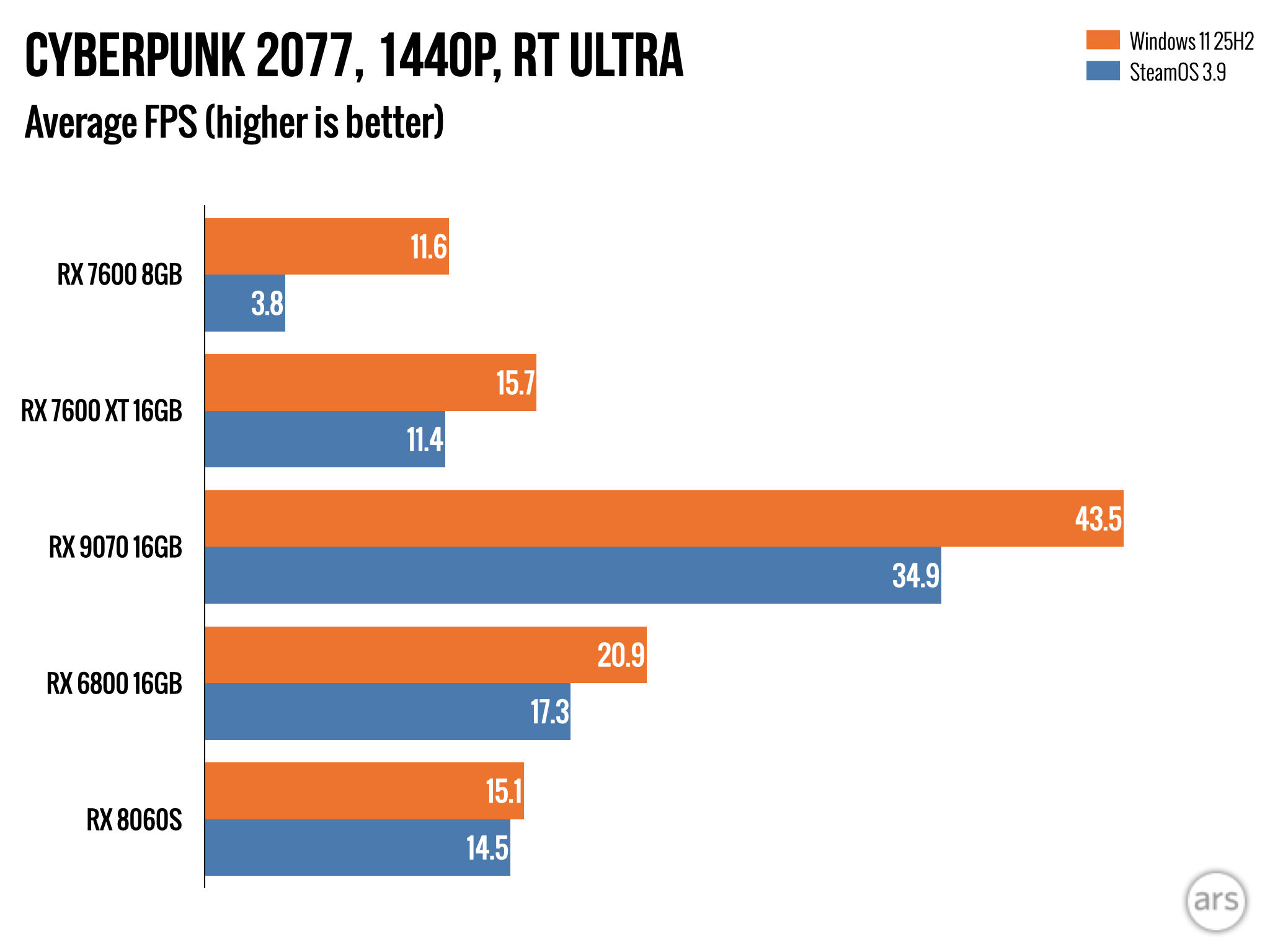
In our reviews of these GPUs, we’ve already run into some games where the RAM ceiling limits performance in Windows, especially at 1440p. But we’ve been doing more extensive testing of various GPUs with SteamOS, and we can confirm that in current betas, 8GB GPUs struggle even more on SteamOS than they do running the same games at the same settings in Windows 11.

The good news is that Valve is working on solutions, and having a stable platform like the Steam Machine to aim for should help improve things for other hardware with similar configurations. The bad news is there’s plenty of work left to do.

The numbers

We’ve tested an array of dedicated and integrated Radeon GPUs under SteamOS and Windows, and we’ll share more extensive results in another article soon (along with broader SteamOS-vs-Windows observations). But for our purposes here, the two GPUs that highlight the issues most effectively are the 8GB Radeon RX 7600 and the 16GB Radeon RX 7600 XT.

These dedicated GPUs have the benefit of being nearly identical to what Valve plans to ship in the Steam Machine—32 compute units (CUs) instead of Valve’s 28, but the same RDNA3 architecture. They’re also, most importantly for our purposes, pretty similar to each other—the same physical GPU die, just with slightly higher clock speeds and more RAM for the 7600 XT than for the regular 7600.

Testing shows why the Steam Machine’s 8GB of graphics RAM could be a problem Read More »

gpu-prices-are-coming-to-earth-just-as-ram-costs-shoot-into-the-stratosphere

GPU prices are coming to earth just as RAM costs shoot into the stratosphere

It’s not just PC builders

PC and phone manufacturers—and makers of components that use memory chips, like GPUs—mostly haven’t hiked prices yet. These companies buy components in large quantities, and they typically do so ahead of time, dulling the impact of the increases in the short-term. The kinds of price increases we see, and what costs are passed on to consumers, will vary from company to company.

Bloomberg reports that Lenovo is “stockpiling memory and other critical components” to get it through 2026 without issues and that the company “will aim to avoid passing on rising costs to its customers in the current quarter.” Apple may also be in a good position to weather the shortage; analysts at Morgan Stanley and Bernstein Research believe that Apple has already laid claim to the RAM that it needs and that its healthy profit margins will allow it to absorb the increases better than most.

Framework on the other hand, a smaller company known best for its repairable and upgradeable laptop designs, says “it is likely we will need to increase memory pricing soon” to reflect price increases from its suppliers. The company has also stopped selling standalone RAM kits in its online store in an effort to fight scalpers who are trying to capitalize on the shortages.

Tom’s Hardware reports that AMD has told its partners that it expects to raise GPU prices by about 10 percent starting next year and that Nvidia may have canceled a planned RTX 50-series Super launch entirely because of shortages and price increases (the main draw of this Super refresh, according to the rumor mill, would have a bump from 2GB GDDR7 chips to 3GB chips, boosting memory capacities across the lineup by 50 percent).

GPU prices are coming to earth just as RAM costs shoot into the stratosphere Read More »

after-confusing-driver-release,-amd-says-old-gpus-are-still-actively-supported

After confusing driver release, AMD says old GPUs are still actively supported

The release notes for the 25.10.2 Adrenalin release also dropped Windows 10 from the list of “compatible operating systems,” listing only Windows 11 21H2 and later. But AMD confirmed to Windows Latest that the driver packages would still support Windows 10 for the foreseeable future. The company said that the OS is not listed in the release notes because Microsoft has technically ended support for Windows 10, but home users running Windows 10 on their PCs can get an extra year of security patches relatively easily. Microsoft will continue to provide support for the OS in businesses, schools, and other large organizations until at least 2028.

Why all the fuss?

It would look bad if AMD dropped or reduced support for those Radeon 5000- and 6000-series GPUs, given that Nvidia continues to support GeForce RTX 20- and 30-series graphics cards launched in the same 2019 to 2022 time window. But the end of support could have been even worse for gaming handhelds and lower-end PCs with integrated graphics.

The RDNA 2 architecture, in particular, has enjoyed a long and ongoing life as an integrated GPU, including for systems that are explicitly marketed and sold as gaming PCs. And because so many of AMD and Intel’s lower-end chips are just rebranded versions of older silicon, AMD continues to launch “new” products with RDNA 2 GPUs. The RDNA 2 architecture is the one Valve has used in the Steam Deck since 2022, for example, but Microsoft and Asus’ just-launched ROG Xbox Ally series also includes an RDNA 2 GPU in the entry-level model.

The last time AMD formally scaled back its GPU driver support was in 2023, when it moved drivers for its Polaris and Vega GPU architectures into a separate package that would only get occasional “critical updates.” At the time, AMD had launched its last dedicated Vega-based GPU just four years before, and many lower-end desktop and laptop processors still shipped with Vega-based integrated GPUs.

For the Steam Deck and other SteamOS and Linux systems, at least, it seems that things aren’t really changing, no matter what happens with the Windows drivers. Phoronix points out that the Linux driver package for AMD’s GPUs has always been maintained separately from the Windows drivers and that GPU architectures considerably older than RDNA 1 continue to get official support and occasional improvements.

After confusing driver release, AMD says old GPUs are still actively supported Read More »

amd-and-sony’s-ps6-chipset-aims-to-rethink-the-current-graphics-pipeline

AMD and Sony’s PS6 chipset aims to rethink the current graphics pipeline

It feels like it was just yesterday that Sony hardware architect Mark Cerny was first teasing Sony’s “PS4 successor” and its “enhanced ray-tracing capabilities” powered by new AMD chips. Now that we’re nearly five full years into the PS5 era, it’s time for Sony and AMD to start teasing the new chips that will power what Cerny calls “a future console in a few years’ time.”

In a quick nine-minute video posted Thursday, Cerny sat down with Jack Huynh, the senior VP and general manager of AMD’s Computing and Graphics Group, to talk about “Project Amethyst,” a co-engineering effort between both companies that was also teased back in July. And while that Project Amethyst hardware currently only exists in the form of a simulation, Cerny said that the “results are quite promising” for a project that’s still in the “early days.”

Mo’ ML, fewer problems?

Project Amethyst is focused on going beyond traditional rasterization techniques that don’t scale well when you try to “brute force that with raw power alone,” Huynh said in the video. Instead, the new architecture is focused on more efficient running of the kinds of machine-learning-based neural networks behind AMD’s FSR upscaling technology and Sony’s similar PSSR system.

From the same source. Two branches. One vision.

My good friend and fellow gamer @cerny and I recently reflected on our shared journey — symbolized by these two pieces of amethyst, split from the same stone.

Project Amethyst is a co-engineering effort between @PlayStation and… pic.twitter.com/De9HWV3Ub2

— Jack Huynh (@JackMHuynh) July 1, 2025

While that kind of upscaling currently helps let GPUs pump out 4K graphics in real time, Cerny said that the “nature of the GPU fights us here,” requiring calculations to be broken up into subproblems to be handled in a somewhat inefficient parallel process by the GPU’s individual compute units.

To get around this issue, Project Amethyst uses “neural arrays” that let compute units share data and process problems like a “single focused AI engine,” Cerny said. While the entire GPU won’t be connected in this manner, connecting small sets of compute units like this allows for more scalable shader engines that can “process a large chunk of the screen in one go,” Cerny said. That means Project Amethyst will let “more and more of what you see on screen… be touched or enhanced by ML,” Huynh added.

AMD and Sony’s PS6 chipset aims to rethink the current graphics pipeline Read More »

amd-wins-massive-ai-chip-deal-from-openai-with-stock-sweetener

AMD wins massive AI chip deal from OpenAI with stock sweetener

As part of the arrangement, AMD will allow OpenAI to purchase up to 160 million AMD shares at 1 cent each throughout the chips deal.

OpenAI diversifies its chip supply

With demand for AI compute growing rapidly, companies like OpenAI have been looking for secondary supply lines and sources of additional computing capacity, and the AMD partnership is part the company’s wider effort to secure sufficient computing power for its AI operations. In September, Nvidia announced an investment of up to $100 billion in OpenAI that included supplying at least 10 gigawatts of Nvidia systems. OpenAI plans to deploy a gigawatt of Nvidia’s next-generation Vera Rubin chips in late 2026.

OpenAI has worked with AMD for years, according to Reuters, providing input on the design of older generations of AI chips such as the MI300X. The new agreement calls for deploying the equivalent of 6 gigawatts of computing power using AMD chips over multiple years.

Beyond working with chip suppliers, OpenAI is widely reported to be developing its own silicon for AI applications and has partnered with Broadcom, as we reported in February. A person familiar with the matter told Reuters the AMD deal does not change OpenAI’s ongoing compute plans, including its chip development effort or its partnership with Microsoft.

AMD wins massive AI chip deal from OpenAI with stock sweetener Read More »

framework-laptop-16-update-brings-nvidia-geforce-to-the-modular-gaming-laptop

Framework Laptop 16 update brings Nvidia GeForce to the modular gaming laptop

It’s been a busy year for Framework, the company behind the now well-established series of repairable, upgradeable, modular laptops (and one paradoxically less-upgradeable desktop). The company has launched a version of the Framework Laptop 13 with Ryzen AI processors, the new Framework Laptop 12, and the aforementioned desktop in the last six months, and last week, Framework teased that it still had “something big coming.”

That “something big” turns out to be the first-ever update to the Framework Laptop 16, Framework’s more powerful gaming-laptop-slash-mobile-workstation. Framework is updating the laptop with Ryzen AI processors and new integrated Radeon GPUs and is introducing a new graphics module with the mobile version of Nvidia’s GeForce RTX 5070—one that’s also fully compatible with the original Laptop 16, for upgraders.

Preorders for the new laptop open today, and pricing starts at $1,499 for a DIY Edition without RAM, storage, an OS, or Expansion Cards, a $100 increase from the price of the first Framework Laptop 16. The first units will begin shipping in November.

While Framework has launched multiple updates for its original Laptop 13, this is the first time it has updated the hardware of one of its other computers. We wouldn’t expect the just-launched Framework Laptop 12 or Framework Desktop to get an internal overhaul any time soon, but the Laptop 16 will be pushing 2-years-old by the time this upgrade launches.

The old Ryzen 7 7840HS CPU version of the Laptop 16 will still be available going forward at a slightly reduced starting price of $1,299 (for the DIY edition, before RAM and storage). The Ryzen 9 7940HS model will stick around until it sells out, at which point Framework says it’s going away.

GPU details and G-Sync asterisks

The Laptop 16’s new graphics module and cooling system, also exploded. Credit: Framework

This RTX 5070 graphics module includes a redesigned heatsink and fan system, plus an additional built-in USB-C port that supports both display output and power input (potentially freeing up one of your Expansion Card slots for something else). Because of the additional power draw of the GPU and the other new components, Framework is switching to a 240 W default power supply for the new Framework Laptop 16, up from the previous 180 W power brick.

Framework Laptop 16 update brings Nvidia GeForce to the modular gaming laptop Read More »

ars-technica-system-guide:-five-sample-pc-builds,-from-$500-to-$5,000

Ars Technica System Guide: Five sample PC builds, from $500 to $5,000


Despite everything, it’s still possible to build decent PCs for decent prices.

You can buy a great 4K gaming PC for less than it costs to buy a GeForce RTX 5090. Let us show you some examples. Credit: Andrew Cunningham

You can buy a great 4K gaming PC for less than it costs to buy a GeForce RTX 5090. Let us show you some examples. Credit: Andrew Cunningham

Sometimes I go longer than I intend without writing an updated version of our PC building guide. And while I could just claim to be too busy to spend hours on Newegg or Amazon or other sites digging through dozens of near-identical parts, the lack of updates usually correlates with “times when building a desktop PC is actually a pain in the ass.”

Through most of 2025, fluctuating and inflated graphics card pricing and limited availability have once again conspired to make a normally fun hobby an annoying slog—and honestly kind of a bad way to spend your money, relative to just buying a Steam Deck or something and ignoring your desktop for a while.

But three things have brought me back for another round. First, GPU pricing and availability have improved a little since early 2025. Second, as unreasonable as pricing is for PC parts, pre-built PCs with worse specs and other design compromises are unreasonably priced, too, and people should have some sense of what their options are. And third, I just have the itch—it’s been a while since I built (or helped someone else build) a PC, and I need to get it out of my system.

So here we are! Five different suggestions for builds for a few different budgets and needs, from basic browsing to 4K gaming. And yes, there is a ridiculous “God Box,” despite the fact that the baseline ridiculousness of PC building is higher than it was a few years ago.

Notes on component selection

Part of the fun of building a PC is making it look the way you want. We’ve selected cases that will physically fit the motherboards and other parts we’re recommending and which we think will be good stylistic fits for each system. But there are many cases out there, and our picks aren’t the only options available.

It’s also worth trying to build something that’s a little future-proof—one of the advantages of the PC as a platform is the ability to swap out individual components without needing to throw out the entire system. It’s worth spending a little extra money on something you know will be supported for a while. Right this minute, that gives an advantage to AMD’s socket AM5 ecosystem over slightly cheaper but fading or dead-end platforms like AMD’s socket AM4 and Intel’s LGA 1700 or (according to rumors) LGA 1851.

As for power supplies, we’re looking for 80 Plus certified power supplies from established brands with positive user reviews on retail sites (or positive professional reviews, though these can be somewhat hard to come by for any given PSU these days). If you have a preferred brand, by all means, go with what works for you. The same goes for RAM—we’ll recommend capacities and speeds, and we’ll link to kits from brands that have worked well for us in the past, but that doesn’t mean they’re better than the many other RAM kits with equivalent specs.

For SSDs, we mostly stick to drives from known brands like Samsung, Crucial, Western Digital, and SK hynix. Our builds also include built-in Bluetooth and Wi-Fi, so you don’t need to worry about running Ethernet wires and can easily connect to Bluetooth gamepads, keyboards, mice, headsets, and other accessories.

We also haven’t priced in peripherals like webcams, monitors, keyboards, or mice, as we’re assuming most people will reuse what they already have or buy those components separately. If you’re feeling adventurous, you could even make your own DIY keyboard! If you need more guidance, Kimber Streams’ Wirecutter keyboard guides are exhaustive and educational, and Wirecutter has some monitor-buying advice, too.

Finally, we won’t be including the cost of a Windows license in our cost estimates. You can pay many different prices for Windows—$139 for an official retail license from Microsoft, $120 for an “OEM” license for system builders, or anywhere between $15 and $40 for a product key from shady gray market product key resale sites. Windows 10 keys will also work to activate Windows 11, though Microsoft stopped letting old Windows 7 and Windows 8 keys activate new Windows 10 and 11 installs a couple of years ago. You could even install Linux, given recent advancements in game compatibility layers! But if you plan to go that route, know that AMD’s graphics cards tend to be better-supported than Nvidia’s.

The budget all-rounder

What it’s good for: Browsing, schoolwork or regular work, amateur photo or video editing, and very light casual gaming. A low-cost, low-complexity introduction to PC building.

What it sucks at: You’ll need to use low settings at best for modern games, and it’s hard to keep costs down without making big sacrifices.

Cost as of this writing: $479 to $504, depending on your case

The entry point for a basic desktop PC from Dell, HP, and Lenovo is somewhere between $400 and $500 as of this writing. You can beat that pricing with a self-built one if you cut your build to the bone, and you can find tons of cheap used and refurbished stuff and serviceable mini PCs for well under that price, too. But if you’re chasing the thrill of the build, we can definitely match the big OEMs’ pricing while doing better on specs and future-proofing.

The AMD Ryzen 5 8500G should give you all the processing power you need for everyday computing and less-demanding games, despite most of its CPU cores using the lower-performing Zen 4c variant of AMD’s last-gen CPU architecture. The Radeon 740M GPU should do a decent job with many games at lower settings; it’s not a gaming GPU, but it will handle kid-friendly games like Roblox or Minecraft or undemanding battle royale or MOBA games like Fortnite and DOTA 2.

The Gigabyte B650M Gaming Plus WiFi board includes Wi-Fi, Bluetooth, and extra RAM and storage slots for future expandability. Most companies that make AM5 motherboards are pretty good about releasing new BIOS updates that patch vulnerabilities and add support for new CPUs, so you shouldn’t have a problem popping in a new processor a few years down the road if this one is no longer meeting your needs.

An AMD Ryzen 7 8700G. The 8500G is a lower-end relative of this chip, with good-enough CPU and GPU performance for light work. Credit: Andrew Cunningham

This system is spec’d for general usage and exceptionally light gaming, and 16GB of RAM and a 500 GB SSD should be plenty for that kind of thing. You can get the 1TB version of the same SSD for just $20 more, though—not a bad deal if you think light gaming is in the cards. The 600 W power supply is overkill, but it’s just $5 more than the 500 W version of the same PSU, and 600 W is enough headroom to add a GeForce RTX 4060 or 5060-series card or a Radeon RX 9600 XT to the build later on without having to worry.

The biggest challenge when looking for a decent, cheap PC case is finding one without a big, tacky acrylic window. Our standby choice for the last couple of years has been the Thermaltake Versa H17, an understated and reasonably well-reviewed option that doesn’t waste internal space on legacy features like external 3.5 and 5.25-inch drive bays or internal cages for spinning hard drives. But stock seems to be low as of this writing, suggesting it could be unavailable soon.

We looked for some alternatives that wouldn’t be a step down in quality or utility and which wouldn’t drive the system’s total price above $500. YouTubers and users generally seem to like the $70 Phanteks XT Pro, which is a lot bigger than this motherboard needs but is praised for its airflow and flexibility (it has a tempered glass side window in its cheapest configuration, and a solid “silent” variant will run you $88). The Fractal Design Focus 2 is available with both glass and solid side panels for $75.

The budget gaming PC

What it’s good for: Solid all-round performance, plus good 1080p (and sometimes 1440p) gaming performance.

What it sucks at: Future proofing, top-tier CPU performance.

Cost as of this writing: $793 to $828, depending on components

Budget gaming PCs are tough right now, but my broad advice would be the same as it’s always been: Go with the bare minimum everywhere you can so you have more money to spend on the GPU. I went into this totally unsure if I could recommend a PC I’d be happy with for the $700 to $800 we normally hit, and getting close to that number meant making some hard decisions.

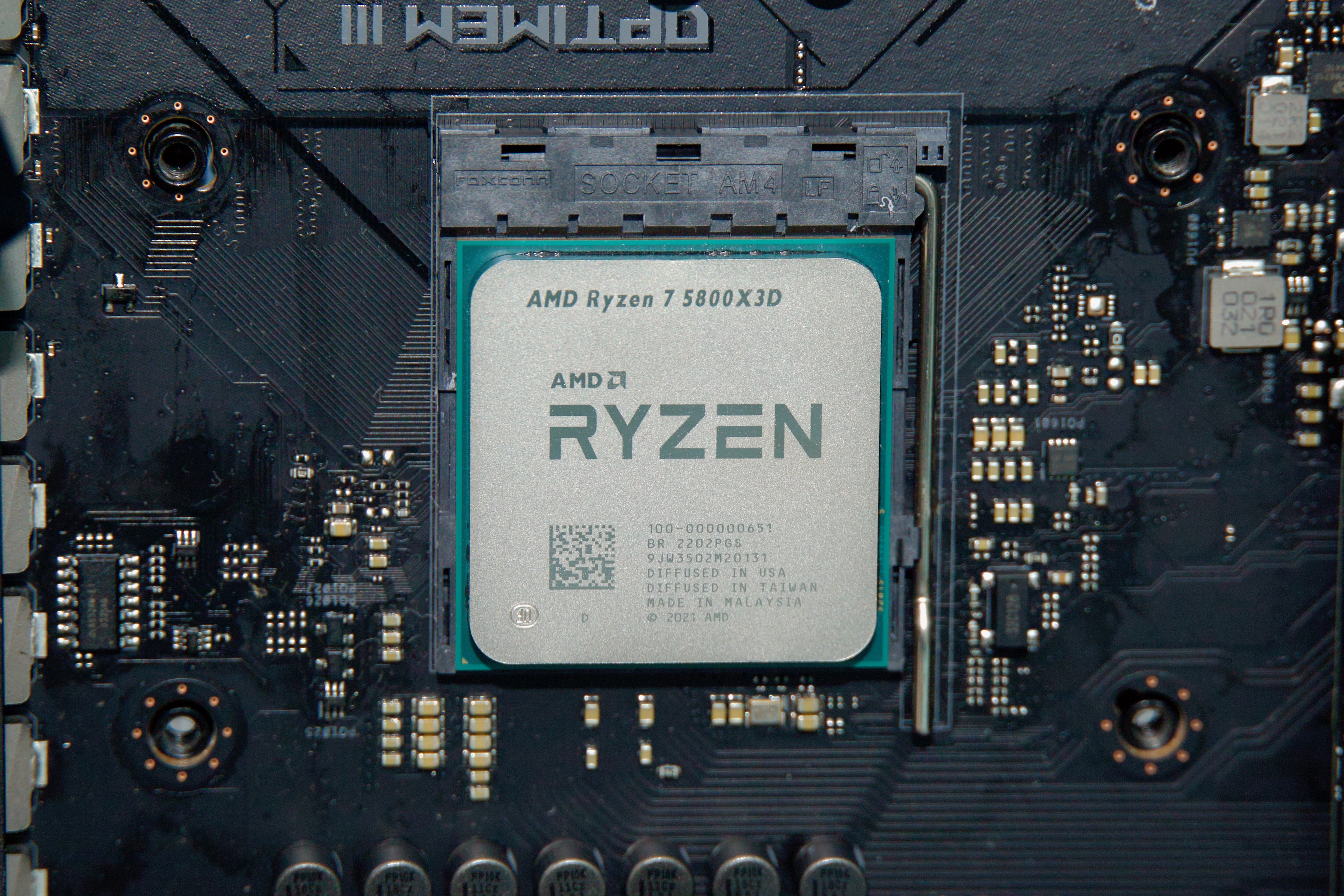
I talked myself into a socket AM5 build for our non-gaming budget PC because of its future proof-ness and its decent integrated GPU, but I went with an Intel-based build for this one because we didn’t need the integrated GPU for it and because AMD still mostly uses old socket AM4 chips to cover the $150-and-below part of the market.

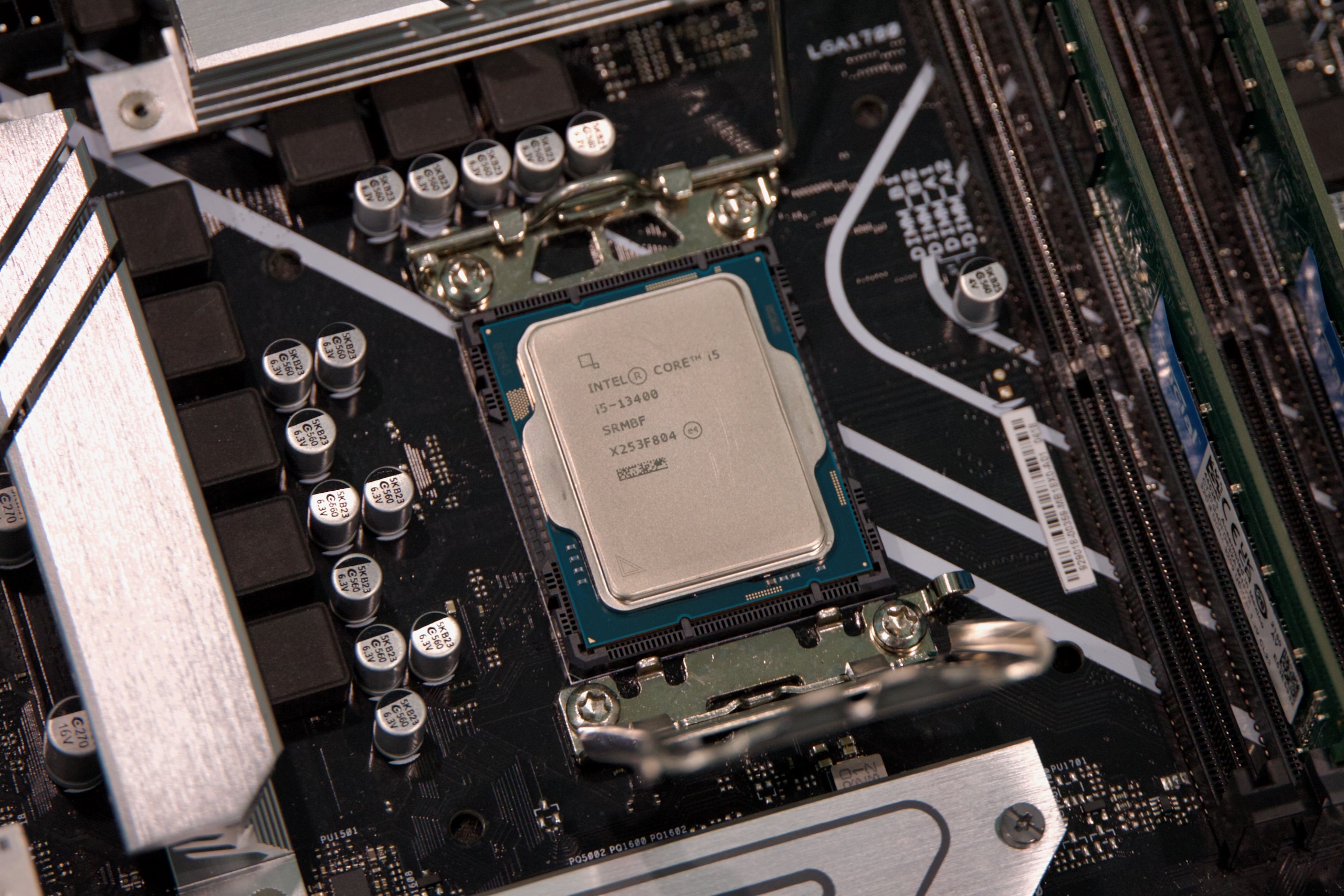
Given the choice between aging AMD CPUs and aging Intel CPUs, I have to give Intel the edge, thanks to the Core i5-13400F’s four E-cores. And if a 13th-gen Core chip lacks cutting-edge performance, it’s plenty fast for a midrange GPU. The $109 Core i5-12400F would also be OK and save a little more money, but we think the extra cores and small clock speed boost are worth the $20-ish premium.

For a budget build, we think your best strategy is to save money everywhere you can so you can squeeze a 16GB AMD Radeon RX 9060 XT into the budget. Credit: Andrew Cunningham

Going with a DDR4 motherboard and RAM saves us a tiny bit, and we’ve also stayed at 16GB of RAM instead of stepping up (some games, sometimes can benefit from 32GB, especially if you want to keep a bunch of other stuff running in the background, but it still usually won’t be a huge bottleneck). We upgraded to a 1TB SSD; huge AAA games will eat that up relatively quickly, but there is another M.2 slot you can use to put in another drive later. The power supply and case selections are the same as in our budget pick.

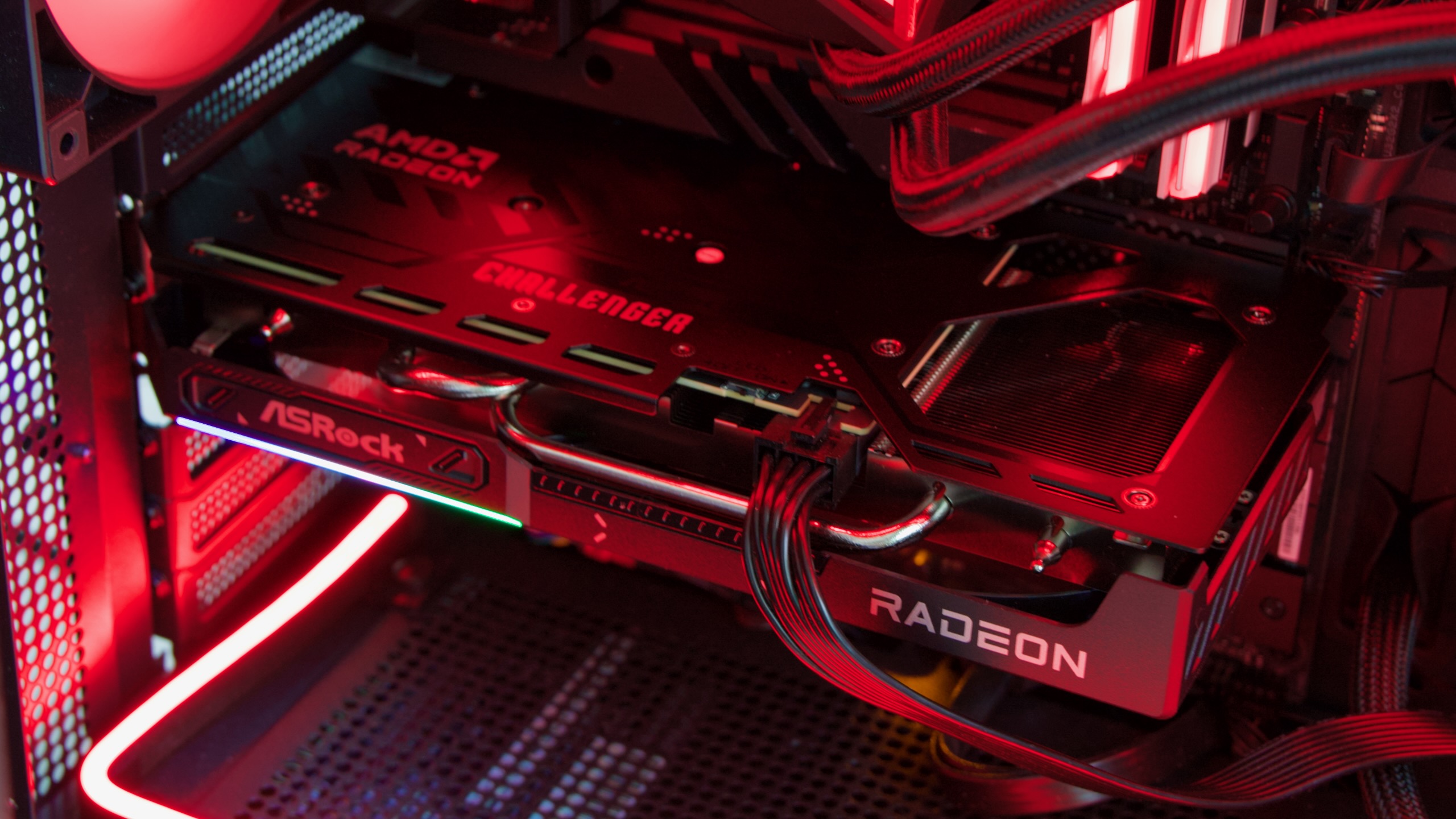
All of that cost-cutting was done in service of stretching the budget to include the 16GB version of AMD’s Radeon RX 9060 XT graphics card.

You could go with the 8GB version of the 9060 XT or Nvidia’s GeForce RTX 5060 and get solid 1080p gaming performance for almost $100 less. But we’re at a point where having 8GB of RAM in your graphics card can be a bottleneck, and that’s a problem that will only get worse over time. The 9060 XT has a consistent edge over the RTX 5060 in our testing, even in games with ray-tracing effects enabled, and at 1440p, the extra memory can easily be the difference between a game that runs and a game that doesn’t.

A more future-proofed budget gaming PC

What it’s good for: Good all-round performance with plenty of memory and storage, plus room for future upgrades.

What it sucks at: Getting you higher frame rates than our budget-budget build.

Cost as of this writing: $1,070 to $1,110, depending on components

As I found myself making cut after cut to maximize the fps-per-dollar we could get from our budget gaming PC, I decided I wanted to spec out a system with the same GPU but with other components that would make it better for non-gaming use and easier to upgrade in the future, with more generous allotments of memory and storage.

This build shifts back to many of the AMD AM5 components we used in our basic budget build, but with an 8-core Ryzen 7 7700X CPU at its heart. Its Zen 4 architecture isn’t the latest and greatest, but Zen 5 is a modest upgrade, and you’ll still get better single- and multi-core processor performance than you do with the Core i5 in our other build. It’s not worth spending more than $50 to step up to a Ryzen 7 9700X, and it’s overkill to spend $330 on a 12-core Ryzen 9 7900X or $380 on a Ryzen 7 7800X3D.

This chip doesn’t come with its own fan, so we’ve included an inexpensive air cooler we like that will give you plenty of thermal headroom.

A 32GB kit of RAM and 2TB of storage will give you ample room for games and enough RAM that you won’t have to worry about the small handful of outliers that benefit from more than 16GB of system RAM, while a marginally beefier power supply gives you a bit more headroom for future upgrades while still keeping costs relatively low.

This build won’t benefit your frame rates much since we’re sticking with the same 16GB RX 9060 XT. But the rest of it is specced generously enough that you could add a GeForce RTX 5070 (currently around $550) or a non-XT Radeon RX 9070 card (around $600) without needing to change any of the other components.

A comfortable 4K gaming rig

What it’s good for: Just about anything! But it’s built to play games at higher resolutions than our budget builds.

What it sucks at: Getting you top-of-the-line bragging rights.

Cost as of this writing: $1,829 to $1,934, depending on components.

Our budget builds cover 1080p-to-1440p gaming, and with an RTX 5070 or an RX 9070, they could realistically stretch to 4K in some games. But for more comfortable 4K gaming or super-high-frame-rate 1440p performance, you’ll thank yourself for spending a bit more.

You’ll note that the quality of the component selections here has been bumped up a bit all around. X670 or X870-series boards don’t just get you better I/O; they’ll also get you full PCI Express 5.0 support in the GPU slot and components better-suited to handling faster and more power-hungry components. We’ve swapped to a modular ATX 3.x-compliant power supply to simplify cable management and get a 12V-2×6 power connector. And we picked out a slightly higher-end SSD, too. But we’ve tried not to spend unnecessary money on things that won’t meaningfully improve performance—no 1,000+ watt power supplies, PCIe 5.0 SSDs, or 64GB RAM kits here.

A Ryzen 7 7800X3D might arguably be overkill for this build—especially at 4K, where the GPU will still be the main bottleneck—but it will be useful for getting higher frame rates at lower resolutions and just generally making sure performance stays consistent and smooth. Ryzen 7900X, 7950X, or 9900X chips are all good alternatives if you want more multi-core CPU performance—if you plan to stream as you play, for instance. A 9700X or even a 7700X would probably hold up fine if you won’t be doing that kind of thing and want to save a little.

You could cool any of these with a closed-loop AIO cooler, but a solid air cooler like the Thermalright model will keep it running cool for less money, and with a less-complicated install process.

A GeForce RTX 5070 Ti is the best 4K performance you can get for less than $1,000, but that doesn’t make it cheap. Credit: Andrew Cunningham

Based on current pricing and availability, I think the RTX 5070 Ti makes the most sense for a non-absurd 4K-capable build. Its prices are still elevated slightly above its advertised $749 MSRP, but it’s giving you RTX 4080/4080 Super-level performance for between $200 and $400 less than those cards launched for. Nvidia’s next step up, the RTX 5080, will run you at least $1,200 or $1,300—and usually more. AMD’s best option, the RX 9070 XT, is a respectable contender, and it’s probably the better choice if you plan on using Linux instead of Windows. But for a Windows-based gaming box, Nvidia still has an edge in games with ray-tracing effects enabled, plus DLSS upscaling and frame generation.

Is it silly that the GPU costs as much as our entire budget gaming PC? Of course! But it is what it is.

Even more than the budget-focused builds, the case here is a matter of personal preference, and $100 or $150 is enough to buy you any one of several dozen competent cases that will fit our chosen components. We’ve highlighted a few from case makers with good reputations to give you a place to start. Some of these also come in multiple colors, with different side panel options and both RGB and non-RGB options to suit your tastes.

If you like something a little more statement-y, the Fractal Design North ($155) and Lian Li Lancool 217 ($120) both include the wood accents that some case makers have been pushing lately. The Fractal Design case comes with both mesh and tempered glass side panel options, depending on how into RGB you are, while the Lancool case includes a whopping five case fans for keeping your system cool.

The “God Box”

What it’s good for: Anything and everything.

What it sucks at: Being affordable.

Cost as of this writing: $4,891 to $5,146

We’re avoiding Xeon and Threadripper territory here—frankly, I’ve never even tried to do a build centered on those chips and wouldn’t trust myself to make recommendations—but this system is as fast as consumer-grade hardware gets.

An Nvidia GeForce RTX 5090 guarantees the fastest GPU performance you can buy and continues the trend of “paying as much for a GPU as you could for an entire fully functional PC.” And while we have specced this build with a single GPU, the motherboard we’ve chosen has a second full-speed PCIe 5.0 x16 slot that you could use for a dual-GPU build.

A Ryzen 9950X3D chip gets you top-tier gaming performance and tons of CPU cores. We’re cooling this powerful chip with a 360 mm Arctic Liquid Freezer III Pro cooler, which has generally earned good reviews from Gamers Nexus and other outlets for its value, cooling performance, and quiet performance. A white option is also available if you’re going for a light-mode color scheme instead of our predominantly dark-mode build.

Other components have been pumped up similarly gratuitously. A 1,000 W power supply is the minimum for an RTX 5090, but to give us some headroom, why not use a 1,200 W model with lights on it? Is PCIe 5.0 storage strictly necessary for anything? No! But let’s grab a 4 TB PCIe 5.0 SSD anyway. And populating all four of our RAM slots with a 32GB stick of DDR5 avoids any unsightly blank spots inside our case.

We’ve selected a couple of largish case options to house our big builds, though as usual, there are tons of other options to fit all design sensibilities and tastes. Just make sure, if you’re selecting a big Extended ATX motherboard like the X870E Taichi, that your case will fit a board that’s slightly wider than a regular ATX or micro ATX board (the Taichi is 267 mm wide, which should be fine in either of our case selections).

Photo of Andrew Cunningham

Andrew is a Senior Technology Reporter at Ars Technica, with a focus on consumer tech including computer hardware and in-depth reviews of operating systems like Windows and macOS. Andrew lives in Philadelphia and co-hosts a weekly book podcast called Overdue.

Ars Technica System Guide: Five sample PC builds, from $500 to $5,000 Read More »

trump-strikes-“wild”-deal-making-us-firms-pay-15%-tax-on-china-chip-sales

Trump strikes “wild” deal making US firms pay 15% tax on China chip sales


“Extra penalty” for US firms

The deal won’t resolve national security concerns.

Ahead of an August 12 deadline for a US-China trade deal, Donald Trump’s tactics continue to confuse those trying to assess the country’s national security priorities regarding its biggest geopolitical rival.

For months, Trump has kicked the can down the road regarding a TikTok ban, allowing the app to continue operating despite supposedly urgent national security concerns that China may be using the app to spy on Americans. And now, in the latest baffling move, a US official announced Monday that Trump got Nvidia and AMD to agree to “give the US government 15 percent of revenue from sales to China of advanced computer chips,” Reuters reported. Those chips, about 20 policymakers and national security experts recently warned Trump, could be used to fuel China’s frontier AI, which seemingly poses an even greater national security risk.

Trump’s “wild” deal with US chip firms

Reuters granted two officials anonymity to discuss Trump’s deal with US chipmakers, because details have yet to be made public. Requiring US firms to pay for sales in China is an “unusual” move for a president, Reuters noted, and the Trump administration has yet to say what exactly it plans to do with the money.

For US firms, the deal may set an alarming precedent. Not only have analysts warned that the deal could “hurt margins” for both companies, but export curbs on Nvidia’s H20 chips, for example, had been established to prevent US technology thefts, secure US technology leadership, and protect US national security. Now the US government appears to be accepting a payment to overlook those alleged risks, without much reassurance that the policy won’t advantage China in the AI race.

The move drew immediate scrutiny from critics, including Geoff Gertz, a senior fellow at the US think tank Center for a New American Security, who told Reuters that he thinks the deal is “wild.”

“Either selling H20 chips to China is a national security risk, in which case we shouldn’t be doing it to begin with, or it’s not a national security risk, in which case, why are we putting this extra penalty on the sale?” Gertz posited.

At this point, the only reassurance from the Trump administration is an official suggesting (without providing any rationale) that selling H20 or equivalent chips—which are not Nvidia’s most advanced chips—no longer compromises national security.

Trump “trading away” national security

It remains unclear when or how the levy will be implemented.

For chipmakers, the levy is likely viewed as a relatively small price to pay to avoid export curbs. Nvidia had forecasted $8 billion in potential losses if it couldn’t sell its H20 chips to China. AMD expected $1 billion in revenue cuts, partly due to the loss of sales for its MI308 chips in China.

The firms apparently agreed to Trump’s deal as a condition to receive licenses to export those chips. But caving to Trump could bite them back in the long run, AJ Bell, investment director Russ Mould, told Reuters—perhaps especially if Trump faces increasing pressure over feared national security concerns.

“The Chinese market is significant for both these companies, so even if they have to give up a bit of the money, they would otherwise make it look like a logical move on paper,” Mould said. However, the deal “is unprecedented and there is always the risk the revenue take could be upped or that the Trump administration changes its mind and re-imposes export controls.”

So far, AMD has not commented on the report. Nvidia’s spokesperson declined to comment beyond noting, “We follow rules the US government sets for our participation in worldwide markets.”

A former adviser to Joe Biden’s Commerce Department, Alasdair Phillips-Robins, told Reuters that the levy suggests the Trump administration “is trading away national security protections for revenue for the Treasury.”

Huawei close to unveiling new AI chip tech

The end of a 90-day truce between the US and China is rapidly approaching, with the US signaling that the truce will likely be extended soon as Trump attempts to get a long-sought-after meeting with China’s President Xi Jinping.

For China, gutting export curbs on chips remains a key priority in negotiations, the Financial Times reported Sunday. But Nvidia’s H20 chips, for example, are lower priority than high-bandwidth memory (HBM) chips, sources told FT.

Chinese state media has even begun attacking the H20 chips as a Chinese national security risk. It appears that China is urging a boycott on H20 chips due to questions linked to a recent Congressional push to require chipmakers to build “backdoors” that would allow remote shutdowns of any chips detected as non-compliant with export curbs. That bill may mean that Nvidia’s chips already allow for US surveillance, China seemingly fears. (Nvidia has denied building such backdoors.)

Biden banned HBM exports to China last year, specifically moving to hamper innovation of Chinese chipmakers Huawei and Semiconductor Manufacturing International Corporation (SMIC).

Currently, US firms AMD and Micron remain top suppliers of HBM chips globally, along with South Korean firms Samsung Electronics and SK Hynix, but Chinese firms have notably lagged behind, South China Morning Post (SCMP) reported. One source told FT that China “had raised the HBM issue in some” Trump negotiations, likely directly seeking to lift Biden’s “HBM controls because they seriously constrain the ability of Chinese companies, including Huawei, to develop their own AI chips.”

For Trump, the HBM controls could be seen as leverage to secure another trade win. However, some experts are hoping that Trump won’t play that card, citing concerns from the Biden era that remain unaddressed.

If Trump bends to Chinese pressure and lifts HBM controls, China could more easily produce AI chips at scale, Biden had feared. That could even possibly endanger US firms’ standing as world leaders, seemingly including threatening Nvidia, a company that Trump discovered this term. Gregory Allen, an AI expert at a US think tank called the Center for Strategic and International Studies, told FT that “saying that we should allow more advanced HBM sales to China is the exact same as saying that we should help Huawei make better AI chips so that they can replace Nvidia.”

Meanwhile, Huawei is reportedly already innovating to help reduce China’s reliance on HBM chips, the SCMP reported on Monday. Chinese state-run Securities Times reported that Huawei is “set to unveil a technological breakthrough that could reduce China’s reliance on high-bandwidth memory (HBM) chips for running artificial intelligence reasoning models” at the 2025 Financial AI Reasoning Application Landing and Development Forum in Shanghai on Tuesday.

It’s a conveniently timed announcement, given the US-China trade deal deadline lands the same day. But the risk of Huawei possibly relying on US tech to reach that particular milestone is why HBM controls should remain off the table during Trump’s negotiations, one official told FT.

“Relaxing these controls would be a gift to Huawei and SMIC and could open the floodgates for China to start making millions of AI chips per year, while also diverting scarce HBM from chips sold in the US,” the official said.

Experts and policymakers had previously warned Trump that allowing H20 export curbs could similarly reduce access to semiconductors in the US, potentially disrupting the entire purpose of Trump’s trade war, which is building reliable US supply chains. Additionally, allowing exports will likely drive up costs to US chip firms at a time when they noted “projected data center demand from the US power market would require 90 percent of global chip supply through 2030, an unlikely scenario even without China joining the rush to buy advanced AI chips.” They’re now joined by others urging Trump to revive Biden’s efforts to block chip exports to China, or else risk empowering a geopolitical rival to become a global AI leader ahead of the US.

Photo of Ashley Belanger

Ashley is a senior policy reporter for Ars Technica, dedicated to tracking social impacts of emerging policies and new technologies. She is a Chicago-based journalist with 20 years of experience.

Trump strikes “wild” deal making US firms pay 15% tax on China chip sales Read More »

review:-framework-desktop-is-a-mash-up-of-a-regular-desktop-pc-and-the-mac-studio

Review: Framework Desktop is a mash-up of a regular desktop PC and the Mac Studio


Size matters most for Framework’s first stab at a desktop workstation/gaming PC.

The Framework Desktop. Credit: Andrew Cunningham

The Framework Desktop. Credit: Andrew Cunningham

Framework’s main claim to fame is its commitment to modular, upgradeable, repairable laptops. The jury’s still out on early 2024’s Framework Laptop 16 and mid-2025’s Framework Laptop 12, neither of which has seen a hardware refresh, but so far, the company has released half a dozen iterations of its flagship Framework Laptop 13 in less than five years. If you bought one of the originals right when it first launched, you could go to Framework’s site, buy an all-new motherboard and RAM, and get a substantial upgrade in performance and other capabilities without having to change anything else about your laptop.

Framework’s laptops haven’t been adopted as industry-wide standards, but in many ways, they seem built to reflect the flexibility and modularity that has drawn me to desktop PCs for more than two decades.

That’s what makes the Framework Desktop so weird. Not only is Framework navigating into a product category where its main innovation and claim to fame is totally unnecessary. But it’s actually doing that with a desktop that’s less upgradeable and modular than any given self-built desktop PC.

The Framework Desktop has a lot of interesting design touches, and it’s automatically a better buy than the weird AMD Ryzen AI Max-based mini desktops you can buy from a couple of no-name manufacturers. But aside from being more considerate of PC industry standards, the Framework Desktop asks the same question that any gaming-focused mini PC does: Do you care about having a small machine so much that you would pay more money for less performance, and for a system you can’t upgrade much after you buy it?

Design and assembly

Opening the Framework Desktop’s box. The PC and all its accessories are neatly packed away in all-recyclable carboard and paper. Andrew Cunningham

My DIY Edition Framework Desktop arrived in a cardboard box that was already as small or a bit smaller than my usual desktop PC, a mini ITX build with a dedicated GPU inside a 14.67-liter SSUPD Meshlicious case. It’s not a huge system, especially for something that can fit a GeForce RTX 5090 in it. But three of the 4.5-liter Framework Desktops could fit inside my build’s case with a little space leftover.

The PC itself is buried a couple of layers deep in this box under some side panels and whatever fan you choose (Framework offers RGB and non-RGB options from Cooler Master and Noctua, but any 120 mm fan will fit on the heatsink). Even for the DIY Edition, the bulk of it is already assembled: the motherboard is in the case, a large black heatsink is already perched atop the SoC, and both the power supply and front I/O ports are already hooked up.

The aspiring DIYer mainly needs to install the SSD and the fan to get going. Putting in these components gives you a decent crash course in how the system goes together and comes apart. The primary M.2 SSD slot is under a small metal heat spreader next to the main heatsink—loosen one screw to remove it, and install your SSD of choice. The system’s other side panel can be removed to expose a second M.2 SSD slot and the Wi-Fi/Bluetooth module, letting you install or replace either.

Lift the small handles on the two top screws and loosen them by hand to remove them, and the case’s top panel slides off. This provides easier access to both the CPU fan header and RGB header, so you can connect the fan after you install it and its plastic shroud on top of the heatsink. That’s pretty much it for assembly, aside from sliding the various panels back in place to close the thing up and reinstalling the top screws (or, if you bought or printed one, adding a handle to the top of the case).

The Framework Desktop includes a beefier version of Framework’s usual screwdriver with a longer bit. Credit: Andrew Cunningham

Framework includes a beefier version of its typical screwdriver with the Desktop, including a bit that can be pulled out and reversed to be switched between Phillips and Torx heads. The iFixit-style install instructions are clearly written and include plenty of high-resolution sample images so you can always tell how things are supposedto look.

The front of the system requires some assembly, too, but all of this stuff can be removed and replaced easily without opening up the rest of the system. The front panel, where the system’s customizable tiles can be snapped on and popped off, attaches with magnets and can easily be pried away from the desktop with your fingernails. At the bottom are slots for two of Framework’s USB-C Expansion Cards, the same ones that all the Framework Laptops use.

By default, those ports are limited to 5 Gbps USB transfer speeds in the BIOS, something the system says reduces wireless interference; those with all-wired networking and accessories can presumably enable the full 10 Gbps speeds without downsides. The front ports should support all of the Expansion Cards except for display outputs, which they aren’t wired for. (I also had issues getting the Desktop to boot from a USB port on the front of the system while installing Windows, but your mileage may vary; using one of the rear USB ports solved the issue for me.)

Standards, sometimes

Putting in the M.2 SSD. There’s another SSD slot on the back of the motherboard. Andrew Cunningham

What puts the Framework Desktop above mini PCs from Amazon or the various gaming NUCs that Intel and Asus have released over the years is a commitment to standards.

For reasons we’ll explore later, there was no way to build the system around this specific AMD chip without using soldered-on memory. But the motherboard is a regular mini ITX-sized motherboard. Other ITX boards will fit into Framework’s case, and the Framework Laptop’s motherboard will fit into other systems (as long as they can also fit the fan and heatsink).

The 400 W power supply conforms to the FlexATX standard. The CPU fan is just a regular 120 mm fan, and the mounting holes for system fans on the front can take any 92 mm fan. The two case fan headers on the motherboard are the same ones you’d find on any motherboard you bought for yourself. The front panel ports can’t be used for display outputs, but anything else ought to work.

Few elements of the Framework Desktop are truly proprietary, and if Framework went out of business tomorrow, you’d still have a lot of flexibility for buying and installing replacement parts. The problem is that the soldered-down, non-replaceable, non-upgradeable parts are the CPU, GPU, and RAM. There’s at least a little flexibility with the graphics card if you move the board into a different case—there’s a single PCIe x4 slot on the board that you could put an external GPU into, though many PCIe x16 graphics cards will be bandwidth starved. But left in its original case, it’s an easy-to-work-on, standards-compliant system that will also never be any better or get any faster than it is the day you buy it.

Hope you like plastic

Snapping some tiles into the Framework Desktop’s plastic front panel. Credit: Andrew Cunningham

The interior of the Framework Desktop is built of sturdy metal, thoughtfully molded to give easy access to each of the ports and components on the motherboard. My main beef with the system is the outside.

The front and side panels of the Framework Desktop are all made out of plastic. The clear side panel, if you spring for it, is made of a thick acrylic instead of tempered glass (presumably because Framework has drilled holes in the side of it to improve airflow).

This isn’t the end of the world, but the kinds of premium ITX PC cases that the Desktop is competing with are predominantly made of nicer-looking and nicer-feeling metal rather than plastic. It just feels surprisingly cheap, which was an unpleasant surprise—even the plastic Framework Laptop 12 felt sturdy and high-quality, something I can’t really say of the Desktop’s exterior panels.

I do like the design on the front panel—a grid of 21 small square plastic tiles that users can rearrange however they want. Framework sells tiles with straight and diagonal lines on them, plus individual tiles with different logos or designs printed or embossed on them. If you install a fan in the front of the system, you’ll want to stick to the lined tiles in the top 9 x 9 section of the grid, which will allow air to pass through. The tiles with images on them are solid—putting a couple of them in front of a fan likely won’t hurt your airflow too much, but you won’t want to use too many.

Framework has also published basic templates for both the tiles and the top panel so that those with 3D printers can make their own.

PC testbed notes

We’ve compared the performance of the Framework Desktop to a bunch of other PCs to give you a sense of how it stacks up to full-size desktops. We’ve also compared it to the Ryzen 7 8700G in a Gigabyte B650I Aorus Ultra mini ITX motherboard with 32GB of DDR5-6400 to show the best performance you can expect from a similarly sized socketed desktop system.

Where possible, we’ve also included some numbers from the M4 Pro Mac mini and the M4 Max Mac Studio, two compact desktops in the same general price range as the Framework Desktop.

For our game benchmarks, the dedicated GPU results were gathered using our GPU testbed, which you can read about in our latest dedicated GPU review. The integrated GPUs were obviously tested with the CPUs they’re attached to.

AMD AM5 Intel LGA 1851 Intel LGA 1700
CPUs Ryzen 7000 and 9000 series Core Ultra 200 series 12th, 13th, and 14th-generation Core
Motherboard ASRock X870E Taichi or MSI MPG X870E Carbon Wifi (provided by AMD) MSI MEG Z890 Unify-X (provided by Intel) Gigabyte Z790 Aorus Master X (provided by Intel)
RAM config 32GB G.Skill Trident Z5 Neo (provided by AMD), running at DDR5-6000 32GB G.Skill Trident Z5 Neo (provided by AMD), running at DDR5-6000 32GB G.Skill Trident Z5 Neo (provided by AMD), running at DDR5-6000

Performance and power

Our Framework-provided review unit was the highest-end option; it has a 16-core Ryzen AI Max+395 processor, 40 graphics cores, and 128GB of RAM. At $1,999 before adding an SSD, a fan, an OS, front tiles, or Expansion Cards, this is the best, priciest configuration Framework offers. The $1,599 configuration uses the same chip with the same performance, but with 64GB of RAM instead.

All 16 of those CPU cores are based on the Zen 5 architecture, with none of the smaller-but-slower Zen 5c cores. But its total TDP is also limited to 120 W in total, which will hold it back a bit compared to socketed 16-core desktop CPUs like the Ryzen 9 9950X, which has a 170 W default TDP for the CPU alone.

In our testing, it seems clear that the CPU throttles when being tasked with intensive multi-core work like our Handbrake test, with temperatures that spike to around 100 degrees Celsius and hang out at around or just under that number for the duration of our test runs. The CPU package uses right around 100 W on average (this will vary based on the tests you’re running and how long you’re running them), compared to the 160 W and 194 W that the 12- and 16-core Ryzen 9 9900X and 9950X can consume at their default power levels.

Those are socketed desktop chips in huge cases being cooled by large AIO watercooling loops, so it’s hardly a fair comparison. The Framework Desktop’s CPU is also quite efficient, using even less power to accomplish our video encoding test than the 9950X in its 105 W Eco Mode. But this is the consequence of prioritizing a small size—a 16-core processor that, under heavy loads, performs more like a 12-core or even an 8-core desktop processor.

The upside is that the Framework Desktop is quieter than most desktops either under load or when idling. By default, the main CPU fan will turn off entirely when the system is under light load, and I often noticed it parking itself when I was just browsing or moving files around.

Based on our gaming tests, the Framework Desktop should be a competent 1080p-to-1440p  midrange gaming system. We observed similar performance from the Radeon 8060S integrated GPU when we tested it in the Asus ROG Flow Z13 tablet. For an integrated GPU, it’s head and shoulders over anything you can get in a socketed desktop system, and it easily ran three or four times faster than the Radeon 780M in the 8700G. The soldered RAM is annoying, but the extra speed it enables helps address the memory bandwidth problem that starves most integrated GPUs.

Compared to other desktop GPUs, though, the 8060S is merely fine. It’s usually a little slower than the last-generation Radeon RX 7600 XT, a card that cost $329 when it launched in early 2024—and with a performance hit that’s slightly more pronounced in games with ray-tracing effects on.

The 8060S stacks up OK to older midrange GPUs like the GeForce RTX 3060 and 4060, but it’s soundly beaten by the RTX 5060 or the 16GB version of the Radeon RX 9060 XT, cards currently available for $300-to-$400. (One problem for the 8060S—it’s based on the RDNA3.5 architecture, so it’s missing ray-tracing performance improvements introduced in RDNA4 and the RX 9000 series).

All of that said, the GPU may be more interesting than it looks on paper for people whose workloads need gobs and gobs of graphics memory but who don’t necessarily need that memory to be attached to the blazing-fastest GPU that exists. For people running certain AI or machine learning workloads, the 8060S’s unified memory setup means you can get a GPU with 64GB or 128GB of VRAM for less than the price of a single RTX 5090 (Framework says the GPU can use up to 112GB of RAM on the 128GB Desktop). Framework is advertising that use case pretty extensively, and it offers a guide to setting up large language models to run locally on the system.

That memory would likely be even more useful if it were attached to an Nvidia GPU instead of an AMD model—Nvidia’s hold on the workstation graphics market is at least as tight as its hold on the gaming GPU market, and many apps and tools support Nvidia GPUs and CUDA first/best/only. But it’s still one possible benefit the Framework Desktop might offer, relative to a desktop with a dedicated GPU.

You can’t say it isn’t unique

The Framework Desktop is a bit like a PC tower blended with Apple’s Mac Studio. Credit: Andrew Cunningham

In one way, Framework has done the same thing with the Desktop that it has done with all its laptops: found a niche and built a product to fill it. And with its standard-size components and standard connectors, the Framework Desktop is a clear cut above every Intel gaming NUC or Asus ROG thingamajig that’s ever existed.

I’m always impressed by the creativity, thoughtfulness, and attention to detail that Framework brings to its builds. For the Desktop, this is partially offset by how much I don’t care for most of its cheap plastic-and-acrylic exterior. But it’s still thoughtfully designed on the inside, with as much respect for standards, modularity, and repairability as you can get, once you get past that whole thing where that the major functional components are all irrevocably soldered together.

The Framework Desktop is also quiet, cute, and reasonably powerful. You’re paying some extra money and giving up both CPU and GPU speed to get something small. But you won’t run into games or apps that simply refuse to run for performance-related reasons.

It does feel like a weird product for Framework to build, though. It’s not that I can’t imagine the kind of person a Framework Desktop might be good for—it’s that I think Framework has built its business targeting a PC enthusiast demographic that will mainly be turned off by the desktop’s lack of upgradeability.

The Framework desktop is an interesting option for people who want or need a compact and easy-to-build workstation or gaming PC, or a Windows-or-Linux version of Apple’s Mac Studio. It will fit comfortably under a TV or in a cramped office. It’s too bad that it isn’t easier to upgrade. But for people who would prefer the benefits of a socketed CPU or a swappable graphics card, I’m sure the people at Framework would be the first ones to point you in the direction of a good-old desktop PC.

The good

  • Solid all-round performance and good power efficiency.
  • The Radeon 8060S is exceptionally good for an integrated GPU, delivering much better performance than you can get in something like the Ryzen 7 8700G.
  • Large pool of RAM available to the GPU could be good for machine learning and AI workloads.
  • Thoughtfully designed interior that’s easy to put together.
  • Uses standard-shaped motherboard, fan headers, power supply, and connectors, unlike lots of pre-built mini PCs.
  • Front tiles are fun.

The bad

  • Power limits keep the 16-core CPU from running as fast as the socketed desktop version.
  • A $300-to-$400 dedicated GPU will still beat the Radeon RX 8060S.
  • Cheap-looking exterior plastic panels.

The ugly

  • Soldered RAM in a desktop system.

Photo of Andrew Cunningham

Andrew is a Senior Technology Reporter at Ars Technica, with a focus on consumer tech including computer hardware and in-depth reviews of operating systems like Windows and macOS. Andrew lives in Philadelphia and co-hosts a weekly book podcast called Overdue.

Review: Framework Desktop is a mash-up of a regular desktop PC and the Mac Studio Read More »

amd’s-$299-radeon-rx-9060-xt-brings-8gb-or-16gb-of-ram-to-fight-the-rtx-5060

AMD’s $299 Radeon RX 9060 XT brings 8GB or 16GB of RAM to fight the RTX 5060

AMD didn’t provide much by way of performance comparisons, but it’s promising that the cards have the same number of compute units as AMD’s last-generation RX 7600 series. AMD says that RDNA 4 compute units are much faster than those used for RDNA 3, particularly in games with ray-tracing effects enabled. This helped make the Radeon RX 9070 cards generally as fast or faster than the RX 7900 XTX and 7900 XT series, despite having around two-thirds as many compute units. Sticking with 32 CUs for the 9060 series isn’t exciting on paper, but we should still see a respectable generation-over-generation performance bump. The RX 7600 series, by contrast, provided a pretty modest performance improvement compared to 2022’s Radeon RX 6650 XT.

AMD says that the cards’ total board power—the amount of power the entire graphics card, including the GPU itself, RAM, and other components—starts at 150 W for the 8GB card and 160 W for the 16GB card, with a maximum TBP of 182 W. That’s a shade higher than but generally comparable to the RTX 5060 and 5060 Ti, and (depending on where actual performance ends up) quite a bit more efficient than the RX 7600 series. This partly comes down to a more efficient 4nm TSMC manufacturing process, a substantial upgrade from the 6nm process used for the 7600 series.

It’s unusual for a GPU maker to define a TBP range—more commonly we’re just given a single default value. But this is in line with new settings we observed in our RX 9070 review; AMD officially supports a range of different user-selectable TBP numbers in its Catalyst driver package, and some GPU makers were shipping cards that used higher TBPs by default.

Higher power limits can increase performance, though usually the performance increase is disproportionately small compared to the increase in power draw. These power limits should also generally mean that most 9060 XTs can be powered with a single 8-pin power connector, rather than using multiple connectors or the 12-pin 12VHPWR/12V-2×6 connector.

AMD’s $299 Radeon RX 9060 XT brings 8GB or 16GB of RAM to fight the RTX 5060 Read More »