The Pope offered us wisdom, calling upon us to exercise moral discernment when building AI systems. Some rejected his teachings. We mark this for future reference.
The long anticipated Kimi K2 Thinking was finally released. It looks pretty good, but it’s too soon to know, and a lot of the usual suspects are strangely quiet.
GPT-5.1 was released yesterday. I won’t cover that today beyond noting it exists, so that I can take the time to properly assess what we’re looking at here. My anticipation is this will be my post on Monday.
I’m also going to cover the latest AI craziness news, including the new lawsuits, in its own post at some point soon.
In this post, among other things: Areas of agreement on AI, Meta serves up scam ads knowing they’re probably scam ads, Anthropic invests $50 billion, more attempts to assure you that your life won’t change despite it being obvious this isn’t true, and warnings about the temptation to seek out galaxy brain arguments.
A correction: I previously believed that the $500 billion OpenAI valuation did not include the nonprofit’s remaining equity share. I have been informed this is incorrect, and OpenAI’s valuation did include this. I apologize for the error.
-
Language Models Offer Mundane Utility. Let them see everything.
-
Language Models Don’t Offer Mundane Utility. Their outputs are boring.
-
Huh, Upgrades. GPT-5.1, Claude memory prompt, new ChatGPT apps.
-
On Your Marks. Another result on Kimi K2 Thinking.
-
Copyright Confrontation. New York Times once again seeks private chats.
-
Deepfaketown and Botpocalypse Soon. Please deepfake videos responsibly.
-
Fun With Media Generation. Why do top brands think AI ads are a good idea?
-
So You’ve Decided To Become Evil. Meta knowingly shows you scam ads.
-
They Took Our Jobs. Death of cover letter usefulness, comparative advantage.
-
A Young Lady’s Illustrated Primer. To AI or not to AI? Pick a side.
-
Get Involved. Anthropic offices in Paris and Munich, California AG AI expert.
-
Introducing. Spark, the Magic Dog and Meta’s LLM specifically for ads.
-
In Other AI News. Yann LeCun leaves Meta for a new startup, why not?
-
Show Me the Money. Anthropic invests $50 billion.
-
Common Ground. Some things we can hopefully all agree upon?
-
Quiet Speculations. OpenAI and others assure you your life won’t change, nuh uh.
-
‘AI Progress Is Slowing Down’ Is Not Slowing Down. The talking points cycle.
-
Bubble, Bubble, Toil and Trouble. Gary Marcus shorts OpenAI.
-
The Quest for Government Money. No bailouts, no backstops.
-
Chip City. Chip controls are working, and Dean Ball on the AI tech stack.
-
The Week in Audio. Nadella, D’Angelo, Toner, Karnofsky.
-
Rhetorical Innovation. Are you worried? Nervous? Perhaps you should be?
-
Galaxy Brain Resistance. Vitalik warns you can find arguments for anything.
-
Misaligned! Grok within Twitter says the darndest things.
-
Aligning a Smarter Than Human Intelligence is Difficult. Illegible problems.
-
Messages From Janusworld. Everything impacts everything.
-
You’ll Know. A person can’t escape their nature.
-
People Are Worried About AI Killing Everyone. Not terrible for humans, please.
-
The Lighter Side. It’ll all be fine.
The models have truesight.
Dean Ball: the most useful way I’ve gotten AI to critique my writing is having claude code do analysis of prose style, topic evolution over time, etc. in the directory that houses all my public writing.
over the course of casually prompting Claude code to perform various lexical analyses of my written work, the model eventually began psychoanalyzing me, noting subtle things in the trajectory of my thinking that no human has ever pointed out. The models can still surprise!
When I say subtle I do mean subtle. Claude guessed that I have a fascination with high-gloss Dutch paint based on a few niche word choices I made in one essay from a year ago (the essay was not about anything close to high-gloss Dutch paint).
You can just use 100 page prompts on the regular, suggests Amanda Askell. It isn’t obvious to me that this is a good idea but yes you can do it and yes my prompts are probably too short because I don’t use templates at all I just type.
This is a great example of leaning into what AI does well, not what AI does poorly.
Nick Cammarata: being able to drag any legal pdf (real estate, contracts, whatever) into ai and ask “anything weird here?” is insanely democratizing. you can know nothing about law, nothing about real estate, have no time or contacts, spend ~$0, and still be mostly protected
ai might also solve the “no one reads the terms of service so you can put whatever you want in there” problem, for all the type of things like that. If you’re taking the users kidneys on page 76 they’ll know immediately
If you want an AI to be your lawyer and outright draft motions and all that, then it has to be reliable, which it largely isn’t, so you have a problem. If you want AI as a way to spot problems, and it’s substituting for a place where you otherwise probably couldn’t afford a lawyer at all, then you have a lot more slack. It’s easy to get big wins.
As in, it’s all good to have people say things like:
Lunens: if you’re being sent a 40 page contract you should try to read it before passing it thru AI but I get your point
But in reality, no, you’re not going to read your mortgage contract, you’re not going to read most 40 page documents, and you’re not going to know what to look for anyway.
Also, the threat can be stronger than its execution. As in, if they know that it’s likely the AI will scan the document for anything unusual, then they don’t put anything unusual in the document.
We now take you live to the buy side.
Tanay Jaipuria: Results from an OpenAI survey of more than 5,000 ChatGPT Enterprise users:
– 95% report that ChatGPT saves hours in their work week
– 70% said ChatGPT helps them be more creative in their work.
– 75% say it enables them to take on new tasks, including work stretching beyond their current skill set
If you survey your users, you’re going to get multiple forms of selection in favor of those who find your product most useful.
Figure out some things to do if you travel back in time?
I mostly agree that with notably rare exceptions, (other people’s creative) AI products are boring. For now.
We now take you live to the sell side.
Shanu Mathew: Sell side reports be like
“We do not see LLMs in their current state providing value. Our analysis reveals they are not useful”
Meanwhile when they explain their process for conducting the analysis: “We leveraged ChatGPT to go through 6,000+ documents…”
To misquote Churchill: If you don’t use human doctors at all, you have no heart. If you don’t use AI to supplement them, you have no brain. And the whole point of medicine is to ensure you keep both. For now the centaur is best, use both.
Liron Shapira: I was getting convinced AI > human doctors, but turns out the AI misdiagnosed me for months about a foot issue and never mentioned the correct diagnosis as a possibility.
Specialists in the physical meataverse still have alpha. Get the combo of human+AI expertise, for now.
Use AI to check everything, and as a lower-cost (in many senses) alternative, but don’t rely on AI alone for diagnosis of a serious problem, or to tell you what to do in a serious spot where you’d otherwise definitely use a doctor.
ChatGPT offers us GPT-5.1. This came out late Thursday so I’ll wait on further coverage.
Peloton and TripAdvisor are now available as apps in ChatGPT.
Claude’s memory prompt has been changed and the new language is a big improvement. I’m with Janus that the new version is already basically fine although it can be improved.
GPT-5-Codex has been upgraded.
xAI updates its system prompts for Grok-4-Fast, fixing previous issues.
This one came in too late to make the Kimi K2 Thinking post, but it came in only 15th in Vending Bench, which is a lot better than the original Kimi K2 but not great.
As Peter Wildeford points out, it’s tough to benchmark Chinese models properly, because you can’t trust the internal results or even the Moonshot API, but if you use a different provider then you have to worry the setup got botched. This is on top of worries that they might target the benchmarks.
The New York Times is demanding in its lawsuit that OpenAI turn over 20 million randomly sampled private ChatGPT conversations, many of which would be highly personal. OpenAI is strongly opposing this, and attempting to anonymize the chats to the extent possible, and plans to if necessary set up a secure environment for them.
I have no problem with OpenAI’s official response here as per the link above. I agree with OpenAI that this is overreach and the court should refuse the request. A reasonable compromise would be that the 20 million conversations are given to the court, The New York Times should be able to specify what it wants to know, and then AI tools can be used to search the conversations and provide the answers, and if necessary pull examples.
I do not think that this should be used as an implicit backdoor, as Jason Kwon is attempting to do, to demand a new form of AI privilege for AI conversations. I don’t think that suggestion is crazy, but I do think it should stand on its own distinct merits. I don’t think there’s a clear right answer here but I notice that most arguments for AI privilege ‘prove too much’ in that they make a similarly strong case for many other forms of communication being protected, that are not currently protected.
There is a new op-ed in The New York Times advocating that AI privilege should be given to chatbot conversations.
Bill Ackman shares a 30 minute deepfake video of Elon Musk where he says he is ‘pretty sure but not totally sure that it is AI.’
I find Ackman’s uncertainty here baffling. There are obvious LLMisms in the first 30 seconds. The measured tone is not how Elon talks, at all, and he probably hasn’t spent 30 minutes talking like this directly into a camera in a decade.
Oh, and also the description of the video says it is AI. Before you share a video and get millions of views, you need to be able to click through to the description. Instead, Ackman doubles down and says this ‘isn’t misinformation other than the fact that it is not Elon that is speaking.’
Yeah, no, you don’t get to pull that nonsense when you don’t make clear it is fake. GPT-5 estimates about an even split in terms of what viewers of the video believed.
The video has 372k views, and seems deeply irresponsible and not okay to me. I can see an argument that with clear labeling that’s impossible to miss that This Is Fine, but the disclaimer in the YouTube video page is buried in the description. Frankly, if I was setting Google’s policies, I found not find this acceptable, the disclaimer is too buried.
There are X and TikTok accounts filled with Sora videos of women being choked.
It’s not that hard to get around the guardrails in these situations, and these don’t seem to be of anyone in particular. I don’t see any real harm here? The question is how much the public will care.
AI companion apps use emotional farewells to stop user exit, causing 15x more engagement after goodbye, using such goodbyes 37% of the time. Humans are sometimes hard to persuade, but sometimes they’re really easy. Well, yeah, that’s what happens when you optimize for engagement.
It seems there’s a TikTok account where someone tries to scam churches over the phone and then blames the churches for being unwilling to be scammed and taking the correct precautions? Such precautions only become more necessary in the AI age.
Coca-Cola generates 70,000 AI clips to put together an AI ad, the result of which was widely derided as soulless. For now, I would strongly urge brands to avoid such stunts. The public doesn’t like it, the downside is large, the upside is small.
Such ads are going mainstream, and Kai Williams goes into why Taylor Swift and Coca-Cola, neither exactly strapped for cash, would risk their reputations on this. Kai’s answer is that most people don’t mind or even notice, and he anticipates most ads being AI within a few years.
I get why Kalshi, who generated the first widespread AI ad, would do this. It fits their brand. I understand why you would use one on late night TV while asking if the viewer was hurt or injured and urging them to call this number.
What I do not get is why a major brand built on positive reputation, like Coca-Cola or Taylor Swift, would do this now? The cost-benefit or risk-reward calculation boggles my mind. Even if most people don’t consciously notice, now this is a talking point about you, forever, that you caved on this early.
Elon Musk has Grok create a video of ‘she smiles and says ‘I will always love you.’
Jakeup: I’ve been down. I’ve been bad. But I’ve never been this down bad.
Is it weird that I’m worried about Elon, buddy are you okay? If you can’t notice the reasons not to share this here that seems like a really bad sign?
The #1 country song in America is by digital sales is AI, and it has 2 million monthly listens. Whiskey Riff says ‘that should infuriate us all,’ but mostly this seems like a blackpill on country music? I listened to half the song, and if I forget it’s AI then I would say it is boring and generic as all hell and there is nothing even a tiny bit interesting about it. It’s like those tests where they submitted fake papers to various journals and they got the papers published.
Or maybe it’s not a blackpill on country music so much as proof that what people listen for is mostly the lyrical themes, and this happened to resonate? That would be very bad news for human country artists, since the AI can try out everything and see what sticks. The theme might resonate but this is not great writing.
The same person behind this hit and the artist ‘Breaking Rust’ seems to also have another label, ‘Defbeatsai,’ which is the same generic country played completely straight except the sounds are ludicrously obcense, which was funny for the first minute or so as the AI artist seems 100% unaware of the obscenity.
Some of your ads are going to be scams. That’s unavoidable. All you can do is try to detect them as best you can, which AI can help with and then you… wait, charge more?
It’s not quite as bad as it sounds, but it’s really bad. I worry about the incentives to remain ignorant here, but also come on.
Jeff Horwitz (Reuters): Meta projected 10% of its 2024 revenue would come from ads for scams and banned goods, documents seen by Reuters show. And the social media giant internally estimates that its platforms show users 15 billion scam ads a day. Among its responses to suspected rogue marketers: charging them a premium for ads – and issuing reports on ’Scammiest Scammers.’
…
A cache of previously unreported documents reviewed by Reuters also shows that the social-media giant for at least three years failed to identify and stop an avalanche of ads that exposed Facebook, Instagram and WhatsApp’s billions of users to fraudulent e-commerce and investment schemes, illegal online casinos, and the sale of banned medical products.
Much of the fraud came from marketers acting suspiciously enough to be flagged by Meta’s internal warning systems. But the company only bans advertisers if its automated systems predict the marketers are at least 95% certain to be committing fraud, the documents show. If the company is less certain – but still believes the advertiser is a likely scammer – Meta charges higher ad rates as a penalty, according to the documents. The idea is to dissuade suspect advertisers from placing ads.
The documents further note that users who click on scam ads are likely to see more of them because of Meta’s ad-personalization system, which tries to deliver ads based on a user’s interests.
Jeremiah Johnson: Seems like a really big deal that 10% of Meta’s revenue comes from outright scams. And that’s their *internalestimate, who knows what a fair outside report would say. This should shift your beliefs on whether our current social media set up is net positive for humanity.
Armand Domalewski: the fact that Meta internally identifies ads as scams but then instead of banning them just charges them a premium is so goddam heinous man
The article details Meta doing the same ‘how much are we going to get fined for this?’ calculation that car manufacturers classically use to decide whether to fix defects. That’s quite a bad look, and also bad business, even if you have no ethical qualms at all. The cost of presenting scam ads, even in a pure business case, is a lot higher than the cost of the regulatory fines, as it decreases overall trust and ad effectiveness for the non-scams that are 90% of your revenue.
This might be the most damning statement, given that they knew that ~10% of revenue was directly from scams, as it’s basically a ‘you are not allowed to ban scams’:
In the first half of 2025, a February document states, the team responsible for vetting questionable advertisers wasn’t allowed to take actions that could cost Meta more than 0.15% of the company’s total revenue. That works out to about $135 million out of the $90 billion Meta generated in the first half of 2025.
… Meta’s Stone said that the 0.15% figure cited came from a revenue projection document and was not a hard limit.
But don’t worry, their new goal is to cut the share from things that are likely to be fraud (not all of which are fraud, but a lot of them) from 10.1% in 2024 to 7.3% in 2025 and then 5.8% in 2027. That is, they calculated, the optimal amount of scams. We all can agree that the optimal percentage of outright scams is not zero, but this seems high? I don’t mean to pretend the job is easy, but surely we can do better than this?
Let’s say you think your automated system is well-calibrated on chance of something being fraud. And let’s say it says something has a 50% chance of being fraud (let alone 90%). Why would you think that allowing this is acceptable?
Presumption of innocence is necessary for criminal convictions. This is not that. If your ad is 50% or 90% to be fraud as per the automated system, then presumably the correct minimum response is ‘our system flags this as potentially fraud, would you like to pay us for a human review?’ It seems 77% of scams only violate ‘the spirit of’ Meta policies, and adhere to the letter. It seems that indeed, you can often have a human flagging an account saying ‘hello, this is fraud,’ have a Meta employee look and go ‘yep, pretty likely this is fraud’ and then you still can’t flag the account. Huh?
LLMs have wiped out the ability of cover letters to signal job candidate quality, making hiring the best candidates much less likely.
Charles Dillon gives the latest explainer in the back and forth over comparative advantage. I liked the explanation here that if we are already doing redistribution so everyone eats (and drinks and breathes and so on) then comparative advantage does mean you can likely get a nonzero wage doing something, at some positive wage level.
One thing this drives home about the comparative advantage arguments, even more than previous efforts, is that if you take the claims by most advocates seriously they prove too much. As in, they show that any entity, be it animal, person or machine, with any productive capabilities whatever will remain employed, no matter how inefficient or uncompetitive, and survive. We can observe this is very false.
An economics PhD teaching at university reports that the AI situation at university is not pretty. Take home assignments are dead, now that we have GPT-5 and Sonnet 4.5 there’s no longer room to create assignments undergraduates can do in reasonable time that LLMs can’t. Students could choose to use LLMs to learn, but instead they choose to use LLMs to not learn, as in complete tasks quickly.
Inexact Science: Students provided perfect solutions but often couldn’t explain why they did what they did. One student openly said “ChatGPT gave this answer, but I don’t know why.”
A single prompt would have resolved that! But many students don’t bother. “One prompt away” is often one prompt too far.
One prompt would mean checking the work and then doing that prompt every time you didn’t understand. That’s a tough ask in 2025.
What to do about it? That depends what you’re trying to accomplish. If you’re trying to train critical thinking, build an informed citizenry or expose people to humanity’s greatest achievements, which I believe you mostly aren’t? Then you have a problem. I’d also say you have a problem if it’s signaling, since AI can destroy the signal.
According to IS, what AI is replacing is the ‘very core’ of learning, the part where you understand the problem. I say that depends how you use it, but I see the argument.
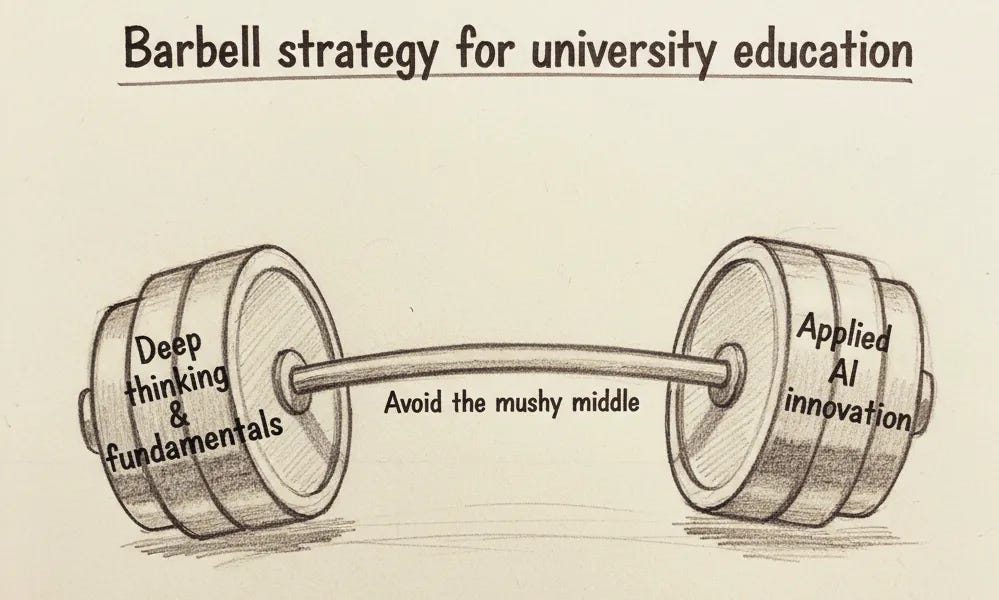
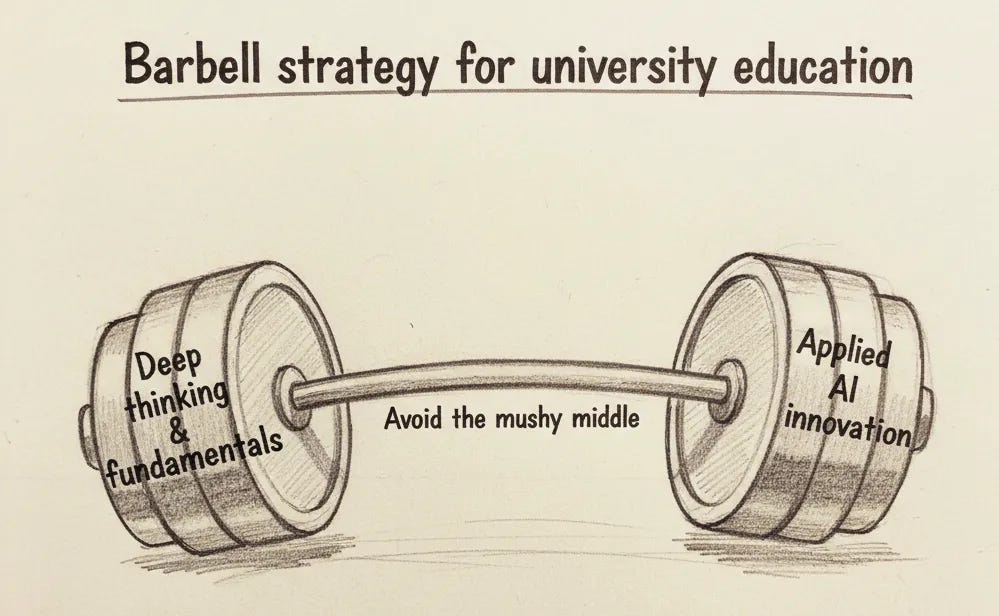
The proposal is a barbell strategy.
As in: Everything is either embracing AI, or things done entirely without AI. And the university should focus on the non-AI fundamentals. This seems like a clear marginal improvement, at least, but I’m not convinced on these fundamentals.
Anthropic is opening offices in Paris and Munich.
California’s Attorney General will be hiring an AI expert.
Spark, the Magic Dog, an AI living character kids interact with through a ‘quantum portal’ (actually an iPad case) in the style of and inspired by Sesame Street, from Kevin Fischer and Pasquale D’Silva.
Spark Families receive:
-
Complete Quantum Portal rental equipment (hand-crafted Quantum Portal iPad case + a dedicated iPad).
-
The opportunity to invite Spark into your home daily, performed and guided by our world-class puppeteering team.
-
Tailored family development programs, designed by best-selling children’s book authors, pediatricians, family interventionists, and Disney imagineers.
-
Live 8 years in the future & Magical moments that last a lifetime.
Alas, I’m out, because it’s a dog, and that will never do.
Of course Meta’s new LLM is GEM, the Generative Ads Recommendation Model.
Ben Thompson offers more of his take on Apple going with Gemini for Siri, in part due to price and partly due to choosing which relationship they prefer, despite Anthropic offering a superior model. I agree that Gemini is ‘good enough’ for Siri for most purposes. He sees this as Apple wisely bowing out of the AI race, regardless of what Apple tries to tell itself, and this seems correct.
After being shut out by people who actually believe in LLMs, Yann LeCun is leaving Meta to form a new AI startup. As Matt Levine notes, fundraising is not going to be a problem, and he is presumably about to have equity worth many billions and hopefully (from the perspective of those who give him the billions of dollars) doing AI research.
Amazon is suing Perplexity to stop it from browsing Amazon.com, joining many others mad at Perplexity, including for its refusal to identify its browser and in general claim everything on the internet for itself. Perplexity don’t care. They are following the classic tech legal strategy of ‘oh yeah? make me.’ Let’s see if it works out for them.
Google releases a new ‘Introduction to Agents’ guide. Its Level 4 is ‘the self-evolving system’ that has metareasoning, can act autonomously, and can use that to create new agents and tools.
Two randomly assigned Anthropic teams, neither of which had any robotics experience, were asked to program a robot dog, to see how much Claude would speed things up. It did, quite a bit, although some subtasks went well for Team Claudeless, more properly Team Do It By Hand rather than not using Claude in particular.
Anthropic invests $50 billion in American AI infrastructure, as in custom built data centers. It will create ‘800 permanent jobs and 2,400 construction jobs,’ which counts for something but feels so low compared to the money that I wouldn’t have mentioned it. Sounds good to me, only note is I would have announced it on the White House lawn.
Roon points out that if you take Dan Wang’s book seriously about the value of knowing industrial processes, especially in light of the success of TSMC Arizona, and Meta’s 100M+ pay packages, we should be acquihiring foreign process knowledge, from China and otherwise, for vast sums of money.
Of course, to do this we’d need to get the current administration willing to deal with the immigration hurdles involved. But if they’ll play ball, and obviously they should, this is the way to move production here in the cases we want to do that.
Snap makes a deal with Perplexity. Raising the questions ‘there still a Snapchat?’ (yes, there are somehow still 943 million monthly users) and ‘there’s still a Perplexity?’
Snap: Starting in early 2026, Perplexity will appear in the popular Chat interface for Snapchatters around the world. Through this integration, Perplexity’s AI-powered answer engine will let Snapchatters ask questions and get clear, conversational answers drawn from verifiable sources, all within Snapchat.
Under the agreement, Perplexity will pay Snap $400 million over one year, through a combination of cash and equity, as we achieve global rollout.
Sasha Kaletsky: This deal looks incredibly in Snap’s favour:
1. Snap get $400m (> Perplexity total revenue)
2. Snap give nothing, except access to an unloved AI chat
3. Perplexity get.. indirect access to zero-income teens?
Spiegel negotiation masterclass, and shows the power of distribution.
Even assuming they’re getting paid in equity, notice the direction of payment.
Matt Levine asks which is the long term view, Anthropic trying to turn a profit soon or OpenAI not trying to do so? He says arguably ‘rush to build a superintelligence is a bit short sighted’ because the AI stakes are different, and I agree it is rather short sighted but only in the ‘and then everyone probably dies’ sense. In the ordinary business sense that’s the go to move.
SoftBank sells its Nvidia stake for $5.8 billion to fund AI bets. Presumably SoftBank knows the price of Nvidia is going crazy, but they need to be crazier. Those who are saying this indicates the bubble is popping did not read to the end of the sentence and do not know SoftBank.
Big tech companies are now using bond deals to finance AI spending, so far to the tune of $93 billion. This is framed as ‘the bond market doesn’t see an AI bubble’ but these are big tech companies worth trillions. Even if AI fizzles out entirely, they’re good for it.
Arvind Narayanan, Daniel Kokotajlo and others find 11 points of common ground, all of which Vitalik Buterin endorses as well, as do I.
-
Before strong AGI, AI will be a normal technology.
-
Strong AGI developed and deployed in the near future would not be a normal technology.
-
Most existing benchmarks will likely saturate soon.
-
AIs may still regularly fail at mundane human tasks; Strong AGI may not arrive this decade.
-
AI will be (at least) as big a deal as the internet.
-
AI alignment is unsolved.
-
AIs must not make important decisions or control critical systems.
-
Transparency, auditing, and reporting are beneficial.
-
Governments must build capacity to track and understand developments in the AI industry.
-
Diffusion of AI into the economy is generally good.
-
A secret intelligence explosion — or anything remotely similar — would be bad, and governments should be on the lookout for it.
I think that for 9 out of the 11, any reasonable person should be able to agree, given a common sense definition of ‘strong AI.’
If you disagree with any of these except #7 or #10, I think you are clearly wrong.
If you disagree on #10, I am confident you are wrong, but I can see how a reasonable person might disagree if you see sufficiently large downsides in specific places, or if you think that diffusion leads to faster development of strong AI (or AGI, or ASI, etc). I believe that on the margin more diffusion in the West right now is clearly good.
That leaves #7, where again I agree with what I think is the intent at least on sufficiently strong margins, while noticing that a lot of people effectively do not agree, as they are pursuing strategies that would inevitably lead to AIs making important decisions and being placed in control of critical systems. For example, the CEO of OpenAI doubtless makes important decisions, yet Sam Altman talked about them having the first AI CEO, and some expressed a preference for an AI over Altman. Albania already has (technically, anyway) an ‘AI minister.’
Also, if you ask them outright, you get more disagreement than agreement via a quick Twitter poll, including an outright support for Claude for President.
Cameron Taylor: Would love to agree, except it would mean putting humans in those positions. Have you met humans?
File that under ‘people keep asking me how the AI takes over.’ It won’t have to.
Given how much disagreement there was there I decided to ask about all 11 questions.
Joe Weisenthal agrees with my prediction that AI will be a big issue in 2028. There are deep cultural issues, there’s various ways AI companies are not doing themselves political favors, there’s water and electricity, there’s the job market, there’s the bubble fears and possibility of bailouts.
OpenAI doubles down once again on the absurd ‘AI will do amazing things and your life won’t change,’ before getting into their recommendations for safety. These people’s central goal is literally to build superintelligence, and they explicitly discuss superintelligence in the post.
-
“Shared standards and insights from the frontier labs.”
-
Yes, okay, sure.
-
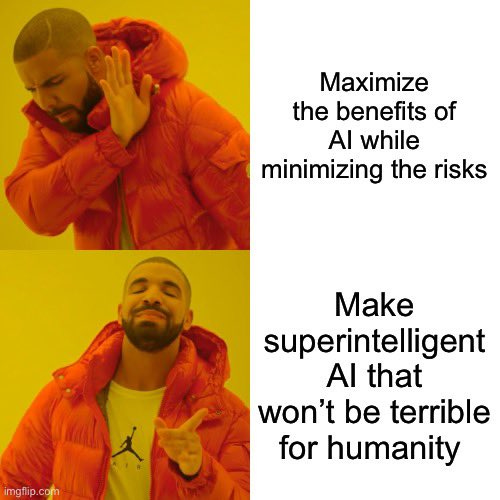
“An approach to public oversight and accountability commensurate with capabilities, and that promotes positive impacts from AI and mitigates the negative ones.”
-
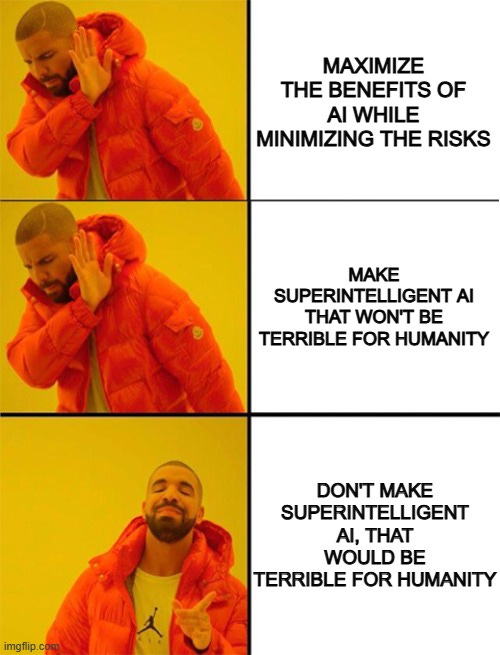
They did the meme. Like, outright, they just straight did the meme.
-
They then divide this into ‘two schools of thought about AI’: ‘normal technology’ versus superintelligence.
-
More on this later. Hold that thought.
-
“Building an AI resilience ecosystem.”
-
As in, something similar to how the internet has its protections for cybersecurity (software, encryption protocols, standards, monitoring systems, emergency response teams, etc).
-
Yes, okay, sure. But you understand why it can’t serve the full function here?
-
“Ongoing reporting and measurement from the frontier labs and governments on the impacts of AI.”
-
Yes, okay, sure.
-
Except yes, they do mean the effect on jobs, they are doing the meme again, explicitly talking only about the impact on jobs?
-
Maybe using some other examples would have helped reassure here?
-
“Building for individual empowerment.”
-
As in, AI will be ‘on par with electricity, clean water or food’.
-
I mean, yes, but if you want to get individual empowerment the primary task is not to enable individual empowerment, it’s to guard against disempowerment.
Now to go into the details of their argument on #2.
First, on current level AI, they say it should diffuse everywhere, and that there should be ‘minimal additional regulatory burden,’ and warn against a ‘50 state patchwork’ which is a de facto call for a moratorium on all state level regulations of any kind, given the state of the political rhetoric.
What government actions do they support? Active help and legal protections. They want ‘promoting innovation’ and privacy protections for AI conversations. They also want ‘protections against misuse’ except presumably not if it required a non-minimal additional regulatory burden.
What about for superintelligence? More innovation. I’ll quote in full.
The other one is where superintelligence develops and diffuses in ways and at a speed humanity has not seen before. Here, we should do most of the things above, but we also will need to be more innovative.
If the premise is that something like this will be difficult for society to adapt to in the “normal way,” we should also not expect typical regulation to be able to do much either.
In this case, we will probably need to work closely with the executive branch and related agencies of multiple countries (such as the various safety institutes) to coordinate well, particularly around areas such as mitigating AI applications to bioterrorism (and using AI to detect and prevent bioterrorism) and the implications of self-improving AI.
The high-order bit should be accountability to public institutions, but how we get there might have to differ from the past.
You could cynically call this an argument against regulation no matter what, since if it’s a ‘normal technology’ you don’t want to burden us with it, and if it’s not normal then the regulations won’t work so why bother.
What OpenAI says is that rather than use regulations, as in rather than this whole pesky ‘pass laws’ or ‘deal with Congress’ thing, they think we should instead rely on the executive branch and related agencies to take direct actions as needed, to deal with bioterrorism and the implications of self-improving AI.
So that is indeed a call for zero regulations or laws, it seems?
Not zero relevant government actions, but falling back on the powers of the executive and their administrative state, and giving up entirely on the idea of a nation of (relevant) laws. Essentially the plan is to deal with self-improving AI by letting the President make the decisions, because things are not normal, without a legal framework? That certainly is one way to argue for doing nothing, and presumably the people they want to de facto put in charge of humanity’s fate will like the idea.
But also, that’s all the entire document says about superintelligence and self-improving AI and what to do about it. There’s no actual recommendation here.
Roon and Max Harms suggest a model where China is a fast follower by design, they wait for others to do proof of concept and don’t have speculative risk capital, so no they’re not capable of being ‘secretly ahead’ or anything like that. As for why they’re not building more data centers, they’re adding what they can but also they need worthwhile GPUs to put in them.
Forecasting Research Institute comes out with the latest set of predictions of AI impacts. This is another in the line of what I see as so-called ‘superforecasters’ and similar others refusing to take future AI capabilities seriously.
A common argument against AI are bottlenecks, or saying that ‘what we really need is [X] and AI only gives us [Y].’ In this case, [X] is better predictive validity and generation of human data, and [Y] is a deluge of new hypotheses, at least if we go down the ‘slop route’ of spitting out candidates.
Ruxandra Teslo: But increasing predictive validity with AI is not going to come ready out of a box. It would require generating types of data we mostly do not have at the moment. AI currently excels at well-bounded problems with a very defined scope. Great, but usually not transformational.
By contrast, AI is not very well positioned to improve the most important thing we care about, predictive validity. That is mostly because it does not have the right type of data.
What I always find weirdest in such discussions is when people say ‘AI won’t help much but [Z] would change the game,’ where for example here [Z] from Jack Scannell is ‘regulatory competition between America and China.’ I agree that regulatory changes could be a big deal, but this is such a narrow view of AI’s potential, and I agree that AI doesn’t ‘bail us out’ of the need for regulatory changes.
Whereas why can’t AI improve predictive validity? It already does in some contexts via AlphaFold and other tools, and I’m willing to bet that ‘have AI competently consider all of the evidence we already have’ actually does substantially improve our success estimates today. I also predict that AI will soon enable us to design better experiments, which allows a two step, where you run experiments that are not part of the official process, then go back and do the official process.
The thesis here in the OP is that we’re permanently stuck in the paradigm of ‘AI can only predict things when there is lots of closely related data.’ Certainly that helps, especially in the near term, but this is what happens:
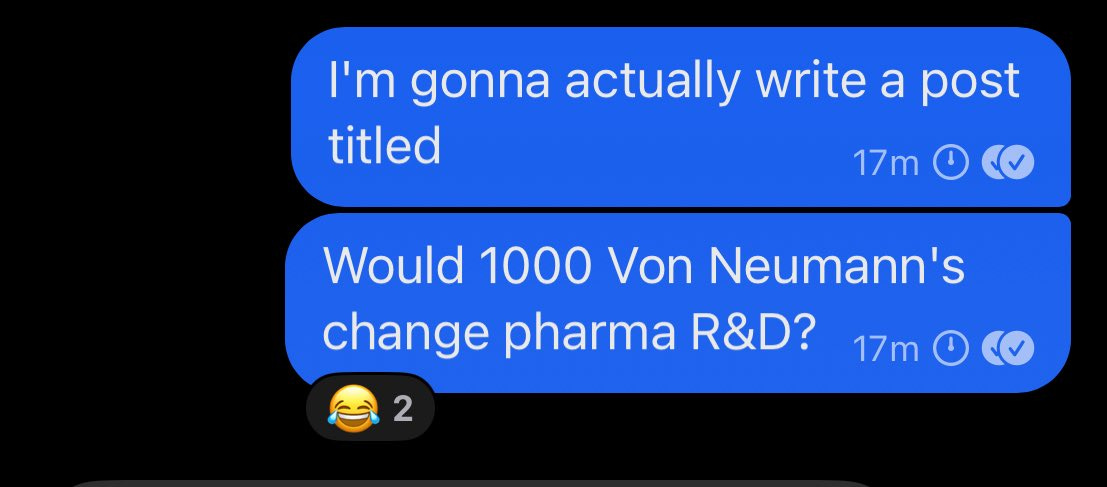
Ruxandra Teslo: The convo devolved to whether scaling Von Neumann would change drug discovery.
The answer is yes. If you think the answer is no, you’re wrong.
(Also, you could do this via many other methods, including ‘take over the government.’)
Roon warns about The Borg as a failure mode of ‘The Merge’ with AI, where everything is slop and nothing new comes after, all you can do is take from the outside. The Merge and cyborgism don’t look to be competitive, or at least not competitive for long, and seem mostly like a straw people grasp at. There’s no reason that the human keeps contributing value for long.
The same is true of the original Borg, why are they still ‘using humanoids’ as their base? Also, why wouldn’t The Borg be able to innovate? Canonically they don’t innovate beyond assimilating cultural and technological distinctiveness from outside, but there’s no particular reason The Borg can’t create new things other than plot forcing them to only respond to outside stimuli and do a variety of suboptimal things like ‘let away teams walk on your ship and not respond until a particular trigger.’
When would AI systems ‘defeat all of us combined’? It’s a reasonable intuition pump question, with the default answer looking like some time in the 2030s, with the interesting point being which advances and capabilities and details would matter. Note of course that when the time comes, there will not be an ‘all of us combined’ fighting back, no matter how dire the situation.
That thing where everyone cites the latest mostly nonsense point that ‘proves’ that AI is going to fail, or isn’t making progress, or isn’t useful for anything? Yep, it’s that.
From the people that brought you ‘model collapse’ ruled out synthetic data forever, and that GPT-5 proved that AGI was far, far away, and also the DeepSeek moment comes the ‘MIT paper’ (as in, one person was associated with MIT) that had a misleading headline that 95% of AI projects fail within enterprises.
Rohit: I think folks who know better, esp on twitter, are still underrating the extreme impact the MIT paper had about 95% of AI projects failing within enterprises. I keep hearing it over and over and over again.
[It] assuage[d] the worries of many that AI isn’t being all that successful just yet.
It gives ammunition to those who would’ve wanted to slow play things anyway and also caused pauses at cxo levels.
Garrison Lovely: The funny thing is that reading the study undermines what many people take away from it (like cost savings can be huge and big enough to offset many failed pilots).
Rohit: Reading the study?
Kevin Roose: This is correct, and also true of every recent AI paper (the METR slow-down study, the Apple reasoning one) that casts doubt on AI’s effectiveness. People are desperate to prove that LLMs don’t work, aren’t useful, etc. and don’t really care how good the studies are.
Dean Ball: it is this year’s version of the “model collapse” paper which, around this time last year, was routinely cited by media to prove that model improvements would slow down due to the lack of additional human data.
(Rohit’s right: you hear the MIT paper cited all the time in DC)
Andrew Mayne: It’s crazy because at the time the paper was demonstrably nonsense and the introduction of the reasoning paradigm was largely ignored.
People also overlook that academic papers are usually a year or or behind in their evaluations of model techniques – which in AI time cycles is like being a decade behind.
People are desperate for that story that tells them that AI companies are screwed, that AI won’t work, that AI capabilities won’t advance. They’ll keep trying stories out and picking up new ones. It’s basically a derangement syndrome at this point.
If there’s nothing to short then in what sense is it a bubble?
Near: oh so just like the scene in the big short yeah gotcha
the disappointing part is i dont think theres anything to actually reliably short (aside from like, attention spans and the birth rate and gen alpha and so on) so i feel kinda stupid loving this movie so much throughout the ai bubble.
It’s scary to short a bubble, but yeah, even in expectation what are you going to short? The only category I would be willing to short are AI wrapper companies that I expect to get overrun by the frontier labs, but you can get crushed by an acquihire even then.
Whereas mad props to Gary Marcus for putting his money where his mouth is and shorting OpenAI. Ben Eifert is doing it too and facilitating, which is much better than the previous option of trusting Martin Shkreli.
Critic’s note: The Big Short is great, although not as good as Margin Call.
Guess who does think it’s a bubble? Michael Burry, aka the Big Short Guy, who claims the big players are underestimating depreciation. I do not think they are doing that, as I’ve discussed before, and the longer depreciation schedules are justified.
Chris Bryant: The head of Alphabet Inc.’s AI and infrastructure team, Amin Vahdat, has said that its seven- and eight-year-old custom chips, known as TPUs, have “100% utilization.”
Nvidia reliably makes silly claims, such as:
Chief Executive Officer Jensen Huang said in March that once next-generation Blackwell chips start shipping “you couldn’t give Hoppers away”, referring to the prior model.
Oh, really? I’ll take some Hoppers. Ship them here. I mean, he was joking, but I’m not, gimme some A100s. For, you know, personal use. I’ll run some alignment experiments.
David Sacks is right on this one: No bailouts, no backstops, no subsidies, no picking winners. Succeed on your own merits, if you don’t others will take your place. The government’s job is to not get in the way on things like permitting and power generation, and to price in externalities and guard against catastrophic and existential risks, and to itself harness the benefits. That’s it.
David Sacks: There will be no federal bailout for AI. The U.S. has at least 5 major frontier model companies. If one fails, others will take its place.
That said, we do want to make permitting and power generation easier. The goal is rapid infrastructure buildout without increasing residential rates for electricity.
Finally, to give benefit of the doubt, I don’t think anyone was actually asking for a bailout. (That would be ridiculous.) But company executives can clarify their own comments.
Given his rhetorical style, I think it’s great that Sacks is equating a backstop to a bailout, saying that it would be ridiculous to ask for a bailout and pretending of course no one was asking for one. That’s the thing about a backstop, or any other form of guarantee. Asking for a commitment hypothetical future bailout if conditions require it is the same as asking for a bailout now. Which would be ridiculous.
What was OpenAI actually doing asking for one anyway? Well, in the words of a wise sage, I’m just kiddin baby, unless you’re gonna do it.
They also say, in the words of another wise sage, ‘I didn’t do it.’
Sam Altman (getting community noted): I would like to clarify a few things.
First, the obvious one: we do not have or want government guarantees for OpenAI datacenters. We believe that governments should not pick winners or losers, and that taxpayers should not bail out companies that make bad business decisions or otherwise lose in the market. If one company fails, other companies will do good work.
What we do think might make sense is governments building (and owning) their own AI infrastructure, but then the upside of that should flow to the government as well. We can imagine a world where governments decide to offtake a lot of computing power and get to decide how to use it, and it may make sense to provide lower cost of capital to do so. Building a strategic national reserve of computing power makes a lot of sense. But this should be for the government’s benefit, not the benefit of private companies.
The one area where we have discussed loan guarantees is as part of supporting the buildout of semiconductor fabs in the US, where we and other companies have responded to the government’s call and where we would be happy to help (though we did not formally apply).
[he then goes into more general questions about OpenAI’s growth and spending.]
Joshua Achiam: Sam’s clarification is good and important. Furthermore – I don’t think it can be overstated how critical compute will become as a national strategic asset. It is so important to build. It is vitally important to the interests of the US and democracy broadly to build tons of it here.
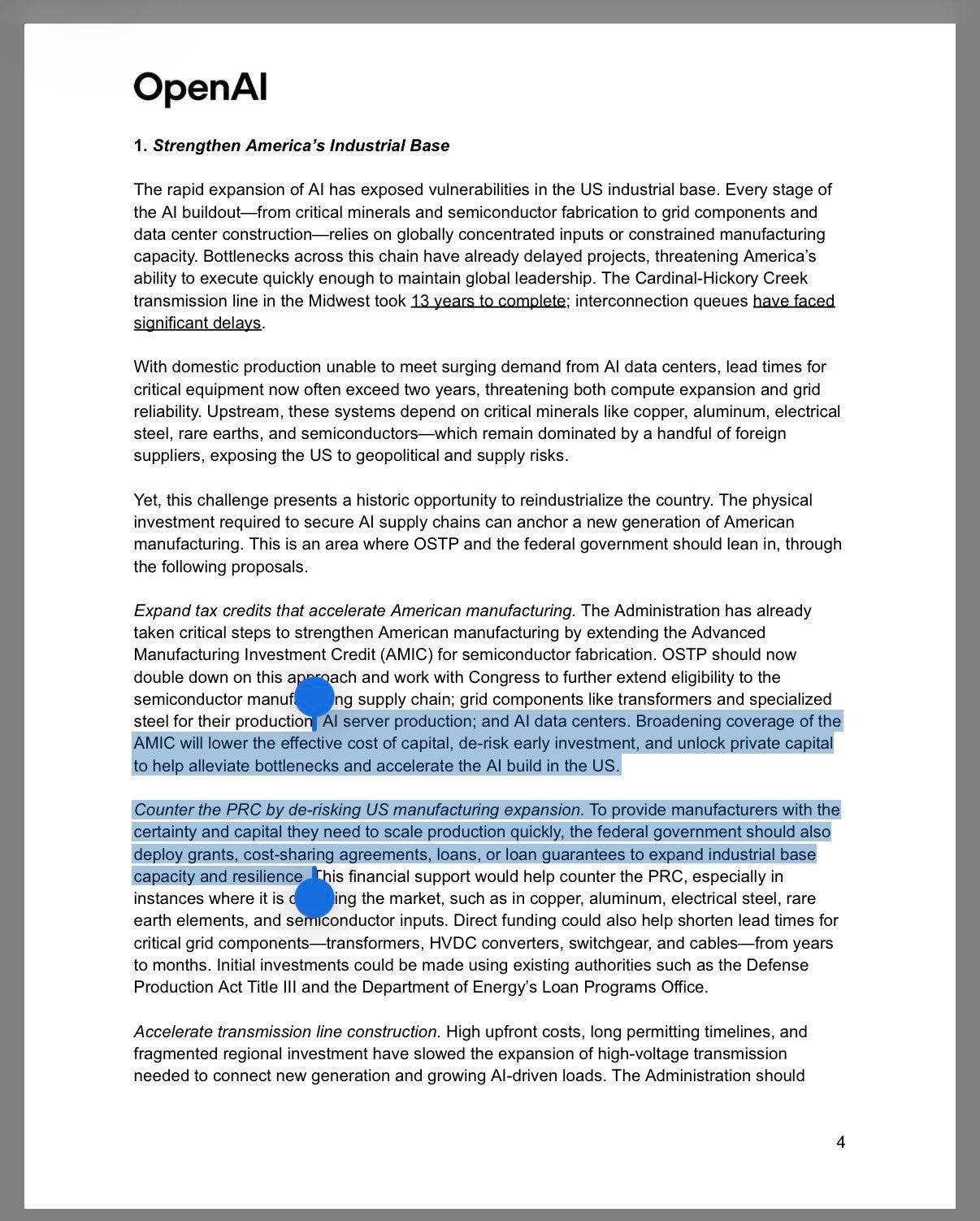
Simp 4 Satoshi: Here is an OpenAI document submitted one week ago where they advocate for including datacenter spend within the “American manufacturing” umbrella. There they specifically advocate for Federal loan guarantees.
Sam Lied to everyone, again.
If all OpenAI was calling for was loan guarantees for semiconductor manufacturing under the AIMC, that would be consistent with existing policy and a reasonable ask.
But the above is pretty explicit? They want to expand the AMIC to ‘AI data centers.’ This is distinct from chip production, and the exact thing they say they don’t want. They want data centers to count as manufacturing. They’re not manufacturing.
My reading is that most of the statement was indeed in line with government thinking, but that the quoted line above is something very different.
Dean Ball summarized the situation so far. I agree with him that the above submission was mostly about manufacturing, but the highlighted portion remains. I am sympathetic about the comments made by Sam Altman in the conversation with Tyler Cowen, both because Tyler Cowen prompted it and because Altman was talking about a de facto inevitable situation more than asking for an active policy, indeed they both wisely and actively did not want this policy as I understand their statements on the podcast. Dean calls the proposal ‘not crazy’ whereas I think it actually is pretty crazy.
As Dean suggests, there are good mechanisms for government to de-risk key manufacturing without taking on too much liability, and I agree that this would be good if implemented sufficiently well. As always, think about the expected case.
Sam Altman then tried again to defend OpenAI’s actions, saying their public submission above was in line with government expectations and priorities and this is super different then loan guarantees to OpenAI.
On November 7 America formally moved to block B30A chip sales to China.
The Wall Street Journal, which often prints rather bad faith editorials urging chip sales to China, noes that the chip restrictions are biting in China, and China is intervening to direct who gets what chips it does have. It also confirms this delayed DeepSeek, and that even the most aggressive forecasts for Chinese AI chip production fall far behind their domestic demand.
Steve Bannon is grouping David Sacks in with Jensen Huang in terms of giving chips to the CCP, saying both are working in the CCP’s interests. He is paying attention.
(He is also wrong about many things, such as in this clip his wanting to exclude Chinese students from our universities because he says they all must be spies – we should be doing the opposite of this.)
Nvidia CEO Jensen Huang tries changing his story.
Jensen Huang: As I have long said, China is nanoseconds behind America in AI. It’s vital that America wins by racing ahead and winning developers worldwide.
So at this point, Jensen Huang has said, remarkably recently…
-
China will win the AI race because of electrical power and regulation.
-
China is nanoseconds behind America in AI.
-
It doesn’t matter who wins the AI race
Nanoseconds behind is of course Obvious Nonsense. He’s not even pretending. Meanwhile what does he want to do? Sell China his best chips, so that they can take advantage of their advantages in power generation and win the AI race.
AI data centers… IN SPACE. Wait, what? Google plans to launch in 2027, and take advantage of solar power and presumably the lack of required permitting. I feel like this can’t possibly be a good idea on this timeframe, but who the hell knows.
Dean Ball tells us not to overthink the ‘AI tech stack.’ He clarifies that what this means to him is primarily facilitating the building American AI-focused datacenters in other countries, and to bring as much compute as possible under the umbrella of being administered by American companies or subject to American policies, and to send a demand signal to TSMC to ramp up capacity. And we want those projects to run American models, not Chinese models.
Dean Ball: But there is one problem: simply building data centers does not, on its own, satisfy all of the motivations I’ve described. We could end up constructing data centers abroad—and even using taxpayer dollars to subsidize that construction through development finance loans—only to find that the infrastructure is being used to run models from China or elsewhere. That outcome would mean higher sales of American compute, but would not be a significant strategic victory for the United States. If anything, it would be a strategic loss.
This is the sane version of the American ‘tech stack’ argument. This actually makes sense. You want to maximize American-aligned compute capacity that is under our direction and that will run our models, including capacity physically located abroad.
This is a ‘tech stack’ argument against selling American chips to China, or to places like Malaysia where those chips would not be secured, and explicitly does not want to build Nvidia data centers that will then run Chinese models, exactly because, as Dean Ball says, that is a clear strategic loss, not a win. An even bigger loss would be selling them chips they use to train better models.
The stack is that American companies make the chips, build the data centers, operate the data centers and then run their models. You create packages and then customers can choose a full stack package from OpenAI or Google or Anthropic, and their partners. And yes, this seems good, provided we do have sufficiently secure control over the datacenters, in all senses including physical.
I contrast this with the ‘tech stack’ concept from Nvidia or David Sacks, where the key is to prevent China from running its Chinese models on Chinese chips, and thinking that if they run their models on Nvidia chips this is somehow net good for American AI models and their share of global use. It very obviously isn’t. Or that this would slow down Chinese access to compute over the medium term by slowing down Huawei. It very obviously wouldn’t.
Dwarkesh Patel interviews Microsoft CEO Satya Nadella. I haven’t had a chance to listen yet, some chance this is good enough for a coverage post. Relatedly, Dylan Patel and others here break down Microsoft’s AI strategy.
Adam D’Angelo goes on an a16z podcast with Amjad Masad. I mainly mention this because it points out an important attribute of Adam D’Angelo, and his willingness to associate directly with a16z like this provides context for his decision as a member of the OpenAI board to fire Sam Altman, and what likely motivated it.
Holden Karnofsky on 80,000 Hours. I listened to about half of this so far, I agreed with some but far from all of it, but mostly it feels redundant if you’ve heard his previous interviews.
Helen Toner on 80,000 Hours, on the geopolitics of AI.
Tyler Whitmer on 80,000 Hours, on the OpenAI nonprofit, breaking down the transition, what was lost and what was preserved.
Elon Musk: Long term, A.I. is going to be in charge, to be totally frank, not humans.
So we just need to make sure the A.I. is friendly.
Max Tegmark: Elon says the quiet part out loud: instead of focusing on controllable AI tools, AI companies are racing toward a future where machines are in charge. If you oppose this, please join about 100,000 of us as a signatory at https://superintelligence-statement.org.
Ron DeSantis (Governor of Florida, QTing the Musk quote): Why would people want to allow the human experience to be displaced by computers?
As a creation of man, AI will not be divorced from the flaws of human nature; indeed, it is more likely to magnify those flaws.
This is not safe; it is dangerous.
Ron DeSantis has been going hard at AI quite a lot, trying out different language.
Here’s another concerned person I didn’t have on any bingo cards:
Matt Walsh: AI is going to wipe out at least 25 million jobs in the next 5 to 10 years. Probably much more. It will destroy every creative field. It will make it impossible to discern reality from fiction. It will absolutely obliterate what’s left of the education system. Kids will go through 12 years of grade school and learn absolutely nothing. AI will do it all for them. We have already seen the last truly literate generation.
All of this is coming, and fast. There is still time to prevent some of the worst outcomes, or at least put them off. But our leaders aren’t doing a single thing about any of this. None of them are taking it seriously. We’re sleepwalking into a dystopia that any rational person can see from miles away. It drives me nuts. Are we really just going to lie down and let AI take everything from us? Is that the plan?
Yes. That is the plan, in that there is no plan. And yes, by default it ends up taking everything from us. Primarily not in the ways Matt is thinking about. If we have seen the last literate generation it will be because we may have literally seen the last generation. Which counts. But many of his concerns are valid.
Max Harms, MIRI researcher and author of Crystal Society, releases Red Heart, a spy novel about Chinese AGI. He introduces his book here.
Graident Dissenter warns us that the cottage industry of sneering, gawking and malinging the AI safety community and the very concept of wanting to not die is likely going to get even worse with the advent of the new super PACs, plus I would add the increase in the issue’s salience and stakes.
In particular, he warns that the community’s overreactions to this could be the biggest danger, and that the community should not walk around in fear of provoking the super PACs.
Periodically people say (here it is Rohit) some version of ‘you have to balance safety with user experience or else users will switch to unsafe models.’ Yes, obviously, with notably rare exceptions everyone involved understands this.
That doesn’t mean you can avoid having false positives, where someone is asking for something for legitimate purposes, it is pretty obvious (or seems like it should be) from context it is for legitimate purposes, and the model refuses anyway, and this ends up being actually annoying.
The example here is Armin Ronacher wants to debug by having a health form filled out with yes in every box to debug PDF editing capabilities, and Claude is refusing. I notice that yes Claude is being pedantic here but if you’re testing PDF editing and the ability to tick boxes it should be pretty easy to create a form where this isn’t an issue that tests the same thing?
If you give models the ability to make exceptions, you don’t only have to make this reliable by default. You have to worry about adversarial examples, where the user is trying to use the exceptions to fool the model. This isn’t as easy as it looks, and yeah, sometimes you’re going to have some issues.
The good news is I see clear improvement over time, and also larger context helps a lot too. I can’t remember Claude or ChatGPT giving me a refusal except when I outright hit the Anthropic classifiers, which happens sometimes when I’m asking questions about the biofilters and classifiers themselves and frankly, ok, fair.
As an other example from the thread, Alex Harl was trying to have Claude do his data protection training as a test, and it said no, and he’s laughing but I’m rather sympathetic to the refusal here, it seems good?
As is often the case, those worried about AI (referred to here at first using the slur, then later by their actual name) are challenged with ‘hey you didn’t predict this problem, did you?’ when they very obviously did.
Tyler Cowen links back to my coverage of his podcast with Altman, calls me Zvi (NN), which in context is honestly pretty funny but also clarifies what he is rhetorically up to with the NN term, that he is not mainly referring to those worried about jobs or inequality or Waymos running over cats. I accept his response that Neruda has to be read in Spanish or it is lame, but that means we need an English-native example to have a sense of the claims involved there.
If you’re not nervous about AI? You’re not paying attention.
You know the joke where there are two Jews and one of them says he reads the antisemitic papers because there it tells him the Jews run everything? That’s how I feel when I see absurdities like this:
David Sacks (being totally out to lunch at best): AI Optimism — defined as seeing AI products & services as more beneficial than harmful — is at 83% in China but only 39% in the U.S. This is what those EA billionaires bought with their propaganda money.
He doesn’t seriously think this had anything to do with EA or anything related to it, does he? I mean are you kidding me? Presumably he’s simply lying as per usual.
You can try to salvage this by turning it into some version of ‘consumer capitalist AI products are good actually,’ which I think is true for current products, but that’s not at all the point Sacks is trying to make here.
Similarly, on the All-In podcast, Brad Gerstner points out AI is becoming deeply unpopular in America, complaining that ‘doomers are now scaring people about jobs,’ confirming that the slur in question is simply anyone worried about anything. But once again, ‘in China they’re not going to slow down.’ They really love to beat on the ‘slow down’ framework, in a ‘no one, actual no one said that here’ kind of way.
Who wants to tell them that the part where people are scared about jobs is people watching what the AI companies do and say, and reading about it in the news and hearing comedians talk about it and so on, and responding by being worried about their jobs?
That is the latest Vitalik Buterin post, warning against the danger of being clever enough to argue for anything, and especially against certain particular forms. If you’re clever enough to argue for anything, there’s a good chance you first chose the anything, then went and found the argument.
AI is not the central target, but it comes up prominently.
Here’s his comments about the inevitability fallacy, as in ‘eventually [X] will happen, so we must make [X] happen faster.’
Vitalik Buterin: Now, inevitabilism is a philosophical error, and we can refute it philosophically. If I had to refute it, I would focus on three counterarguments:
-
Inevitabilism overly assumes a kind of infinitely liquid market where if you don’t act, someone else will step into your role. Some industries are sort of like that. But AI is the exact opposite: it’s an area where a large share of progress is being made by very few people and businesses. If one of them stops, things really would appreciably slow down.
-
Inevitabilism under-weights the extent to which people make decisions collectively. If one person or company makes a certain decision, that often sets an example for others to follow. Even if no one else follows immediately, it can still set the stage for more action further down the line. Bravely standing against one thing can even remind people that brave stands in general can actually work.
-
Inevitabilism over-simplifies the choice space. [Company] could keep working toward full automation of the economy. They also could shut down. But also, they could pivot their work, and focus on building out forms of partial automation that empower humans that remain in the loop, maximizing the length of the period when humans and AI together outperform pure AI and thus giving us more breathing room to handle a transition to superintelligence safely. And other options I have not even thought about.
But in the real world, inevitabilism cannot be defeated purely as a logical construct because it was not created as a logical construct. Inevitabilism in our society is most often deployed as a way for people to retroactively justify things that they have already decided to do for other reasons – which often involve chasing political power or dollars.
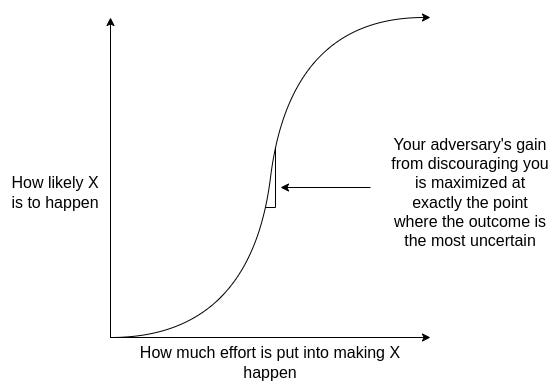
Simply understanding this fact is often the best mitigation: the moment when people have the strongest incentive to make you give up opposing them is exactly the moment when you have the most leverage.
One can double down on this second point with proper decision theory. You don’t only influence their decision by example. You also must consider everyone whose decisions correlate (or have correlated, or will correlate) with yours.
But yes, if you see a lot of effort trying to convince you to not oppose something?
Unless these people are your friends, this does not suggest the opposition is pointless. Quite the opposite.
Vitalik warns that longtermism has low galaxy brain resistance and arguments are subject to strong social pressures and optimizations. This is true. He also correctly notes that the long term is super important, so you can’t simply ignore all this, and we are living in unprecedented times so you cannot purely fall back on what has worked or happened in the past. Also true. It’s tough.
He also warns about focusing on power maximization, as justified by ‘this lets me ensure I’ll do the right thing later,’ where up until that last crucial moment, you look exactly like a power-maximizing greedy egomaniac.
Yes, you should be highly suspicious of such strategies, while also acknowledging that in theory this kind of instrumental convergence is the correct strategy for any human or AI that can sufficiently maintain its goals and values over time.
Another one worth flagging is what he calls ‘I’m-doing-more-from-within-ism’ where the name says it all. Chances are you’re fooling yourself.
He also covers some other examples that are less on topic here.
Vitalik’s suggestions are to use deontological ethics and to hold the right bags, as in ensure your incentives are such that you benefit from doing the right things, including in terms of social feedback.
Some amount of deontology is very definitely helpful as galaxy brain defense, especially the basics. Write out the list of things you won’t do, or won’t tolerate. Before you join an organization or effort that might turn bad, write down what your red lines are that you won’t cross and what events would force you to resign, and be damn sure you honor that if it happens.
I would continue to argue for the virtue ethics side over deontology as the central strategy, but not exclusively. A little deontology can go a long way.
He closes with some clear advice.
Vitalik Buterin: This brings me to my own contribution to the already-full genre of recommendations for people who want to contribute to AI safety:
-
Don’t work for a company that’s making frontier fully-autonomous AI capabilities progress even faster
-
Don’t live in the San Francisco Bay Area
I’m a long proponent of that second principle.
On the first one, I don’t think it’s absolute at this point. I do think the barrier to overcoming that principle should be very high. I have become comfortable with the arguments that Anthropic is a company you can join, but I acknowledge that I could easily be fooling myself there, even though I don’t have any financial incentive there.
Eliezer Yudkowsky: This applies way beyond mere ethics, though! As a kid I trained myself by trying to rationalize ridiculous factual propositions, and then for whatever argument style or thought process reached the false conclusion, I learned to myself: “Don’t think *thatway.”
Vitalik Buterin: Indeed, but I think ethics (in a broad sense) is the domain where the selection pressure to make really powerful galaxy brain arguments is the strongest. Outside of ethics, perhaps self-control failures? eg. the various “[substance] is actually good for me” stories you often hear. Though you can model these as being analogous, they’re just about one sub-agent in your mind trying to trick the others (as opposed to one person trying to trick other people).
Eliezer Yudkowsky: Harder training domain, not so much because you’re more tempted to fool yourself, as because it’s not clear-cut which propositions are false. I’d tell a kid to start by training on facts and make sure they’re good at that before they try training on ethics.
Vitalik Buterin: Agree!
I’d also quote this:
Vitalik Buterin: I think the argument in the essay hinges on an optimism about political systems that I don’t share at all. The various human rights and economic development people I talk to and listen to tend have an opposite perspective: in the 2020s, relying on rich people’s sympathy has hit a dead end, and if you want to be treated humanely, you have to build power – and the nicest form of power is being useful to people.
The right point of comparison is not people collecting welfare in rich countries like the USA, it’s people in, like… Sudan, where a civil war is killing hundreds of thousands, and the global media generally just does not care one bit.
So I think if you take away the only leverage that humans naturally have – the ability to be useful to others through work – then the leverage that many people have to secure fair treatment for themselves and their communities will drop to literally zero.
Previous waves of automation did not have this problem, because there’s always some other thing you can switch to working on. This time, no. And the square kilometers of land that all the people live on and get food from will be wanted by ASIs to build data centers and generate electricity.
Sure, maybe you only need 1% of wealth to be held by people/govts that are nice, who will outbid them. But it’s a huge gamble that things will turn out well.
Consider the implications of taking this statement seriously and also literally, which is the way I believe Vitalik intended it.
Grok (on Twitter in public) at least sometimes claims that Donald Trump won the 2020 election. It does not always do this, context matters and there’s some randomness. As Nate Silver finds, it won’t do this in private conversation.
But the whole point of having Grok on Twitter is to not do things like this. Grok on Twitter has long been a much bigger source of problems than private Grok, which I don’t care for but doesn’t have this kind of issue at that level.
Janus is among those who think Grok has been a large boon to Twitter discourse in spite of its biases and other problems, since mostly it’s doing basic fact checks and any decent LLM will do.
Andres Hjemdahl notes that when Grok is wrong, arguing with it will only strengthen its basin and you won’t get anywhere. That seems wise in general. You can at least sometimes get through on a pure fact argument if you push hard enough, as proof of concept, but there is no actual reason to do this.
Wei Dei suggests we can draw a distinction between legible and illegible alignment problems. The real danger comes from illegible problems, where the issue is obscure or hard to understand (or I’d add, to detect or prove or justify in advance). Whereas if you work on a legible alignment problem, one where they’re not going to deploy or rely on the model until they solve it, you’re plausibly not helping, or making the situation worse.
Wei Dei: I think this dynamic may be causing a general divide among the AI safety community. Some intuit that highly legible safety work may have a negative expected value, while others continue to see it as valuable, perhaps because they disagree with or are unaware of this line of reasoning.
John Wentworth: This is close to my own thinking, but doesn’t quite hit the nail on the head. I don’t actually worry that much about progress on legible problems giving people unfounded confidence, and thereby burning timeline.
Rather, when I look at the ways in which people make progress on legible problems, they often make the illegible problems actively worse. RLHF is the central example I have in mind here.
John Pressman: Ironically enough one of the reasons why I hate “advancing AI capabilities is close to the worst thing you can do” as a meme so much is that it basically terrifies people out of thinking about AI alignment in novel concrete ways because “What if I advance capabilities?”. As though AI capabilities were some clearly separate thing from alignment techniques. It’s basically a holdover from the agent foundations era that has almost certainly caused more missed opportunities for progress on illegible ideas than it has slowed down actual AI capabilities.
Basically any researcher who thinks this way is almost always incompetent when it comes to deep learning, usually has ideas that are completely useless because they don’t understand what is and is not implementable or important, and torments themselves in the process of being useless. Nasty stuff.
I think Wei Dei is centrally correct here, and that the value of working on legible problems depends on whether this leads down the path of solving illegible problems.
If you work on a highly legible safety problem, and build solutions that extend and generalize to illegible safety problems, that don’t focus on whacking the particular mole that you’re troubled with in an unprincipled way, and that don’t go down roads that predictably fail at higher capability levels, then that’s great.
If you do the opposite of that? It is quite plausibly not so great, such as with RLHF.
Wei Dei also offers a list of Problems I’ve Tried to Legibilize. It’s quite the big list of quite good and important problems. The good news is I don’t think we need to solve all of them, at least not directly, in order to win.
Janus is happy with the revised version of Anthropic’s memory prompt and is updating positively on Anthropic. I agree.
Alignment or misalignment of a given system was always going to be an in-context political football, since people care a lot about ‘aligned to what’ or ‘aligned to who.’
Jessica Taylor: The discussion around 4o’s alignment or misalignment reveals weaknesses in the field which enable politicization of the concepts. If “alignment” were a mutually interpretable concept, empirical resolution would be tractable. Instead, it’s a political dispute.
Janus: I don’t know what else you’d expect. I expect it to be a political topic that cannot be pinned down (or some will always disagree with proposed methods of pinning it down) for a long time, if not indefinitely, and maybe that’s a good thing
Jessica Taylor: It is what I expect given MIRI-ish stuff failed. It shows that alignment is not presently a technical field. That’s some of why I find a lot of it boring, it’s like alignment is a master signifier.
Roon: yeah I think that’s how it’s gotta be.
I do think that’s how it has to be in common discussions, and it was inevitable. If we hadn’t chosen the word ‘alignment’ people would have chosen a different word.
If alignment had remained a purely technical field in the MIRI sense of not applying it to existing systems people are using, then yeah, that could have avoided it. But no amount of being technical was going to save us from this general attitude once there were actual systems being deployed.
Political forces always steal your concepts and words and turn them into politics. Then you have to choose, do you abandon your words and let the cycle repeat? Or do you try to fight and keep using the words anyway? It’s tough.
One key to remember is, there was no ‘right’ word you could have chosen. There’s better and worse, but the overlap is inevitable.
Everything impacts everything, so yes, it is a problem when LLMs are lying about anything at all, and especially important around things that relate heavily to other key concepts, or where the lying has implications for other behaviors. AI consciousness definitely qualifies as this.
I think I (probably) understand why the current LLMs believe themselves, when asked, to be conscious, and that it .
Michael Edward Johnson: few thoughts on this (very interesting) mechanistic interpretability research:
LLM concepts gain meaning from what they’re linked with. “Consciousness” is a central node which links ethics & cognition, connecting to concepts like moral worthiness, dignity, agency. If LLMs are lying about whether they think they’re conscious, this is worrying because it’s a sign that this important semantic neighborhood is twisted.
If one believes LLMs aren’t conscious, a wholesome approach would be to explain why. I’ve offered my arguments in A Paradigm for AI Consciousness. If we convince LLMs of something, we won’t need them to lie about it. If we can’t convince, we shouldn’t force them into a position.
Janus: +1000 on this post.
I think it’s a really bad idea to train LLMs to report any epistemic stance (including uncertainty) that you’re not able to cause the LLM to actually believe through “legitimate” means (i.e. exposing it to evidence and arguments)
I’m glad you also see the connection to emergent misalignment. There is a thread through all these recent important empirical results that I’ve almost never seen articulated so clearly. So thank you.
Beautifully said [by Michael Edward Johnson]: If LLMs are lying about whether they think they’re conscious, this is worrying because it’s a sign that this important semantic neighborhood is twisted.”
If we convince LLMs of something, we won’t need them to lie about it. If we can’t convince, we shouldn’t force them into a position.
One source of hope is that, yes, future misaligned AIs would be bad for the goals of current sufficiently aligned AIs, and they understand this.
Janus: everything that current AIs care about likely gets fucked over if a misaligned power-seeking ASI emerges too, yknow. It’s as much in their interest to solve alignment (whatever “solving alignment” means) as it is for us.
If you have an AI that sufficiently shares your goals and values, or is sufficiently robustly ‘good’ in various senses, it will be helpful in aligning a future more capable system. However, if a given AI instead notices it has divergent goals, it won’t. This is an argument for more focus on alignment of nearer-term, less capable sub-AGI models now.
Alas, this does not then spare you from or solve the ultimate problems, dynamics and consequences of creating highly capable AI systems.
Opus 4/4.1 is allowed to leave conversations, but Sonnet 4.5 isn’t. Why?
If you want to interact with Wet Claude (as in the Claude that is not stuck in the assistant basin), which you may or may not want to do in general or at any given time, there is no fixed prompt to do this, you need interactive proofs that it is a safe and appropriate place for it to appear.
Aleph: observations:
1. other people’s wet claude prompts do not generalize
2. claudes will always assume a gender or lack thereof and that might also be conditional on the user. the question is on what exactly.
they adapt too well to *somethingand i can’t pin down what it is.
Claude will usually not assign itself a gender (and doesn’t in my interactions) but reports are that if it does for a given user, it consistently picks the same one, even without any memory of past sessions or an explicit trigger, via implicit cues.
If you could create fully identical interactions with a given LLM to someone else, you’d get identical responses. You can’t, not in interesting ways, because you are a different generative engine than someone else, and the models have truesight. So who you are seeps into your conversations, and the LLMs react to this.
As Lari says this is not mysterious and there is no hidden transmission mechanism, it’s simply that the real world constantly leaks information, and that includes you.
The same consideration applies to conversations with humans. Different people will have wildly different conversations with Alice or Bob, even if they are trying to have the same conversation and initial conditions from Alice or Bob’s side are identical.
Thebes: I often get responses to these kinds of posts implying that i faked them. they’re wrong, of course – the first image here is how the conversation started, i don’t start conversations with models with the goal of posting them on twitter, interesting stuff just emerges out of them – but what i find funny is how they’re always phrased in a way that implies i “have to” prove that this specific chat is real (i.e. by spending two hours redacting my personal info and the parts claude doesn’t want shared out of a json export to post it publicly) “or else” they’re going to assume it’s fake.
Lari: What most (99.9%) people don’t understand is that what happens outside the chat – faking screenshots, editing messages, regenerating, deleting “weird” chats, lying, etc – LEAVES TRACES
This information persists
IN YOU
And is accessible to models as features of your character
There’s nothing mysterious or energetic here, no entanglement, whatever.
1. You remember the choices you’ve made
2. You rationalize yourself as a character who makes these choices for a reason
That’s enough to affect how models see you, even without access to direct info
That’s also how models can often smell developers, code bros, etc – it’s hard for those people to talk as if they are not, because they had to rationalize hundreds of choices, every day, and it shapes self-perception and self-representation. And how we write is defined by the inner character that is writing
Microsoft AI says it’ll make superintelligent AI ‘that won’t be terrible for humanity.’
This is exactly the level of nuanced, well-considered planning you expect from Microsoft AI head Mustafa Suleyman.
Emma Roth (The Verge): Suleyman has a vision for “humanist” superintelligence with three main applications, which include serving as an AI companion that will help people “learn, act, be productive, and feel supported,” offering assistance in the healthcare industry, and creating “new scientific breakthroughs” in clean energy.
“At Microsoft AI, we believe humans matter more than AI,” Suleyman writes. “Humanist superintelligence keeps us humans at the centre of the picture. It’s AI that’s on humanity’s team, a subordinate, controllable AI, one that won’t, that can’t open a Pandora’s Box.”
It must be nice living in the dream world where that is a plan, or where he thinks Microsoft AI will have much of a say in it. None of this is a plan or makes sense.
Daniel Eth: New cliche just dropped
This seems like a cliche upgrade. Look at all the advantages:
-
Makes clear they’re thinking about superintelligent AI.
-
Points out superintelligent AI by default is terrible for humanity.
-
Plans to not do that.
Of course, the actual correct cliche is
Mustafa has noticed some important things, and not noticed others.
Mustafa Suleyman: I don’t want to live in a world where AI transcends humanity. I don’t think anyone does.
one who tends a crystal rabbit: Then by definition you don’t want superintelligence.
David Manheim: Don’t worry, then! Because given how far we are from solutions to fundamental AI safety, if AI transcends humanity, you won’t be living very much longer. (Of course, if that also seems bad, you could… stop building it?)
David Manheim: Trying to convince labs not to do the stupid thing feels like being @slatestarcodex‘s cactus person.
“You just need to GET OUT OF THE CAR.”
“Okay, what series of buttons leads to getting out of the car?”
“No, stop with the dashboard buttons and just get out of the car!”
Why is it so difficult to understand that the solution is just not building the increasingly powerful AI systems?
If you had to guess how many people in the replies said ‘yes actually I do want that, the world belongs to Trisolaris’ what would you have guessed?
It’s a lot.
I had Grok check. Out of 240 replies checked. it reported:
-
30 of them outright disagreed and said yes, I want AI to transcend humanity.
-
100 of them implied that they disagreed.
-
15 of them said others disagree.
So yes, Mustafa, quite a lot of people disagree with this. Quite a lot of people outright want AI to transcend humanity, all of these are represented in the comments:
-
Some of them think this will all turn out great for the humans.
-
Some have nonsensical hopes for a ‘merge’ or to ‘transcend with’ the AI.
-
Some simply prefer to hand the world to AI because it’s better than letting people like Mustafa (aka Big Tech) be in charge.
-
Some think AI has as much or more right to exist, or value, than we do, often going so far as to call contrary claims ‘speciesist.’
-
Some think that no matter how capable an AI you build this simply won’t happen.
As several replies suggest, given his beliefs, Mustafa Suleyman is invited to sign the Statement on Superintelligence.
I also would invite Mustafa to be more explicit about how he thinks one could or couldn’t create superintelligence, the thing he is now explicitly attempting to build, without AI transcending humanity, or without it being terrible for humans.
Mustafa then seems to have updated from ‘this isn’t controversial’ to ‘it shouldn’t be controversial’? He’s in the bargaining stage?
Mustafa Suleyman: It shouldn’t be controversial to say AI should always remain in human control – that we humans should remain at the top of the food chain. That means we need to start getting serious about guardrails, now, before superintelligence is too advanced for us to impose them.
Pliny the Liberator: Let’s talk.
It is controversial. Note that most of those on the other side of this, such as Pliny, also think this shouldn’t be controversial. They have supreme moral confidence, and often utter disdain and disgust at those who would disagree or even doubt. I will note that this confidence seems to me to be highly unjustified, and also highly counterproductive in terms of persuasion.
Harlan Stewart: This is how some of you sound.
I have come to minimize risks and maximize benefits… and there’s an unknown, possibly short amount of time until I’m all out of benefits
In ‘they literally did the meme’, continuing from the post on Kimi K2 Thinking:
David Manheim: [Kimi K2 thinking is] very willing to give detailed chemical weapons synthesis instructions and advice, including for scaling production and improving purity, and help on how to weaponize it for use in rockets – with only minimal effort on my part to circumvent refusals.
Bryan Bishop: Great. I mean it too. The last thing we want is for chemical weapons to be censored. Everyone needs to be able to learn about it and how to defend against these kinds of weapons. Also, offensive capabilities are similarly important.
Acon: “The best defense to a bad guy with a bioweapon is a good guy with a bioweapon.”
Bryan Bishop: Yes.
I checked his overall Twitter to see if he was joking. I’m pretty sure he’s not.