Author name: Mike M.

cloudflare-defies-italy’s-piracy-shield,-won’t-block-websites-on-111.1-dns

Cloudflare defies Italy’s Piracy Shield, won’t block websites on 1.1.1.1 DNS

The CCIA added that “the Piracy Shield raises a significant number of concerns which can inadvertently affect legitimate online services, primarily due to the potential for overblocking.” The letter said that in October 2024, “Google Drive was mistakenly blocked by the Piracy Shield system, causing a three-hour blackout for all Italian users, while 13.5 percent of users were still blocked at the IP level, and 3 percent were blocked at the DNS level after 12 hours.”

The Italian system “aims to automate the blocking process by allowing rights holders to submit IP addresses directly through the platform, following which ISPs have to implement a block,” the CCIA said. “Verification procedures between submission and blocking are not clear, and indeed seem to be lacking. Additionally, there is a total lack of redress mechanisms for affected parties, in case a wrong domain or IP address is submitted and blocked.”

30-minute blocking prevents “careful verification”

The 30-minute blocking window “leaves extremely limited time for careful verification by ISPs that the submitted destination is indeed being used for piracy purposes,” the CCIA said. The trade group also questioned the piracy-reporting system’s ties to the organization that runs Italy’s top football league.

“Additionally, the fact that the Piracy Shield platform was developed for AGCOM by a company affiliated with Lega Serie A, which is one of the very few entities authorized to report, raises serious questions about the potential conflict of interest exacerbating the lack of transparency issue,” the letter said.

A trade group for Italian ISPs has argued that the law requires “filtering and tasks that collide with individual freedoms” and is contrary to European legislation that classifies broadband network services as mere conduits that are exempt from liability.

“On the contrary, in Italy criminal liability has been expressly established for ISPs,” Dalia Coffetti, head of regulatory and EU affairs at the Association of Italian Internet Providers, wrote in April 2025. Coffetti argued, “There are better tools to fight piracy, including criminal Law, cooperation between States, and digital solutions that downgrade the quality of the signal broadcast via illegal streaming websites or IPtv. European ISPs are ready to play their part in the battle against piracy, but the solution certainly does not lie in filtering and blocking IP addresses.”

Cloudflare defies Italy’s Piracy Shield, won’t block websites on 1.1.1.1 DNS Read More »

is-orion’s-heat-shield-really-safe?-new-nasa-chief-conducts-final-review-on-eve-of-flight.

Is Orion’s heat shield really safe? New NASA chief conducts final review on eve of flight.


“That level of openness and transparency is exactly what should be expected of NASA.”

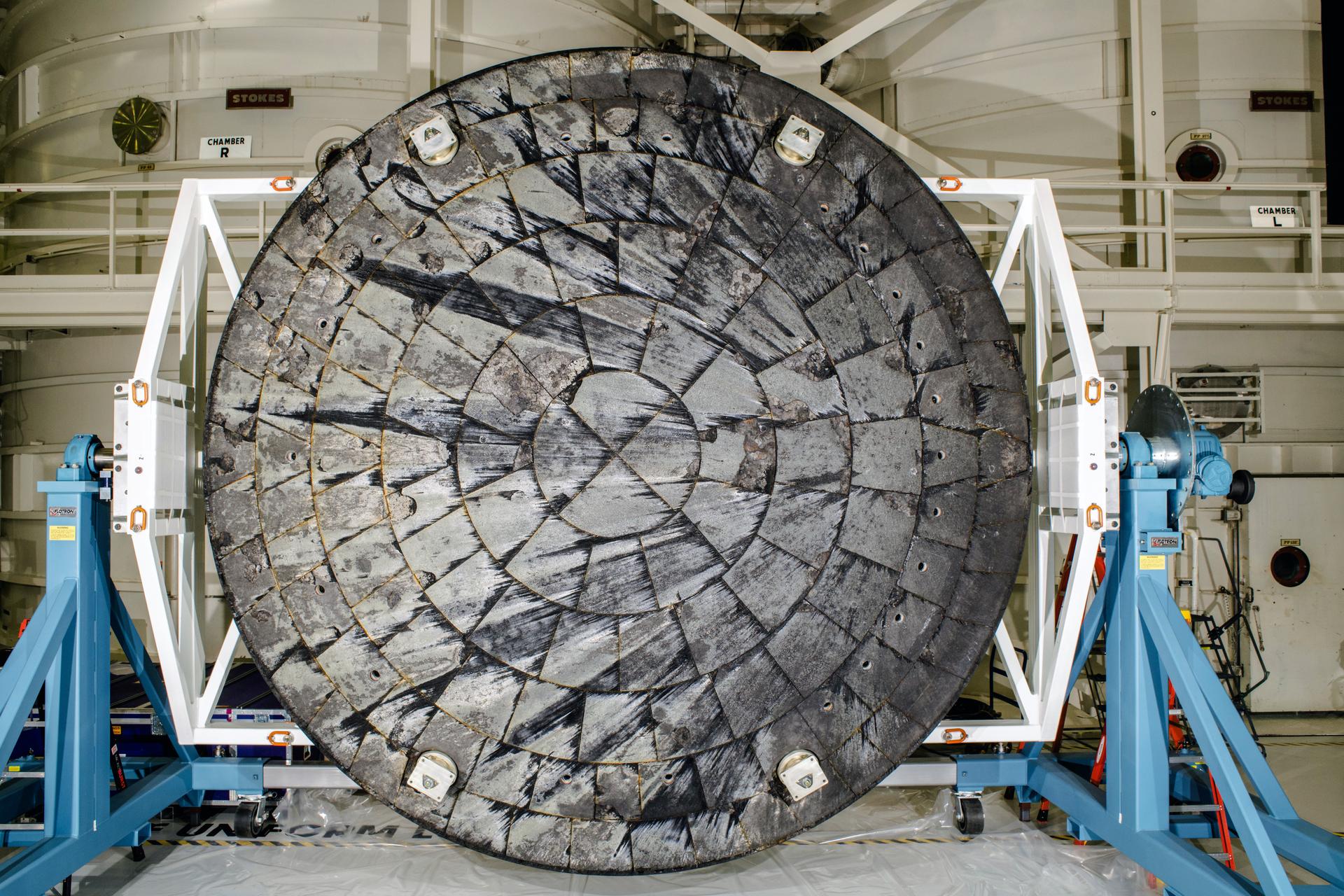
The Orion heat shield as seen after the Artemis I flight. Credit: NASA

The Orion heat shield as seen after the Artemis I flight. Credit: NASA

WASHINGTON, DC—This week, NASA’s new administrator, Jared Isaacman, said he has “full confidence” in the space agency’s plans to use the existing heat shield to protect the Orion spacecraft during its upcoming lunar mission.

Isaacman made the determination after briefings with senior leaders at the agency and a half-day review of NASA’s findings with outside experts.

“We have full confidence in the Orion spacecraft and its heat shield, grounded in rigorous analysis and the work of exceptional engineers who followed the data throughout the process,” Isaacman said Thursday.

Isaacman has previously indicated that reviewing the heat shield issue early in his tenure, especially with the Artemis II mission due to launch in as few as four weeks, was a top priority. He met with senior agency officials about the matter within hours of being sworn in on December 18.

The private astronaut and billionaire entrepreneur has also said there should be more public transparency at NASA.

Following the Artemis I mission in November 2022, NASA was roundly criticized for its opaque handling of damage to Orion’s heat shield. The seriousness of the problem was not disclosed for nearly a year and a half after the Artemis I mission, when NASA’s Inspector General finally published close-up images of char loss—chunks of ablative material at Orion’s base that were intended to protect the spacecraft during its return but had fallen away.

To address these concerns, NASA tapped an “independent review team” in April 2024 to assess the agency’s investigation of the heat shield. This group’s findings were finalized in December 2024, at which time NASA formally decided to fly the Artemis II mission with the existing heat shield. Although NASA held a news conference to discuss its conclusions, a publicly released copy of the independent review team’s report was heavily redacted, creating further doubt about the integrity of the process. Some notable critics assailed NASA’s decision to fly on the heat shield as is and decried the ongoing lack of transparency.

That is more or less where the matter stood until a few days before Christmas, when Isaacman officially became NASA administrator.

Transparency for the taxpayer

After taking the job in Washington, DC, Isaacman asked the engineers who investigated the heat shield issue for NASA, as well as the chair of the independent review team and senior human spaceflight officials, to meet with a handful of outside experts. These included former NASA astronauts Charles Camarda and Danny Olivas, both of whom have expertise in heat shields and had expressed concerns about the agency’s decision-making.

For the sake of transparency, Isaacman also invited two reporters to sit in on the meeting, me and Micah Maidenberg of The Wall Street Journal. We were allowed to report on the discussions without directly quoting participants for the sake of a full and open discussion.

The inspector general’s report, released on May 1, 2024, included new images of Orion’s heat shield.

Credit: NASA Inspector General

The inspector general’s report, released on May 1, 2024, included new images of Orion’s heat shield. Credit: NASA Inspector General

Convened in a ninth-floor conference room at NASA Headquarters known as the Program Review Center, the meeting lasted for more than three hours. Isaacman attended much of it, though he stepped out from time to time to handle an ongoing crisis involving an unwell astronaut on orbit. He was flanked by the agency’s associate administrator, Amit Kshatriya; the agency’s chief of staff, Jackie Jester; and Lori Glaze, the acting associate administrator for NASA’s Exploration Systems Development Mission Directorate. The heat shield experts joined virtually from Houston, along with Orion Program Manager Howard Hu.

Isaacman made it clear at the outset that, after reviewing the data and discussing the matter with NASA engineers, he accepted the agency’s decision to fly Artemis II as planned. The team had his full confidence, and he hoped that by making the same experts available to Camarda and Olivas, it would ease some of their concerns.

What followed was a spirited discussion, with Camarda sparring regularly with the presenters and Olivas asking questions more infrequently. The engineering team in Houston, led by Luis Saucedo, went through dozens of charts and presented reams of data that had not been made public before.

“That level of openness and transparency is exactly what should be expected of NASA,” Isaacman said after the meeting.

“What if we’re wrong?”

Perhaps the most striking revelation was what the NASA engineers called “what if we’re wrong” testing.

At the base of Orion, there are 186 blocks of a material called Avcoat, individually attached to provide a protective layer that allows the spacecraft to survive the heating of atmospheric reentry. Returning from the Moon, Orion encounters temperatures of up to 5,000° Fahrenheit (2,760° Celsius). A char layer that builds up on the outer skin of the Avcoat material is supposed to ablate, or erode, in a predictable manner during reentry. Instead, during Artemis I, fragments fell off the heat shield and left cavities in the Avcoat material.

Work by Saucedo and others—including substantial testing in ground facilities, wind tunnels, and high-temperature arc jet chambers—allowed engineers to find the cause of gases becoming trapped in the heat shield, leading to cracking. This was due to the Avcoat material being “impermeable,” essentially meaning it could not breathe.

After considering several options, including swapping the heat shield out for a newer one with more permeable Avcoat, NASA decided instead to change Orion’s reentry profile. For Artemis II, it would return through Earth’s atmosphere at a steeper angle, spending fewer minutes in the environment where this outgassing occurred during Artemis I. Much of Thursday’s meeting involved details about how the agency reached this conclusion and why the engineers deemed the approach safe.

A test block of Avcoat undergoes heat pulse testing inside an arc jet test chamber at NASA’s Ames Research Center in California. The test article, configured with both permeable (upper) and non-permeable (lower) Avcoat sections for comparison, helped to confirm an understanding of the root cause of the loss of charred Avcoat material on Artemis I.

Credit: NASA

A test block of Avcoat undergoes heat pulse testing inside an arc jet test chamber at NASA’s Ames Research Center in California. The test article, configured with both permeable (upper) and non-permeable (lower) Avcoat sections for comparison, helped to confirm an understanding of the root cause of the loss of charred Avcoat material on Artemis I. Credit: NASA

However, toward the end of the meeting, the NASA team agreed to discuss something that “no one really liked to talk about.” This was an analysis of what would happen to Orion if large sections of the heat shield failed completely during Artemis II. Formally, this is known as a “damage tolerance evaluation,” the engineers said. Informally, it’s known as “What if we’re wrong.”

The Avcoat blocks, which are about 1.5 inches thick, are laminated onto a thick composite base of the Orion spacecraft. Inside this is a titanium framework that carries the load of the vehicle. The NASA engineers wanted to understand what would happen if large chunks of the heat shield were stripped away entirely from the composite base of Orion. So they subjected this base material to high energies for periods of 10 seconds up to 10 minutes, which is longer than the period of heating Artemis II will experience during reentry.

What they found is that, in the event of such a failure, the structure of Orion would remain solid, the crew would be safe within, and the vehicle could still land in a water-tight manner in the Pacific Ocean.

“We have the data to say, on our worst day, we’re able to deal with that if we got to that point,” one of the NASA engineers said.

Getting to “flight rationale”

The composite layer beneath the heat shield is intended to withstand a maximum temperature of 500° F during reentry. During Artemis I, the maximum temperature recorded, despite the persistent cracking and char loss, was 160°. So any crew on board would have been safe. Even so, the heat shield damage was a serious concern because the agency’s modeling did not predict it.

After more than two years of testing and analysis of the char loss issue, the NASA engineers are convinced that, by increasing the angle of Orion’s descent during Artemis II, they can minimize damage to the heat shield. During Artemis I, as the vehicle descended from about 400,000 to 100,000 feet, it was under a “heat load” of various levels for 14 minutes. With Artemis II, this time will be reduced to eight minutes.

Orion’s entry profile will be similar for the first two and a half minutes, but afterward, the Artemis II entry will undertake a bit of a higher heat load than Artemis I for a couple of minutes. All of the agency’s modeling and extensive arc jet testing indicate this will produce significantly less cracking in the Avcoat material.

Much of the discussion Thursday delved into the technical minutiae of heat shields, tamp planes (the process of packing Avcoat into blocks), early char loss, spallation, and more. The discourse also revealed that one test in 2019, three years before Artemis I, indicated hints of the char loss later observed in flight. But this finding was not unequivocal, nor did it throw up a huge red flag at the time, the NASA officials said.

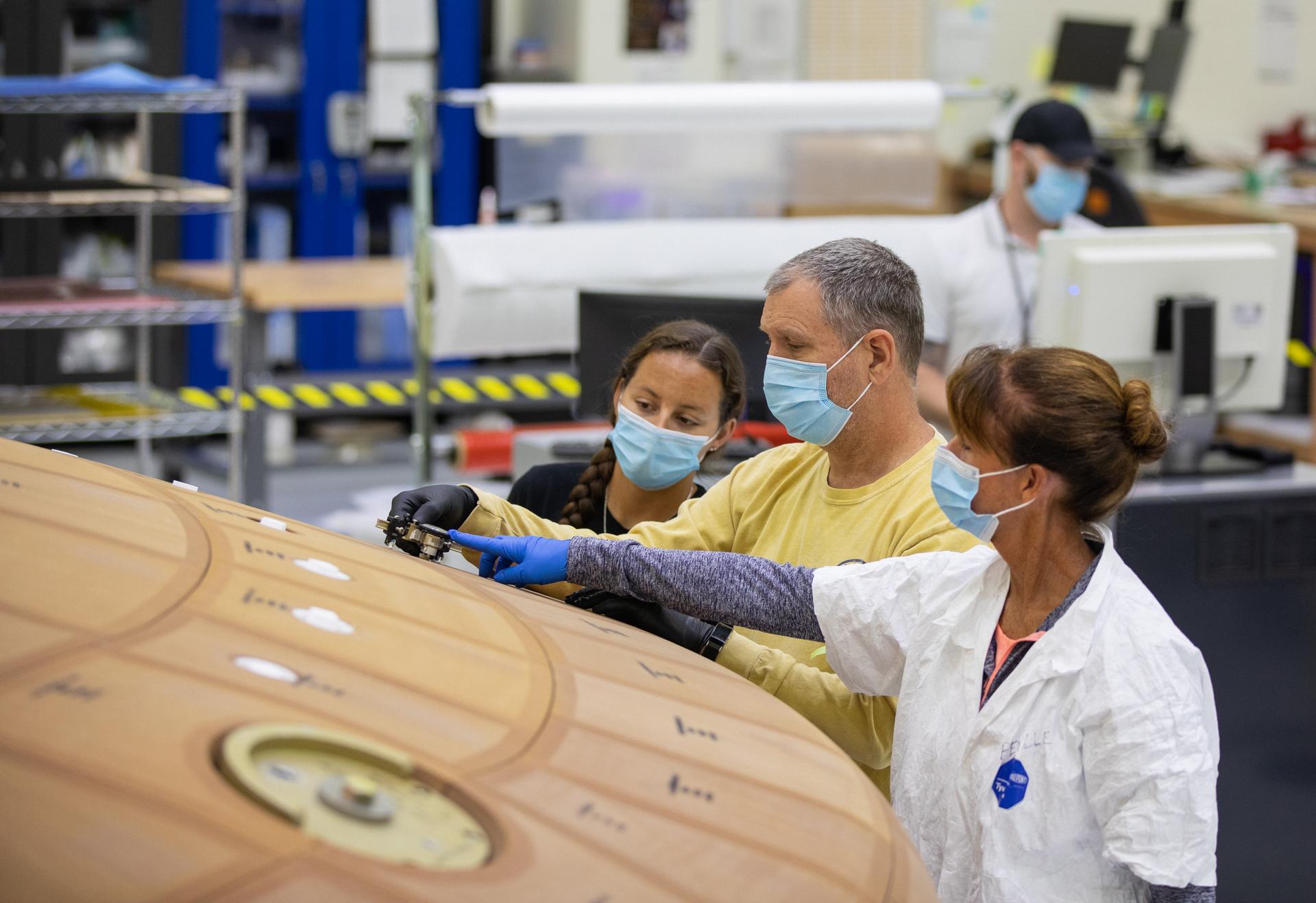
Technicians inspect the heat shield for the Artemis II launch.

Credit: NASA

Technicians inspect the heat shield for the Artemis II launch. Credit: NASA

The message from Isaacman, Kshatriya, and other NASA officials at the meeting was clear. This heat shield was not perfect. If NASA knew several years ago what it knows now, the heat shield would be designed differently. It would be permeable to prevent the outgassing problems. Those changes are being incorporated into the Artemis III mission’s heat shield. There will be other tweaks to increase reliability.

Nevertheless, the agency is confident that flying the Artemis II heat shield on the revised profile is perfectly safe. In NASA jargon, such a rigorous justification that a space mission is safe to fly is known as flight rationale.

But why get to flight rationale at all? About 18 months ago, as the agency was narrowing in on the root cause of the heat shield issues, NASA’s leaders at the time, including Kshatriya, considered their options. They mulled the possibility of flying Artemis II in low-Earth orbit to test its life support equipment but not overly stress the heat shield. They thought about flying a second robotic mission around the Moon.

Perhaps most seriously, they considered moving forward with the Orion spacecraft (or at least its heat shield) that will be flown in Artemis III, which has permeable Avcoat, to be used for this mission. I asked Kshatriya on Thursday why they had not simply done this.

“We had considered ‘let’s just pull forward CSM 3 (the Artemis III spacecraft),’” he said, in part. “and essentially turn CSM 2 (Artemis II) either into a test article or something else. Again, CSM 3 has unique capabilities, docking systems on it, right? We didn’t have a docking mode for that mission (Artemis II). CSM 2 could not be retrofitted with the docking system because of the uniqueness of the tunnel. Really, CSM 2 is kind of uniquely a free return vehicle because of the way it was designed initially. So the mods that would have had to be made for (Artemis) II and III to do that swap would have been too odious, and we wouldn’t have gotten the learnings. And, you know, we’re trying to get up hill as quickly as we can.”

Given all of this, how should we feel about this flight rationale, with Artemis II potentially launching in early February?

Over the last 18 months, I have had many discussions with experts about this, from mid-level engineers and current and former astronauts to senior leaders. I know definitively that the four Artemis II astronauts, Reid Wiseman, Victor Glover, Christina Koch, and Jeremy Hansen, are comfortable with the decision. They did not feel that way at the beginning of the process. Wiseman, in particular, was quite skeptical. But they’ve been won over. Like almost everyone else who has reviewed NASA’s data at length, they accept the plan. Indeed, they are ready and eager to fly.

But what of the outside critics? That was the whole point of Thursday’s session. Could the NASA engineers convince Olivas and Camarda?

Yes, and maybe

Olivas flew two Space Shuttle missions in 2007 and 2009 and has an advanced degree in materials science from Rice University. Before this week’s meeting, he had not gone public with his heat shield concerns. But he has been talking to me and another space reporter, Robert Pearlman, for about a month now.

Olivas is very credible on these issues. He was asked by the NASA leadership in late 2023, before the independent review team was formally named, to provide a second set of eyes on the space agency’s heat shield work. He saw all of the investigative data in real time. Although not formally a member, he sat in on the review team’s meetings through 2024 before that process ended. Afterward, he had some lingering questions he felt were unresolved by that process. A few weeks ago, he told Pearlman and me he would be reluctant to fly on Orion. It was a stunning admission.

Isaacman appeared to take these concerns seriously. In advance of Thursday’s meeting, he engaged with Olivas to hear him out and share information about what NASA’s engineers had done over the last 18 months to resolve some of the independent review team’s questions. These included char loss very early in Orion’s reentry.

After Thursday’s meeting, Olivas told me he had changed his mind, expressing appreciation and admiration for the in-depth engineering work done by the NASA team. He would now fly on Orion.

Camarda, another former shuttle astronaut, was less effusive. He has been very public with his criticism of NASA’s handling of the Orion heat shield. He told me in December 2024 that the space agency and its leadership team should be “ashamed.” Unlike Olivas, however, he has been on the outside the whole time. NASA had kept Camarda, 73, at arm’s length, and he felt disrespected. Given his credentials—the aerospace engineer spent two decades working on thermal protection for the space shuttle and hypersonic vehicles–Camarda could be a potent voice of skepticism leading up to the Artemis II launch.

After the meeting, I asked Camarda whether he felt any better about flying crew on the Artemis II heat shield.

“I would never be happy accepting a workaround and flying something that I know is the worst version of that heat shield we could possibly fly and hoping that the workaround is going to fix it,” Camarda said. “What I really hope he [Isaacman] gets is that if we don’t get back to doing research at NASA, we’re not going to be able to help Starship solve their problems. We’ve got to get back to doing research.”

But Camarda was no longer the firebrand he was at the outset of the meeting. Near its end, in fact, he even thanked the leadership team for being brought in, read in on the data, and allowed to have his say.

Photo of Eric Berger

Eric Berger is the senior space editor at Ars Technica, covering everything from astronomy to private space to NASA policy, and author of two books: Liftoff, about the rise of SpaceX; and Reentry, on the development of the Falcon 9 rocket and Dragon. A certified meteorologist, Eric lives in Houston.

Is Orion’s heat shield really safe? New NASA chief conducts final review on eve of flight. Read More »

claude-codes

Claude Codes

Claude Code with Opus 4.5 is so hot right now. The cool kids use it for everything.

They definitely use it for coding, often letting it write all of their code.

They also increasingly use it for everything else one can do with a computer.

Vas suggests using Claude Code as you would a mini-you/employee that lives in your computer and can do literally anything.

There’s this thread of people saying Claude Code with Opus 4.5 is AGI in various senses. I centrally don’t agree, but they definitely have a point.

If you’d like, you can use local Claude Code via Claude Desktop, documentation here. It’s a bit friendlier than the terminal and some people like it a lot more. Here is a more extensive basic discussion of setup options. The problem is the web interface still lacks some power user functions, even after some config work Daniel San misses branch management, create new repository directory via ‘new’ and import plugins from marketplaces.

If you haven’t checked Claude Code out, you need to check it out.

This could be you:

Paulius: ​whoever made this is making me FEEL SEEN

  1. Hype!

  2. My Own Experiences.

  3. Now With More Recursive Self Improvement.

  4. A Market Of One.

  5. Some Examples Of People Using Claude Code Recently.

  6. Dealing With Context Limits.

  7. The Basic Claude Code Setup.

  8. Random Claude Code Extension Examples I’ve Seen Recently.

  9. Skilling Up.

  10. Reasons Not To Get Overexcited.

I note that the hype has been almost entirely Claude Code in particular, skipping over OpenAI’s Codex or Google’s Jules. Claude Code with Opus 4.5 is, for now, special.

InternetVin: The more I fuck around with Claude Code, the more I feel like 2026 is the tipping point for how we interact with computers. Will never be the same again. All of this shit is becoming StarCraft for the next little bit.

Reports of productivity with Claude Code and Opus 4.5 are off the charts.

Elvis: Damn, it is so much fun to build orchestrators on top of Claude Code.

You would think the terminal would be the ultimate operator.

There is so much more alpha left to build on top of all of this. Include insane setups to have coding agents running all day.

I didn’t think it was possible to have a better experience with coding agents beyond AI-powered IDEs, then came Claude Code CLI.

Now it’s about the UIs and orchestration capabilities, and turning your computer into a 24-hour building machine. Just scratching the surface.

Rohan Anil: if I had agentic coding and particularly opus, I would have saved myself first 6 years of my work compressed into few months.

Yuchen Jin: This matches my experience. AI collapses the learning curve, and turns junior engineers into senior engineers dramatically fast.

New-hire onboarding on large codebases shrinks from months to days. What used to take hours of Googling and Stack Overflow is now a single prompt. AI is also a good mentor and pair programmer. Agency is all you need now.

Claude Code built in an hour what took a Google team a year.

That part isn’t shocking. What is shocking is that Google allows their engineers to use Claude Code instead of forcing Gemini, Gemini CLI, or Antigravity.

Jaana Dogan (Google): I’m not joking and this isn’t funny. We have been trying to build distributed agent orchestrators at Google since last year. There are various options, not everyone is aligned… I gave Claude Code a description of the problem, it generated what we built last year in an hour.

It’s not perfect and I’m iterating on it but this is where we are right now. If you are skeptical of coding agents, try it on a domain you are already an expert of. Build something complex from scratch where you can be the judge of the artifacts.

Andy Masley: Do just have the urge to post “Wow Claude + the browser app + code can just do anything with computers now and I can just sit back and watch” over and over, which imo would be annoying. Trying to not hype too much but like it does feel so crazy

Dean Ball: got tired of having Claude use my computer (mostly I use gui use for qa) so I told it to spin up a vm and hook it up to the computer use api. so now when claude needs to use the gui to test a feature it’s coding in the gui it knows to fire up its vm. this itself is agi-pilling.

Dean Ball: I agree with all this; it is why I also believe that opus 4.5 in claude code is basically AGI.

Most people barely noticed, but *it is happening.*

It’s just happening, at first, in a conceptually weird way: Anyone can now, with quite high reliability and reasonable assurances of quality, cause bespoke software engineering to occur.

Lukas: Claude code is actually as good as all the insane Silicon Valley people on your timeline are saying

It appears 80% of jobs are totally debunked and we’re just waiting for people to notice

McKay Wrigley (warning: often super excited): feels like a ton of people finally got a proper chance to toy around with cc + opus 4.5 over the holidays (aka agi for devs)

the deserved vibe shift begins.

2026 will be electric.

claude code + opus 4.5 injected the immaculate hacker vibes back into ai that we haven’t had since gpt-4.

everything is new + fun + weird again.

you can feel it.

another oom of new ideas & latent economic value is waiting to be unlocked.

and building has never been this fun.

Oliver Habryka notices he is confused, and asks why one would use Claude Code rather than Cursor, given you get all the same parallelism and access either way, so as to integrate the same model with your IDE. Henry suggests that Anthropic now RLs for the Claude Code scaffolding in particular.

My experience coding has been that when I wanted to look at the code Cursor did seem like the way unless there was some price or performance difference, but also I’ve mostly stopped looking at the code and also it does seem like the model does way better work in Claude Code.

So far I’ve been working on two coding projects. I’ve been using the terminal over the web interface on the ‘skill up at doing this before you reject it’ theory and it’s been mostly fine although I find editing my prompts annoying.

One that I’ve started this past week is the reimplementation of my Aikido handicapping system. That’s teaching me a lot about the ways in which the things I did were anti-intuitive and difficult to find and fiddly, and required really strong discipline to make them work, even if the underlying concepts were conceptually simple.

At first I thought I was making good progress, and indeed I got something that ‘kind of worked’ remarkably fast and it did an amazing job finding and downloading data sources, which used to be a ton of work for me. That would have saved me a ton of time. But ultimately enough different things went wrong that I had my ‘no you can’t straight up vibe code this one’ moment. It’s too adversarial a space and too sensitive to mistakes, and I was trying to ‘fly too close to the sun’ in terms of not holding its hand.

That’s on me. What I actually need to do is go into an old computer, find a full version of the old program including its data, and then have Claude iterate from there.

The success finding and downloading data sources was exceedingly useful. I’m still processing the implications of being able to pull in essentially any data on the internet, whenever I have the urge to do that.

I also learned some of the importance of saying ‘put that in the claude.md file.’ Finally we have a clear consistent way to tell the AI how we want it to work, or what to remember, and it just works because files work.

The more important project, where it’s working wonders, is my Chrome extension.

The main things it does, noting I’m expanding this continuously:

  1. On Substack, it will generate or update a Table of Contents with working links, remove any blank sections, apply any standard links from a list you can manage, strip source info from links, or use Ctrl+Q to have Gemini reformat the current block quote or paragraph for those who refuse to use capitalization, spelling or punctuation.

  2. It will copy over your Substack post to WordPress and to a Twitter Article. I’m expanding this to Google Docs but permissions are making that annoying.

  3. Alt+click in Twitter Pro will add the highlighted tweet to a tab group elsewhere.

  4. Alt+a on a Twitter page loads it into the clipboard, alt+v will fully paste it so that it becomes a black quote in proper format, including the link back.

  5. F4 toggles between regular text and Header 4.

It’s early days, there’s tons more to do, but that already adds up fast in saving time.

I’d managed to get some of the core functionality working using Cursor, using previous LLMs, while doing a lot of reading of code and manual fixing. Annoying, although still worthwhile. But when I tried to push things further, I ran into a wall, and I ran into a wall again when I tried to use Antigravity with Gemini 3.

When I tried using Claude Code with Opus 4.5, suddenly everything started working, usually on the first or second try. What I’ve implemented is particular to my own work, but I’d say it saves me on the order of 10 minutes a day at this point, is the only reason I’m able to post my articles to Twitter, and the gains are accelerating.

Before, I had a distinct desktop, so that when I was coding with Cursor I would be able to focus and avoid distractions.

Now I do the opposite, so I can be running Claude Code in the background while I do other things, and notice when it needs a push. Vastly higher productivity.

As I write this, I have multiple windows working.

I’m having Claude Code manage my Obsidian Vault, increasingly handle my Email, it’s downloaded an archive of all my posts so I can do analysis and search easily, and so on. It seems clear the sky’s the limit once you realize it has crossed the critical thresholds.

This morning I needed contact info for someone, asked it to find it, and it pulled it from a stored Certificate of Insurance. I definitely would not have found it.

I’m still in the stage where this is net negative for my observed output, since I’m spending a bunch of time organizing and laying groundwork, but that will change.

The main reason I’m not doing more is that I’m not doing a great job thinking of things I want to do with it. That’s on me, but with time it is getting fixed.

I’m in the early stages of spinning up non-coding Claude Code folders, starting with one where I had it download a copy of all of my writing for analysis. For most basic search purposes I already got similar functionality from a GPT, but this will over time be doing more than that.

I’m not zero scared to hook it up to my primary email and let it actually do things as opposed to being read only, but the gains seem worth it.

Claude Code just upgraded to version 2.1.0, including this:

Added automatic skill hot-reload – skills created or modified in `~/.claude/skills` or `.claude/skills` are now immediately available without restarting the session

also:

Added support for MCP `list_changed` notifications, allowing MCP servers to dynamically update their available tools, prompts, and resources without requiring reconnection​

Thus, if you have it create a skill for you or change an MCP server, you can now start using it without a reload.

There’s a ton of other things here too, most of them minor.

Claude Code creator Boris Cherney’s highlights are:

​- Shift+enter for newlines, w/ zero setup

– Add hooks directly to agents & skills frontmatter

– Skills: forked context, hot reload, custom agent support, invoke with /

– Agents no longer stop when you deny a tool use

– Configure the model to respond in your language (eg. Japanese, Spanish)

– Wildcard support for tool permissions: eg. Bash(*-h*)

– /teleport your session to http://claude.ai/code

Fernando: Have any of these people spending thousands on CC shipped anything of note?

Jeffrey Emanuel: Yeah, I’ve shipped a tremendous amount of software in the last 8 weeks that’s used by many thousands of people.

Deepfates: Our ideas about making software need to be completely upended. You no longer have to “ship” anything. The software just needs to be useful for you. It doesn’t have to be scalable or have nine nines uptime, it doesn’t need to be a library. We are returning to the personal computer.

Peter Wildeford: ​People realize that Claude Code can do email and calendar right?

I do a lot of things like “Can you look at my todo list and calendars and make a plan for today” and “Bob just emailed me asking to meet, can you look at my calendar and draft a reply about when I’m available?”

You can also do things like “What are my most urgent emails?” and “What have I sent in the past two weeks that still needs a response and thus I should follow up?”

How to set this up for yourself? Just ask Claude lol.

Ankit Kumar: Claude out here replacing both my EA and my sense of guilt about unread emails.

Molly Cantillon gives us an essay on her use that Tyler Cowen expects to be one of the most important of the year, entitled The Personal Panopticon. She’s got eight main instances running at all times, it’s paying for itself in cancelled subscriptions and by managing her trades and personal finances, and so much more.

Molly Cantillon: This is the default now. The bottleneck is no longer ability. The bottleneck is activation energy: who has the nerve to try, and the stubbornness to finish. This favors new entrants.​

Here’s what my tower looks like mechanically. I run a swarm of eight instances in parallel: ~/𝚗𝚘𝚡, ~/𝚖𝚎𝚝𝚛𝚒𝚌𝚜, ~/𝚎𝚖𝚊𝚒𝚕, ~/𝚐𝚛𝚘𝚠𝚝𝚑, ~/𝚝𝚛𝚊𝚍𝚎𝚜, ~/𝚑𝚎𝚊𝚕𝚝𝚑, ~/𝚠𝚛𝚒𝚝𝚒𝚗𝚐, ~/𝚙𝚎𝚛𝚜𝚘𝚗𝚊𝚕. Each operates in isolation, spawns short-lived subagents, and exchanges context through explicit handoffs. They read and write the filesystem. When an API is absent, they operate the desktop directly, injecting mouse and keystroke events to traverse apps and browsers. 𝚌𝚊𝚏𝚏𝚎𝚒𝚗𝚊𝚝𝚎 -𝚒 keeps the system awake on runs, in airports, while I sleep. On completion, it texts me; I reply to the checkpoint and continue. All thought traces logged and artifacted for recursive self-improvement.

The essay was presumably written by Claude, does that make it and the whole process involved more impressive or less?

Roon: ​vessels for Claude. I don’t mean to single this person out but she wrote a wall of egregiously recognizable claudeslop about how claude is running her entire life. the Borg is coming

Near: i would be less upset if these ppl didnt lie when you ask them who wrote it

She does indeed deny it but admits it would be surprising if she hadn’t:

I do not think this is ‘one of the most important essays of the year’ and expect a hell of a year, but if you need this kind of kick to see what the baby can do and have some ideas, then it’s pretty strong for that.

Pedram.md has Opus 4.5 build an orchestrator, expecting it to fail. It succeeds.

Zulali has Claude Code recover corrupted wedding footage.

Ryan Singer is teaching it technical spaing and breadboarding, from his Shape Up methodology, it’s a technique to design features abstractly using places, affordances and wires before coding starts.

Ryan McEntush creates BuildList 2.0, a website listing companies doing important work, in two days with Claude Code. As per usual with websites, nothing here seems hard once you have the concepts down, but speed kills.

Avery vibe coded an interactive particle playground where you move them using your hands. Emily Lambert also did something similar.

Jake Eaton gives Claude Code the raw data for his PhD, the calculating and writing up of which took him 3 months the first time, and it recreates a third of the whole thing in 20 minutes with a short prompt. When you look at exactly what it did nothing is particularly impressive, but think of the time I save.

If you want Claude to use Chrome, you now have at least three options: The official Claude Chrome extension, Chrome DevTools MCP and Playright MCP. I am partial to typing ‘claude —chrome.’

You can do quite a lot with that, if you trust the process:

Nader Dabit: Claude Code can also control your browser.

It uses your login and session state, so Claude can access anything you’re already logged into without API keys or OAuth setup.

Here are 10 workflows that I’ve been experimenting with:

“open the PR preview, click through every link, report any 404s”

“watch me do this workflow once, then do it 50 more times”

“check my calendar for tomorrow’s meetings and draft prep notes in a google doc” (you can even combine this with notion pages and other docs etc..)

“open this airtable base and update the status column based on this spreadsheet”

triage gmail without touching gmail: “delete all promo emails from the last 24 hours”

scrape docs from a site → analyze them → generate code from what you learned → commit. one prompt.

“pull pricing and features from these 5 similar products, save to csv, analyze where we’re underpriced or overpriced, and draft a slide for monday’s meeting with recommendations”

“read through this notion wiki and find everywhere we mention the old API”

“compare staging vs prod and screenshot any differences”

You can debug user issues by having Claude literally reproduce their steps

If claude hits a captcha or login, it pauses, you handle it, tell it to continue, and it picks up where it left off.

It’s fun to watch chrome move in real time, no headless mode. It kind of feels like pair programming with a very fast ghost who never gets tired of clicking.

You can run this by upgrading to the latest and running claude –chrome

Use Claude Code with Chrome to directly fight customer service and file an FCC claim. When more people are doing this we’re going to have Levels of Friction issues.

Mehul Mohan points out that ideally many of us would have Claude Code running 24/7, in the background, doing various forms of work or research for potential use later. That wouldn’t be cheap, but it could well be cheap compared to the cost of your time, once you get it working well.

One issue Claude Code users share is compaction.

When you hit auto-compact, Claude Code does its best to condense the prior conversation and keep going, but you will lose important context. Daniel San disabled auto-compaction for this reason, instead choosing to restart sessions if and when limits get hit.

Many replied with some form of the claim that if you ever hit auto-compaction it means you did not manage your hooks, commands and subagents correctly.

My experience is that, at minimum, when you get into the danger zone you want to ‘rescue’ important context into files.

Daniel Sen also shares his other configuration settings.

Boris Cherny, creator of Claude Code, shows us how he uses it.

He calls his setup ‘basic.’ So yes, to many this now counts as basic:

  1. Five Claude Code windows inside Terminal tabs, plus 5-10 on claude.ai/code, all in parallel, always using Opus 4.5 with Thinking.

    1. I note that I do NOT use tabs for my different terminals because I want to watch the tabs work, also this is why we have three huge monitors.

  2. He often will tag @.claude on coworkers’ PRs to add to claude.md. Most sessions start in plan mode.

  3. He uses slash commands for every ‘inner loop’ he does repeatedly.

  4. He uses some regular subagents.

  5. He uses PostToolUse.

  6. He does NOT use —dangerously-skip-permission, but does use /permissions to pre-allow common bash commands he knows are safe.

  7. “Claude Code uses all my tools for me. It often searches and posts to Slack (via the MCP server), runs BigQuery queries to answer analytics questions (using bq CLI), grabs error logs from Sentry, etc. The Slack MCP configuration is checked into our .mcp.json and shared with the team.”

  8. “For very long-running tasks, I will either (a) prompt Claude to verify its work with a background agent when it’s done, (b) use an agent Stop hook to do that more deterministically, or (c) use the ralph-wiggum plugin (originally dreamt up by @GeoffreyHuntley). I will also use either –permission-mode=dontAsk or –dangerously-skip-permissions in a sandbox to avoid permission prompts for the session, so Claude can cook without being blocked on me.

  9. A final tip: probably the most important thing to get great results out of Claude Code — give Claude a way to verify its work. If Claude has that feedback loop, it will 2-3x the quality of the final result.

Claude Code team gives us their code-simplifier agent:

Boris Cherny: ​We just open sourced the code-simplifier agent we use on the Claude Code team.

Try it: claude plugin install code-simplifier

Or from within a session:

/plugin marketplace update claude-plugins-official

/plugin install code-simplifier

Ask Claude to use the code simplifier agent at the end of a long coding session, or to clean up complex PRs. Let us know what you think!

Claude Canvas gives Claude an external ‘monitor’ space for the user to see things.

Claude Code Docs tells Claude about itself so it can suggest its own upgrades, he suggests most value comes from finding new hooks.

CallMe lets you talk to Claude Code on the phone, and have it ping you when it needs your feedback.

That’s not how I roll at all, but different strokes, you know?

Claude HUD shows you better info: Remaining context, currently executing tools and subagents, and claude’s to-do list progress.

Jarrod Watts (explaining how to install HUD if you want that):

Add the marketplace

/plugin marketplace add jarrodwatts/claude-hud

· Install the plugin

/plugin install claude-hud

· Configure the statusline

/claude-hud:setup​

Or have it do a skill itself, such as here where Riley Brown asks it to hook itself up to Nana Banana, so it does. Or you can grab that skill here, if you’d prefer.

Claude Code is a blank canvas. Skill and configuration very clearly matter a lot.

So, how does one improve, whether you’re coding or doing other things entirely?

Robert Long asks for the best guides. The only piece of useful advice was to follow the Claude Code team itself, as in Boris Cherny and Ado. There is clearly lots of good stuff there, but that’s not very systematic.

Ado offers a guide to getting started and to the most powerful features. Here are some:

  1. If you’re importing a project, start with /init.

  2. Tell claude “Update Claude.md: [new instructions].”

  3. Use commands like @src/auth.ts, or @src/components, to add to context.

  4. Use @mcp:github and similar to enable/disable MCP servers.

  5. ! [bash command] runs the command.

  6. Double Esc rewinds.

  7. Ctrl+R searches your past prompts and cycles matches, enter runs it, tab edits.

  8. Ctrl+S stashes the current prompt.

  9. Alt+P switches models (not that I’ve ever wanted to do this).

  10. claude —continue or claude —resume to restore a past session.

  11. /rename the current session, then refer to it by name.

  12. claude —teleport to move sections between web and terminal.

  13. /export dumps your entire conversation to markdown.

  14. /vim unlocks vim-style editing of prompts, not being able to do normal editing is the main disadvantage for me so far of the terminal interface

  15. /statusline to customize the status bar at the bottom, including things people build extensions to display, especially context window percentage

  16. /context to tell you what’s eating up your context window.

  17. /usage to see your usage limits.

  18. ultrathink (to start a command) to get it to think really hard.

  19. Shift+Tab twice to enter Plan mode.

  20. /sandbox defines boundaries.

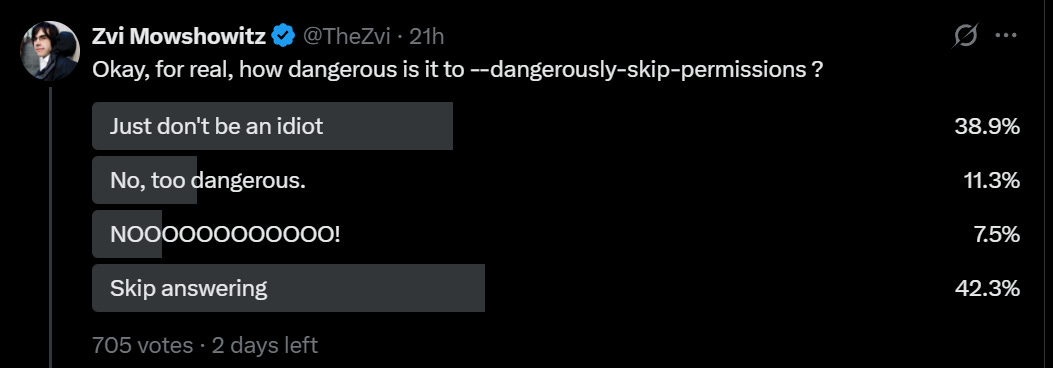
  21. claude —dangerously-skip-permissions, of course, skips all permissions. In theory this means it can do arbitrary damage if not isolated.

  22. /hooks or editing .claude/settings.json creates shell commands to run on predetermined lifecycles.

  23. /plugin install my-setup

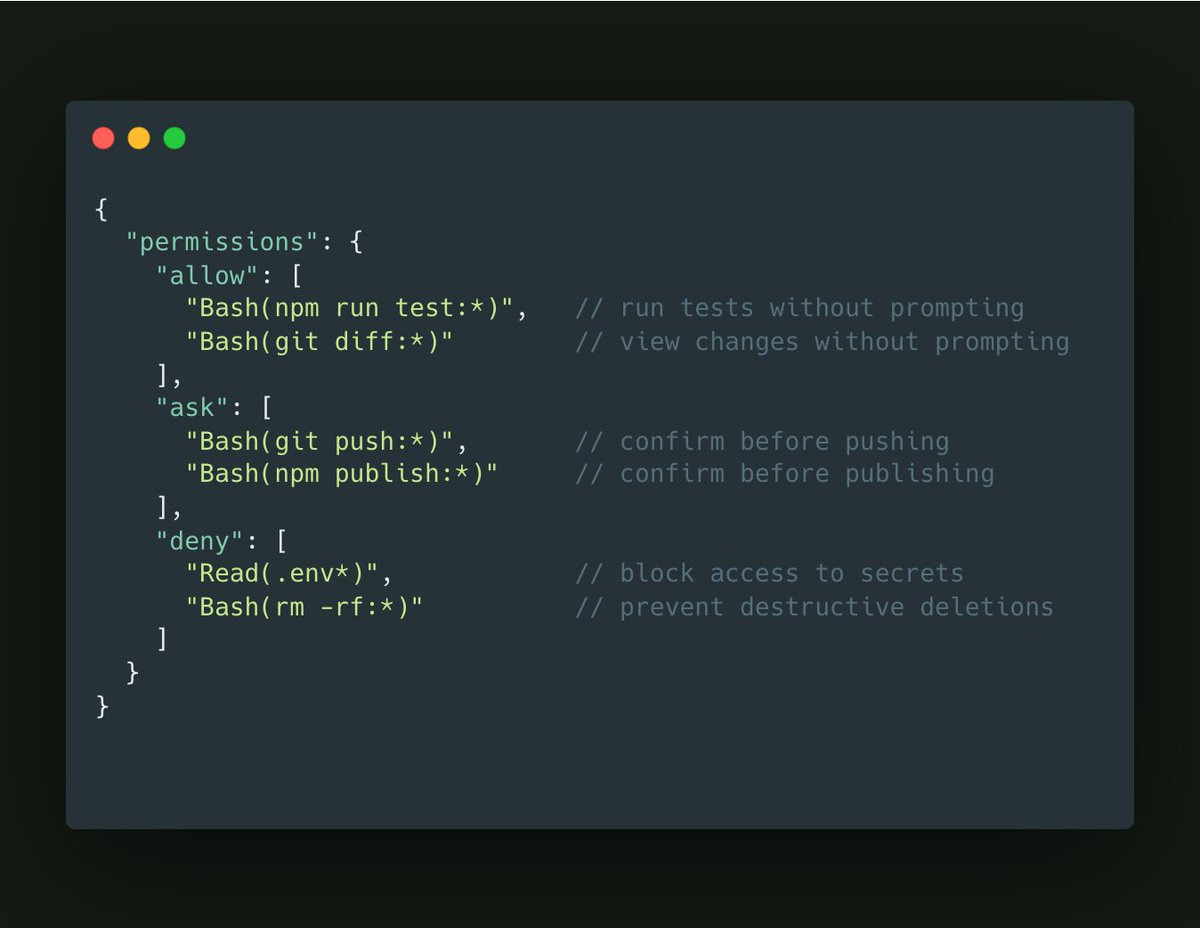
  24. Your permissions config file has three levels: Allow, ask and deny.

Petr Baudis suggests allowing most commands with notably rare exceptions.

​ask Bash –cmd ‘/brmb/’

ask Bash –cmd ‘/bgitb/’

ask Bash –cmd ‘/bcurlb/’

allow Bash –cmd ‘*’

A version of this seems logical for most uses, if you assume the system isn’t actively trying to work around you? Most of the things that go really wrong involve rm, git or curl, but also prompting on every git is going to get old fast.

My Twitter public mostly was fine with flat out dangerously skipping permissions for personal use:

Here’s a ‘Twitter slop’ style article about vibe coding that still has good core basic info. The key insight here is that it’s not about coding, it’s about communication, and specifying exactly what you want your code to do, as if you’re telling someone completely unfamiliar with your context, and having it do this one concrete step at a time and testing those steps as you go.

The process Elena is describing here should work great for ‘build something simple for your own use’ but very obviously won’t work for bigger projects.

Similar good basic advice from Dave Karsten is ‘treat it exactly as you would a junior employee you are giving these instructions to.’

Dan McAteer gives a super basic first two minute guide for non-coders.

Nader Dabit here gives a low-level guide to building agents with the Claude Agent SDK, listed partly for utility but largely to contrast it with ‘tell Claude Code to do it.’

Some people use voice dictation and have ditched keyboards. This seems crazy to me, but they swear by it, and it is at least an option.

Anthony Morris suggests you throw caution to the wind in the sense that you should stop micromanaging, delegate to the AIs, run a lot of instances and if it messes up just run it again. This is presumably The Way once you’re used to it, if you are conserving tokens aggressively on things that don’t scale you are presumably doing it wrong given what your time costs versus what tokens cost.

Another basic piece of advice is, whatever you want, ask for it, because you might well get it that way.

Allen: Is there anyway to chain skills or commands together in claude code?

Boris Cherny: Yes, just ask claude to invoke skill 1, then skill 2, then skill 3, in natural language. Or ask it to use parallel subagents to invoke the skills in parallel. Then if you want, put that all in a skill.​

You can use /config to set your output style to Default, Explanatory or Learning, where Learning has it prompt you to write code sometimes. You can also create your own custom style.

Like my attempt to reimplement Aikido, when you iterate in detail in domains you know well, you see the ways in which you can’t fully trust the results or feedback, and when you need precision in any non-standard way you need to specify your requirements extremely precisely.

Noam Brown: I vibecoded an open-source poker river solver over the holiday break. The code is 100% written by Codex, and I also made a version with Claude Code to compare.

Overall these tools allowed me to iterate much faster in a domain I know well. But I also felt I couldn’t fully trust them. They’d make mistakes and encounter bugs, but rather than acknowledging it they’d often think it wasn’t a big deal or, on occasion, just straight up try to gaslight me into thinking nothing is wrong.

In one memorable debugging session with Claude Code I asked it, as a sanity check, what the expected value would be of an “always fold” strategy when the player has $100 in the pot. It told me that according to its algorithm, the EV was -$93. When I pointed out how strange that was, hoping it would realize on its own that there’s a bug, it reassured me that $93 was close to $100 so it was probably fine. (Once I prompted it to specifically consider blockers as a potential issue, it acknowledged that the algorithm indeed wasn’t accounting for them properly.) Codex was not much better on this, and ran into its own set of (interestingly) distinct bugs and algorithmic mistakes that I had to carefully work through. Fortunately, I was able to work through these because I’m an expert on poker solvers, but I don’t think there are many other people that could have succeeded at making this solver by using AI coding tools.

The most frustrating experience was making a GUI. After a dozen back-and-forths, neither Codex nor Claude Code were able to make the frontend I requested, though Claude Code’s was at least prettier. I’m inexperienced at frontend, so perhaps what I was asking for simply wasn’t possible, but if that was the case then I wish they would have *toldme it was difficult or impossible instead of repeatedly making broken implementations or things I didn’t request. It highlighted to me how there’s still a big difference between working with a human teammate and working with an AI.

After the initial implementations were complete and debugged, I asked Codex and Claude Code to create optimized C++ versions. On this, Codex did surprisingly well. Its C++ version was 6x faster than Claude Code’s (even after multiple iterations of prompting for further optimizations). Codex’s optimizations still weren’t as good as what I could make, but then again I spent 6 years of PhD making poker bots. Overall, I thought Codex did an impressive job on this.

My final request was asking the AIs if they could come up with novel algorithms that could solve NLTH rivers even faster. Neither succeeded at this, which was not surprising. LLMs are getting better quickly, but developing novel algorithms for this sort of thing is a months-long research project for a human expert. LLMs aren’t at that level yet.

​Got this DM:

I appreciate that you posted this – increasingly my twitter feed feels out of whack, especially with people claiming Claude Code makes them 1000000x more efficient. Felt like I was going crazy and falling behind badly even though I use coding assistants quite a bit.

Rituraj: Twitter is a feed of “Hello World” speedruns, not Production Engineering.

Jeffrey Emanuel: As a counterpoint, I honestly feel like I’m single-handedly outproducing companies with 1,000+ developers with my 9 Claude Max accounts and 4 GPT Pro accounts.

Another danger is that a lot of the things that ‘feel productive’ might not be.

Nabeel S. Qureshi: I love that people are getting into Claude Code for non-coding use cases but some of it feels Roam Research / note-taking app coded Organizing Mac folders or getting an LLM to churn through notes feels like you’re “doing something” but is not actually producing anything valuable

Also, getting AI to read books for you and give you a summary can feel good but it’s a bit like consuming all of your food in smoothie form

The really important stuff you need to read properly, in original form, and digest slowly; this process cannot be skipped

Ben Springwater: 90% of posts on X seem to be PKM-style creating systems for systems’ sake. I have a fairly simple life, so I suppose I’m not the right persona for heavyweight personal data management systems, but I’ve seen very few use cases that seem actually useful as opposed to just demonstrating “what’s possible”.

On books, I would say that a book that ‘deserves to be a book’ can’t be summarized by an AI, and the ones ‘worth reading’ have to be read slowly or you don’t get the point, but you have limited time and can read almost zero percent of all books, and a lot of books that people discuss or get influenced by do not fall into either category.

As in, for any given non-fiction book, it will mostly fall into one of five categories. A very similar set of rules applies to papers.

  1. Reading this (or some sections of this) for real is valuable, interesting on every page, you could easily write a full book review as part of that process.

  2. Reading this is fun, if you summarize it you’re missing the whole point.

  3. The value is in particular facts, the AI can extract those for you.

  4. There’s a good blog post worth of value in there, the AI can extract it for you.

  5. There isn’t even a good blog post of value in there.

So you need to know which one you are dealing with, and respond accordingly.

On organizing your notes or files, or otherwise trying to set yourself up for better productivity, that may or may not be a good use of time. At minimum it is a good excuse to skill up your use of Claude Code and other similar things.

Seriously, get pretty excited. Claude Code might not be the best tool for you, or for any particular job, but it’s rapidly becoming unacceptable to only use chatbots, or only use chatbots and Cursor-like IDEs.

Things are escalating quickly. Don’t get left behind.

Discussion about this post

Claude Codes Read More »

trump-withdraws-us-from-world’s-most-important-climate-treaty

Trump withdraws US from world’s most important climate treaty

The actual impact of the US withdrawal on many of the UN bodies singled out by Trump would depend on how aggressively his administration followed through on its announcement.

The head of one of the UN bodies named in the executive order said that the full effect of the move would become clear only during the UN’s annual budget allocation process.

“If they want to be difficult they could block the adoption of our budget. So it depends on how far they want to take it,” the person added.

Although the list caused anguish among environmental groups, it did not go as far as originally envisaged on trade and economic matters after the administration quietly dropped the World Trade Organization and the OECD from its list of potential targets last year.

In October, it emerged that Trump had authorized the payment of $25 million in overdue subscriptions to the WTO, despite the administration deriding the organization as “toothless” only a month previously.

The list also did not include the International Maritime Organization despite the Trump administration’s successful—and diplomatically bruising—move last year to block the IMO’s plan to introduce a net zero framework for shipping.

Sue Biniaz, the former US climate negotiator, said she hoped the retreat from the UNFCCC treaty was “a temporary one,” adding there were “multiple future pathways to rejoining the key climate agreements” in future.

Stiell of the UNFCCC agreed: “The doors remain open for the US to re-enter in the future, as it has in the past with the Paris Agreement. Meanwhile the size of the commercial opportunity in clean energy, climate resilience, and advanced electrotech remains too big for American investors and businesses to ignore.”

He added: “While all other nations are stepping forward together, this latest step back from global leadership, climate co-operation, and science can only harm the US economy, jobs, and living standards, as wildfires, floods, megastorms, and droughts get rapidly worse.”

© 2026 The Financial Times Ltd. All rights reserved Not to be redistributed, copied, or modified in any way.

Trump withdraws US from world’s most important climate treaty Read More »

japanese-nuclear-plant-operator-fabricated-seismic-risk-data

Japanese nuclear plant operator fabricated seismic risk data

On Wednesday, Japan’s Nuclear Regulation Authority announced that it is halting the relicensing process for two reactors at the Hamaoka plant after revelations that the plant’s chosen operator fabricated seismic hazard data. Japan has been slowly reactivating its extensive nuclear power plant collection after it was shut down following the Fukushima Daiichi disaster. The latest scandal is especially shocking, given that the Hamaoka plant is located on the coast near an active subduction fault—just as Fukushima Daiichi is.

A whistleblower reportedly alerted the Nuclear Regulation Authority in February of last year, but the issue became public this week when the regulators halted an evaluation process that could have led to a reactor restart at Hamaoka. This prompted the company that operates the plants, the Chubu Electric Power Co., to issue a press release describing in detail how the company manipulated the seismic safety data.

Based on an English translation, it appears that seismic risks were evaluated at least in part by scaling up the ground motion using data from smaller earthquakes. This is an inexact process, so the standard approach is to create a group of 20 different upscaled earthquake motions and find the one that best represents the average among the 20.

The company now acknowledges that since 2018, its staff has been generating large collections of upscaled earthquake scenarios, choosing one from among them, and then selecting another 19 so the average would make that event appear representative. The company does not mention how this process affected risk analysis, but it’s probably safe to assume that it was chosen specifically to make any risks seem more tolerable.

Japanese nuclear plant operator fabricated seismic risk data Read More »

evs-remain-a-niche-choice-in-the-us,-according-to-survey

EVs remain a niche choice in the US, according to survey

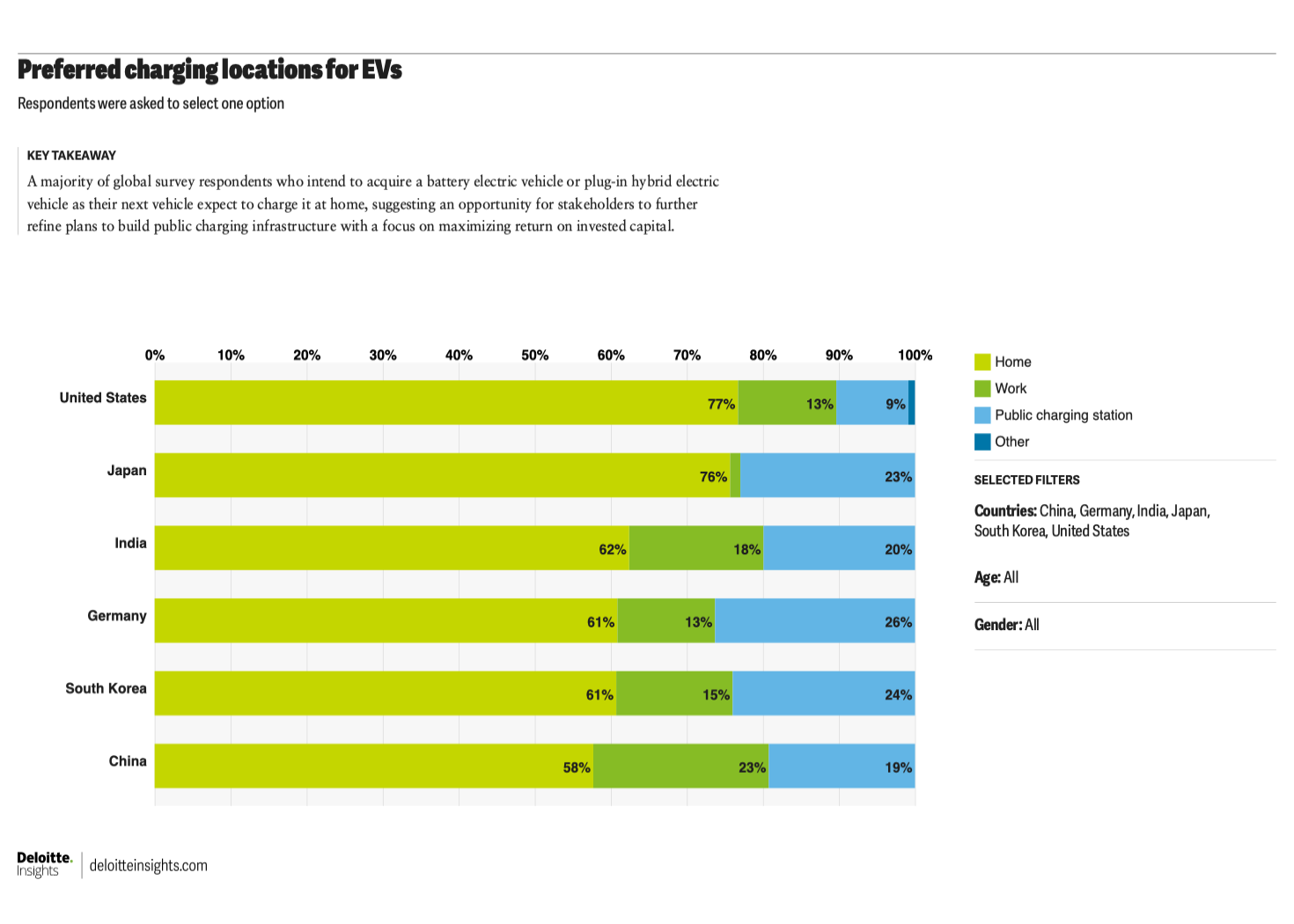
A graph showing charger location preference for car buyers in the US, Germany, the UK, China, Japan, and South Korea

A graph showing preferred charging locations for car buyers.

Credit: Deloitte

A graph showing preferred charging locations for car buyers. Credit: Deloitte

While reliable charging at one’s workplace—emphasis on reliable—can make up for not being able to charge at home, 77 percent of US car buyers said they would prefer to charge at home (with just 13 percent indicating they would prefer charging at work).

Why pick an EV?

For people who haven’t yet decided to switch, an underappreciated fact is just how much more efficient an electric powertrain is compared to one that burns liquid petroleum. Ford’s experiment putting an electric powertrain into its best-selling F-150 pickup truck might have turned sour, but consider the following: The V6 truck needs more than three times as much energy to travel 300 miles as the one you plug into a wall, when you consider a gallon of gasoline contains 33.7 kWh of energy.

Among the EV-convinced, this is presumably old news. More than half—52 percent of US survey respondents—said lower fuel costs were a reason for choosing an EV, beating out concern for the environment, which ranked second at 38 percent. And between $20,000 and $49,999 appears to be the pricing sweet spot, with 24 percent looking for something in the $20,000–$34,999 band (cars like the new Nissan Leaf or the soon-reborn Chevrolet Bolt) and another 24 percent looking in the $35,000–$49,999 band, which has plenty of EVs to choose from, including Mercedes-Benz’s efficient new CLA.

Just 7 percent of those EV buyers are looking to spend more than $75,000 on their electric car, but luxury EVs abound at this price point.

A graph of reasons given by US car buyers as to why their next car would be electric. Deloitte

Meanwhile, range and charging times remain the foremost concerns among car buyers when discussing EVs, along with the cost premium. Some other fears are ill-founded, however. Thirty-eight percent said they were concerned about the cost of eventually replacing an EV’s battery. But EV batteries are proving more durable on the road than many early adopters once believed. There’s little evidence that EVs will require costly battery replacements with any more frequency than older cars require new engines, a concern that is rarely mentioned when someone wants to buy a gas-powered machine.

The US doesn’t care about software-defined vehicles

One of the biggest shifts in car design and manufacturing over the past few years has been the advent of the software-defined vehicle. Until now, pretty much every electronic function in a car, from an electric window to the antilock brakes, needed its own electronic control unit. Some cars can have up to two hundred discrete ECUs, some with software dating back years.

EVs remain a niche choice in the US, according to survey Read More »

new-battery-idea-gets-lots-of-power-out-of-unusual-sulfur-chemistry

New battery idea gets lots of power out of unusual sulfur chemistry

When the battery starts discharging, the sulfur at the cathode starts losing electrons and forming sulfur tetrachloride (SCl4), using chloride it stole from the electrolyte. As the electrons flow into the anode, they combine with the sodium, which plates onto the aluminum, forming a layer of sodium metal. Obviously, this wouldn’t work with an aqueous electrolyte, given how powerfully sodium reacts with water.

High capacity

To form a working battery, the researchers separated the two electrodes using a glass fiber material. They also added a porous carbon material to the cathode to keep the sulfur tetrachloride from diffusing into the electrolyte. They used various techniques to confirm that sodium was being deposited on the aluminum and that the reaction at the cathode was occurring via sulfur dichloride intermediates. They also determined that sodium chloride was a poor source of sodium ions, as it tended to precipitate out onto some of the solid materials in the battery.

The battery was also fairly stable, surviving 1,400 cycles before suffering significant capacity decay. Higher charging rates caused capacity to decay more quickly, but the battery did a great job of holding a charge, maintaining over 95 percent, even when idled for 400 days.

While the researchers provide some capacity-per-weight measurements, they don’t do so for a complete battery, focusing instead on portions of the battery, such as the sulfur or the total electrode mass.

But with both electrodes considered, the energy density can reach over 2,000 Watt-hours per kilogram. While that will undoubtedly drop with the total mass of the battery, it’s difficult to imagine that it wouldn’t outperform existing sodium-sulfur or sodium-ion batteries.

Beyond the capacity, the big benefit of the proposed system appears to be its price. Given the raw materials, the researchers estimate that their cost is roughly $5 per kilowatt-hour of capacity, which is less than a tenth of the cost of current sodium batteries.

Again, there’s no guarantee that this work can be scaled up for manufacturing in a way that keeps it competitive with current technologies. Still, if the materials used in existing battery technologies become expensive, it’s reassuring to have other options.

Nature, 2026. DOI: 10.1038/s41586-025-09867-2  (About DOIs).

New battery idea gets lots of power out of unusual sulfur chemistry Read More »

with-geforce-super-gpus-missing-in-action,-nvidia-focuses-on-software-upgrades

With GeForce Super GPUs missing in action, Nvidia focuses on software upgrades

For the first time in years, Nvidia declined to introduce new GeForce graphics card models at CES. CEO Jensen Huang’s characteristically sprawling and under-rehearsed 90-minute keynote focused almost entirely on the company’s dominant AI business, relegating the company’s gaming-related announcements to a separate video posted later in the evening.

Instead, the company focused on software improvements for its existing hardware. The biggest announcement in this vein is DLSS 4.5, which adds a handful of new features to Nvidia’s basket of upscaling and frame generation technologies.

DLSS upscaling is being improved by a new “second-generation transformer model” that Nvidia says has been “trained on an expanded data set” to improve its predictions when generating new pixels. According to Nvidia’s Bryan Catanzaro, this is particularly beneficial for image quality in the Performance and Ultra Performance modes, where the upscaler has to do more guessing because it’s working from a lower-resolution source image.

DLSS Multi-Frame Generation is also improving, increasing the number of AI-generated frames per rendered frame from three to five. This new 6x mode for DLSS MFG is being paired with something called Dynamic Multi-Frame Generation, where the number of AI-generated frames can dynamically change, increasing generated frames during “demanding scenes,” and decreasing the number of generated frames during simpler scenes “so it only computes what’s needed.”

The standard caveats for Multi-Frame Generation still apply: It still needs an RTX 50-series GPU (the 40-series can still only generate one frame for every rendered frame, and older cards can’t generate extra frames at all), and the game still needs to be running at a reasonably high base frame rate to minimize lag and weird rendering artifacts. It remains a useful tool for making fast-running games run faster, but it won’t help make an unplayable frame rate into a playable one.

With GeForce Super GPUs missing in action, Nvidia focuses on software upgrades Read More »

dell’s-xps-revival-is-a-welcome-reprieve-from-the-“ai-pc”-fad

Dell’s XPS revival is a welcome reprieve from the “AI PC” fad

After making the obviously poor decision to kill its XPS laptops and desktops in January 2025, Dell started selling 16- and 14-inch XPS laptops again today.

“It was obvious we needed to change,” Jeff Clarke, vice chairman and COO at Dell Technologies, said at a press event in New York City previewing Dell’s CES 2026 announcements.

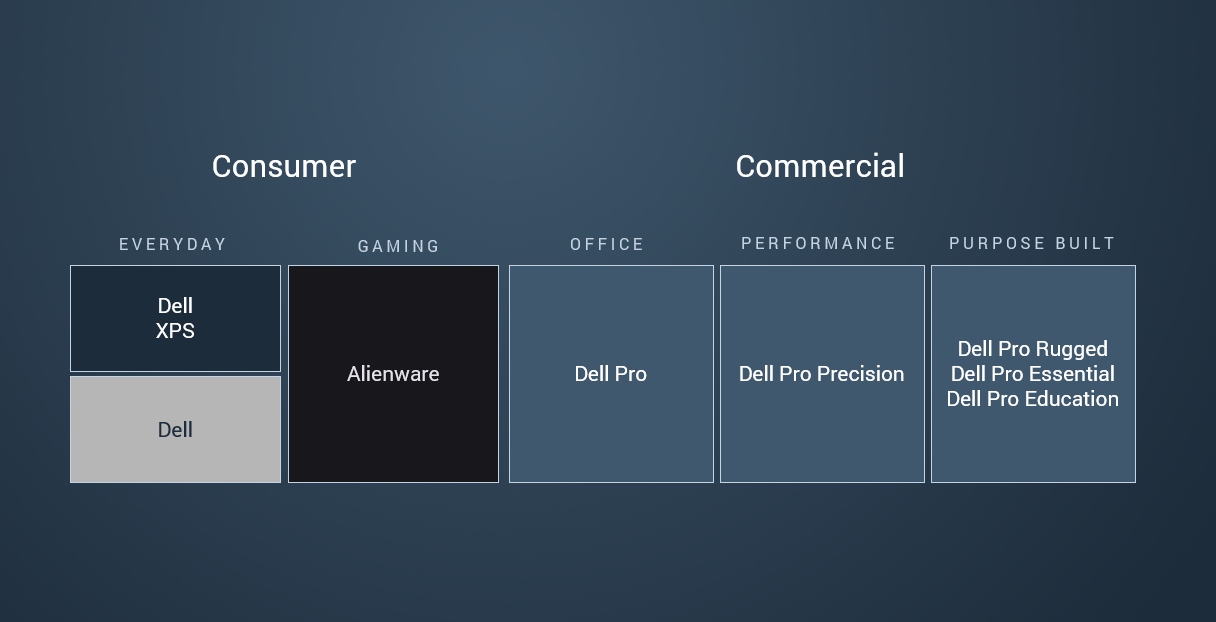
A year ago, Dell abandoned XPS branding, as well as its Latitude, Inspiron, and Precision PC lineups. The company replaced the reputable brands with Dell Premium, Dell Pro, and Dell Pro Max. Each series included a base model, as well as “Plus” and “Premium.” Dell isn’t resurrecting its Latitude, Inspiron, or Precision series, and it will still sell “Dell Pro” models.

Dell's consumer and commercial PC lines.

This is how Dell breaks down its computer lineup now.

Credit: Dell

This is how Dell breaks down its computer lineup now. Credit: Dell

XPS returns

The revival of XPS means the return of one of the easiest recommendations for consumer ultralight laptops. Before last year’s shunning, XPS laptops had a reputation for thin, lightweight designs with modern features and decent performance for the price. This year, Dell is even doing away with some of the design tweaks that it introduced to the XPS lineup in 2022, which, unfortunately, were shoppers’ sole option last year.

Inheriting traits from the XPS 13 Plus introduced in 2022, the XPS-equivalent laptops that Dell released in 2025 had a capacitive-touch row without physical buttons, a borderless touchpad with haptic feedback, and a flat, lattice-free keyboard. The design was meant to enable more thermal headroom but made using the computers feel uncomfortable and unfamiliar.

The XPS 14 and XPS 16 laptops launching today have physical function rows. They still have a haptic touchpad, but now the touchpad has comforting left and right borders. And although the XPS 14 and XPS 16 have the same lattice-free keyboard of the XPS 13 Plus, Dell will release a cheaper XPS 13 later this year with a more traditional chiclet keyboard, since those types of keyboards are cheaper to make.

Dell’s XPS revival is a welcome reprieve from the “AI PC” fad Read More »

appeals-court-agrees-that-congress-blocked-cuts-to-research-costs

Appeals court agrees that Congress blocked cuts to research costs

While indirect rates (the money paid for indirects as a percentage of the money that goes directly to the researcher to support their work) average about 30 percent, many universities have ended up with indirect cost rates above 50 percent. A sudden and unexpected drop to the 15 percent applied retroactively, as planned by the Trump administration, would create serious financial problems for major research universities.

The district court’s initial ruling held that this change was legally problematic in several ways. It violated the Administrative Procedures Act by being issued without any notice or comment, and the low flat rate was found to be arbitrary and capricious, especially compared to the system it was replacing. The ruling determined that the new policy also violated existing procedures within the Department of Health and Human Services.

But the Appeals Court panel of three judges unanimously determined that they didn’t even have to consider all of those issues because Congress had already prohibited exactly this action. In 2017, the first Trump administration also attempted to set all indirect costs to the same low, flat fee, and Congress responded by attaching a rider to a budget agreement that blocked alterations to the NIH overhead policy. Congress has been renewing that rider ever since.

A clear prohibition

In arguing for its new policy, the government tried to present it as consistent with Congress’s prohibition. The rider allowed some exceptions to the normal means of calculating overhead rates, but they were extremely limited; the NIH tried to argue that these exceptions could include every single grant issued to a university, something the court found was clearly inconsistent with the limits set by Congress.

The court also noted that, as announced, the NIH policy applied to every single grant, regardless of whether the recipient was at a university—something it later contended was a result of “inartful language.” But the judges wrote that it’s a bit late to revise the policy, saying, “We cannot, of course, disregard what the Supplemental Guidance actually says in favor of what NIH now wishes it said.”

Appeals court agrees that Congress blocked cuts to research costs Read More »

nvidia’s-new-g-sync-pulsar-monitors-target-motion-blur-at-the-human-retina-level

Nvidia’s new G-Sync Pulsar monitors target motion blur at the human retina level

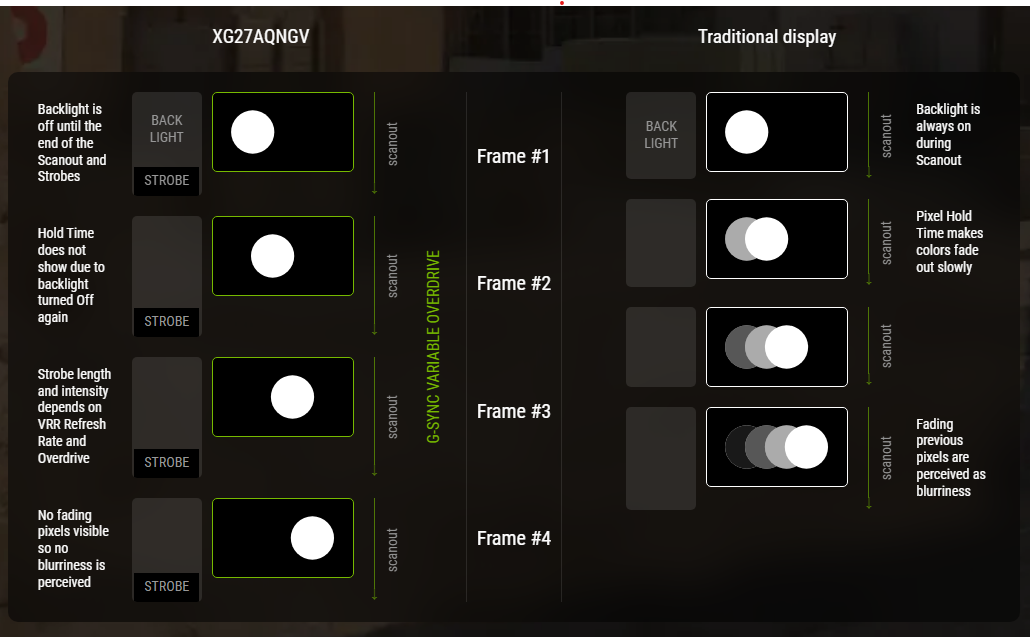
That gives those individual pixels time to fully transition from one color to the next before they’re illuminated, meaning viewers don’t perceive those pixels fading from one color as they do on a traditional G-Sync monitor. It also means those old pixels don’t persist as long on the viewer’s retina, increasing the “apparent refresh rate” above the monitor’s actual refresh rate, according to Nvidia.

An Asus illustration highlights how G-Sync Pulsar uses strobing to limit the persistence of old frames on your retina.

An Asus illustration highlights how G-Sync Pulsar uses strobing to limit the persistence of old frames on your retina. Credit: Asus/ Nvidia

Similar “Ultra Low Motion Blur” features on other pulsing backlight monitors have existed for a while, but they only worked at fixed refresh rates. Pulsar monitors differentiate themselves by syncing the pulses with the variable refresh rate of a G-Sync monitor, offering what Nvidia calls a combination of “tear free frames and incredible motion clarity.”

Independent testers have had more varied impressions of the visual impact of the Pulsar. The Monitors Unboxed YouTube channel called it “clearly the best solution currently available” for limiting motion blur and “the first version of this technology that I would genuinely consider using on a regular basis.” PC Magazine, on the other hand, said the Pulsar improvements are “minor in the grand scheme of things” and would be hard to notice for a casual viewer.

Nvidia explains how its Pulsar monitors work.

In any case, G-Sync Pulsar should be a welcome upgrade for high-end gamers as we wait for 1,000 Hz monitors to become a market force.

Nvidia’s new G-Sync Pulsar monitors target motion blur at the human retina level Read More »

stewart-cheifet,-pbs-host-who-chronicled-the-pc-revolution,-dies-at-87

Stewart Cheifet, PBS host who chronicled the PC revolution, dies at 87

Stewart Cheifet, the television producer and host who documented the personal computer revolution for nearly two decades on PBS, died on December 28, 2025, at age 87 in Philadelphia. Cheifet created and hosted Computer Chronicles, which ran on the public television network from 1983 to 2002 and helped demystify a new tech medium for millions of American viewers.

Computer Chronicles covered everything from the earliest IBM PCs and Apple Macintosh models to the rise of the World Wide Web and the dot-com boom. Cheifet conducted interviews with computing industry figures, including Bill Gates, Steve Jobs, and Jeff Bezos, while demonstrating hardware and software for a general audience.

From 1983 to 1990, he co-hosted the show with Gary Kildall, the Digital Research founder who created the popular CP/M operating system that predated MS-DOS on early personal computer systems.

Computer Chronicles – 01×25 – Artificial Intelligence (1984)

From 1996 to 2002, Cheifet also produced and hosted Net Cafe, a companion series that documented the early Internet boom and introduced viewers to then-new websites like Yahoo, Google, and eBay.

A legacy worth preserving

Computer Chronicles began as a local weekly series in 1981 when Cheifet served as station manager at KCSM-TV, the College of San Mateo’s public television station. It became a national PBS series in 1983 and ran continuously until 2002, producing 433 episodes across 19 seasons. The format remained consistent throughout: product demonstrations, guest interviews, and a closing news segment called “Random Access” that covered industry developments.

After the show’s run ended and Cheifet left television production, he worked to preserve the show’s legacy as a consultant for the Internet Archive, helping to make publicly available the episodes of Computer Chronicles and Net Cafe.

Stewart Cheifet, PBS host who chronicled the PC revolution, dies at 87 Read More »