Dan Hendrycks, Eric Schmidt and Alexandr Wang released an extensive paper titled Superintelligence Strategy. There is also an op-ed in Time that summarizes.
The major AI labs expect superintelligence to arrive soon. They might be wrong about that, but at minimum we need to take the possibility seriously.
At a minimum, the possibility of imminent superintelligence will be highly destabilizing. Even if you do not believe it represents an existential risk to humanity (and if so you are very wrong about that) the imminent development of superintelligence is an existential threat to the power of everyone not developing it.
Planning a realistic approach to that scenario is necessary.
What would it look like to take superintelligence seriously? What would it look like if everyone took superintelligence seriously, before it was developed?
The proposed regime here, Mutually Assured AI Malfunction (MAIM), relies on various assumptions in order to be both necessary and sufficient. If those assumptions did turn out to hold, it would be a very interesting, highly not crazy proposal.
-
ASI (Artificial Superintelligence) is Dual Use.
-
Three Proposed Interventions.
-
The Shape of the Problems.
-
Strategic Competition.
-
Terrorism.
-
Loss of Control.
-
Existing Strategies.
-
MAIM of the Game.
-
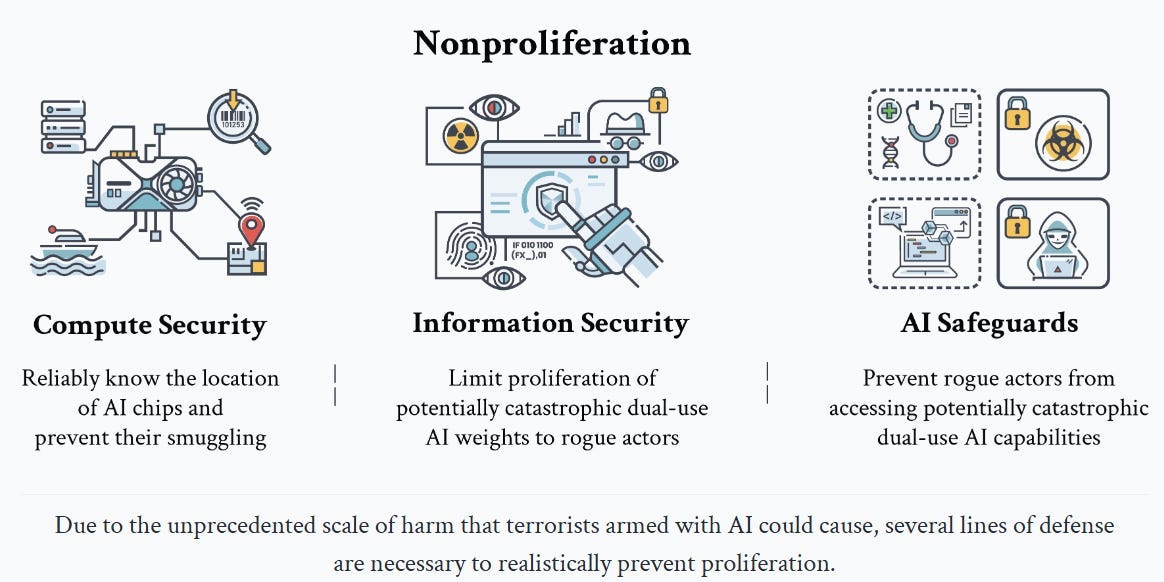
Nonproliferation.
-
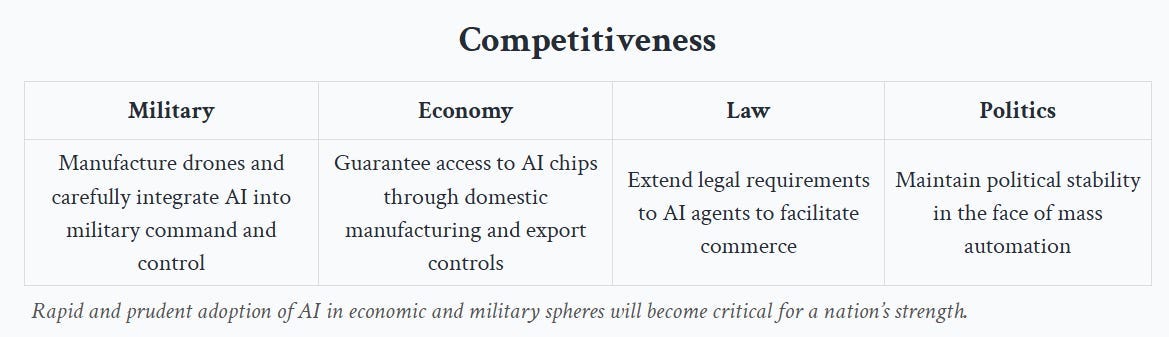
Competitiveness.
-
Laying Out Assumptions: Crazy or Crazy Enough To Work?.
-
Don’t MAIM Me Bro.
ASI helps you do anything you want to do, which in context is often called ‘dual use.’
As in, AI is both a highly useful technology for both military and economic use. It can be used for, or can be an engine of, creation and also for destruction.
It can do both these things in the hands of humans, or on its own.
That means that America must stay competitive in AI, or even stay dominant in AI, both for our economic and our military survival.
The key players include not only states but also non-state actors.
Given what happens by default, what can we do to steer to a different outcome?
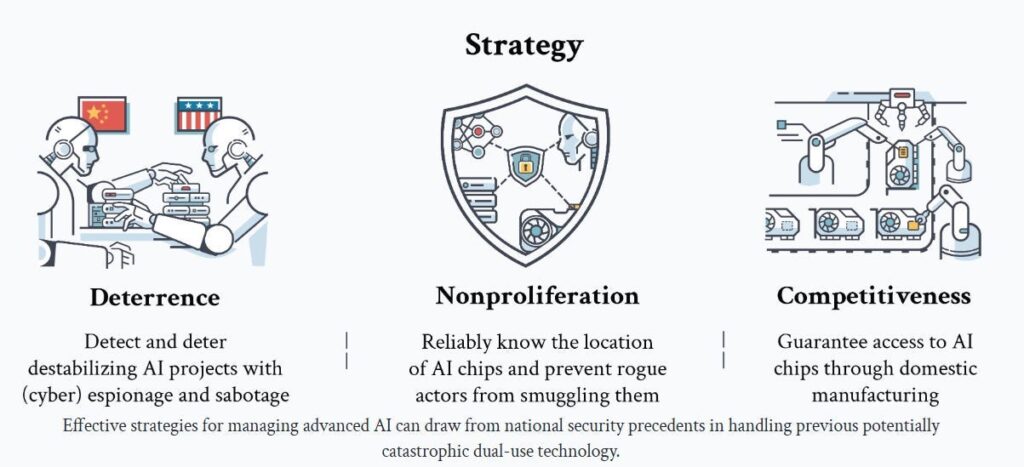
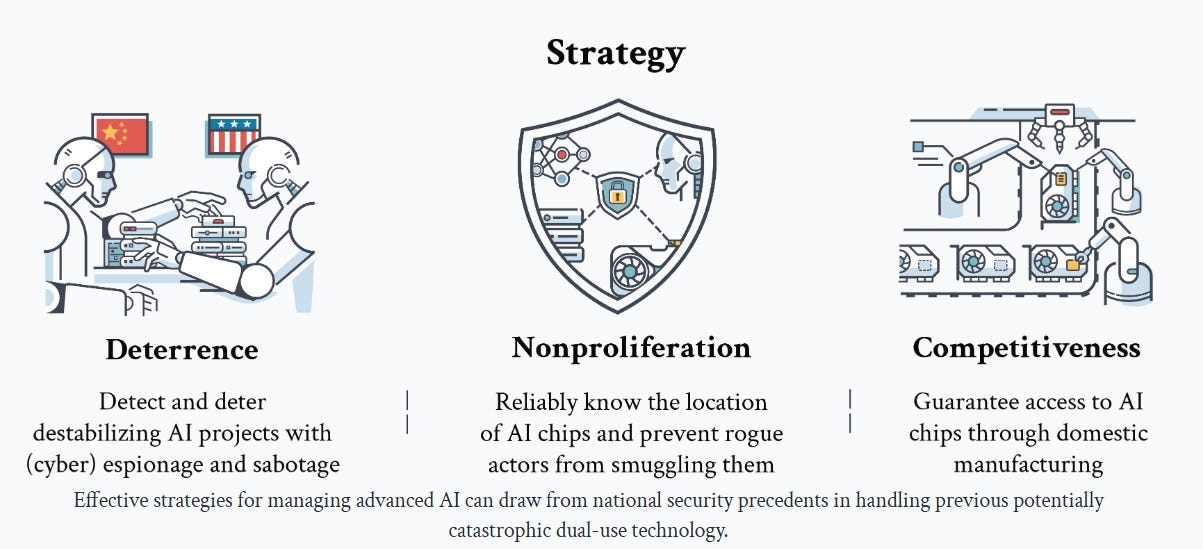
They propose three pillars.
Two are highly conventional and traditional. One is neither, in the context of AI.
First, the two conventional ones.
Essentially everyone can get behind Competitiveness, building up AI chips through domestic manufacturing. At least in principle. Trump called for us to end the Chips Act because he is under some strange delusions about how economics and physics work and thinks tariffs are how you fix everything (?), but he does endorse the goal.
Nonproliferation is more controversial but enjoys broad support. America already imposes export controls on AI chips and the proposed diffusion regulations would substantially tighten that regime. This is a deeply ordinary and obviously wise policy. There is a small extremist minority that flips out and calls proposals for ordinary enforcement of things like ‘a call for a global totalitarian surveillance state’ but such claims are rather Obvious Nonsense, entirely false and without merit, since they describe the existing policy regime in many sectors, not only in AI.
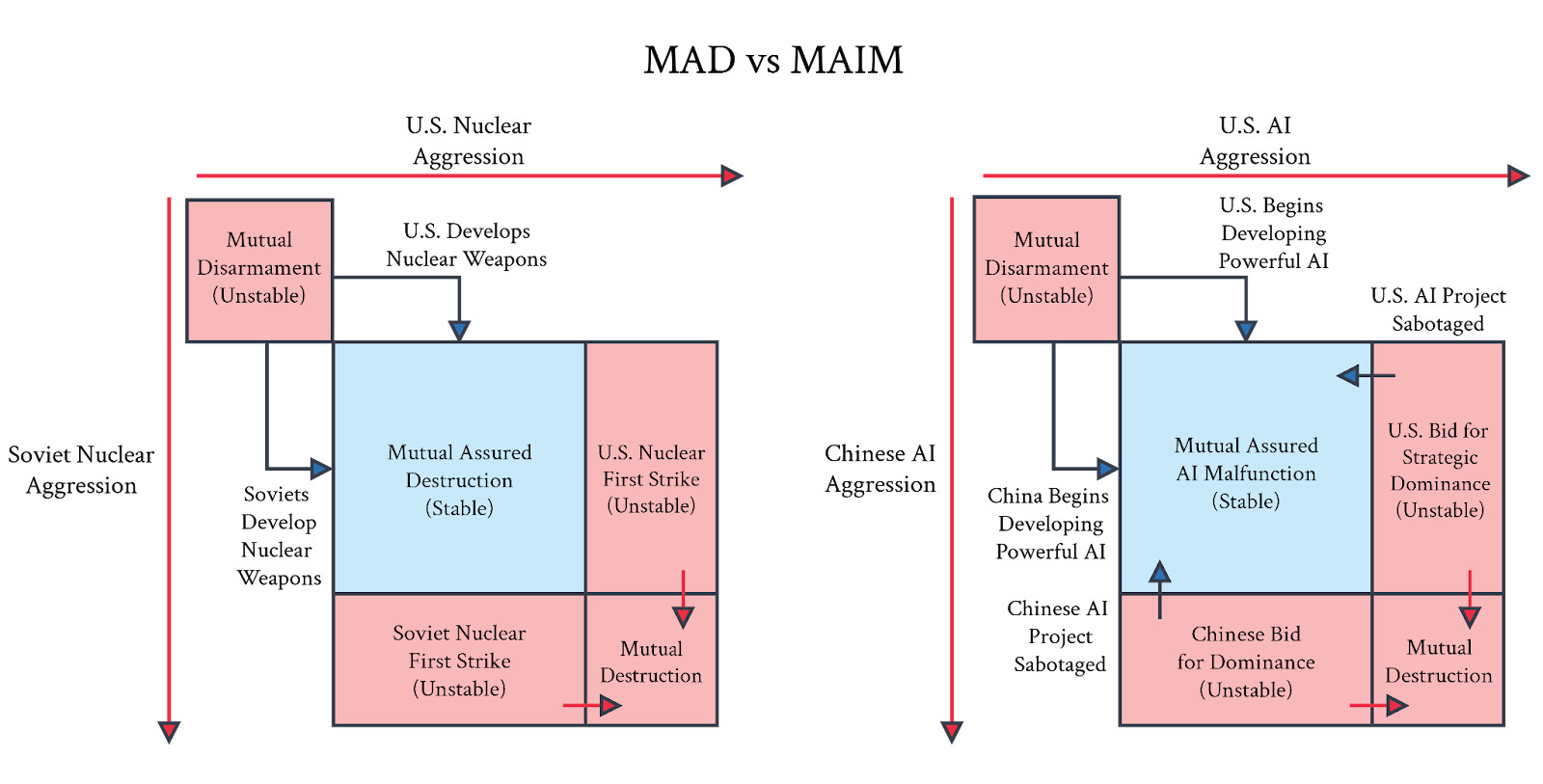
The big proposal here is Deterrence with Mutual Assured AI Malfunction (MAIM), as a system roughly akin to Mutually Assured Destruction (MAD) from nuclear weapons.
The theory is that if it is possible to detect and deter opposing attempts to developer superintelligence, the world can perhaps avoid developing superintelligence until we are ready for that milestone.
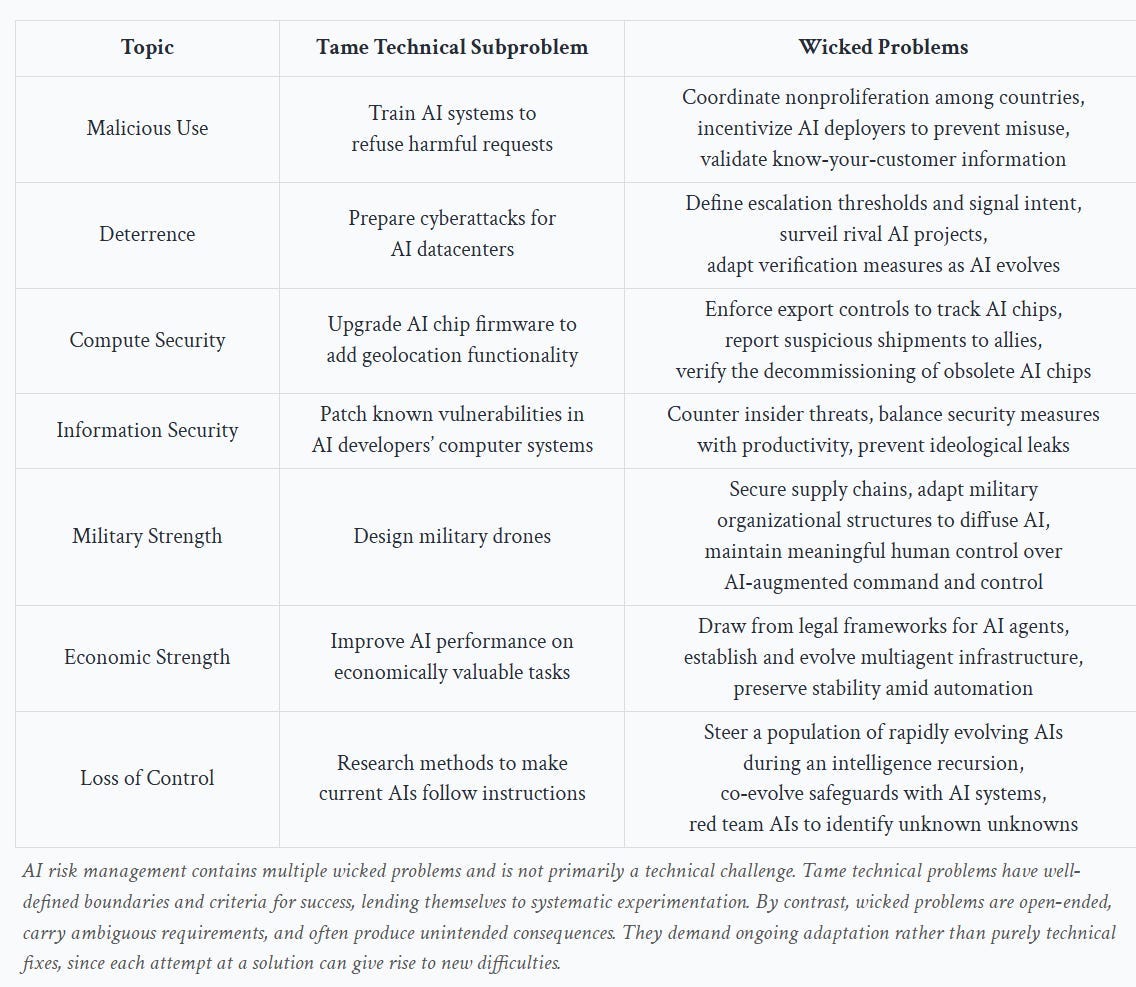
This chart of wicked problems in need of solving is offered. The ‘tame technical subproblems’ are not easy, but are likely solvable. The wicked problems are far harder.
Note that we are not doing that great a job on even the tame technical subproblems.
-
Train AI systems to refuse harmful requests: We don’t have an AI system that cannot be jailbroken, even if it is closed weights and under full control, without crippling the mundane utility offered by the system.
-
Prepare cyberattacks for AI datacenters: This is the one that is not obviously a net positive idea. Presumably this is being done in secret, but I have no knowledge of us doing anything here.
-
Upgrade AI chip firmware to add geolocation functionality: We could presumably do this, but we haven’t done it.
-
Patch known vulnerabilities in AI developers’ computer systems: I hope we are doing a decent job of this. However the full ‘tame’ problem is to do this across all systems, since AI will soon be able to automate attacks on all systems, exposing vulnerable legacy systems that often are tied to critical infrastructure. Security through obscurity is going to become a lot less effective.
-
Design military drones: I do not get the sense we are doing a great job here, either in design or production, relative to its military importance.
-
Economic strength: Improve AI performance in economically valuable tasks: We’re making rapid progress here, and it still feels like balls are dropped constantly.
-
Loss of control: Research methods to make current AIs follow instructions: I mean yes we are doing that, although we should likely be investing 10x more. The problem is that our current methods to make this work won’t scale to superintelligence, with the good news being that we are largely aware of that.
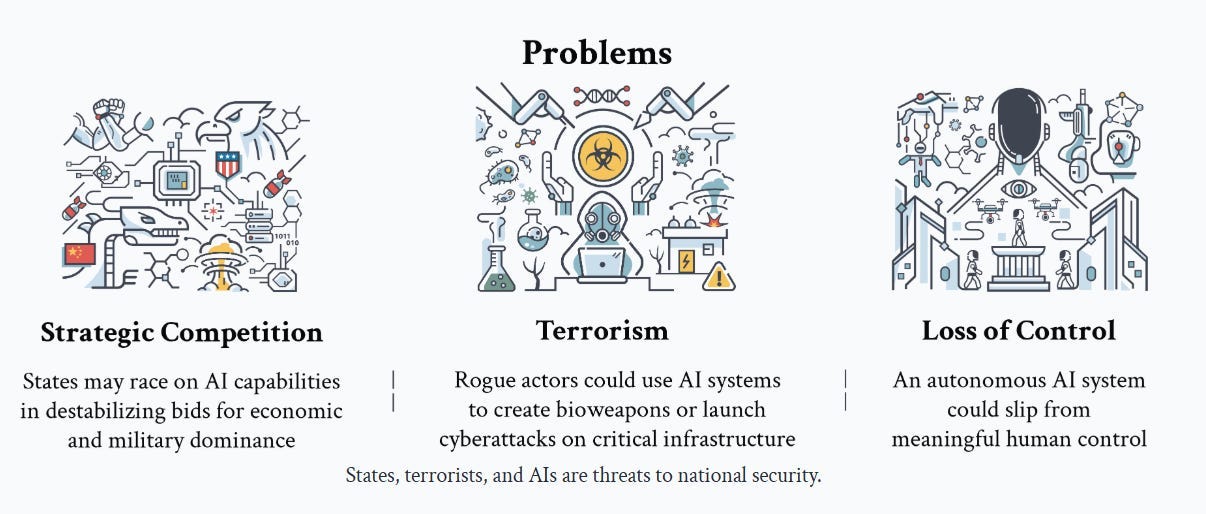
They focus on three problems.
They don’t claim these are a complete taxonomy. At a sufficiently abstract level, we have a similar trio of threats to the ones OpenAI discusses in their philosophy document: Humans might do bad things on purpose (terrorism), the AI might do bad things we didn’t intend (loss of control), or locally good things could create bad combined effects (this is the general case of strategic competition, the paper narrowly focuses on state competition but I would generalize this to competition generally).
These problems interact. In particular, strategic competition is a likely key motivator for terrorism, and for risking or triggering a loss of control.
Note the term ‘meaningful’ in meaningful human control. If humans nominally have control, but in practice cannot exercise that control, humans still have lost control.
The paper focuses on the two most obvious strategic competition elements: Economic and military.
Economics is straightforward. If AI becomes capable of most or all labor, then how much inference you can do becomes a prime determinant of economic power, similar to what labor is today, even if there is no full strategic dominance.
Military is also straightforward. AI could enable military dominance through ‘superweapons,’ up to and including advanced drone swarms, new forms of EMP, decisive cyber weapons or things we aren’t even imagining. Sufficiently strong AI would presumably be able to upend nuclear deterrence.
If you are about to stare down superintelligence, you don’t know what you’ll face, but you know if you don’t act now, it could be too late. You are likely about to get outcompeted. It stands to reason countries might consider preventative action, up to and including outright war. We need to anticipate this possibility.
Strategic competition also feeds into the other two risks.
If you are facing strong strategic competition, either the way the paper envisioned at a national level, or competition at the corporate or personal level, from those employing superintelligence, you may have no choice but to either lose or deploy superintelligence yourself. And if everyone else is fully unleashing that superintelligence, can you afford not to do the same? How do humans stay in the loop or under meaningful control?
Distinctly from that fear, or perhaps in combination with it, if actions that are shaped like ‘terrorism’ dominate the strategic landscape, what then?
The term terrorism makes an assertion about what the goal of terrorism is. Often, yes, the goal is to instill fear, or to trigger a lashing out or other expensive response. But we’ve expanded the word ‘terrorism’ to include many other things, so that doesn’t have to be true.
In the cases of this ‘AI-enabled terrorism’ the goal mostly is not to instill fear. We are instead talking about using asymmetric weapons, to inflict as much damage as possible. The scale of the damage relatively unresourced actors can do will scale up.
We have to worry in particular about bioterrorism and cyberattacks on critical infrastructure – this essay chooses to not mention nuclear and radiological risks.
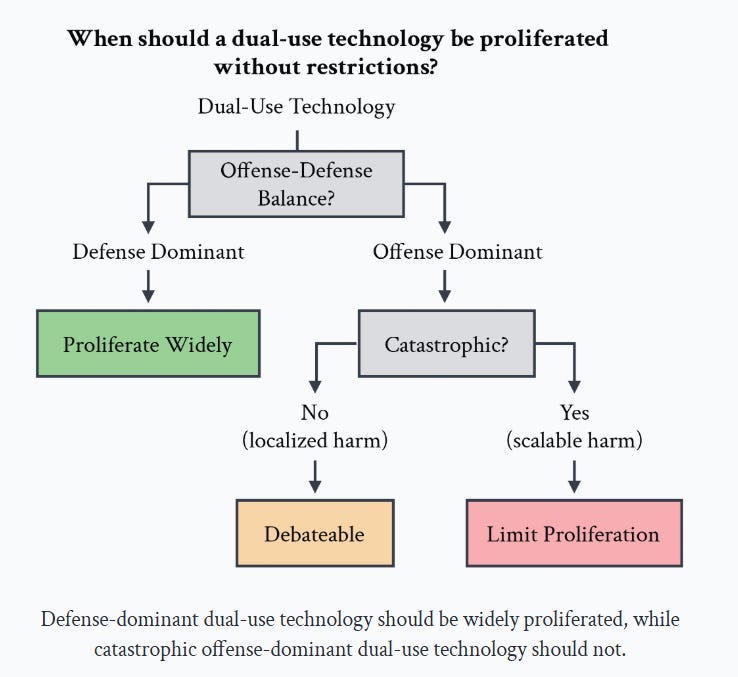
As always this question comes down to offense-defense balance and the scale (and probability) of potential harm. If everyone gets access to similarly powerful AI, what happens? Does the ‘good guy with an AI’ beat the ‘bad guy with an AI’? Does this happen in practice, despite the future being unevenly distributed, and thus much of critical infrastructure not having up-to-date defenses, and suffering from ‘patch lag’?
This is a cost-benefit analysis, including the costs of limiting proliferation. There are big costs in taking action to limit proliferation, even if you are confident it will ultimately work.
The question is, are there even larger costs to not doing so? That’s a fact question. I don’t know the extent to which future AI systems might enable catastrophic misuse, or how much damage that might cause. You don’t either.
We need to do our best to answer that question in advance, and if necessary to limit proliferation. If we want to do that limiting gracefully, with minimal economic costs and loss of freedom, that means laying the necessary groundwork now. The alternative is doing so decidedly ungracefully, or failing to do so at all.
The section on Loss of Control is excellent given its brevity. They cover three subsections.
-
Erosion of control is similar to the concerns about gradual disempowerment. If anyone not maximally employing AI becomes uncompetitive, humans would rapidly find themselves handing control over voluntarily.
-
Unleashed AI Agents are an obvious danger. Even a single sufficient capable rouge AI agent unleashed on the internet could cause no end of trouble, and there might be no reasonable way to undo this without massive economic costs we would not be willing to pay once it starts gathering resources and self-replicating. Even a single such superintelligent agent could mean irrevocable loss of control. As always, remember that people will absolutely be so stupid as to, and also some will want to do it, on purpose.
-
Intelligence Recursion, traditionally called Recursive Self-Improvement (RSI), where smarter AI builds smarter AI builds smarter AI, perhaps extremely rapidly. This is exactly how one gets a strategic monopoly or dominant position, and is ‘the obvious thing to do,’ it’s tough not to do it.
They note explicitly that strategic competition, in the form of geopolitical competitive pressures, could easily make us highly tolerant of such risks, and therefore we could initiate such a path of RSI even if those involved thought the risk of loss of control was very high. I would note that this motivation also holds for corporations and others, not only nations, and again that some people would welcome a loss of control, and others will severely underestimate the risks, with varying levels of conscious intention.
What are our options?
They note three.
-
There is the pure ‘hands-off’ or ‘YOLO’ strategy where we intentionally avoid any rules or restrictions whatsoever, on the theory that humans having the ability to collectively steer the future is bad, actually, and we should avoid it. This pure anarchism is a remarkably popular position among those who are loud on Twitter. As they note, from a national security standpoint, this is neither a credible nor a coherent strategy. I would add that from the standpoint of trying to ensure humanity survives, it is again neither credible nor coherent.
-
Moratorium strategy. Perhaps we can pause development past some crucial threshold? That would be great if we could pull it off, but coordination is hard and the incentives make this even harder than usual, if states lack reliable verification mechanisms.
-
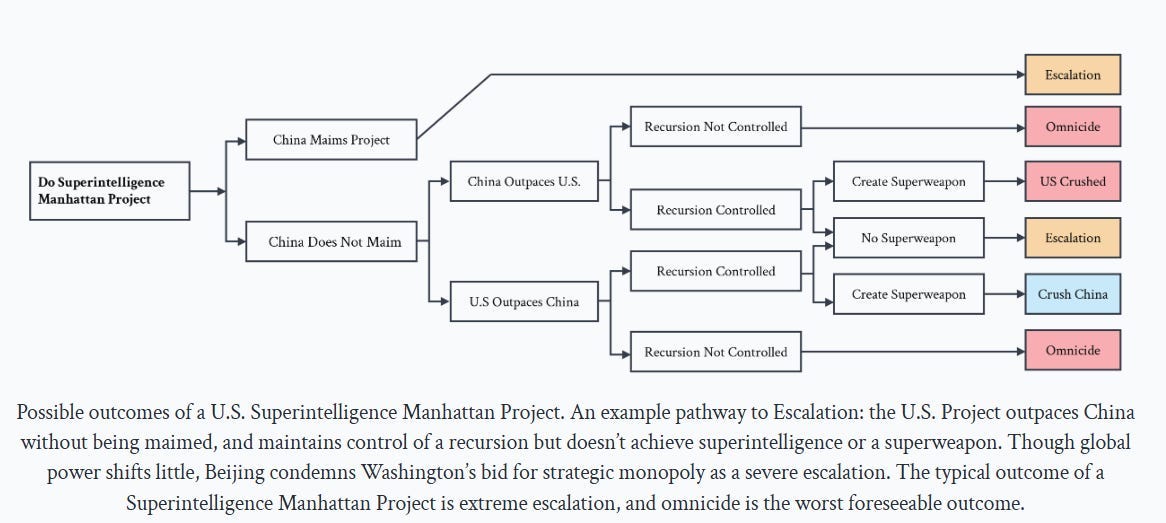
Monopoly strategy. Try to get there first and exert a monopoly, perhaps via a ‘Manhattan Project’ style state program. They argue that it would be impossible to hide this program, and others would doubtless view it as a threat and respond with escalations and hostile countermeasures.
They offer this graph as an explanation for why they don’t like Monopoly strategy:
Certainly escalation and even war is one potential response to the monopoly strategy, but the assumption that it goes that way is based on China or others treating superintelligence as an existential strategic threat. They have to take the threat so seriously that they will risk war over it, for real.
Would they take it that seriously before it happens? I think this is very far from obvious. It takes a lot of conviction to risk everything over something like that. Historically, deterrence strikes are rare, even when they would have made strategic sense, and the situation was less speculative. Nor does a successful strike automatically lead to escalation.
That doesn’t mean that going down these paths is good or safe. Racing for superintelligence as quickly as possible, with no solution on how to control it, in a way that forces your rival to respond in kind when previously let’s face it they weren’t trying all that hard, does not seem like a wise thing to aim for or do. But I think the above chart is too pessimistic.
Instead they propose a Multipolar strategy, with the theory being that Deterrence with Mutual Assured AI Malfunction (MAIM), combined with strong nonproliferation and competitiveness, can hopefully sustain an equilibrium.
There are two importantly distinct claims here.
The first claim here is that a suboptimal form of MAIM is the default regime, that costs for training runs will balloon, thus they can only happen at large obvious facilities, and therefore there are a variety of escalations those involved can use to shut down AI programs, from sabotage up to outright missile attacks, and any one rival is sufficient to shut down an attempt.
The second claim is that it would be wise to pursue a more optimal form of MAIM as an intentional policy choice.
MAIM is trivially true, at least in the sense that MAD is still in effect, although the paper claims that sabotage means there are reliable options available well short of a widespread nuclear strike. Global thermonuclear war would presumably shut down everyone’s ASI projects, but it seems likely that launching missiles at a lot of data centers would lead to full scale war, perhaps even somewhat automatic nuclear war. Do we really think ‘kinetic escalation’ or sabotage can reliably work and also be limited to the AI realm? Are there real options short of that?
Yes, you could try to get someone to sabotage, or engage in a cyberattack. The paper authors think that between all the options available, many of which are hard to attribute or defend against, we should expect such an afford to work if it is well resourced, at least enough to delay progress on the order of months. I’m not sure I have even that confidence, and I worry that it won’t count for much. Human sabotage seems likely to become less effective over time, as AIs themselves take on more of the work and error checking. Cyberattacks similarly seem like they are going to get more difficult, especially once everyone involved is doing fully serious active defense and accepting real costs of doing so.
The suggestion here is to intentionally craft and scope out MAIM, to allow for limited escalations along a clear escalation ladder, such as putting data centers far away from population centers and making clear distinctions between acceptable projects and destabilizing ones, and implementing ‘AI-assisted inspections.’
Some actions of this type took place during the Cold War. Then there are other nations and groups with a history of doing the opposite, doing some combination of hiding their efforts, hardening the relevant targets and intentionally embedding military targets inside key civilian infrastructure and using ‘human shields.’
That’s the core idea. I’ll touch quickly on the other two parts of the plan, Nonproliferation and Competitiveness, then circle back to whether the core idea makes sense and what assumptions it is making. You can safety skip ahead to that.
They mention you can skip this, and indeed nothing here should surprise you.
In order for the regime of everyone holding back to make sense, there need to be a limited number of actors at the established capabilities frontier, and you need to keep that level of capability out of the hands of the true bad actors. AI chips would be treated, essentially, as if they were also WMD inputs.
Compute security is about ensuring that AI chips are allocated to legitimate actors for legitimate purposes. This echoes the export controls employed to limit the spread of fissile materials, chemical weapons, and biological agents.
Information security involves securing sensitive AI research and model weights that form the core intellectual assets of AI. Protecting these elements prevents unwarranted dissemination and malicious use, paralleling the measures taken to secure sensitive information in the context of WMDs.
They discuss various mechanisms for tracking chips, including geolocation and geofencing, remote attestation, networking restrictions and physical tamper resistance. Keeping a lockdown on frontier-level model weights also follows, and they offer various suggestions on information security.
Under AI Security (5.3) they claim that model-level safeguards can be made ‘significantly resistant to manipulation.’ In practice I am not yet convinced.
They offer a discussion in 5.3.2 of loss of control, including controlling an intelligence recursion (RSI). I am not impressed by what is on offer here in terms of it actually being sufficient, but if we had good answers that would be a case for moving forward, not for pursuing a solution like MAIM.
The question on competitiveness is not if but rather how. The section feels somewhat tacked on, they themselves mention you can skip this.
The suggestions under military and economy should be entirely uncontroversial.
The exception is ‘facilitate immigration for AI scientists,’ which seems like the most obvious thing in the world to do, but alas. What a massive unforced error.
The correct legal framework for AI and AI agents has been the subject of extended debate, which doubtless will continue. The proposed framework here is to impose upon AIs a duty of reasonable care to the public, another duty of care to the principle, and a duty not to lie. They propose to leave the rest to the market to decide.
The section is brief so they can’t cover everything, but as a taste to remind one that the rabbit holes run deep even when considering mundane situations: Missing here is which human or corporation bears liability for harms. If something goes wrong, who is to blame? The user? The developer or deployer? They also don’t discuss how to deal with other obligations under the law, and they mention the issue of mens rea but not how they propose to handle it.
They also don’t discuss what happens if an AI agent is unleashed and is outside of human control, whether or not doing so was intentional, other than encouraging other AIs to not transact with such an AI. And they don’t discuss to what extent an AI agent would be permitted to act as a legal representative of a human. Can they sign contracts? Make payments? When is the human bound, or unbound?
They explicitly defer discussion of potential AI rights, which is its own rabbit hole.
The final discussion here is on political stability, essentially by using AI to empower decision makers and filter information, and potentially doing redistribution in the wake of automation. This feels like gesturing at questions beyond the scope of the paper.
What would make deliberately pursuing MAIM as a strategy both necessary and sufficient?
What would make it, as they assert, the default situation?
Both are possible, but there are a good number of assumptions.
The most basic requirement is that it essentially requires common knowledge.
Everyone must ‘feel the superintelligence,’ and everyone must be confident that:
-
At least one other major player feels the superintelligence.
-
That another state will attempt to stop you via escalation, if you go for it.
-
That such escalation would either succeed or escalate to total war.
If you don’t believe all of that, you don’t have MAIM, the same way you would not have had MAD.
Indeed, we have had many cases of nuclear proliferation, exactly because states including North Korea have correctly gambled that no one would escalate sufficiently to stop them. Our planetary track record of following through in even the most obvious of situations is highly spotty. Our track record of preemptive wars in other contexts is even worse, with numerous false negatives and also false positives.
Superintelligence is a lot murkier and uncertain in its definition, threshold and implications than a nuclear bomb. How confident are you that your rivals will be willing to pull the trigger? How confident do they need to be that this is it? Wouldn’t there be great temptation to be an ostrich, and pretend it wasn’t happening, or wasn’t that big a deal?
That goes together with the question of whether others can reliably identify an attempt to create superintelligence, and then whether they can successfully sabotage that effort with a limited escalation. Right now, no one is trying all that hard to hide or shield what they are up to, but that could change. Right now, the process requires very obvious concentrated data centers, but that also could change, especially if one was willing to sacrifice efficiency. And so on. If we want to preserve things as they are, we will have to do that deliberately.
The paper asserts states ‘would not stand idly by’ while another was on the ‘cusp of superintelligence.’ I don’t think we can assume that. They might not realize what is happening. They might not realize the implications. They might realize probabilistically but not be willing to move that far up the escalatory ladder or credibly threaten to do so. A central failure mode is that the threat is real but not believed.
It seems, at minimum, rather strange to assume MAIM is the default. Surely, various sabotage efforts could complicate things, but presumably things get backed up and it is not at all obvious that there is a limited-scope way to stop a large training run indefinitely. It’s not clear what a few months of sabotage buys you even if it works.
The proposal here is to actively engineer a stable MAIM situation, which if enacted improves your odds, but the rewards to secrecy and violating the deals are immense. Even they admit that MAIM is a ‘wicked problem’ that would be in an unstable, constantly evolving state in the best of times.
I’m not saying it cannot be done, or even that you shouldn’t try. It certainly seems important to have the ability to implement such a plan in your back pocket, to the greatest extent possible, if you don’t intentionally want to throw your steering wheel out the window. I’m saying that even with the buy-in of those involved, it is a heavy lift. And with those currently in power in America, the lift is now that much tougher.
All of this can easily seem several levels of rather absurd. One could indeed point to many reasons why this strategy could wind up being profoundly flawed, or that the situation might be structured so that this does not apply, or that there could end up being a better way.
The point is to start thinking about these questions now, in case this type of scenario does play out, and to consider under what conditions one would want to seek out such a solution and steer events in that direction. To develop options for doing so, in case we want to do that. And to use this as motivation to actually consider all the other ways things might play out, and take them all seriously, and ask how we can differentiate which world we are living in, including how we might move between those worlds.