Beloved UK comedy show Taskmaster is getting its own VR game soon featuring the Taskmaster tyrant himself, Greg Davies (and of course Little Alex Horne).
Targeting a 2024 launch on Quest 2/3/Pro and SteamVR headsets, the single-player game puts you in the hotseat of your very own series of Taskmaster.
And as you’d expect, Taskmaster VR takes you to the titular Taskmaster House, the show’s humble abode that regularly plays host to the game’s plethora of madcap missions. That means the full suite of unassuming locales: the house, the lab, the kitchen, the caravan, the garden, everything.
“Mastering tasks requires skill, patience, precision and grace. And if all that fails, maybe just throwing things around and hoping for the best will work out! Just get it done within the time limit and use the plethora of ordinary and not-so-ordinary items at your disposal. Grab, smash, balance, throw, magnetise, fry, pierce – do whatever you need to do to complete the task.”
Voiced by the Taskmaster himself, Greg Davies, and his long-suffering assistant Alex Horne, the ultimate goal is to complete all the tasks, thereby winning the show’s iconic bronze bust. And don’t punch a wall, or anything else you don’t want sufficiently punched.
There’s no exact release date yet, however you can now wishlist it on Steam and the Meta Quest Store.
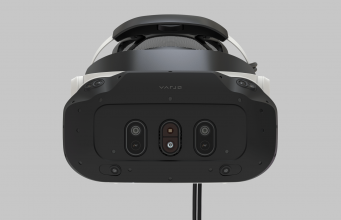
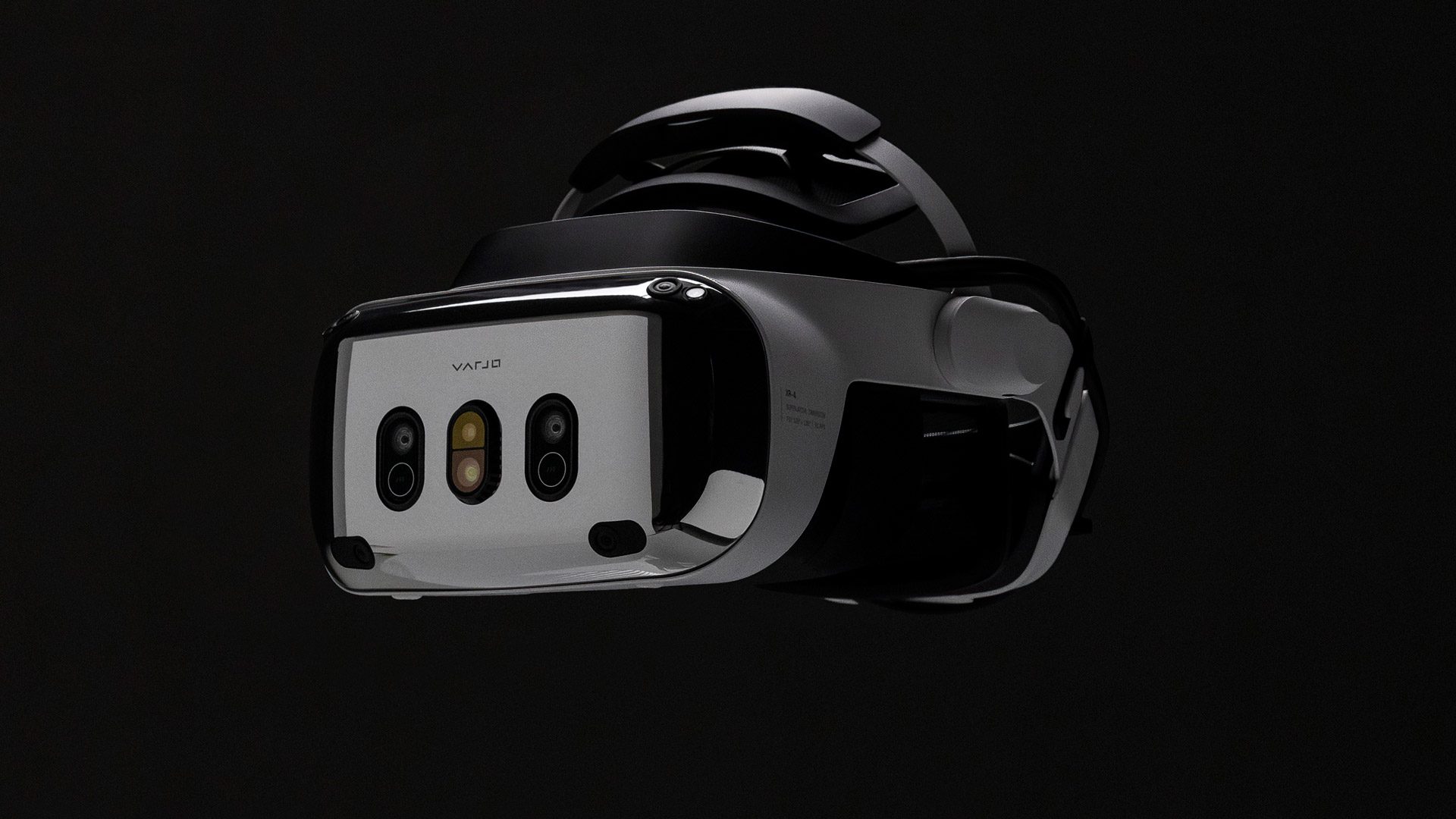
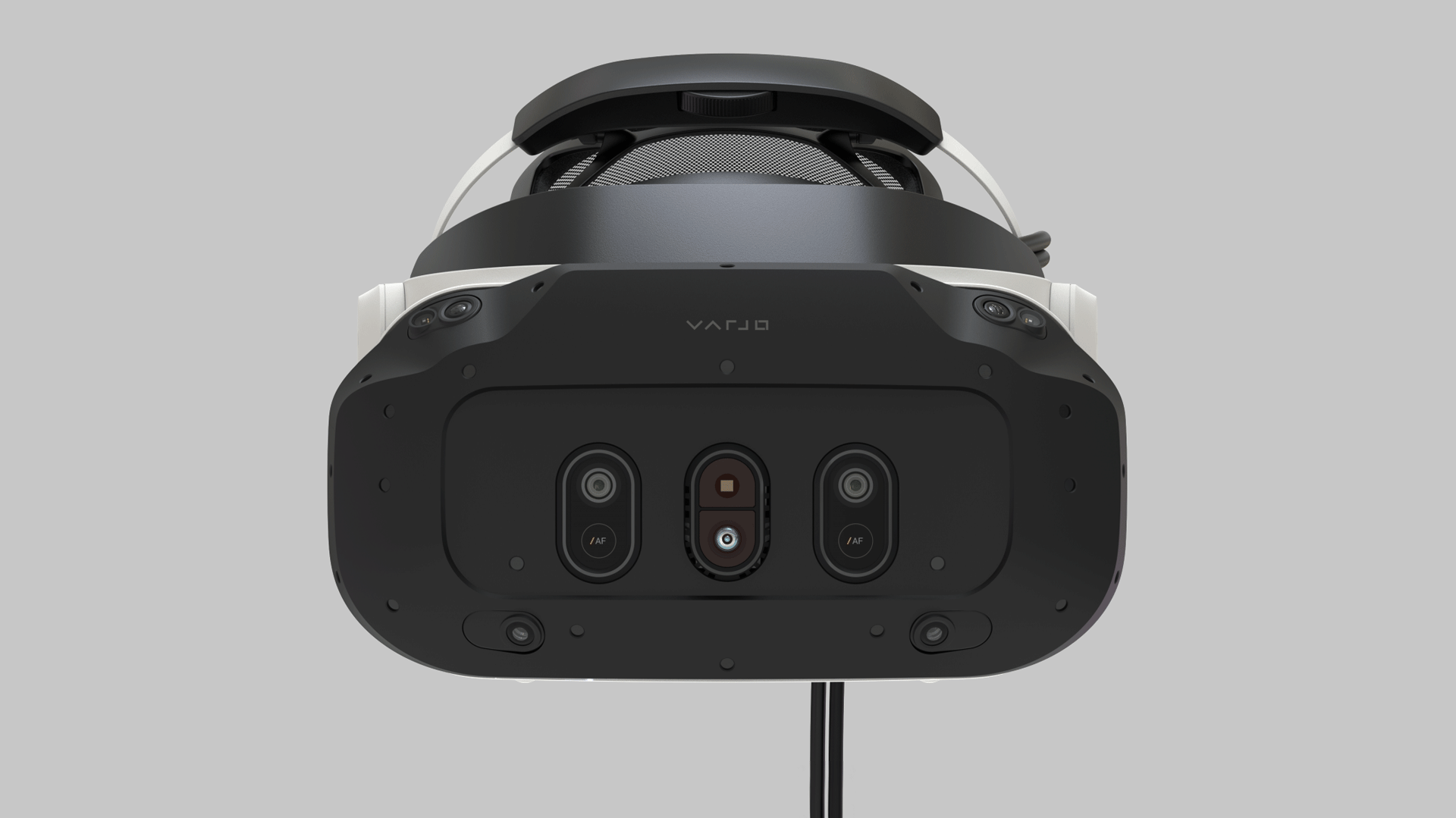
Varjo just announced its latest headset, the XR-4, and while the company is primarily continuing to target high-end enterprise use-cases, this is the first headset in their ‘XR’ series that they will sell directly to consumers and without a hefty annual fee that was once required to use the headset.
The new Varjo XR-4 is the latest headset from the company that has focused on creating the highest-fidelity tethered headset on the market. While the headset’s $4,000 price tag is surely targeting high-end enterprise use-cases, for the handful of prosumers out there who have cash to burn, XR-4 is actually the cheapest of the company’s enterprise-positioned headsets yet. It’s also the first of Varjo’s XR-series headsets that the company will sell directly to consumers and without a required annual fee.
While XR-4 has its own inside-out tracking system, the company is also making a variant of the headset which ties it into the SteamVR Tracking ecosystem (as its prior headsets once relied upon).
Unfortunately it’ll bring the price of the base variant of the headset up by another $1,000. Varjo has confirmed that this variant of XR-4 can switch back and forth between SteamVR Tracking and the headset’s own inside-out tracking.
It’s potentially also possible to eschew the $1,000 addition and instead add SteamVR Tracking to the base variant of XR-4 by attaching something like the Tundra Tracker and configuring it to represent the position of the headset. Though this will take a few extra steps compared to having SteamVR Tracking built right in.
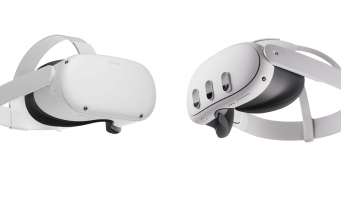
With such an alluring price point on Quest 2 during the Black Friday period, it makes sense the headset would sell more than Quest 3. But what will it mean for the company’s effort to make mixed reality the main selling proposition of its headsets?
Twitter user JustDaven pointed out that Amazon reveals some coarse sales figures in certain cases, including for Quest 2 and Quest 3. We thought it would be interesting to look at all of the major Amazon territories where Quests are sold to find out what the numbers look like.
Across all major Amazon territories (just one of many places where the headset is sold), we found that Meta has sold some 240,000 Quest headsets. What’s more interesting than the raw number however is that Quest 2 is outselling Quest 3 nearly 3:1.
Even though Quest 3 is the hot new model that’s getting all the marketing, it’s not surprising how this happened.
The Quest 2 had a pretty stellar Black Friday discount with a sticker price of $250, including a $50 gift card (pricing it effectively at $200). Compare that to the lowest sticker price for Quest 3 which was $500, including a $15 gift card and a copy of Asgard’s Wrath 2 (pricing it effectively at $425).
Considering the Black Friday sticker prices ($250 vs. $500), people will naturally ask: “At twice the price of Quest 2, is Quest 3 twice as good?”
What It Means
In any case, the cheaper headset appears to be the clear winner so far this holiday season. But what does this mean for Meta—which has been trying to pivot from pure VR to mixed reality with its last two headsets?
Demeo Mixed Reality mode | Image courtesy Meta
Meta has pushed mixed reality as the primary use-case for both the Quest Pro and Quest 3. But while developers still need time to build killer apps and use-cases for mixed reality, a fresh surge of Quest 2 users is about to hit—a headset which just barely supports mixed reality experiences with a grainy black & white view.
This creates a difficult decision for developers: build for the new-fangled headsets with their greater power, better visuals, and much improved mixed reality capabilities? Or cater to the much larger audience of Quest 2 users?
This is of course always the case when game developers need to choose when to shift their focus to a next-gen game console. But this is different.
Between PS4 and PS5, for instance, there is no significant difference between the consoles that compares with the difference in mixed reality capabilities between Quest 2 and Quest 3. For PS4 and PS5, it’s comparatively easy for developers to build a single game and tune it to run well on both systems.
That’s arguably the same case for Quest 2 to Quest 3, but only if we’re talking about pure VR apps.
But a great mixed reality game built for Quest 3 is really going to struggle to provide a good experience on Quest 2; not only because of the lower resolution and black & white passthrough view, but also Quest 2’s lack of depth-sensor—a critical component for creating reasonably accurate maps of the player’s environment to truly mix the virtual and real worlds.
Quest 2 is already three years old. That’s not long for a typical console generation, but it is in the much faster moving landscape of standalone VR headsets.
A new surge of users for the last-gen headset will inevitably slow the transition to the next generation. That means developers will stay focused on the broader Quest 2 audience for a longer period, leaving Quest Pro and Quest 3 with less content that truly takes care of their main differentiator of higher quality mixed reality.
Image courtesy Meta
Ever since Quest Pro, Meta has focused its Quest marketing very heavily on mixed reality, giving customers a sense that there’s lots of great mixed reality content for the devices. But that’s far from the truth as things stand today. Mixed reality games and apps are still barely gestating, with most simply attaching a passthrough background to an existing game. Sure, that might make those games better in some cases, but it doesn’t really make use of the headsets’ mixed reality capabilities.
So while Meta would apparently like to see developers accelerate their transition to Quest Pro and Quest 3’s unique capabilities, the market is incentivizing them to decelerate that transition. That puts the platform and its developers at odds, with customers stuck somewhere in the twilight zone between.
Starting early next year, commuters in London will be able to hail the capital’s iconic black cabs via Uber, the American ride-hailing giant has announced.
London’s black taxi drivers — famous for their uncanny knowledge of the city’s thousands of streets — have long been at odds with Uber, who they say threatens their livelihoods. Frustrated drivers even blocked London streets in 2014 in protest against the tech company’s famously aggressive expansion tactics, and relations still remain tense.
Black cabs are currently the only taxis in London licensed to pick up passengers from the streets in the city and are already available for bookings through apps like Gett, Taxiapp, and FreeNow.
While Uber is playing off the new deal as a partnership, the Licensed Taxi Drivers’ Association (LTDA), which represents more than 10,000 taxi drivers, said it was not consulted ahead of Uber’s “unilateral announcement”.
Steve McNamara, a spokesperson for the organisation, said it has no interest in “sullying the name of London’s iconic, world-renowned black cab trade by aligning it with Uber, its poor safety record and everything else that comes with it.”
Uber, however, claims a “small number” of taxi drivers have already signed up to the service and it hopes to recruit “several hundred” by January. The company said it would not charge new drivers commission for their first six months but didn’t reveal what the fee would be after that period.
While it remains to be seen whether Uber will woo London’s black cab drivers, it wouldn’t be the first time it has turned former foes into friends.
The ride-hail giant recently signed on taxi fleets in Los Angeles, New York City, Paris, and Rome to list drivers on the app. Uber says in Europe and the Middle East, over 10% of Uber trips are now completed by taxi drivers.
This article was originally published on .cult by Luis Minvielle. .cult is a Berlin-based community platform for developers. We write about all things career-related, make original documentaries, and share heaps of other untold developer stories from around the world.
Developers who finally land a job doing what they love — coding — frequently face a brain-teaser: Coding for a living is fantastic, indeed, but is it as endearing when you’re stuck doing the same task over and over again? Because, we get it: writing CSS is allegedly fun, but try doing it on repeat.
Fortunately, web developers constantly drop tools and frameworks that make day-to-day tasks feel like less of a headache. One toolkit that has gained significant attention recently is Tailwind CSS.
Its approach to building user interfaces promotes a utility-first CSS framework that allows you to easily style your websites without the need to write custom CSS code. This open-source GitHub favourite provides a set of pre-built utility classes that you can apply directly in your HTML code to achieve different styles and layouts within any design. Sounds promising if you want to stop asking yourself if you loved to code in the first place.
The <3 of EU tech
The latest rumblings from the EU tech scene, a story from our wise ol’ founder Boris, and some questionable AI art. It’s free, every week, in your inbox. Sign up now!
But, is it worth trying in 2024? Let’s dive into the details and explore its features, benefits, downsides, and how it’s still valid for developers today.
What is Tailwind CSS?
Tailwind CSS is a utility-first CSS framework that provides a comprehensive set of pre-built classes to speed up the development process. Unlike traditional CSS frameworks that come with pre-designed components and styles, Tailwind CSS focuses on supplying small, single-purpose utility classes that can be combined to create custom styles, providing more flexibility and control over the appearance of a website. Web designers online have called it a lean, utility-based CSS framework intended for speedy UI development.
The team behind Tailwind CSS is still adding features, and recently launched its Just-In-Time (JIT) compiler to get lightning-quick build times. This means the toolkit is a time saver on two fronts: it’ll save your time and the person-behind-the screen’s time (without testing their patience).
Developers can compose these classes to create components and layouts. For example, you can define text colour, background colour, padding, margin, and more by simply adding classes to your HTML elements. This modular approach makes it easy to tweak and scale your designs without writing custom and repetitive CSS (contrary to Bootstrap, which aims to provide a familiar and consistent look and feel across different projects).
Who’s using Tailwind CSS in 2023? What is it great for?
Even if certain YouTube channels have recently dunked on this framework for being too contrived, Tailwind CSS is anything but a fad. In 2023, these organisations use Tailwind CSS for their sites:
Der Spiegel
OpenAI and ChatGPT (hope they secured royalties here)
Shopify
Loom
The Verge
MrBeast’s Feastables microsite
Microsoft .NET’s marketing site (kind of amusing)
Moreover, according to industry insights, more than 400 companies, some of them even more tech-oriented than the list above, are using Tailwind CSS. The adoption by a number of different companies suggests two things: First, the framework can cater to diverse needs, from media sites to e-commerce platforms. Second, its adoption by such industry heavyweights indicates a level of precision that might not be beginner-friendly. From a frontend perspective, the fact that OpenAI is using it underscores how versatile and respected Tailwind CSS is in 2023, but also hints at a steeper learning curve.
The fact that this toolkit is meant for mid-level developers is already evident. However, due to its diverse acceptance, it can be challenging to pinpoint the specific application of Tailwind. Is it specifically good for e-commerce? Or for marketing sites? It’s not obvious, since it seems like a versatile instrument. That’s a good thing.
Integrations
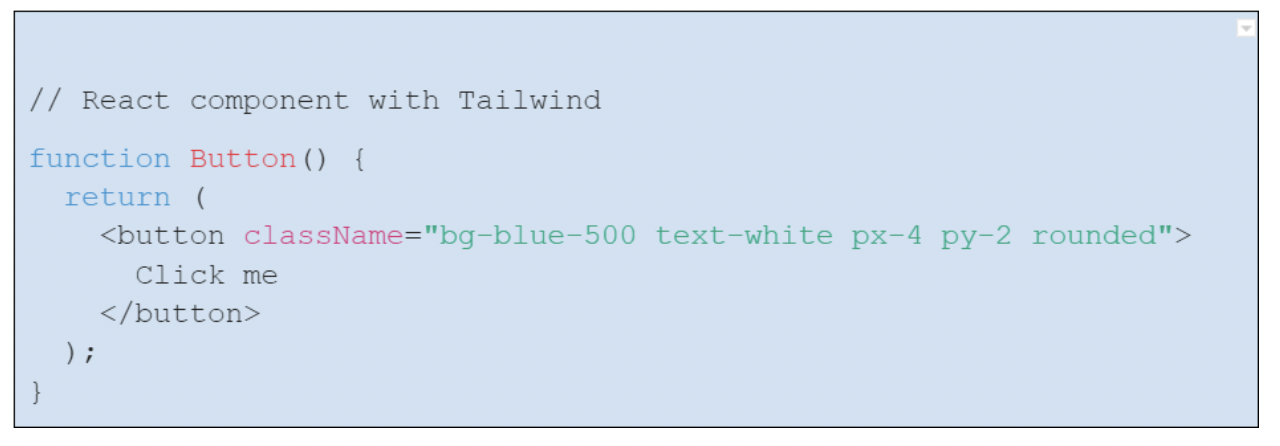
Tailwind CSS integrates seamlessly with various frontend frameworks and tools. It pairs well with popular JavaScript frameworks like React, Vue.js, and Angular. Additionally, Tailwind CSS can be easily integrated into build tools like Webpack and PostCSS, ensuring a sleek development workflow and leaner sites. The following React code snippet should render a blue button with white text when included into a React app that, well, also has a Tailwind CSS set up.
Advantages of Tailwind CSS in 2024
Tailwind CSS offers several benefits that make it a compelling choice for developers in 2024:
Responsive design: Firstly, it provides a highly customisable approach through the tailwind.config.js file, allowing developers to define colours, breakpoints, fonts, and much more.
Consistency: With its unified design system, Tailwind ensures the overall frontend consistency across all pages and maintains a cohesive design.
Speedy development: One of the standout advantages of Tailwind CSS is its ability to accelerate development. By leveraging pre-defined utility classes, developers can build UI components quickly without the need for custom CSS (we’d love to know how long it took you to build a site with Tailwind).
The Tailwind UI repo: Tailwind UI is a collection of professionally designed, pre-built, and fully responsive HTML snippets that can be used in Tailwind CSS projects, It’s run by the same team behind Tailwind CSS and provides a wide range of UI components, templates, and examples that developers can use as a starting point for their web development projects. Tailwind UI aims to help developers build fine-looking and functional user interfaces without writing repetitive code.
The JIT mode: The JIT mode is a compiler that generates CSS styles on-demand as you author your templates, rather than generating all the classes in advance at initial build-time. In JIT mode, Tailwind analyses your HTML templates and generates only the necessary CSS styles based on the classes used in your markup — providing faster build times.
Downsides of Tailwind CSS in 2023
While Tailwind CSS brings numerous advantages to the table, it has received some criticism as well:
Learning curve: For developers new to Tailwind CSS, there can be a long learning curve as they become accustomed to the utility class-based approach. This might slow down initial development until familiarity is achieved.
‘Limited design creativity’: While Tailwind CSS offers flexibility, especially compared to other popular frameworks like Bootstrap, some designers and developers may find it constraining for highly creative or unconventional designs. I’ll admit that this point is a bit nuanced. While Tailwind is utility-first, it doesn’t really limit design creativity. It’s flexible enough to let developers build almost anything. However, the challenge might be thinking within utility class constraints. It’s more about adjusting to a new mindset than an actual limitation in creative design.
Large file sizes: Tailwind CSS can generate large CSS files, which might impact page load times. Careful optimisation and tree shaking are both necessary to mitigate this issue. Still, its integration with PurgeCSS can help developers obtain smaller and quicker files.
It’s worth noting that with the advent of the JIT mode, the development builds are much leaner because only the used classes are generated on-the-fly.
Still, many of these benefits and downsides are just relative. That’s why we suggest comparing Tailwind CSS against other projects, such as the world-famous Bootstrap.
Tailwind CSS vs. Bootstrap: How does it hold up?
When developers consider a new styling tool, Bootstrap typically serves as the gold standard for comparison. A component-based framework, Bootstrap ships with ready-to-use components like modals, buttons, and navbars. It’s the ‘grab-and-go’ of the CSS world, prioritising speed and a unified look. In 2023, you can tell when a site is using Bootstrap’s glossy icons right away.
Tailwind, on the other hand, adopts a utility-first approach. Instead of pre-designed components, you get atomic utility classes. The idea? Craft your UI piece by piece, granting designers and developers more flexibility. So, if in Bootstrap, a button might be determined as in Tailwind, it’ll be:
This brings the matter of customisation. While Bootstrap is customiszable using SCSS variables, deviating significantly from its default look demands overriding styles, sometimes leading to ‘Bootstrap fatigue’ where every site seems eerily similar.
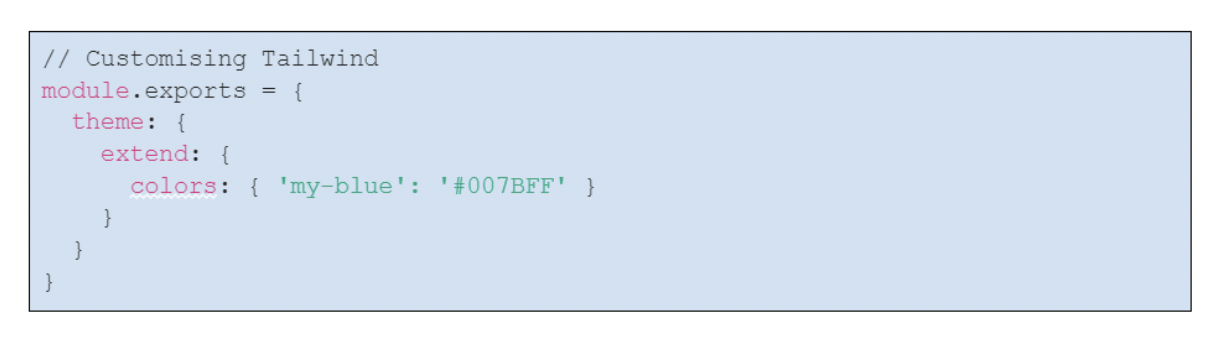
Customisation, on the other hand, is Tailwind’s playground. The tailwind.config.js file is your canvas, allowing bespoke designs. Do you want a specific shade of blue or a unique breakpoint? Devs can define it very easily. So head to your palette-picking sites and get on with it.
Bootstrap, with its well-documented, component-based nature, often serves as the first port of call for budding CSS enthusiasts. Its off-the-shelf components, like responsive navbars, mean rapid development. However, this convenience sometimes contributes to project bloat, affecting performance.
In contrast, Tailwind CSS is akin to crafting with precision tools. Instead of pre-styled components, you’re presented with granular utility classes. For example, with Bootstrap, you might use a single class for a button, whereas in Tailwind, you would meticulously define its appearance with a combination of utilities, like text colour, background, and padding. It’s a system that might seem overwhelming to novices, but offers seasoned frontend developers an unparalleled level of control. Furthermore, Tailwind’s integration with PurgeCSS helps remove unused CSS for an economical, prompt build.
Essentially, while Bootstrap is geared toward quick, uniform designs, Tailwind is great for seasoned developers seeking accuracy in their designs. Both are legitimate choices in 2023.
A real use case for Tailwind CSS in 2023
Thanks to the testimony of a frontend expert, we can go through a use case where Tailwind CSS helped the most relatable of online businesses: a SaaS. While building NodCards, a digital business card platform, the developer came across a challenge: allowing users to dynamically select any primary design colour for their cards. This choice had to be incorporated without altering the website’s markup or stylesheet.
Tailwind CSS, in combination with its JIT compiler (head to Tailwind’s official site to learn how to enable it), presented the dev with a workaround. However, the dynamic colour application wasn’t straightforward. Instead of relying solely on Tailwind’s utility classes, the developer utilised the power of CSS variables and helper functions.
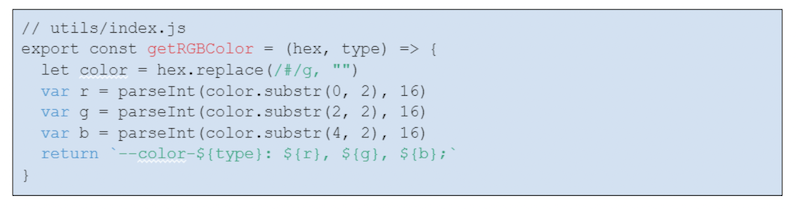
This helper function converts a HEX colour to RGB, which aids in creating CSS variables for the dynamic primary colour. Once converted, these RGB values are integrated with Tailwind CSS to produce varied shades, ensuring flexibility with opacity layering. For instance, the text colour for a user’s name can be dynamically set:
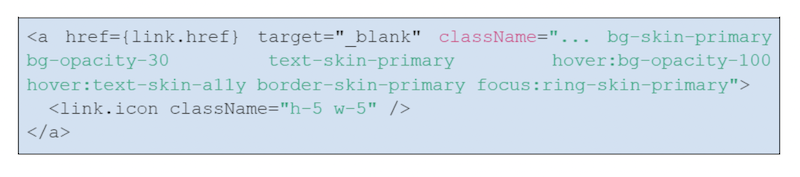
Similarly, buttons can be styled to use the primary colour with variable opacities and even adjust for accessibility concerns on hover:
With Tailwind CSS, NodCards managed to offer users the flexibility to personalise their cards’ design dynamically, while ensuring aesthetics, accessibility, and a nimble site.
So, in conclusion
As seen through the lens of high-profile sites and real-world use cases, it’s clear that Tailwind CSS is more than just a passing trend. If you’re on the fence about adopting it, remember that aptitude often begins with experimentation. So, dive in, get your hands dirty with Tailwind, and let your creations speak for themselves.
Google DeepMind researchers have trained a deep learning model to predict the structure of over 2.2 million crystalline materials — 45 times more than the number discovered in the entire history of science.
Of the two million-plus new materials, some 381,000 are thought to be stable, meaning they wouldn’t decompose — an essential characteristic for engineering purposes. These new materials have the potential to supercharge the development of key future technologies such as semiconductors, supercomputers, and batteries, said the British-American company.
Modern technologies, from electronics to EVs, can make use of just 20,000 inorganic materials. These were largely discovered through trial and error over centuries. Google DeepMind’s new tool, known as Graph Networks for Materials Exploration (GNoME), has discovered hundreds of thousands of stable ones in just a year.
Of the new materials, the AI found 52,000 new layered compounds similar to graphene that could be used to develop more efficient superconductors — crucial components in MRI scanners, experimental quantum computers, and nuclear fusion reactors. It also found 528 potential lithium ion conductors, 25 times more than a previous study, which could be used to boost the performance of EV batteries.
To achieve these discoveries, the deep learning model was trained on extensive data from the Materials Project. The programme, led by the Lawrence Berkeley National Laboratory in the US, has used similar AI techniques to discover about 28,000 new stable materials over the past decade. Google DeepMind has expanded this number eight-fold, in what the company calls an “order of magnitude expansion in stable materials known to humanity.”
While the new materials are technically just predictions, DeepMind researchers say independent experimenters have already made 736 of the materials, verifying their stability. And a team from the Berkeley Lab has already been using autonomous robots to synthesise materials it discovered through the Materials Project as well as the new treasure trove unearthed by DeepMind. As detailed in this study, the autonomous AI-powered robot was able to bring 41 of 58 predicted materials to life, in just 17 hours.
“Industry tends to be a little risk-averse when it comes to cost increases, and new materials typically take a bit of time before they become cost-effective,” Kristin Persson, director of the Materials Project, told Reuters. “If we can shrink that even a bit more, it would be considered a real breakthrough.”
DeepMind researchers say they will immediately release data on the 381,000 compounds predicted to be stable and make the code for its AI publicly available. By giving scientists the full catalogue of the promising ‘recipes’ for new candidate materials, the company said it hopes to speed up discovery and drive down costs.
My ancient Samsung Galaxy is ready for retirement. Cracks expand across the screen, photos are hazy blurs, and the battery barely survives a day. It’s time to buy a replacement.
The initial contenders for my cash were the usual mix: Androids and iPhones with old names, incremental upgrades, and eye-watering price tags. While mulling over the options, a serendipitous email arrived in my inbox. A budding phonemaker called Murena was building a new handset with a bullish promise: “the ultimate pro-privacy smartphone.”
To substantiate the slogan, the company flaunted two compelling features: a physical “kill switch” to disconnect the device and an anti-tracking operating system. Consider me intrigued.
The announcement of the phone — named the Murena 2 — was timely. Just hours later, a news story provided an inadvertent advertisement for the product.
The <3 of EU tech
The latest rumblings from the EU tech scene, a story from our wise ol’ founder Boris, and some questionable AI art. It’s free, every week, in your inbox. Sign up now!
Several US government agencies had been illegally using location data taken from mobile apps. In one case, an official had tracked coworkers for personal reasons.
Such scandals have become commonplace.
The Murena 2 introduces new privacy features for both hardware and software. Credit: Murena
In the past few weeks alone, politicians have accused the Indian government of phone tapping, big box repair stores have snooped on customer devices, and Motorola users have sued the company for “surreptitiously” taking data from their selfies. Prince Harry has also won the latest stage in his lawsuit over alleged phone hacking by newspapers.
The frequency of the offences has a numbing effect. In the decade since Edward Snowden exposed rampant surveillance of our devices, eavesdropping has become just another boring dystopia.
Our nonchalance is reinforced by a sense that ordinary folk aren’t impacted — but that may be wishful thinking. Just a fortnight ago, reports emerged that British police are requesting data from menstrual tracking apps after “unexplained” pregnancy losses.
Average Janes and Joes face a further threat from big tech’s push into health insurance. Any company that sets insurance rates will find enormous value in the personal data on our phones.
There’s also a more pressing danger lurking.
“You have no guarantee that the data is never going to be hacked,” Alexis Noetinger, Murena’s COO, tells TNW. “For us, this is the biggest issue. The more data that is collected, the more risk there is that this data can fall into the wrong hands.”
The Murena 2 aims to mitigate this risk. Set to launch in December, the handset promises “unparalleled” levels of privacy. To test the claim, we got our hands on a prototype of the device.
Our trial doesn’t have the most encouraging start. After turning on the phone, a warning message appears on the screen: “Orange state: Your device has been unlocked and can’t be trusted.”
It’s an inauspicious welcome, but Murena assures us that it’s just a teething issue with the pre-release model. From that point on, the software ran smoothly — which we had expected from Murena.
The French startup emerged from /e/OS, a “deGoogled” operating system. A privacy-focused fork of Android, /e/OS is an anti-tracking, democratised version of its progenitor.
The operating system is open-source, which means anyone can probe the privacy protections. By default, it doesn’t send any data to Google or third parties.
On launch, the Big G’s apps and services have been replaced by open-source versions. If you do install more familiar alternatives, the tracking can be restricted.
“The idea we had was to tilt the status quo on its head, and instead of promoting proprietary and closed solutions, to develop an alternative based on open-source software,” Noetinger says.
That status quo is a duopoly that’s dominated the sector for over a decade.
The similarity to Android makes adapting to /e/OS pretty quick. Credit: Munera
After Blackberry plummeted from the industry’s pinnacle, Android and Apple devoured the smartphone market between them. Regular consumers now only have two real choices: go with Android and its voracious data collection, or opt for the iPhone’s closed ecosystem, which may provide more privacy, but still gobbles up ample user information.
In 2021, researchers at Trinity College Dublin found that both operating systems share data with their motherships every 4.5 minutes on average — even when the handsets aren’t being used.
The data that they send is diverse and detailed. It includes your location, phone number, cookies, local network, and even information about other devices nearby. Some of this is shared when the phone is sitting idle in a pocket or bag.
According to the Trinity team, it could allow location tracking when location services are disabled. They found that both Apple’s iOS and Android transmit telemetry — despite users explicitly opting out of this.
The researchers also contested Apple’s claims of superior protection. They argued that iOS offered “no greater privacy than Google devices.”
“I think most people accept that Apple and Google need to collect data from our phones to provide services such as iCloud or Google Drive,” said study author Professor Douglas Leith.
“But when we simply use our phones as phones — to make and receive calls and nothing more — it is much harder to see why Apple and Google need to collect data.”
There is one obvious reason why it’s necessary: advertising.
Online ads provide the bulk of Google’s revenues, and data provides the biggest selling point. It creates detailed profiles of our real-world tastes, demographics, and behaviours, which advertisers use to target us with ads.
This personalised marketing can be convenient for consumers. But it can also turbocharge political propaganda, disinformation, echo chambers, and exploitation of the vulnerable.
Another bugbear for privacy advocates is government access. Authorities can request the data with a warrant — and they do. Google regularly gives law enforcement agencies search and location data.
Google CEO Sundar Pichai has tried to reassure the US Congress that his company is responsive to law enforcement requests. Credit: Greg Beadle
These issues extend from operating systems to apps. Facebook, for instance, tracks you across all its apps and sites — even after you log off the social network. The social network requests a dizzying array of permissions, from your contacts, calls, and messages to your camera, microphone, and storage. To use Facebook, you must give the company almost full control of your device.
Once you open the app, the Meta behemoth monitors when you log in, what you browse, where you go, which products you buy, and how long you’re on the platform. All of this determines the ads we receive. Sometimes, it also serves more nefarious purposes.
Personal data has been stolen from Facebook by hackers, misused by third-party apps, publicly exposed, and shared without permission. Most infamously, the data of up to 87 million users was harvested without permission by Cambridge Analytica during the 2016 US Presidential election.
It was a damning breach for Facebook. But the platform is far from the only app that puts our data at risk. Murena’s pitch for /e/OS is protection from them all.
On /e/OS, every tracker is removed by default. Extra privacy protections are also installed, while connections to Google are cut.
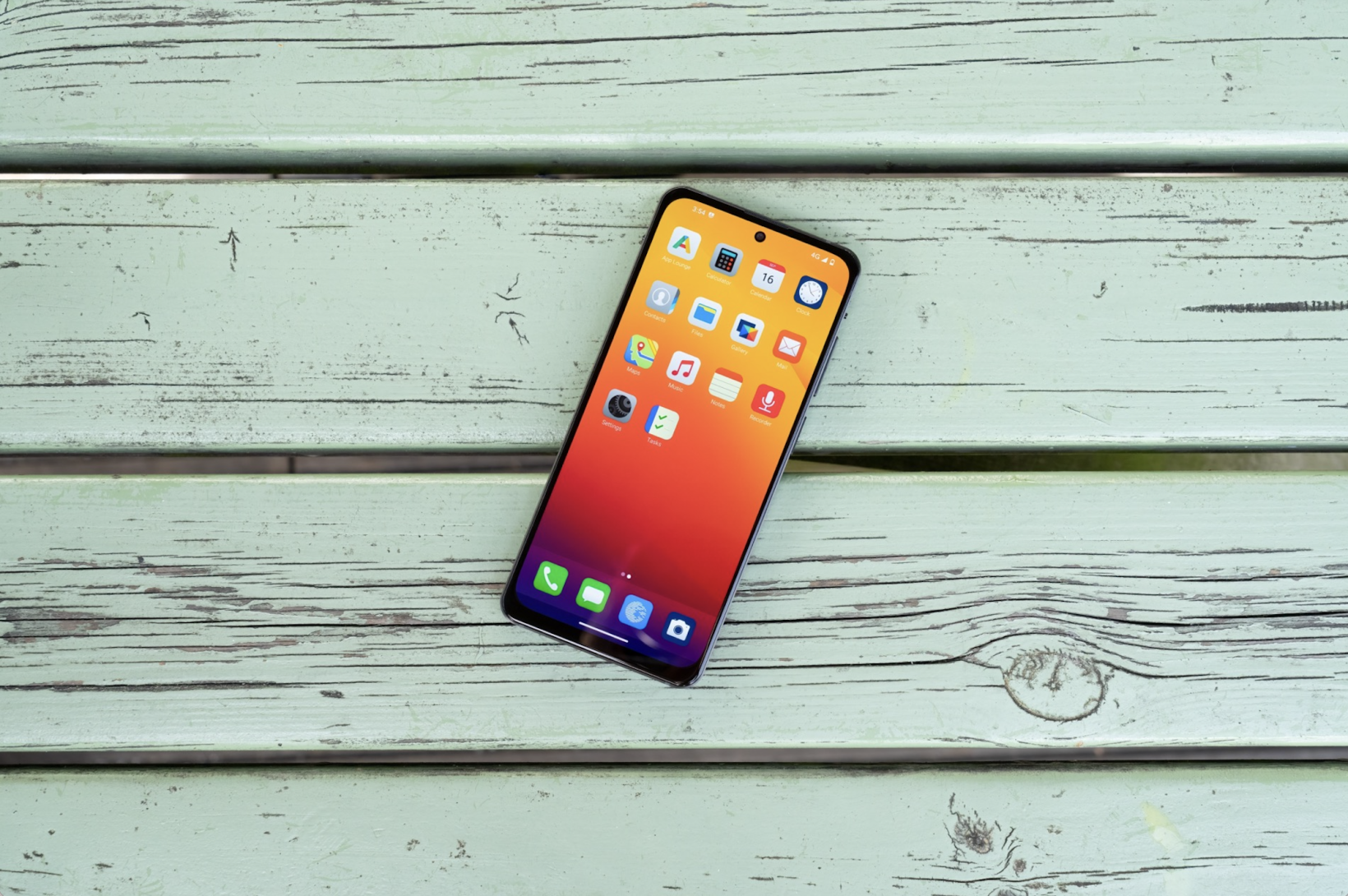
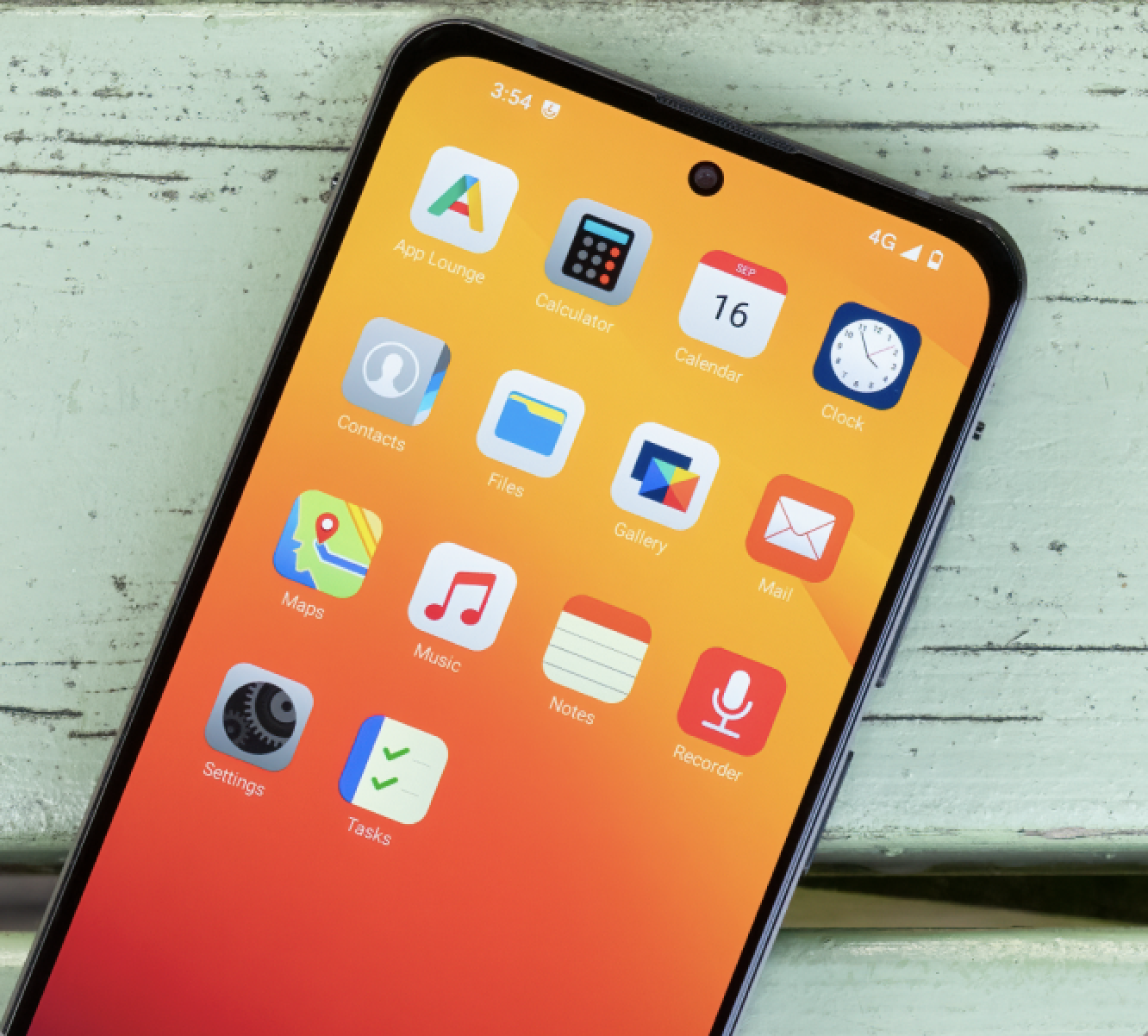
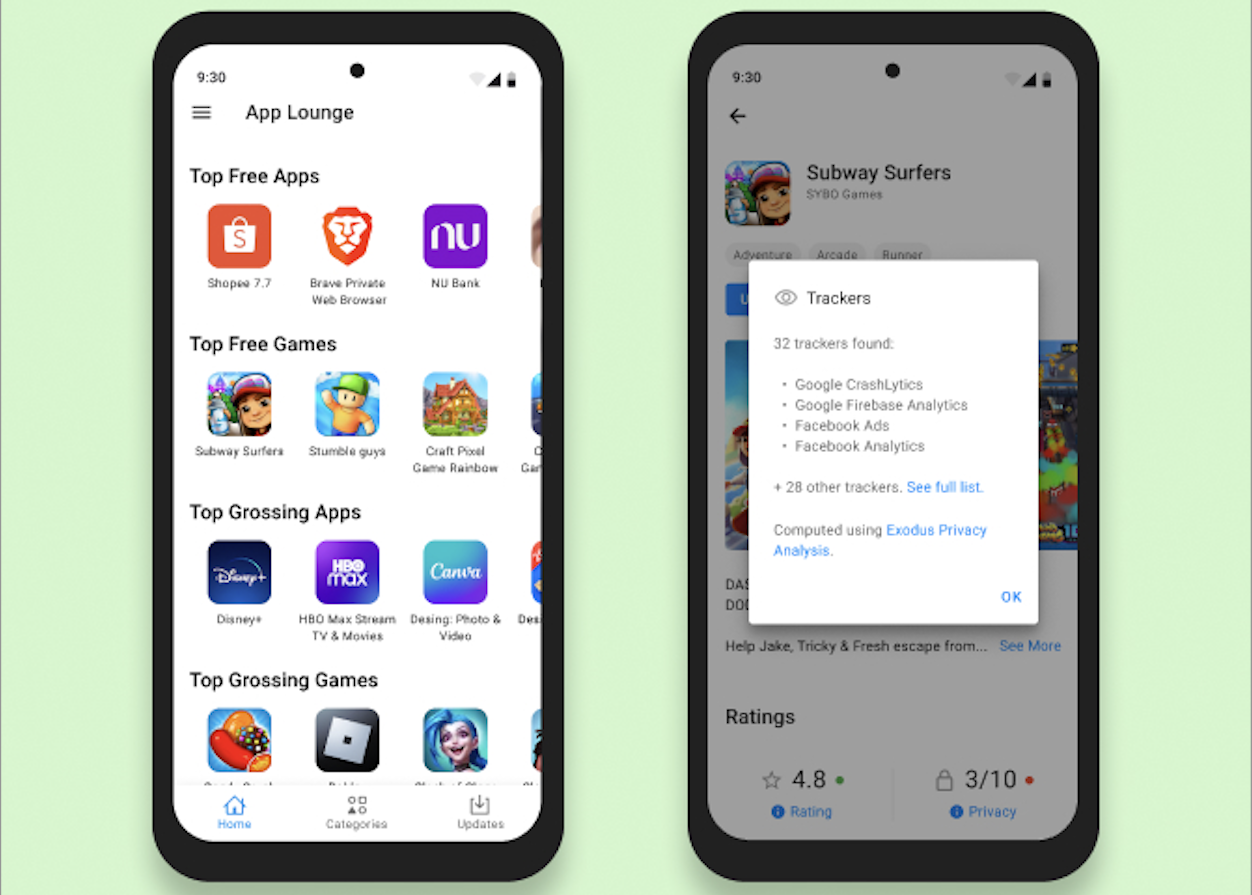
The deGoogling is extensive. The Google default search engine is replaced by a Murena system, Google apps are switched for open source equivalent, no Google servers are used to check connectivity, geolocation uses Mozilla services, and the Google Play Store is ditched for Murena’s App Lounge.
The full extent of the deGoogling is too broad to catalogue here — although some still wish it was wider. More on that later.
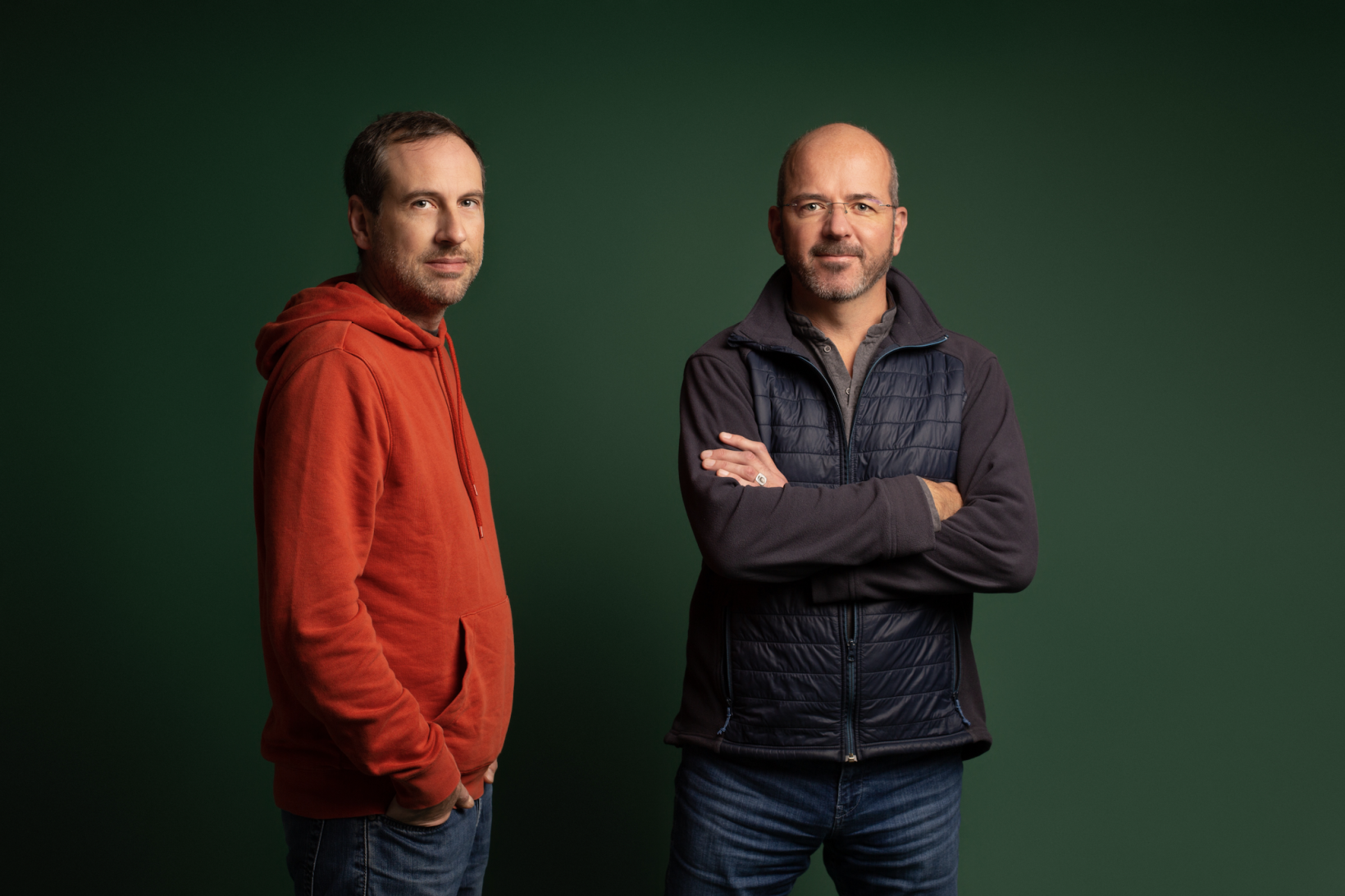
Noetinger (right) alongside Murena founder Gaël Duval, who also created /e/OS. Credit: Murena
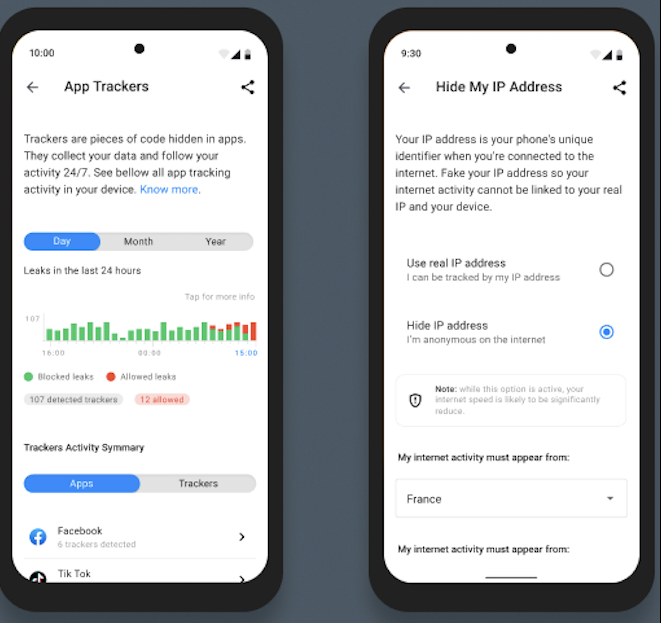
The OS is paired with an advanced privacy module. Once inside, you can monitor each app’s permissions, as well as the hidden trackers, which collect your data and follow your activity. You can then cut the tracking.
“We give the user the visibility on which app is trying to access the data — and which tracker is trying to access the data,” Noetinger says.
You can also find privacy scores for each app, which contains some big surprises. Facebook, for instance, got a whopping nine out of 10 for privacy — the same as Signal. LinkedIn and Spotify, meanwhile, were both given zero out of 10. TikTok, a bogey app for many in the Western world, received a middling four.
Facebook’s apparent superiority has a simple explanation: the app doesn’t use trackers. Yet it obviously still collects copious user data. As Murena told TNW, Facebook doesn’t need a tracker “because it is already one big tracker.” Unfortunately, this somewhat devalues the privacy scores.
Thankfully, you can still fortify your defences against these snooping apps. /e/OS users can fake their location to random and specific places, use a dummy email, or even hide their IP address.
The advanced privacy and anti-tracking features are unusual in consumer smartphones. Credit: Murena
Alongside the operating system and privacy features, /e/OS provides a default set of open-source apps and online services. Among them is the Murena Cloud, which includes an email account, cloud storage, and an online office suite.
In our experience, the software performed pretty well. Like the operating system, the apps are fairly intuitive, functional, and familiar to Android users — although they lack the slickness and style of the Google versions.
Then there is the app store — which is where the deGoogling gets contentious.
Additional applications for the Murena 2 are downloaded from the /e/OS App Lounge, an open-source system that connects directly to the Google Play Store.
The App Lounge combines common apps, open-source apps, and progressive web apps (PWAs) — which work directly from a browser — in one single repository. According to Murena, there’s no other app store that does this today.
To access Google products, the system has a compatibility layer. This means that you can still access Android apps. The free ones are accessible via anonymous browsing to circumvent trackers, but the paid apps still require a Google account.
These concessions have irked early adopters. Murena wants to create a deGoogled world, but won’t fully cut connections to the tech giant.
It’s struck a balance that won’t satisfy every privacy advocate, but the business case is clear. An absence of Play Store apps and Google services would likely send the device to an early grave. It would certainly be a dealbreaker for me.
The compromise evokes the “privacy paradox.” This phenomenon arises when people claim to highly value their privacy, but readily disregard the protection of their personal data. Noetinger sympathises with their plight.
“We know that people need to access some applications because they don’t have the choice,” he says.
“This way, you can still use the applications you need. If they feature trackers, you can block them, and we have additional features that can be quite aggressive.”
After searching for apps, users can find their privacy scores. Credit: Murena
Another issue with the Google link is the App Lounge. When the Murena One launched last year, the developer community XDA claimed that the App Lounge is in a legal “grey area,” because it pulls apps from Google’s servers while bypassing the requirement for a Google account.
Murena acknowledges that there’s an issue here. The company told TNW that Google has hardened its account usage policy this year. Murena said that it proactively warns users about the potential curbs, but that it hadn’t received any reports of restrictions related to the App Lounge. The company assures users that the App Lounge’s terms and conditions are compatible with those of Google.
After finding a foothold in smartphone software, Murena ventured into hardware with last year’s launch of the Murena 1. Its successor adds several compelling features.
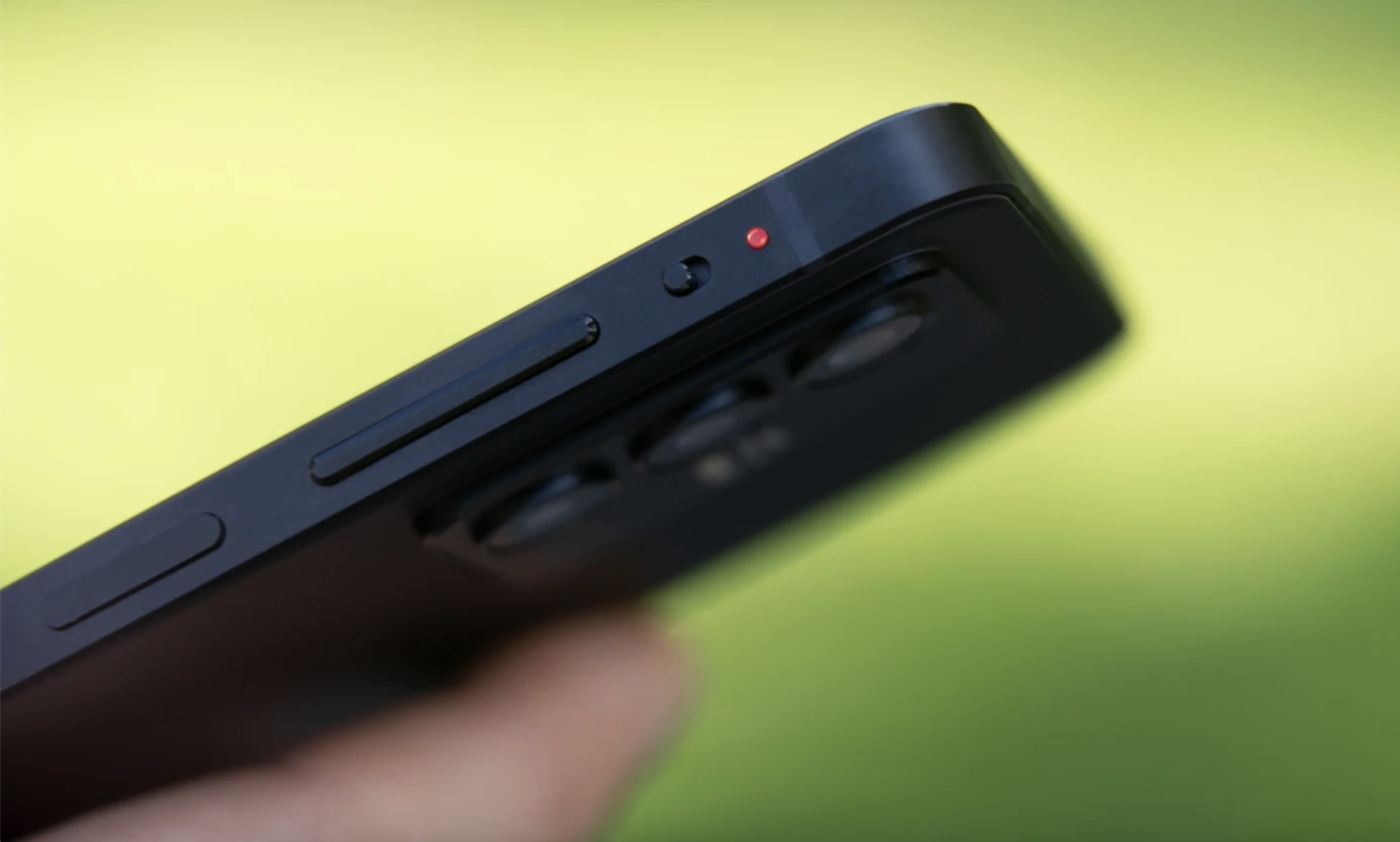
One that really caught our eye is the new physical kill switch. This disables all the device’s microphones and cameras, which many apps use for unspecified reasons. They’re also vulnerable to hacking.
During our trial, the button worked seamlessly. With the flick of a finger, a circuit block instantly deactivated the mic and cams. To reconnect them for a call, we just hit the switch again.
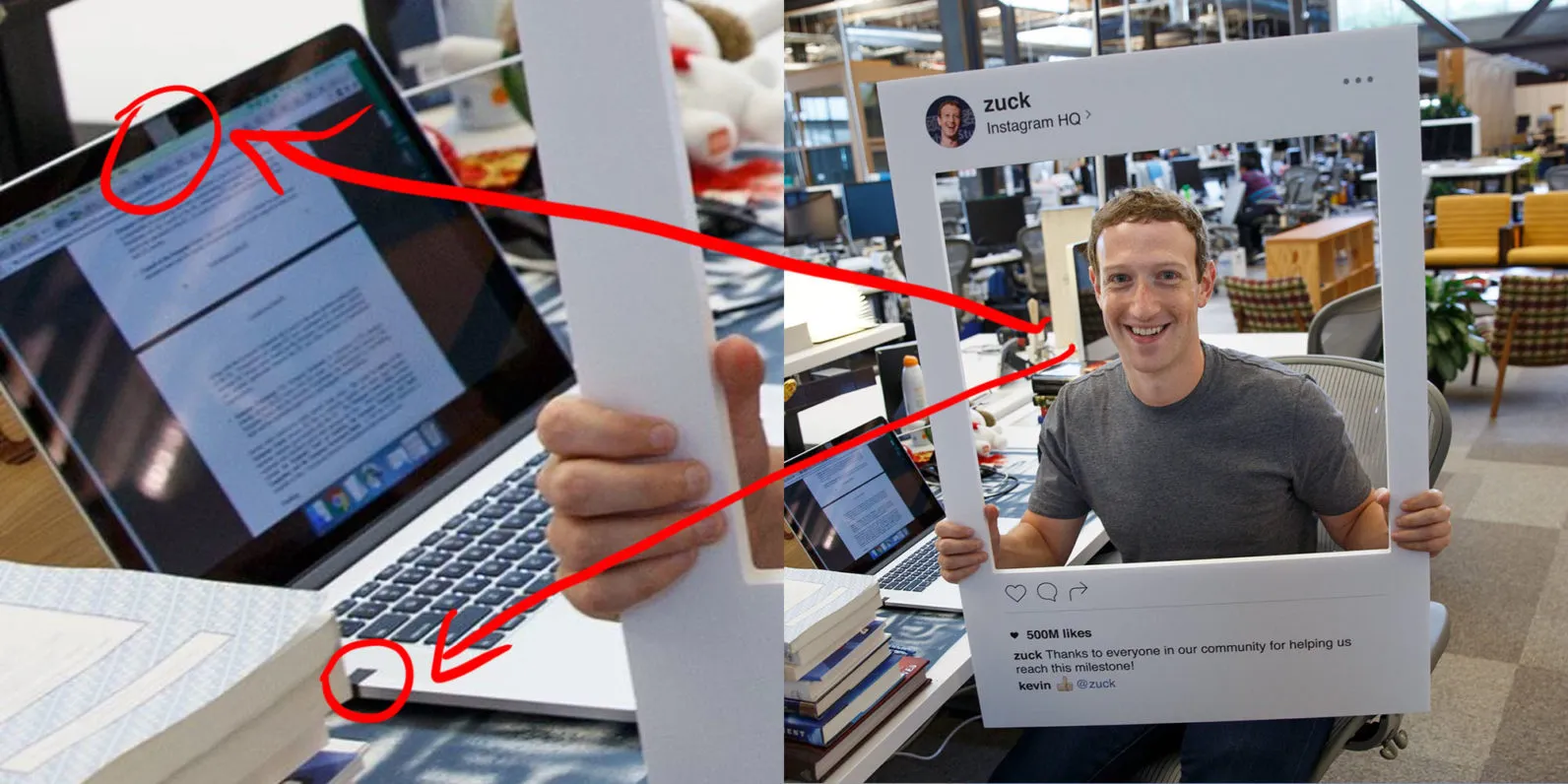
It’s a feature that should impress even Mark Zuckerberg. The Meta boss was once photographed next to a laptop with a physical cover over its webcam and microphone. And if anyone should know about privacy threats, it’s the founder of Facebook.
Zuckerberg’s protective tape technique isn’t ideal for phones.
A second new addition is a disconnection switch. With a tap, the button disables all network activity and mutes the phone.
This one is primarily a “do not disturb” feature. The concept taps into the growing demands for distraction-free environments and digital detoxes. In the future, Murena may add an option to customise the switch’s purpose.
As for the conventional specs, they’re comparable to typical mid-range devices. There’s a 6.43″ high-resolution display, 128GB of storage, 8GB of RAM, a 4000mAh battery, and a 2.1GHz octa-core processor.
For photos, you get a 25mp front selfie camera and a rear triple camera (5mp, 13mp, 64mp). Undoubtedly, the pictures dramatically outclassed those from my decrepit Samsung — although that’s pretty faint praise. If you want the finest photos and the leading specs, you’ll need a top-end phone.
“Our standpoint is not to compete on the specs, because if you want to compete on specs, it never ends,” Noetinger says. “At the end of the day, even if the device is not premium, it will most likely be enough for most people out there for day-to-day use.”
Murena hopes the smartphone’s privacy edge attracts these regular consumers. But the mass market remains a formidable target.
The kill switch adds a rare innovation to a stagnant sector. Credit: Murena
The mobile industry is mired in a historic downturn. Stocks have slumped, sales have slowed, and innovation has stagnated. In 2023, global smartphone shipments are projected to decline by 4.7% to 1.15 billion units — a ten-year low. These are challenging times for new entrants to the market — but they also present opportunities.
A key problem for the sector is consumer apathy. With massive price tags for minor upgrades to interchangeable devices, the big brands no longer provide a big bang for our buck. The latest iPhones and Androids simply aren’t as special as they used to be.
In these uninspiring times, the Munera 2 stands out. By combining inventive hardware, privacy-centric software, and an alternative to the Android/iPhone duopoly, the device has a unique appeal.
Those charms, however, won’t attract everyone. Without the familiar Android interface, a recognisable name, and default Google service, the device will struggle to reach the mainstream.
But for privacy enthusiasts, early adopters, and big tech boycotters, the release date is worth adding to the calendar. Until that day comes, my ageing Samsung will have to survive a few more charges.
The Murena 2 is now available for preorder on Indiegogo. The retail price is $499 in the US, €499 in the EU, £429 in the UK, $679 in Canada, $829 in Australia, and 479 CHF in Switzerland. Shipments are estimated to start in December 2023. The official public launch is planned for early 2024.
Samsung has secured a trademark with the UK’s Intellectual Property Office for ‘Samsung Glasses’, which could mean we’re finally seeing some movement from the South Korean tech giant to release an XR headset.
Filed in August and later entered into registry in November, the Samsung Glasses trademark specifies that it covers “Virtual reality headsets; Augmented reality headsets; Headphones; Smartphones; Smart glasses.” The news was first reported by UploadVR.
Samsung announced in February it was partnering with Google and Qualcomm to develop an XR device, something the company said at the time was “not too far away.” We’re still not sure what it will be other than hardware made by Samsung, software by Google, and chipset by Qualcomm.
While unconfirmed as a related device, only a short month later Samsung filed for the US trademark ‘Samsung Galaxy Glasses’. In its description, the US filing is said to cover the same categories as the UK trademark.
Granted, this is a pretty wide range of devices which span the entire XR gamut, although both proposed ‘Glasses’ monikers seem to imply it wouldn’t be a direct competitor to either Meta Quest 3 or the soon-to-release Apple Vision Pro, the $3,500 mixed reality headset which is set to launch sometime early next year.
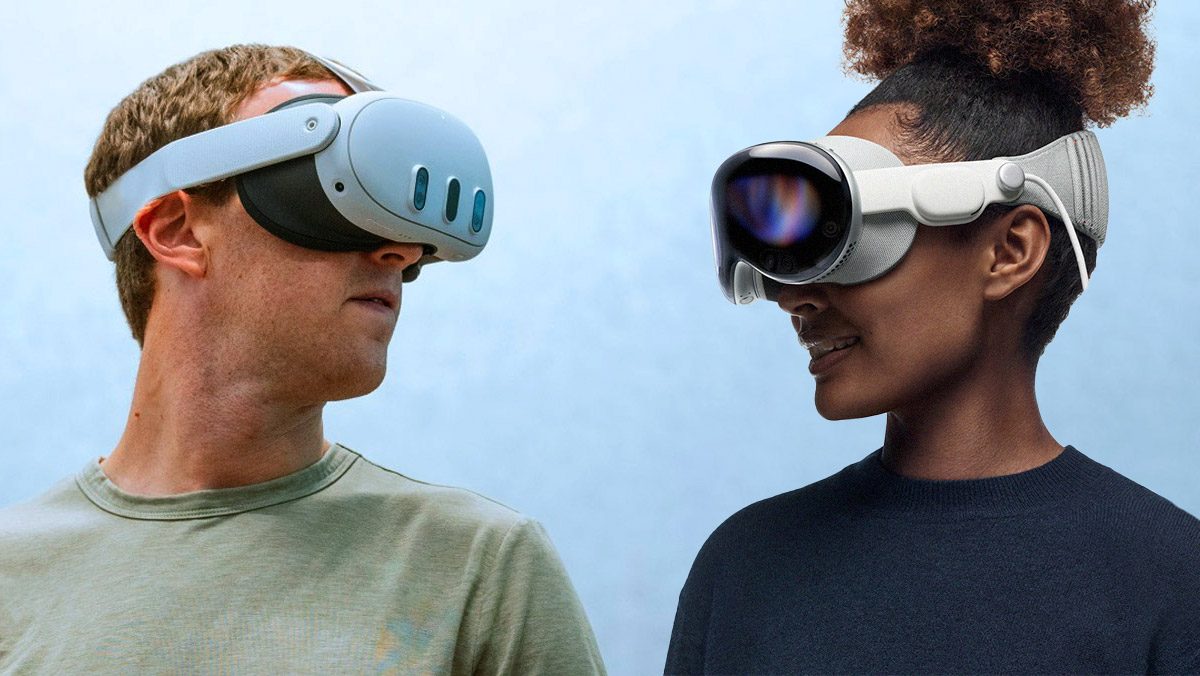
Quest 3 (left) and Apple Vision Pro (right) | Based on images courtesy Meta, Apple
Vision Pro is well beyond the size of spectacles, so calling anything with that format would be an odd move. There are a few candidates though.
Something similar to Meta’s Smart Glasses from Ray-Ban could be more fitting to bear the ‘Samsung Glasses’ name. Confusingly enough, Meta Smart Glasses don’t have a display, instead packing in cameras, off-ear headphones, microphones, and voice access to Meta’s digital assistant.
Another option might be a device similar to XREAL’s Air 2 Pro, which packs in birdbath optics and micro-OLEDs for traditional content consumption, such as film, TV, and flatscreen video games.
A full-blown pair of all-day AR glasses is decidedly out of the picture though, as optics and battery technology (among other things) still aren’t at a point where they’d fit into a glasses format. These are problems that every major tech company in the XR space is working on currently, but it’s safe to say we’re years away from what many hope will be the next major computing platform.
The EU’s upcoming AI Act has an ambitious goal: to set the first landmark framework for regulating artificial intelligence. But its strict approach towards General Purpose AI (GPAI) and foundation models has sparked controversy both among the bloc’s policymakers and the wider tech industry.
Now, following the act’s latest Trilogue negotiations between the Commission, the Council, and the Parliament, representatives of Europe’s IT sector are worried that the bill “misses the mark on tech neutrality and risk-based control.”
In a joint statement, the signatories, who include DOT Europe, argue that the suggested proposals on GPAI and foundation models are neither aligned with the complexity of the AI value chain, nor are they consistent with the act’s intended approach to regulate based on risk and not on the type of technology being used.
Specifically, they express concerns about the potential classification of the two technologies as “highly capable,” or as having “high impact,” noting that the EU’s criteria for this assessment aren’t directly linked to the level of risk an AI system may pose.
The <3 of EU tech
The latest rumblings from the EU tech scene, a story from our wise ol’ founder Boris, and some questionable AI art. It’s free, every week, in your inbox. Sign up now!
They further add that any obligations designed for foundation models should take into consideration the multinational and multi-stakeholder ecosystem, in order to enable co-regulatory processes where actors across the entire value chain can help shape future governance.
Meanwhile, the sector representatives are against the potential additional requirements for using copyrighted data to train AI systems, given that there’s already a comprehensive framework of copyright protection in the bloc.
“We believe this additional legal complexity is out of place in the AI Act, which is primarily focused on health, safety, and fundamental rights,” reads the statement.
Alongside DOT Europe, the signatories include The Software Alliance (BSA), the Computer & Communications Industry Association (CCIA), the Developers Alliance, the Information Technology Industry Council (ITI), and the Association of the Internet Industry (eco).
The IT sector isn’t the first to express concerns about the AI Act. Executives at some of Europe’s biggest companies have raised fears over how over-regulation could stifle innovation, while the US has warned that the bill would hurt smaller European companies and only benefit the big players.
Scientists from Cranfield University in the UK are developing a kind of underwater wing for ships that could help decarbonise a sector responsible for more emissions than air travel.
Known as wave devouring propulsion technology, it is essentially a flapping foil system installed at the bottom of a ship’s hull that helps propel it along. Inspired by the tail fin of a whale, the system harnesses the kinetic energy of the waves to achieve propulsion without fuel.
As the wing flows through the water, it automatically flaps up and down generating thrust — much like when a bird glides through the air or a fish cruises through the water.
Just like a fish or a bird, however, the system won’t work unless there is an engine to provide initial power. But once a ship is cruising, the foils reduce the overall effort needed to push the boat forward.
This graphic from Norwegian startup Wavefoil illustrates the basic concept:
Lab-scale test models of the wave-devouring propulsion system at Cranfield’s ocean laboratory found it could reduce the fuel use of ships by up to 15%. While that might not sound all that much, it is a relatively simple technology that could be retrofitted onto existing vessels. In combination with the plethora of other technologies being developed to decarbonise shipping — like giant windwings or solar sails — the foils could help set the global shipping industry on course for net zero emissions.
The concept of using flapping foils to generate thrust from flowing water was discovered and demonstrated by German researchers over a century ago. But for a long time, the process simply wasn’t well understood enough to scale on a practical level, and the urgency to cut fuel use wasn’t as great as it is today.
Over the last few years, however, there have been a few attempts to commercialise wave devouring propulsion and bring it to market. Two companies, Wavefoil from Norway and Liquid Robotics from the US, have shown the most promise.
Wavefoil made headlines in 2019 when it installed retractable bow foils on a ship for the first time in history. The giant fibreglass foils are designed to fold up into the ship’s hull when not in use, the first technology of its kind to do so. This means the foils can be retracted during heavy storms (they can withstand wave heights up to 6m, not more) and when docking.
By harnessing the up and down motion of the waves, the foils help save fuel but they also increase comfort in rough seas, said their creators. Having raised €5mn so far (the latest round being a grant in 2022 from Innovation Norway), Wavefoil has installed its technology on several ships since its founding.
Liquid Robotics’ Waveglider robots is powered by solar panels on the surface and a wave propulsion rig below it. Credit: Liquid Robotics
While Wavefoil is tackling bigger ships like ferries, Liquid Robotics has developed an autonomous surface vehicle called Waveglider. Fitted with solar panels and a wave propulsion system, the ocean-going robot can spend up to a year at sea collecting data for research and defence applications without any human intervention. The company was acquired by Boeing in 2016 and is currently valued at around $200mn, according to Dealroom data.
While still a nascent field, these two companies have shown that wave-devouring technology has the potential to offer a surprisingly simple solution to cutting the energy consumption of ships great and small. Back at Cranfield, lead researcher Dr Liang Yang envisions the technology will be used for all kinds of maritime applications in the future — from waste-collecting robots to giant cargo ships.
Check out this video to nerd-out on Wavefoil’s technology: